
Google AI Studio
Google's browser-based Gemini playground, whose Build mode turns prompts into full-stack web and Android apps
 (opens full size in a new tab)
Facts
- Price
- Free plan
- Runs on
- WebAndroid apps as a build target
- Needs
- Google Account
- Category
- AI
- Facts checked
Price checked · Current prices on aistudio.google.com ↗
Our verdict
#8 of 10 in AI app builders for prototyping
For trying an idea without paying
What it does
- Builds React and Node apps from prompts, and Android apps in Kotlin
- Sets up Firestore and Sign in with Google
- Two-way GitHub sync and ZIP download
- Publishes to Google Cloud Run
Pros
- Free with a Google account
- Standard code that runs outside AI Studio
Cons
- Free-tier prompts may be used to train Google's models
- Sign-in is limited to Google accounts
- No real-time co-editing
- Choose if:
- You want a backend-connected prototype without a paid builder plan
About Google AI Studio
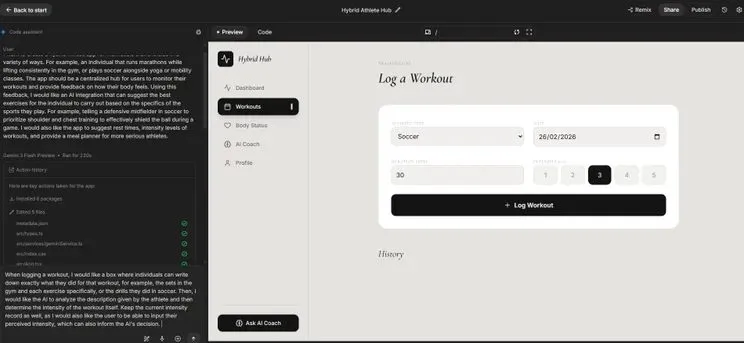
Google AI Studio is Google’s web workspace for the Gemini API, with a prompt playground, API key management and a Build mode that generates apps from a prompt. In Build mode, Gemini (through the Antigravity agent harness) writes a React front end and a Node.js server, shows a live preview, and lets you iterate by chat, by annotating the preview, or by editing code. It can set up Firebase Firestore and Sign in with Google, install npm packages and connect Google Workspace APIs, and it can also build native Android apps in Kotlin. Apps publish to Cloud Run, sync two-way with GitHub, or download as a ZIP. Using Build mode is free with a Google account, but Gemini API use beyond the free limits and Cloud Run hosting are billed separately. It suits people who want a fast, low-cost first version of an app, especially one that uses Gemini, and who can handle the Google Cloud deployment step.
What users say
Two hands-on writers are positive about speed and price. A Tech.co reviewer (March 2026) got a clean first prototype with voice and a chatbot in about three minutes, did not hit free limits, and found edits slower than on Base44 and Lovable. A Learn Prompting author (October 2025) spent hours in Build mode without hitting limits and preferred it to Bolt and Lovable after two demo apps. Critics say the deployment step is harder for non-developers; the Tech.co reviewer wrote that AI Studio does not deploy apps, which Google's current docs contradict, and WeWeb (a competing vendor) says Firestore is the only backend. These are individual accounts, not a survey.
4 quotes from users and reviewers
I created an app for hybrid athletes in Google AI Studio, and I was impressed with the results. The result was clean, good-looking prototype that included voice functionality and an AI chatbot.
Nicole Mousicos, News Editor at Tech.co who wrote the review · tech.co/ai/vibe-coding/google-ai-studio-review · published · checked I was able to successfully copy a link to my app, but Google AI Studio doesn’t deploy your app. To do this, you’ll have to transfer the code via Google Antigravity or use a GitHub integration.
Nicole Mousicos, News Editor at Tech.co who wrote the review · tech.co/ai/vibe-coding/google-ai-studio-review · published · checked The greatest advantage to Build Mode in my eyes is the fact that it's fast, free, and powerful. While Build Mode was always free for people with Google accounts, I think it's worth reiterating here that you can access all of these impressive features for free. While I couldn’t find the exact rate limits, I was able to spend hours in Build mode without hitting any limits.
Learn Prompting Newsletter author, newsletter author who tests AI tools · newsletter.learnprompting.org/p/why-ai-studio-is-my-new-go-to-vibe-coding-platform · published · checked When Build mode generates a web app, it automatically provisions Firestore for storage and Firebase Authentication for login. There's no option inside the tool to point your app at a different backend from the start.
Joyce Kettering, DevRel at WeWeb · weweb.io/blog/google-ai-studio-alternatives · published · checked
Ranked in
-
#8 of 10 AI app builders for prototyping For trying an idea without paying 3.5/5
How it scored
-
How good the first working version is , counts double 3/5
Reviewers got clean, good-looking prototypes in minutes, but the accounts are of front ends with AI features; saved data and sign-in come as a further step (Firestore and Google sign-in). The first builds are similar to v0 and Figma Make.
3/5 means: A good-looking front end that works with sample data, or a working app whose core flows need several fixes
Firebase Firestore and Authentication: Automatically provision and set up Firebase, including Firestore database (persistent data storage) and Firebase Authentication (sign-in flows, specifically "Sign in with Google"). The agent handles the entire setup process and even writes the code in your app for these services.
aistudio.google.com/docs/aistudio-build-mode · checked I created an app for hybrid athletes in Google AI Studio, and I was impressed with the results. The result was clean, good-looking prototype that included voice functionality and an AI chatbot.
Nicole Mousicos, News Editor at Tech.co who wrote the review · tech.co/ai/vibe-coding/google-ai-studio-review · published · checked The greatest advantage to Build Mode in my eyes is the fact that it's fast, free, and powerful. While Build Mode was always free for people with Google accounts, I think it's worth reiterating here that you can access all of these impressive features for free. While I couldn’t find the exact rate limits, I was able to spend hours in Build mode without hitting any limits.
Learn Prompting Newsletter author, newsletter author who tests AI tools · newsletter.learnprompting.org/p/why-ai-studio-is-my-new-go-to-vibe-coding-platform · published · checked
-
Changing it without getting stuck 3/5
Chat edits, annotation mode (still prompt-based) and direct code editing are documented; the docs read list no version history or plan mode, though checkpoint restore may exist. A reviewer found edits slower than on Lovable or Base44. No bug-loop reports were found either way.
3/5 means: Chat edits, rollback, and code or visual editing
Iterate with Gemini: Use the chat panel in Build mode to ask Gemini to make modifications, add new features, or change the styling. Edit the code directly: Open the Code tab in the preview panel to make live edits.
aistudio.google.com/docs/aistudio-build-mode · checked I created an app for hybrid athletes in Google AI Studio, and I was impressed with the results. The result was clean, good-looking prototype that included voice functionality and an AI chatbot.
Nicole Mousicos, News Editor at Tech.co who wrote the review · tech.co/ai/vibe-coding/google-ai-studio-review · published · checked Build mode's annotation feature lets you highlight part of the UI and describe the change you want in words. It's a faster way to prompt, but it's still a prompt. Gemini regenerates the relevant code based on your description.
Joyce Kettering, DevRel at WeWeb · weweb.io/blog/google-ai-studio-alternatives · published · checked
-
Built-in backend, database and sign-in 3/5
The agent provisions Firestore and Firebase Authentication (Sign in with Google only) and a Node server with secrets, but file storage and payments are not documented and the Firebase project is a Google service you connect rather than a built-in one.
3/5 means: A database and sign-in through a guided connection, or a built-in database with limited sign-in
For web apps (default), AI Studio creates a full-stack environment that includes: Client-side: A web frontend (React is the default). Server-side: A Node.js runtime that allows for secure API calls, database connections, and npm package usage.
aistudio.google.com/docs/aistudio-build-mode · checked Firebase Firestore and Authentication: Automatically provision and set up Firebase, including Firestore database (persistent data storage) and Firebase Authentication (sign-in flows, specifically "Sign in with Google"). The agent handles the entire setup process and even writes the code in your app for these services.
aistudio.google.com/docs/aistudio-build-mode · checked AI Studio apps are standard apps running in a Cloud Run container. You can use any storage solution that you can connect to over a network, so long as there is not a firewall preventing access from a dynamic IP range.
aistudio.google.com/docs/aistudio-build-mode · checked When Build mode generates a web app, it automatically provisions Firestore for storage and Firebase Authentication for login. There's no option inside the tool to point your app at a different backend from the start.
Joyce Kettering, DevRel at WeWeb · weweb.io/blog/google-ai-studio-alternatives · published · checked
Show all 4
-
Handing the code to engineers 4/5
Two-way GitHub sync with conflict resolution, ZIP download, standard React and Node code that runs on Cloud Run or elsewhere with GEMINI_API_KEY set. The Firebase backend is a Google project you own, but moving off it is manual.
4/5 means: Two-way GitHub sync of standard code that can run elsewhere after the backend is moved by hand
For web apps (default), AI Studio creates a full-stack environment that includes: Client-side: A web frontend (React is the default). Server-side: A Node.js runtime that allows for secure API calls, database connections, and npm package usage.
aistudio.google.com/docs/aistudio-build-mode · checked Sync with GitHub: Connect your app to a GitHub repository to enable two-way sync. You can push changes prompted in AI Studio directly to your repository with AI-generated commit messages, or pull changes made locally in your IDE or by teammates back into AI Studio.
aistudio.google.com/docs/aistudio-build-mode · checked If you download your app as a ZIP file to run it elsewhere, you will need to set up the GEMINI_API_KEY environment variable in your hosting environment.
aistudio.google.com/docs/aistudio-build-mode · checked AI Studio apps are standard apps running in a Cloud Run container. You can use any storage solution that you can connect to over a network, so long as there is not a firewall preventing access from a dynamic IP range.
aistudio.google.com/docs/aistudio-build-mode · checked
Show all 4
-
Cost of a month of active prototyping 5/5
Build mode is free with a Google account and a reviewer did not hit free limits; Gemini API overage and Cloud Run are usage-billed, small for prototyping, and free-tier data may train models.
5/5 means: Free, or under $20 a month, for a month of active prototyping
Cloud Run: Publish your app as a scalable service. Pricing for Google Cloud Run may apply based on usage.
aistudio.google.com/docs/aistudio-build-mode · checked Google AI Studio’s free version uses a daily reset system for the number of AI requests a user can make, with different Gemini models having different request limits
tech.co/ai/vibe-coding/google-ai-studio-review · published · checked Small changes like fixing a button label would cost approximately $0.001 to $0.005, whereas big changes like adding a dashboard with a chart could cost you $0.17.
Nicole Mousicos, News Editor at Tech.co who wrote the review · tech.co/ai/vibe-coding/google-ai-studio-review · published · checked On the free tier, Google may use your data to train its Gemini models. However, paying users have the guarantee that their data remains private.
tech.co/ai/vibe-coding/google-ai-studio-review · published · checked The greatest advantage to Build Mode in my eyes is the fact that it's fast, free, and powerful. While Build Mode was always free for people with Google accounts, I think it's worth reiterating here that you can access all of these impressive features for free. While I couldn’t find the exact rate limits, I was able to spend hours in Build mode without hitting any limits.
Learn Prompting Newsletter author, newsletter author who tests AI tools · newsletter.learnprompting.org/p/why-ai-studio-is-my-new-go-to-vibe-coding-platform · published · checked
Show all 5
-
Sharing it for tests and demos 4/5
Apps are private by default, can be shared by link with view or edit permission for free, and publish to a Cloud Run URL with custom domains on a paid Google Cloud project. No real-time co-editing or comments; teammates work through GitHub. Shared-app Gemini calls use the creator's quota.
4/5 means: Live links with password-protected or private access, and teammates editing the same project
Cloud Run: Publish your app as a scalable service. Pricing for Google Cloud Run may apply based on usage.
aistudio.google.com/docs/aistudio-build-mode · checked Custom domains: Buy and connect your own domain directly from the Publish panel when publishing on a paid Google Cloud project.
aistudio.google.com/docs/aistudio-build-mode · checked AI Studio doesn't support direct real-time collaborative editing. However, you can collaborate with teammates by linking your app to a shared GitHub repository.
aistudio.google.com/docs/aistudio-build-mode · checked By default your app is private. You can share your app with other users to let them use it. Users you share your app with can see its code and fork it for their own purposes. If you share your app with edit permission, the other users can edit the code of your app.
aistudio.google.com/docs/aistudio-build-mode · checked When sharing your apps with others, API calls count toward your usage limits. If you use paid models, costs may apply. AI Studio will give you a heads-up during setup and before you share if your app could incur costs.
aistudio.google.com/docs/aistudio-build-mode · checked
Show all 5
-
Working from your designs , counts half 2/5
Prompts plus attached files and images are supported; Figma import and design-system support were not found in the docs read.
2/5 means: Prompts plus screenshots or images
For web apps (default), AI Studio creates a full-stack environment that includes: Client-side: A web frontend (React is the default). Server-side: A Node.js runtime that allows for secure API calls, database connections, and npm package usage.
aistudio.google.com/docs/aistudio-build-mode · checked
Top of this ranking
-



Sources
22 quotes from 5 pages; the 11 most useful are below.
-
Pricing 1
Small changes like fixing a button label would cost approximately $0.001 to $0.005, whereas big changes like adding a dashboard with a chart could cost you $0.17.
Nicole Mousicos, News Editor at Tech.co who wrote the review · tech.co/ai/vibe-coding/google-ai-studio-review · published · checked
-
Limits and known issues 3
When Build mode generates a web app, it automatically provisions Firestore for storage and Firebase Authentication for login. There's no option inside the tool to point your app at a different backend from the start.
Joyce Kettering, DevRel at WeWeb · weweb.io/blog/google-ai-studio-alternatives · published · checked AI Studio doesn't support direct real-time collaborative editing. However, you can collaborate with teammates by linking your app to a shared GitHub repository.
aistudio.google.com/docs/aistudio-build-mode · checked When sharing your apps with others, API calls count toward your usage limits. If you use paid models, costs may apply. AI Studio will give you a heads-up during setup and before you share if your app could incur costs.
aistudio.google.com/docs/aistudio-build-mode · checked
-
What users say 3
I created an app for hybrid athletes in Google AI Studio, and I was impressed with the results. The result was clean, good-looking prototype that included voice functionality and an AI chatbot.
Nicole Mousicos, News Editor at Tech.co who wrote the review · tech.co/ai/vibe-coding/google-ai-studio-review · published · checked I was able to successfully copy a link to my app, but Google AI Studio doesn’t deploy your app. To do this, you’ll have to transfer the code via Google Antigravity or use a GitHub integration.
Nicole Mousicos, News Editor at Tech.co who wrote the review · tech.co/ai/vibe-coding/google-ai-studio-review · published · checked The greatest advantage to Build Mode in my eyes is the fact that it's fast, free, and powerful. While Build Mode was always free for people with Google accounts, I think it's worth reiterating here that you can access all of these impressive features for free. While I couldn’t find the exact rate limits, I was able to spend hours in Build mode without hitting any limits.
Learn Prompting Newsletter author, newsletter author who tests AI tools · newsletter.learnprompting.org/p/why-ai-studio-is-my-new-go-to-vibe-coding-platform · published · checked
-
Features 4
Build mode's annotation feature lets you highlight part of the UI and describe the change you want in words. It's a faster way to prompt, but it's still a prompt. Gemini regenerates the relevant code based on your description.
Joyce Kettering, DevRel at WeWeb · weweb.io/blog/google-ai-studio-alternatives · published · checked For web apps (default), AI Studio creates a full-stack environment that includes: Client-side: A web frontend (React is the default). Server-side: A Node.js runtime that allows for secure API calls, database connections, and npm package usage.
aistudio.google.com/docs/aistudio-build-mode · checked Firebase Studio is sunsetting on March 22, 2027. We're simplifying our AI developer offerings by transitioning the lessons learned from the Firebase Studio preview into our flagship tools: Google AI Studio and Google Antigravity.
firebase.google.com/docs/studio/migrating-project · checked June 22, 2026: New workspace creation and user signup are disabled. You can continue to work in and migrate existing workspaces.
firebase.google.com/docs/studio/migrating-project · checked