
KOReader
Free, open-source document viewer with deep typesetting controls, built for e-ink and also available as an Android APK
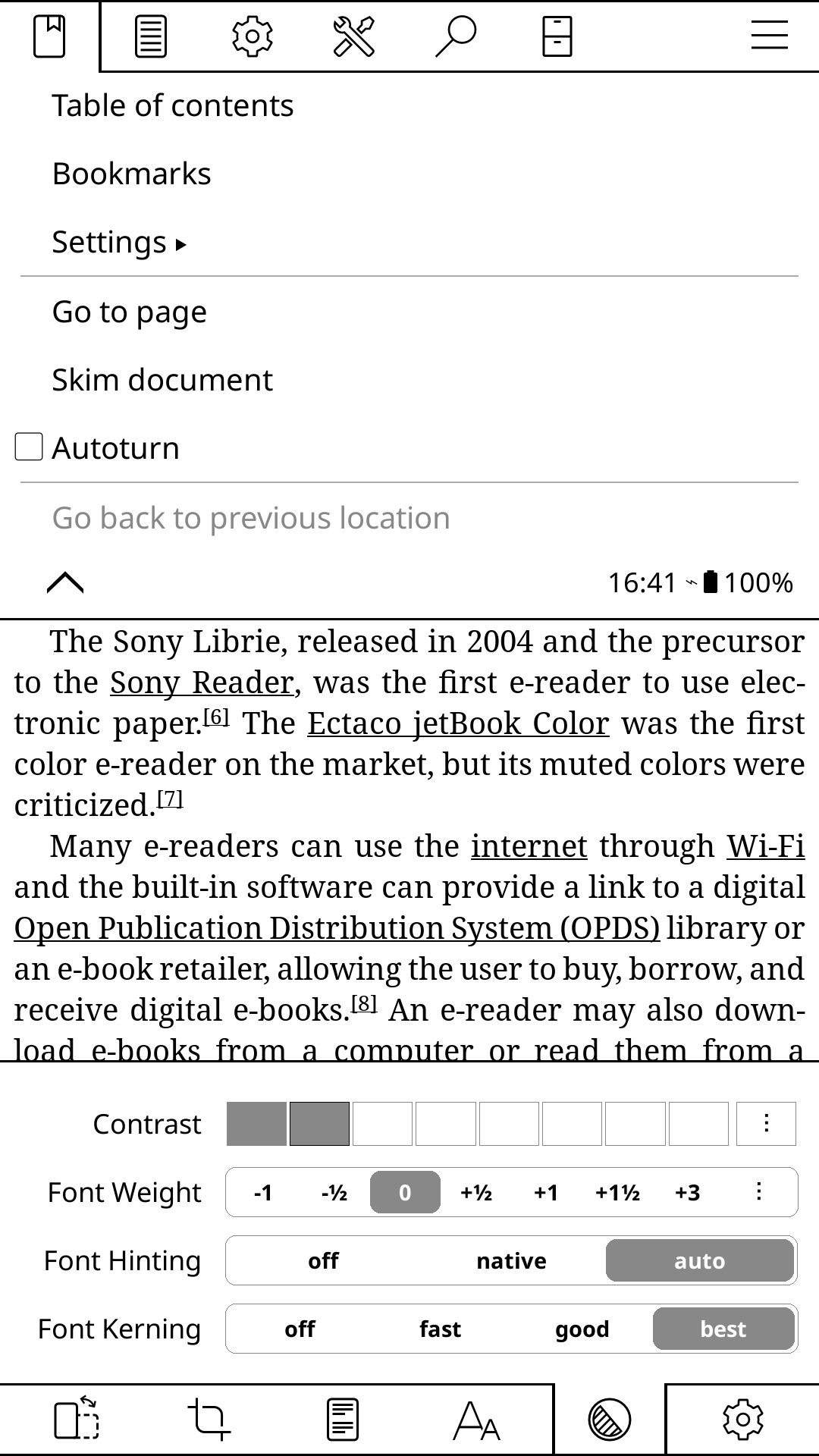

KOReader is a free, open-source (AGPL) document viewer developed by volunteers, primarily aimed at e-ink readers such as Kindle, Kobo and PocketBook. It also runs on Android phones and tablets, installed from F-Droid or a GitHub APK because there is no Google Play version. It opens EPUB, PDF, DjVu, MOBI, FB2, CBZ, DOCX and more, has no store, and works on DRM-free files. It offers fine control over fonts, margins, hyphenation and style tweaks, highlight export to Readwise and Joplin, OPDS catalogs, Calibre wireless transfer and reading-progress sync between KOReader devices. Its interface is designed around e-ink, so it is less polished on a phone touchscreen than mainstream reading apps.
Android readers for your own ebook files scores
Evaluated Nov 21, 2026 Evidence ↓- Reading comfort · counts double 3
3/5 means: Comfortable once set up, with clear rough edges such as an interface built for another kind of device, clutter or some rendering complaints
Typesetting is excellent, but the README says the UI is "optimized for e-ink devices" with no animation, and the menus are dense and monochrome on a phone touchscreen. No reviewer quotes on Android were read; this rests on that design and my knowledge of the app.
- Formats it opens 4
4/5 means: All the common formats (EPUB, PDF, MOBI and AZW3, FB2, DjVu, comic archives, DOCX), but no DRM-protected books
Opens EPUB, PDF, MOBI, FB2, DjVu, CBZ/CBR, DOCX, TXT and more without plugins, but no DRM-protected books are supported.
- Control over the page and gestures 5
5/5 means: Nearly everything can be set, including tap zones, gestures, keys and auto-scroll, plus custom styles or typesetting rules
Own fonts, margins, line spacing, kerning, hyphenation dictionaries and user style tweaks. Tap zones, gestures, volume keys and auto-turn are known from my knowledge of the app, not the pages read.
- Price and ads 5
5/5 means: Everything is free, with no ads
Free AGPL software with no ads or paid tier; donations only. Installed from F-Droid or GitHub, not Google Play.
- Syncing between devices 3
3/5 means: Your place, and often bookmarks or highlights, sync automatically between Android devices, or only on a paid edition
Reading position syncs automatically and free across KOReader devices, including e-readers, but books are not synced and highlight sync was not documented. The sync server must be set up (default server or self-hosted).
- Read-aloud 1
1/5 means: No read-aloud
No built-in read-aloud found in the pages read, and my knowledge is that KOReader has no TTS on Android. This is not an established absence.
- Highlights, notes and export 5
5/5 means: As 4, plus export to several formats or direct sync to note apps
Several highlight styles and colors, notes, dictionary and Wikipedia lookup, export to text, Markdown, HTML, JSON and Kindle clippings, and sync to Readwise and Joplin.
- Organizing your books · counts half 4
4/5 means: Automatic scanning, collections, and authors or series, plus OPDS catalogs or a Calibre connection
OPDS catalogs and a Calibre wireless connection, collections and a file browser with cover views, but no automatic scan that gathers books into an author and series library the way ReadEra or Librera do. Writer calibration, lowered from 5, since the scale's level 4 and 5 assume automatic scanning.
Pricing
- Free Free
Prices checked Nov 21, 2026.
Evidence and sources
Android readers for your own ebook files scores
Reading comfort 1 quote
-
optimized for e-ink devices: custom UI without animation, with paginated menus, adjustable text contrast, and easy zoom to fit content or page in paged media.
github.com/koreader/koreader · checked
Formats it opens 2 quotes
-
supports fixed page formats (PDF, DjVu, CBT, CBZ) and reflowable e-book formats (EPUB, FB2, Mobi, DOC, RTF, HTML, CHM, TXT).
github.com/koreader/koreader · checked -
KOReader supports PDF/PDB/XPS, EPUB/MOBI/FB2, DJVU, CBR/CBT/CBZ, DOCX/RTF, HTML/HTMLZ, TXT/MD and CHM files.
koreader.rocks/user_guide · checked
Control over the page and gestures 2 quotes
-
You can set arbitrary page margins, override line spacing and choose external fonts and styles. It has multi-lingual hyphenation dictionaries bundled into the application.
github.com/koreader/koreader · checked -
Change fonts (including your own), font size, contrast, boldness, kerning, word spacing, word expansion, text alignment, line spacing, column layout, margins...
koreader.rocks/user_guide · checked
Price and ads 3 quotes
-
[AGPL Licence]
github.com/koreader/koreader · checked -
Right now we only support liberapay donations.
github.com/koreader/koreader · checked -
There is no Play Store version of KOReader!
koreader.rocks/user_guide · checked
Syncing between devices 1 quote
-
Can synchronize your reading progress across all your KOReader running devices.
f-droid.org/packages/org.koreader.launcher.fdroid · checked
Highlights, notes and export 2 quotes
-
Export your notes and highlights to your device as text, markdown, HTML, JSON or Kindle clippings format Exporting highlights
koreader.rocks/user_guide · checked -
Synchronize to online services like Joplin, Readwise, Memos, Flomo and XMNote Exporting highlights
koreader.rocks/user_guide · checked
Organizing your books 2 quotes
-
integrated with calibre (search metadata, receive ebooks wirelessly, browse library via OPDS), Wallabag, Wikipedia, Google Translate and other content providers.
github.com/koreader/koreader · checked -
Access public OPDS (Open Publication Distribution System) catalogs or use your own servers to access your library Using OPDS Catalogs
koreader.rocks/user_guide · checked
Facts
License 1 quote
-
[AGPL Licence]
github.com/koreader/koreader · checked
Runs on 1 quote
-
KOReader is a document viewer primarily aimed at e-ink readers.
github.com/koreader/koreader · checked
Needs 1 quote
-
This version requires Android 4.3 or newer.
f-droid.org/packages/org.koreader.launcher.fdroid · checked
Pricing
github.com/koreader/koreader · checked