Librera Reader
Free, GPL-licensed Android reader for your own EPUB, PDF, MOBI, FB2, DjVu and comic files, with ads on Google Play and an ad-free PRO edition
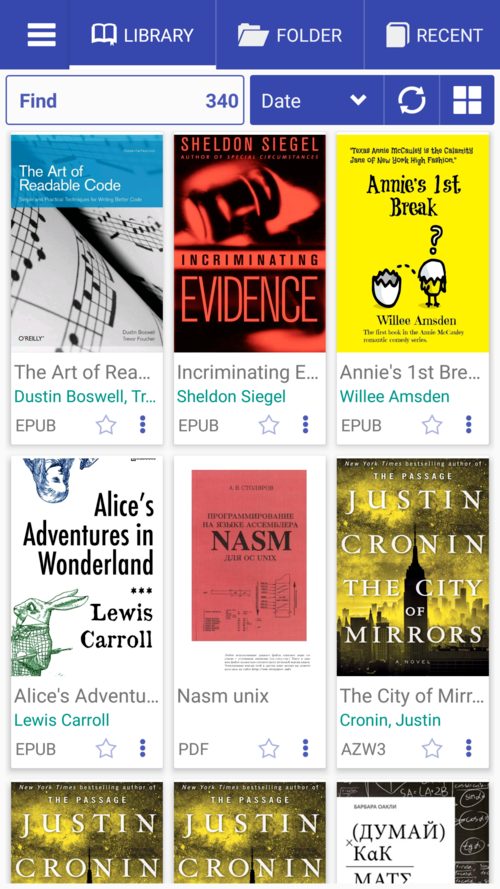
Librera Reader is an Android-only reader for files you already own, with no book store and no public-library loan integration. It opens EPUB, PDF, MOBI, AZW3, FB2, DjVu, CBZ/CBR, DOCX and many other formats, scans folders into a library, and browses OPDS catalogs and offline Calibre libraries. It offers many typography controls, configurable tap zones and volume keys, dictionary and translator lookup, PDF reflow, notes exportable to a file or email, text-to-speech and a hands-free scrolling Musician’s mode. Reading progress and bookmarks sync between Android devices through Google Drive in the Google Play editions. It comes as a free ad-supported Google Play edition, the paid Librera PRO, and an F-Droid build without Google services or Drive sync. The code is GPL v3. The maintainer’s README says development is frozen because of the war in Ukraine, yet builds still ship regularly.
What users say
Evidence ↓Users on Google Play praise it as the best of the many readers they tried, especially for text-to-speech, but note that its interface is not the priority. Individual recent reviews report a Google Drive sync login failure that was fixed within a day, and slow page loads when autoscrolling scanned books on Android 16. These are single reviews, not a measured share of users.
Android readers for your own ebook files scores
Evaluated Nov 21, 2026 Evidence ↓- Reading comfort · counts double 3
3/5 means: Comfortable once set up, with clear rough edges such as an interface built for another kind of device, clutter or some rendering complaints
Typography and PDF reflow are strong, but reviewers note the interface is utilitarian and recent reviews mention sync, TTS-control and autoscroll-on-scanned-books bugs; store rating is about 4.0 (3.9 to 4.0) for the free edition.
- Formats it opens 4
4/5 means: All the common formats (EPUB, PDF, MOBI and AZW3, FB2, DjVu, comic archives, DOCX), but no DRM-protected books
Opens EPUB, PDF, MOBI, AZW3, FB2, DjVu, CBZ/CBR, DOC/DOCX, TXT and more without plugins, but no Adobe DRM or Readium LCP support is documented.
- Control over the page and gestures 5
5/5 means: Nearly everything can be set, including tap zones, gestures, keys and auto-scroll, plus custom styles or typesetting rules
Fonts, line spacing, indents, backgrounds, configurable tap zones and volume keys, auto-scroll (Musician's mode) and custom CSS. Importing your own font files is not confirmed in pages read.
- Price and ads 3
3/5 means: Free with ads, and a one-time purchase removes them and adds extras
Free edition has ads and a one-time PRO purchase (about $5.99, unconfirmed by a page read) removes them and adds Drive sync; the F-Droid build is free without ads but lacks Drive sync.
- Syncing between devices 3
3/5 means: Your place, and often bookmarks or highlights, sync automatically between Android devices, or only on a paid edition
Reading progress and bookmarks sync automatically between Android devices via Google Drive; no other platforms found, and the F-Droid build has no sync. Whether the free edition includes it is unclear (PRO listing advertises it).
- Read-aloud 4
4/5 means: Built-in read-aloud with speed controls and a sleep timer, with background playback in the free or paid edition
Built-in read-aloud with any installed TTS engine and a media player; the F-Droid description lists page-wise recording to MP3 or WAV. Sleep timer and background playback are not confirmed in pages read, and a reviewer reports the player disappearing after pausing, so I stopped short of 5.
- Highlights, notes and export 4
4/5 means: Highlights, notes and dictionary lookup, with export of a book's notes to a file or email
Bookmarks, notes, PDF drawing, dictionary and translator lookup, and export of notes to a file or email; no direct sync to note apps found. Number of highlight colors not verified.
- Organizing your books · counts half 4
4/5 means: Automatic scanning, collections, and authors or series, plus OPDS catalogs or a Calibre connection
Auto-scan of folders, filtering and sorting by author, series and genre, custom tags, OPDS catalogs and offline Calibre libraries with metadata and covers; editing book details is not documented.
Pricing
- Librera (Google Play, free) Free
- Librera PRO (Google Play) $5.99 one-time
- Librera FD (F-Droid) Free
Prices checked Nov 21, 2026.
Evidence and sources
What users say
Summary 3 quotes
-
Sync doesn't work after previous update. Version is 10.0.19. Try to log in to Google to enable sync but I only receive a short "Error" message (without any additional content). TTS got partially better, but the controls are hidden immediately (got to previous pages is the reader is in focus a pain in the butt - compared to previous version). 24 hours later... IT IS FIXED!
Google Play reviewer (anonymous), user of the free edition · play.google.com/store/apps/details · checked -
I've tried many and this particular TTS ebook reader the best by far. I don't mind the fact that the GUI design isn't the priority here - the reader reads the text aloud, it allows to make replacements and tweak the voice expression, wchich in other readers was designed poorly or not at all.
Google Play reviewer (anonymous), user of Librera PRO · play.google.com/store/apps/details · checked -
I shifted to android 16 UI 8.5, I use scanned books, and in autoscroll when changing pages, it takes 10-15 seconds until new page loads, and during this time scrolling in uneven.
Google Play reviewer (anonymous), user of Librera PRO · play.google.com/store/apps/details · checked
Android readers for your own ebook files scores
Reading comfort 4 quotes
-
Downloads
play.google.com/store/apps/details · checked -
Sync doesn't work after previous update. Version is 10.0.19. Try to log in to Google to enable sync but I only receive a short "Error" message (without any additional content). TTS got partially better, but the controls are hidden immediately (got to previous pages is the reader is in focus a pain in the butt - compared to previous version). 24 hours later... IT IS FIXED!
Google Play reviewer (anonymous), user of the free edition · play.google.com/store/apps/details · checked -
I've tried many and this particular TTS ebook reader the best by far. I don't mind the fact that the GUI design isn't the priority here - the reader reads the text aloud, it allows to make replacements and tweak the voice expression, wchich in other readers was designed poorly or not at all.
Google Play reviewer (anonymous), user of Librera PRO · play.google.com/store/apps/details · checked -
I shifted to android 16 UI 8.5, I use scanned books, and in autoscroll when changing pages, it takes 10-15 seconds until new page loads, and during this time scrolling in uneven.
Google Play reviewer (anonymous), user of Librera PRO · play.google.com/store/apps/details · checked
Formats it opens 1 quote
-
Librera Reader is a light-weight and free book reading application that will devour almost any e-book format one can throw at her: PDF, EPUB, EPUB3, MOBI, DJVU, FB2, FB2.ZIP, TXT, RTF, AZW, AZW3, HTML, ODT, XPS, CBZ, CBR, TIFF, PDB, MHT and OPDS Catalgos.
play.google.com/store/apps/details · checked
Control over the page and gestures 3 quotes
-
● Select fonts for text, titles, italics, etc.
play.google.com/store/apps/details · checked -
It even features a unique auto-scrolling, hands-free Musician’s mode.
librera.mobi · checked -
Volume keys’ functionality is configurable, and backgrounds and fonts customizable via the intuitive Settings window.
librera.mobi · checked
Price and ads 3 quotes
-
Contains ads
play.google.com/store/apps/details · checked -
Start with a free, ad-supported version and decide for yourself. You won't be disappointed! Once you're convinced, please consider turning your free version into Librera PRO (by purchasing a PRO license) to help us further develop this amazing App.
play.google.com/store/apps/details · checked -
The only difference between Librera FD (F-Droid) and Librera PRO is the absence of Google Play services and Google Drive book synchronization in Librera FD.
apt.izzysoft.de/fdroid/index/apk/com.foobnix.pro.pdf.reader · checked
Syncing between devices 3 quotes
-
✓ Syncing of reading progress and setup across multiple devices
play.google.com/store/apps/details · checked -
The only difference between Librera FD (F-Droid) and Librera PRO is the absence of Google Play services and Google Drive book synchronization in Librera FD.
apt.izzysoft.de/fdroid/index/apk/com.foobnix.pro.pdf.reader · checked -
Syncing across Android devices via Google Drive (reading progress, bookmarks, etc.)
librera.mobi · checked
Read-aloud 3 quotes
-
Librera Reader is a light-weight and free book reading application that will devour almost any e-book format one can throw at her: PDF, EPUB, EPUB3, MOBI, DJVU, FB2, FB2.ZIP, TXT, RTF, AZW, AZW3, HTML, ODT, XPS, CBZ, CBR, TIFF, PDB, MHT and OPDS Catalgos.
play.google.com/store/apps/details · checked -
I've tried many and this particular TTS ebook reader the best by far. I don't mind the fact that the GUI design isn't the priority here - the reader reads the text aloud, it allows to make replacements and tweak the voice expression, wchich in other readers was designed poorly or not at all.
Google Play reviewer (anonymous), user of Librera PRO · play.google.com/store/apps/details · checked -
Page-wise TTS recording to MP3 or WAV
apt.izzysoft.de/fdroid/index/apk/com.foobnix.pro.pdf.reader · checked
Highlights, notes and export 2 quotes
-
● Exporting notes to a file or an email
play.google.com/store/apps/details · checked -
● Dictionary lookup (installed dictionaries: GoldenDict, ABBYY Lingvo, ColorDict, etc.)
play.google.com/store/apps/details · checked
Organizing your books 2 quotes
-
● Support for offline Calibre libraries (search, meta-data, covers)
play.google.com/store/apps/details · checked -
✓ Support for Online Catalogs (OPDS), book search and download
play.google.com/store/apps/details · checked
Facts
License 1 quote
-
Librera is distributed under the GPL v3
github.com/foobnix/LibreraReader · checked
Runs on 2 quotes
-
9.5.7 · 7.0 (API 24) · 7.0 (API 24) · 2026-09-02
github.com/foobnix/LibreraReader · checked -
Librera Reader is a light-weight and free book reading application that will devour almost any e-book format one can throw at her: PDF, EPUB, EPUB3, MOBI, DJVU, FB2, FB2.ZIP, TXT, RTF, AZW, AZW3, HTML, ODT, XPS, CBZ, CBR, TIFF, PDB, MHT and OPDS Catalgos.
play.google.com/store/apps/details · checked
Needs 1 quote
-
9.5.7 · 7.0 (API 24) · 7.0 (API 24) · 2026-09-02
github.com/foobnix/LibreraReader · checked
Users 1 quote
-
Downloads
play.google.com/store/apps/details · checked
More from the sources
Limits and known issues 2 quotes
-
The development and support of Librera is frozen for an unpredictable time, there is a big war in my country Ukraine.
github.com/foobnix/LibreraReader · checked -
LastVersion: · 10.0.35-fdroid
apt.izzysoft.de/fdroid/index/apk/com.foobnix.pro.pdf.reader · checked
What users say 1 quote
-
The reading settings do not work. It will only display justified text. I prefer left justify which doesn't work so I tried all others including center and none of them work.
Google Play reviewer (anonymous), user of the free edition · play.google.com/store/apps/details · published · checked
Pricing
play.google.com/store/apps/details · checked