Moon+ Reader
Highly customizable Android ebook reader for your own EPUB, PDF and other files, free with ads or paid Pro
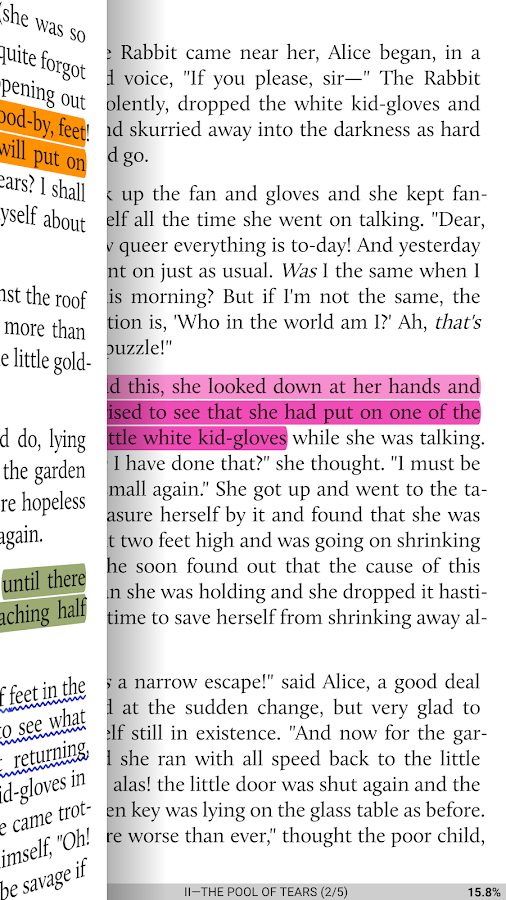
Moon+ Reader is an Android-only ebook reader for files you already own. It opens EPUB, PDF, MOBI, AZW3, FB2, CBZ/CBR, DjVu, DOCX, TXT and many other formats, and has deep controls for fonts, themes, tap zones, gestures and auto-scroll. It has no book store and no public-library loan service, but it can browse OPDS catalogs including a Calibre server, and it syncs reading position, highlights and notes through Dropbox or WebDAV. The free edition shows ads; the paid Moon+ Reader Pro is ad-free and adds text-to-speech with shake-to-speak, full PDF annotation, more themes and fonts, and headset key control. It cannot open DRM-protected books.
What users say
Evidence ↓Long-term users praise the depth of customization and the text-to-speech, and some call it the best ebook reader on Android. Critics, in several comments on one guide and in Play reviews, say the settings are overwhelming, a screen-darkening read filter is easy to trigger by accident, and Dropbox or Google Drive sync sometimes breaks after updates. These are individual reviews and comments, so how widely each view is shared is not measured.
Android readers for your own ebook files scores
Evaluated Nov 21, 2026 Evidence ↓- Reading comfort · counts double 4
4/5 means: Comfortable and dependable, with minor complaints
Good typography, page-turn effects and smooth scrolling, with a 3.5 free and 4.2 Pro Play rating. Commenters say the settings are overwhelming and a read filter can darken the screen by accident.
- Formats it opens 4
4/5 means: All the common formats (EPUB, PDF, MOBI and AZW3, FB2, DjVu, comic archives, DOCX), but no DRM-protected books
EPUB, PDF, MOBI, AZW3, FB2, DjVu, CBZ/CBR, DOCX, TXT and more open without a plugin. DRM-protected books are not supported per the vendor FAQ.
- Control over the page and gestures 5
5/5 means: Nearly everything can be set, including tap zones, gestures, keys and auto-scroll, plus custom styles or typesetting rules
24 customizable operations across taps, swipes and hardware keys, volume-key paging, 5 auto-scroll modes, custom fonts and backgrounds, hyphenation and justification. Pro adds more themes and fonts.
- Price and ads 3
3/5 means: Free with ads, and a one-time purchase removes them and adds extras
The free edition has ads, and the paid Pro app removes them and adds extras. Full PDF annotation and shake-to-speak TTS are Pro features, but PDF opens in the free edition. Current Pro price unconfirmed.
- Syncing between devices 3
3/5 means: Your place, and often bookmarks or highlights, sync automatically between Android devices, or only on a paid edition
Reading position, highlights, notes and bookmarks sync via Dropbox or WebDAV between Android devices, and the free listing includes it. It is only Android, and a reviewer reports breakage after an update.
- Read-aloud 3
3/5 means: Built-in read-aloud with basic controls, or only in the paid edition
Built-in TTS with Android engines is a Pro feature, and reviewers praise it. A sleep timer and background playback with the screen off were not confirmed, and the FAQ says it can pause unless battery optimization is disabled.
- Highlights, notes and export 4
4/5 means: Highlights, notes and dictionary lookup, with export of a book's notes to a file or email
Highlights in several styles, notes, translation and dictionary lookup are in the free edition, and a book's bookmarks and notes can be exported to a file from the bookmarks dialog. No direct export to note apps such as Readwise. Writer calibration, raised from 3, since per-book export to a file is level 4.
- Organizing your books · counts half 4
4/5 means: Automatic scanning, collections, and authors or series, plus OPDS catalogs or a Calibre connection
Shelves, favorites, authors, tags, a file manager, OPDS catalogs including a Calibre server, and editing of title, author and tags. No series sorting complaint resolved, and Calibre works through OPDS only.
Pricing
- Moon+ Reader (free) Free
- Moon+ Reader Pro Contact sales
Prices checked Nov 21, 2026.
Evidence and sources
What users say
Summary 3 quotes
-
The configuration of the app is extremely obtuse. You could spend a month studding it and still not know much about it.
JoeInMissouri, commenter on a Technipages guide · technipages.com/moon-reader-pro-complete-guide · published · checked -
Super customizable viewing, controls, and highlighting that you can set to work just how you want them. Excellent text to speech (turns any book into an audiobook!). I've used this everyday for many years. I haven't found a better ebook reader for Android.
play.google.com/store/apps/details · checked -
Easy to sync your reading to other devices, except when it doesn't work, like it did last night, after they pushed 10.5, which broke google drive.
play.google.com/store/apps/details · checked
Android readers for your own ebook files scores
Reading comfort 3 quotes
-
The configuration of the app is extremely obtuse. You could spend a month studding it and still not know much about it.
JoeInMissouri, commenter on a Technipages guide · technipages.com/moon-reader-pro-complete-guide · published · checked -
Super customizable viewing, controls, and highlighting that you can set to work just how you want them. Excellent text to speech (turns any book into an audiobook!). I've used this everyday for many years. I haven't found a better ebook reader for Android.
play.google.com/store/apps/details · checked -
24 customized operations (screen click, swipe gesture, hardware keys), apply to 15 customized events: search, bookmark, themes, navigation, font size and more.
play.google.com/store/apps/details · checked
Formats it opens 2 quotes
-
Support EPUB, PDF, DJVU, AZW3, MOBI, FB2, PRC, CHM, CBZ, CBR, UMD, DOCX, ODT, RTF, TXT, HTML, MHT/MHTML, MD(MarkDown), WEBP, RAR, ZIP or OPDS
play.google.com/store/apps/details · checked -
Moon+ Reader doesn't support drm-protected books in current version, to read them in the reader, you need to use drm-free tool to drop off the drm protection in computer firstly
moondownload.com/faq.html · checked
Control over the page and gestures 3 quotes
-
24 customized operations (screen click, swipe gesture, hardware keys), apply to 15 customized events: search, bookmark, themes, navigation, font size and more.
play.google.com/store/apps/details · checked -
5 auto-scroll modes: rolling blind mode; by pixel, by line or by page. Real-time speed control.
play.google.com/store/apps/details · checked -
Please copy your font files (.ttf, .otf, .ttc) to "/sdcard/fonts", and copy the background images to "/sdcard/backgrounds", then you can select them in "Visual Options -> Font Name/Background Images".
moondownload.com/faq.html · checked
Price and ads 3 quotes
-
The Pro version includes all features in the free version, and has many advanced options for better reading experiences:
moondownload.com/faq.html · checked -
Contains adsIn-app purchases
play.google.com/store/apps/details · checked -
1,000,000+ downloads, The #1 Paid EBook Reader in Google Play, 30-Day Money Back Guarantee!
play.google.com/store/apps/details · checked
Syncing between devices 4 quotes
-
After open a book, you can enable it from "Miscellaneous" -> "Sync reading positions via Dropbox/WebDav":
moondownload.com/faq.html · checked -
it'll continue to sync highlights/notes/bookmarks of current book in background after it synced reading position.
moondownload.com/faq.html · checked -
Backup/Restore options to cloud via DropBox/WebDav, sync reading positions between phones and tablets.
play.google.com/store/apps/details · checked -
Easy to sync your reading to other devices, except when it doesn't work, like it did last night, after they pushed 10.5, which broke google drive.
play.google.com/store/apps/details · checked
Read-aloud 3 quotes
-
The Pro version includes all features in the free version, and has many advanced options for better reading experiences:
moondownload.com/faq.html · checked -
please add both TTS engine and the reader to system battery optimization white-list, and add to ignore list of system task monitor.
moondownload.com/faq.html · checked -
Super customizable viewing, controls, and highlighting that you can set to work just how you want them. Excellent text to speech (turns any book into an audiobook!). I've used this everyday for many years. I haven't found a better ebook reader for Android.
play.google.com/store/apps/details · checked
Highlights, notes and export 2 quotes
-
Highlight, Annotation, Dictionary, Translation, Share functions all in this ebook reader.
play.google.com/store/apps/details · checked -
You can click "Options - Backup" to make whole backup for all books and all reader settings, or click "Bookmarks dialog - Export - Export to file" to make a single backup for current book.
moondownload.com/faq.html · checked
Organizing your books 2 quotes
-
in Moon+ Reader "Online Library" tab, click "Add new catalog...", input this URL, restart the reader to access your own Calibre server.
moondownload.com/faq.html · checked -
Support EPUB, PDF, DJVU, AZW3, MOBI, FB2, PRC, CHM, CBZ, CBR, UMD, DOCX, ODT, RTF, TXT, HTML, MHT/MHTML, MD(MarkDown), WEBP, RAR, ZIP or OPDS
play.google.com/store/apps/details · checked
Facts
License 1 quote
-
Contains adsIn-app purchases
play.google.com/store/apps/details · checked
Runs on 2 quotes
-
Support EPUB, PDF, DJVU, AZW3, MOBI, FB2, PRC, CHM, CBZ, CBR, UMD, DOCX, ODT, RTF, TXT, HTML, MHT/MHTML, MD(MarkDown), WEBP, RAR, ZIP or OPDS
play.google.com/store/apps/details · checked -
10M+
play.google.com/store/apps/details · checked
Users 1 quote
-
10M+
play.google.com/store/apps/details · checked
More from the sources
Pricing 1 quote
-
Open/Backup/Sync/Download/Upload book files via Dropbox/GDrive
wiki.mobileread.com/wiki/Moon+_Reader · checked
Limits and known issues 1 quote
-
This permission allows the app to read and manage all ebook documents saved in any folder on your device, save PDF annotations back to PDF files, save book files from multiple network libraries, cloud services and websites to your local storage.
play.google.com/store/apps/details · checked
Pricing
play.google.com/store/apps/details · checked