PocketBook Reader
Free Android ebook and audiobook reader with Adobe DRM, OPDS and PocketBook Cloud sync
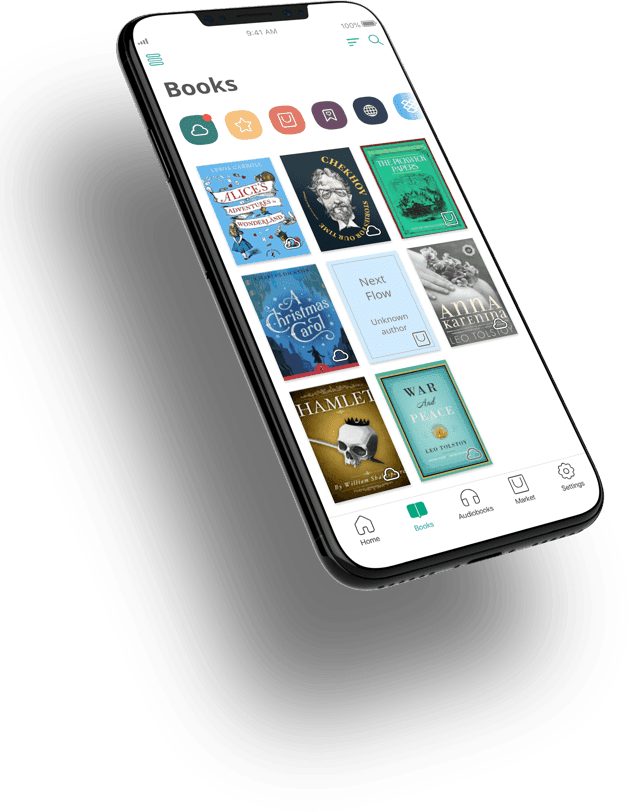
PocketBook Reader is a free ebook and audiobook reading app from Pocketbook International SA for Android (also iOS). It opens DRM-free files in many formats (EPUB, PDF, FB2, MOBI, DjVu, DOCX, CBZ/CBR and more), supports Adobe DRM and, per the vendor, LCP, plays MP3 and M4B audiobooks, and has text-to-speech and OPDS catalogs. Reading position and libraries sync through PocketBook Cloud, so the same book continues on a PocketBook e-reader or another phone. Its built-in store lists free books rather than a paid catalog. The app is free and the developer says it needs no registration to read and shows no ads.
What users say
Evidence ↓Play Store reviewers who have used it for years praise the formats, fonts and night-reading dimmer, and the app has a 4.2 rating over 102K reviews. The recurring complaint in the reviews read is sync, such as cloud upload not working and collections not syncing between phone and tablet. Both views come from single reviews, so how widely each is shared is unknown.
Android readers for your own ebook files scores
Evaluated Nov 21, 2026 Evidence ↓- Reading comfort · counts double 4
4/5 means: Comfortable and dependable, with minor complaints
A 4.2 rating over 102K Play reviews and long-time users praising fonts and the page dimmer; complaints are mostly about sync and small UI oddities, not crashes or rendering.
- Formats it opens 5
5/5 means: All the common formats plus DRM-protected EPUB or PDF from stores and libraries
Vendor lists EPUB, PDF, DjVu, FB2, MOBI, DOCX, CBZ/CBR and more, with Adobe DRM for EPUB and PDF; LCP is only claimed on Play and unverified.
- Control over the page and gestures 3
3/5 means: Typefaces, margins, spacing and themes, but little control over taps, gestures or keys
Fonts, colors, themes, spacing, margins and night mode are documented; own-font import, tap zones, volume keys and auto-scroll were not found for the app.
- Price and ads 4
4/5 means: Free and ad-free for reading, with a one-time purchase for extras such as sync or background read-aloud
Free, no ads and no registration to read per the developer; the in-app purchases are unexplained, probably store books, so 4 rather than 5 is a cautious pick.
- Syncing between devices 4
4/5 means: Books and your place sync automatically and for free to another kind of device as well, such as an iPhone or an e-reader
Free PocketBook Cloud syncs books, position and libraries to e-readers and iOS; highlights and notes sync not documented, and a reviewer reports cloud upload and collection sync failing.
- Read-aloud 3
3/5 means: Built-in read-aloud with basic controls, or only in the paid edition
Built-in text-to-speech is claimed; background playback, sleep timer and speed controls were not verified.
- Highlights, notes and export 2
2/5 means: Highlights and notes, with no export
Notes, bookmarks and integrated dictionaries are claimed; highlight export was not found, so score assumes no export.
- Organizing your books · counts half 4
4/5 means: Automatic scanning, collections, and authors or series, plus OPDS catalogs or a Calibre connection
Collections by author and topic, library management and OPDS are documented; no Calibre connection or book-detail editing found.
Pricing
- Free Free
Prices checked Nov 21, 2026.
Evidence and sources
What users say
Summary 3 quotes
-
4.2_star_ 102K reviews
play.google.com/store/apps/details · checked -
I've had this reader almost 10 years. Still happy with it! I tried other readers...end up right back to this one. Integration with other devices=√ Formats: epub, pdf, mobi, etc=√ Page dimmer (my fav for night reading)=√ Plenty of font selections, easy to navigate/set up.
Google Play reviewer (unnamed in the page text), long-time user · play.google.com/store/apps/details · checked -
The Pocket Book cloud upload doesn't work for me, I have to use Google Drive instead. Collection also doesn't sync between my phone and tablet. I have also found that changing the font size only works when I press and drag the bar, tapping doesn't do anything (which is a bit confusing). Other than that, the reading experience is good.
Google Play reviewer (unnamed in the page text), user · play.google.com/store/apps/details · published · checked
Android readers for your own ebook files scores
Reading comfort 3 quotes
-
4.2_star_ 102K reviews
play.google.com/store/apps/details · checked -
I've had this reader almost 10 years. Still happy with it! I tried other readers...end up right back to this one. Integration with other devices=√ Formats: epub, pdf, mobi, etc=√ Page dimmer (my fav for night reading)=√ Plenty of font selections, easy to navigate/set up.
Google Play reviewer (unnamed in the page text), long-time user · play.google.com/store/apps/details · checked -
The Pocket Book cloud upload doesn't work for me, I have to use Google Drive instead. Collection also doesn't sync between my phone and tablet. I have also found that changing the font size only works when I press and drag the bar, tapping doesn't do anything (which is a bit confusing). Other than that, the reading experience is good.
Google Play reviewer (unnamed in the page text), user · play.google.com/store/apps/details · published · checked
Formats it opens 2 quotes
-
The app supports 26 book formats including EPUB, PDF, FB2, MOBI, DJVU and many others, with full support for protected books (DRM and LCP) and audiobooks. There is a special comfortable mode for reading comics and manga. You also get a built-in store with thousands of free books that is updated daily.
play.google.com/store/apps/details · checked -
The app supports all popular e-book formats! Read in PDF (Adobe DRM), EPUB (Adobe DRM), DjVu, FB2, FB2.zip, MOBI, DOCX, RTF, TXT, CHM, HTML (basic), CBZ, CBR, CBT.
pocketbook.ch/en-ch/app · checked
Control over the page and gestures 1 quote
-
Enjoy a highly customizable reading experience with adjustable fonts, colors, background themes, night mode, TTS (text-to-speech), spacing, margins and many other settings. The smart library management, collections by authors and topics, quick navigation, table of contents, bookmarks and notes make reading even more enjoyable.
play.google.com/store/apps/details · checked
Price and ads 1 quote
-
Read books for free, offline, without ads and registration. Enjoy true reading freedom: start a book in our app or any other e-reader and continue on any device thanks to automatic synchronization. Store your entire library in free cloud storage and never lose your progress again.
play.google.com/store/apps/details · checked
Syncing between devices 3 quotes
-
Read books for free, offline, without ads and registration. Enjoy true reading freedom: start a book in our app or any other e-reader and continue on any device thanks to automatic synchronization. Store your entire library in free cloud storage and never lose your progress again.
play.google.com/store/apps/details · checked -
With PocketBook Cloud, all your books are stored in one place – your personal cloud, synchronized across your e-reader and other devices. Even better, you can upload e-books purchased from different online stores without any restrictions or file conversions.
pocketbook.ch/en-ch/news/unlock-the-full-potential-of-your-pocketbook-ch · published · checked -
The Pocket Book cloud upload doesn't work for me, I have to use Google Drive instead. Collection also doesn't sync between my phone and tablet. I have also found that changing the font size only works when I press and drag the bar, tapping doesn't do anything (which is a bit confusing). Other than that, the reading experience is good.
Google Play reviewer (unnamed in the page text), user · play.google.com/store/apps/details · published · checked
Read-aloud 2 quotes
-
Enjoy a highly customizable reading experience with adjustable fonts, colors, background themes, night mode, TTS (text-to-speech), spacing, margins and many other settings. The smart library management, collections by authors and topics, quick navigation, table of contents, bookmarks and notes make reading even more enjoyable.
play.google.com/store/apps/details · checked -
The app supports MP3 and M4B audiobook formats and has a Text-to-Speech function. Thanks to the integrated dictionaries, you can read an e-book in many different languages.
pocketbook.ch/en-ch/app · checked
Highlights, notes and export 2 quotes
-
Enjoy a highly customizable reading experience with adjustable fonts, colors, background themes, night mode, TTS (text-to-speech), spacing, margins and many other settings. The smart library management, collections by authors and topics, quick navigation, table of contents, bookmarks and notes make reading even more enjoyable.
play.google.com/store/apps/details · checked -
The app supports MP3 and M4B audiobook formats and has a Text-to-Speech function. Thanks to the integrated dictionaries, you can read an e-book in many different languages.
pocketbook.ch/en-ch/app · checked
Organizing your books 2 quotes
-
Enjoy a highly customizable reading experience with adjustable fonts, colors, background themes, night mode, TTS (text-to-speech), spacing, margins and many other settings. The smart library management, collections by authors and topics, quick navigation, table of contents, bookmarks and notes make reading even more enjoyable.
play.google.com/store/apps/details · checked -
PocketBook Reader provides access to network directories (OPDS) and supports Adobe DRM. It has the ability to open jam-packed e-book files quickly, saving time.
pocketbook.ch/en-ch/app · checked
Facts
License 1 quote
-
Read books for free, offline, without ads and registration. Enjoy true reading freedom: start a book in our app or any other e-reader and continue on any device thanks to automatic synchronization. Store your entire library in free cloud storage and never lose your progress again.
play.google.com/store/apps/details · checked
Runs on 2 quotes
-
Read books for free, offline, without ads and registration. Enjoy true reading freedom: start a book in our app or any other e-reader and continue on any device thanks to automatic synchronization. Store your entire library in free cloud storage and never lose your progress again.
play.google.com/store/apps/details · checked -
4.2_star_ 102K reviews
play.google.com/store/apps/details · checked
Users 1 quote
-
10M+ Downloads
play.google.com/store/apps/details · checked
More from the sources
Features 1 quote
-
New book storage services - from now on, PocketBook Reader users can add to their library and read books from Google Drive cloud storage, as well as goods purchased from Google Play Books. Users can also simultaneously log in to several accounts of different services, such as PocketBook Cloud or Dropbox.
pocketbook.ch/en-ch/news/reader-app-update-ch · published · checked
Pricing
play.google.com/store/apps/details · checked