Zoho Books
Hosted accounting with invoicing, bills, bank reconciliation and inventory, from a free plan for businesses under $50K revenue
Our verdict
#3 of 7 in Accounting software for small businesses · Free up to $50K in revenue, cheap after
What it does
- A free plan for very small businesses
- Recurring invoices, reminders, and a customer portal on the free plan
- Bills, purchase orders, and inventory on Professional
- Connects to Zoho's CRM and other apps
Pros
- The most capable free plan
- Low prices that cover several users
- Strong invoicing on every plan
Cons
- No live bank feeds on the free plan
- Few US accountants and bookkeepers know it
- No phone support on the free plan
- Choose if:
- You're just starting out, or you already run your business on Zoho
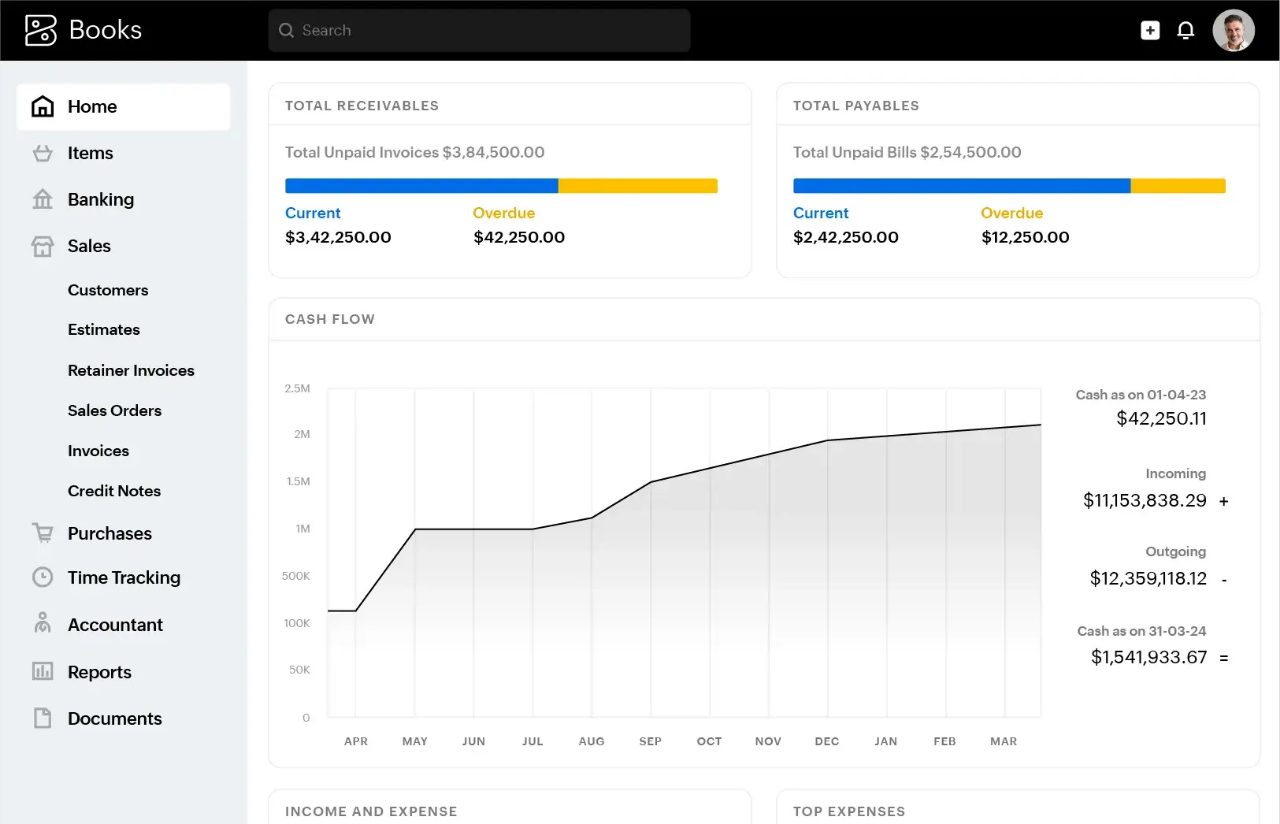
Zoho Books is cloud accounting software for small businesses, used in a browser or on iOS and Android and sold as a subscription priced per organization rather than per user. A free plan covers one user plus an accountant for businesses under $50K in annual revenue, with invoices, expenses, bank statement reconciliation, recurring invoices, a customer portal and 1099 filing. Standard adds live bank feeds, sales tax tracking and custom reports; Professional adds purchase orders, projects, timesheets and inventory; Premium adds budgets and custom modules; Elite adds advanced inventory and Shopify, Amazon, Etsy and eBay connections; Ultimate adds analytics. It connects to other Zoho apps, and is proprietary software.
What users say
Evidence ↓The views found come from review sites, not first-hand users. A CPA reviewer at Fit Small Business finds it very easy to use, with a strong mobile app, project accounting and invoicing, and calls it QuickBooks-like at a lower price, but says US bookkeepers who know it are hard to find (22 states had no listed Zoho advisor) and that outside Zoho apps its integrations are thin. TechRepublic says setup and automations can confuse first-time users. Fit Small Business summarizes user reviews as praising the mobile app and free plan and complaining about slow bank imports, broken connections and unresponsive support; it cites about 4.4 of 5 on Capterra and 4.5 on G2.
Rankings and alternatives
- Accounting software for small businesses #3 of 7 Free up to $50K in revenue, cheap after
- QuickBooks Online (Intuit) #1 Best if your accountant uses it
- Xero #2 Unlimited users at a lower price
- Patriot Accounting #4 Simple books and payroll from one US company

Small business accounting software scores
Evaluated Nov 17, 2026 Evidence ↓- Books you can rely on 4
4/5 means: Full double-entry books with bank feeds, rules, reconciliation and customizable reports, with one notable gap
Live bank feeds from Standard, reconciliation, custom reports, period locking and 50+ reports; Professional adds projects, and tags split results by location or class. The reviewer found no good undeposited-funds handling, and bank rules and audit trail rest on my own knowledge, not a page I read.
- Works with your accountant · counts double 3
3/5 means: Free accountant access on the main plans, but a minority of US accountants know the product
The Free plan includes an accountant seat and paid plans include accountant access, but a CPA reviewer found 22 states with no listed Zoho advisor and a hard time finding bookkeepers who know it (Feb 2025). Zoho does have a practice program, which I did not research.
- Ease for a non-accountant 3
3/5 means: Learnable, with a noticeable learning curve, cluttered screens or frequent interface changes and upsells
A CPA found it very easy, but his usability score was 2.7 of 5, TechRepublic says setup and automations can confuse first-timers, and user reviews cite a learning curve. Review sources are few and partly dated.
- Invoicing and getting paid 5
5/5 means: Everything in 4, plus deposits or retainers and a customer portal, on low plans
The Free plan has recurring invoices, reminders, online payments and a customer portal; retainer invoices and estimates are in the product, and 10+ gateways connect. Processing fees were not found.
- Bills and expenses 3
3/5 means: Bills and receipt capture, but paying vendors, purchase orders or both need an add-on or a higher plan
Bills and purchase orders start at Professional, with 200 autoscans a month, and mileage and 1099 filing are on Free. Paying vendors by ACH needs the $59 to $69 BillPay add-on. The reviewer's no-vendor-payments complaint predates that.
- Cost for a small team 4
4/5 means: $31 to $60 a month
Professional is the cheapest plan with bills, bank feeds, 5 users and accountant access, at $50 a month billed monthly; Standard has only 3 users but no bills.
- Payroll and app connections 3
3/5 means: Payroll that files taxes, built in or from a tightly connected partner, but a small app marketplace or payroll limited to some states
Zoho Payroll US is reported at $19 plus $3 per employee in select states only (12 states in 2023), and integrations are strong with Zoho apps but thin elsewhere. Both are third-party and dated; I found no current Zoho page or Gusto integration.
- Inventory and sales tax · counts half 3
3/5 means: Stock quantities with cost of goods sold or automatic sales tax rates, but not both
Professional has inventory with cost of goods and purchase orders, and Elite adds channels and Shopify. Sales tax jurisdictions are set up manually, and multi-state sellers need Avalara.
Pricing
- Free Free For businesses under $50K annual revenue. 1 user plus 1 accountant, up to 1,000 invoices and 1,000 expenses per year, 50 receipt autoscans per month, email support only. Add-ons other than document autoscans are not available.
- Standard $15.00 /month Per organization. US$15 per month billed annually (15 x 12 = US$180 per year), or US$20 per month billed monthly. 3 users, 5,000 invoices per year, 200 autoscans per month. Adds bank feeds, sales tax tracking, custom reports, API access.
- Professional $40.00 /month Per organization. US$40 per month billed annually (40 x 12 = US$480 per year), or US$50 per month billed monthly. 5 users, 10,000 invoices per year. Adds sales and purchase orders, projects and timesheets, inventory, approvals.
- Premium $60.00 /month Per organization. US$60 per month billed annually (60 x 12 = US$720 per year), or US$70 per month billed monthly. 10 users, 25,000 invoices per year, 1,000 autoscans per month. Adds budgets, cash flow forecasting, fixed assets, vendor portal, custom modules.
- Elite $120.00 /month Per organization. US$120 per month billed annually (120 x 12 = US$1,440 per year), or US$150 per month billed monthly. 10 users, 100,000 invoices per year. Adds warehouses, serial and batch tracking, Etsy, eBay and Amazon channels and up to 2 Shopify stores.
- Ultimate $240.00 /month Per organization. US$240 per month billed annually (240 x 12 = US$2,880 per year), or US$275 per month billed monthly. 15 users. Adds advanced analytics and KPI dashboards.
- Extra users $2.50 /month per seat , extra US$2.50 per user per month billed annually, or US$3 billed monthly (2.5 x 12 = US$30 per user per year). Not available on Free.
- BillPay $59.00 /month , extra US$59 per month billed annually (59 x 12 = US$708 per year) or US$69 billed monthly. Includes 100 ACH vendor payments, PO matching and vendor batch payments.
- Document autoscans $8.00 /month , extra US$8 per 50 scans per month billed annually, or US$10 billed monthly.
Prices checked Nov 17, 2026.
Evidence and sources
What users say
Summary 5 quotes
-
Zoho Books is high-quality small business accounting software with features similar to QuickBooks Online for a substantially lower price. However, you might have trouble finding a bookkeeper familiar with Zoho Books who can offer you support when you have bookkeeping questions.
Tim Yoder, CPA and accounting expert reviewer at Fit Small Business · fitsmallbusiness.com/zoho-books-review · published · checked -
It might be hard for you to find a bookkeeper familiar with Zoho Books who can help you when you have questions. While it does have a formal Zoho Books Advisor network, 22 states in the US lack a single advisor—contrast this to the QuickBooks ProAdvisor network, which has hundreds of advisors in each state.
Tim Yoder, CPA and accounting expert reviewer at Fit Small Business · fitsmallbusiness.com/zoho-books-review · published · checked -
As an experienced accountant, I found Zoho Books very easy to use, but I think less experienced bookkeepers will like it as well.
Tim Yoder, CPA and accounting expert reviewer at Fit Small Business · fitsmallbusiness.com/zoho-books-review · published · checked -
Users Like · Users Dislike Great mobile accounting app · Agents don’t return phone calls or follow up on emails Invoicing and maintaining basic accounts · Slow importing information from banks and connections often break Free version and an option to upgrade · Limited invoice customization Clear user-friendly reporting · Integration with non-Zoho apps is difficult
fitsmallbusiness.com/zoho-books-review · published · checked -
Automations and setup can be complex for first-time accounting software users.
Kylie McQuarrie, reviewer at TechRepublic · techrepublic.com/article/zoho-books-review · published · checked
Small business accounting software scores
Books you can rely on 3 quotes
-
Everything in Free + Progress invoicing Track sales tax and use tax E-File 1099-MISC & 1099-NEC Connect bank feeds Setup recurring expenses Enable transaction period locking Add custom fields Create custom reports
zoho.com/us/books/pricing · checked -
Everything in Standard + Track sales and purchase orders Record multi-currency transactions Bill timesheets Project profitability Manage retainers Track inventory
zoho.com/us/books/pricing · checked -
Zoho Books has excellent banking features, including the ability to print checks—which seems basic but isn’t generally available in Zoho’s cheaper competitors like Wave and ZipBooks. I can choose between importing bank transactions through a live bank connection or uploading them from a bank statement or CSV file.
Tim Yoder, CPA and accounting expert reviewer at Fit Small Business · fitsmallbusiness.com/zoho-books-review · published · checked
Works with your accountant 3 quotes
-
By default, Zoho Books allows you to add 3 users to the Standard Plan, 5 users to the Professional Plan, 10 users to the Premium Plan, 10 users to the Elite Plan, and 15 users to the Ultimate Plan. If you need more users, you can add them with the Zoho Books user add-on for $3 per user/month or $2.50 per user/month, billed annually.
zoho.com/us/books/pricing · checked -
It might be hard for you to find a bookkeeper familiar with Zoho Books who can help you when you have questions. While it does have a formal Zoho Books Advisor network, 22 states in the US lack a single advisor—contrast this to the QuickBooks ProAdvisor network, which has hundreds of advisors in each state.
Tim Yoder, CPA and accounting expert reviewer at Fit Small Business · fitsmallbusiness.com/zoho-books-review · published · checked -
Zoho Books is high-quality small business accounting software with features similar to QuickBooks Online for a substantially lower price. However, you might have trouble finding a bookkeeper familiar with Zoho Books who can offer you support when you have bookkeeping questions.
Tim Yoder, CPA and accounting expert reviewer at Fit Small Business · fitsmallbusiness.com/zoho-books-review · published · checked
Ease for a non-accountant 3 quotes
-
As an experienced accountant, I found Zoho Books very easy to use, but I think less experienced bookkeepers will like it as well.
Tim Yoder, CPA and accounting expert reviewer at Fit Small Business · fitsmallbusiness.com/zoho-books-review · published · checked -
Users Like · Users Dislike Great mobile accounting app · Agents don’t return phone calls or follow up on emails Invoicing and maintaining basic accounts · Slow importing information from banks and connections often break Free version and an option to upgrade · Limited invoice customization Clear user-friendly reporting · Integration with non-Zoho apps is difficult
fitsmallbusiness.com/zoho-books-review · published · checked -
Automations and setup can be complex for first-time accounting software users.
Kylie McQuarrie, reviewer at TechRepublic · techrepublic.com/article/zoho-books-review · published · checked
Invoicing and getting paid 3 quotes
-
Everything in Free + Progress invoicing Track sales tax and use tax E-File 1099-MISC & 1099-NEC Connect bank feeds Setup recurring expenses Enable transaction period locking Add custom fields Create custom reports
zoho.com/us/books/pricing · checked -
Zoho Books also has an excellent client portal where you can convert estimates and quotes to invoices, collect payments, and collaborate with your clients.
business.org/finance/accounting/zoho-books-review · checked -
Automations and setup can be complex for first-time accounting software users.
Kylie McQuarrie, reviewer at TechRepublic · techrepublic.com/article/zoho-books-review · published · checked
Bills and expenses 3 quotes
-
Everything in Standard + Track sales and purchase orders Record multi-currency transactions Bill timesheets Project profitability Manage retainers Track inventory
zoho.com/us/books/pricing · checked -
Free & trial users: 50 scans per month Standard & professional: 200 scans per month Premium & above: 1,000 scans per month
zoho.com/us/books/pricing · checked -
One shortfall of Zoho Books is the inability to initiate online payments to my vendors like I can with the QuickBooks Bill Pay feature within QuickBooks Online. Melio and BILL are great third-party apps for making online payments, but neither of these integrates with Zoho Books.
Tim Yoder, CPA and accounting expert reviewer at Fit Small Business · fitsmallbusiness.com/zoho-books-review · published · checked
Cost for a small team 3 quotes
-
$20 $15 Price/Org/Month Price/Org/Month Billed Annually
zoho.com/us/books/pricing · checked -
By default, Zoho Books allows you to add 3 users to the Standard Plan, 5 users to the Professional Plan, 10 users to the Premium Plan, 10 users to the Elite Plan, and 15 users to the Ultimate Plan. If you need more users, you can add them with the Zoho Books user add-on for $3 per user/month or $2.50 per user/month, billed annually.
zoho.com/us/books/pricing · checked -
Everything in Standard + Track sales and purchase orders Record multi-currency transactions Bill timesheets Project profitability Manage retainers Track inventory
zoho.com/us/books/pricing · checked
Payroll and app connections 3 quotes
-
Payroll · Only in select states via Zoho Payroll ($19 plus $3 per employee, per month)
fitsmallbusiness.com/zoho-books-review · published · checked -
For now, at least, Zoho Books’ only payroll integration is with Zoho Payroll, a relatively new product for U.S.-based businesses. As of July 27, 2023, Zoho Payroll is available only for businesses in 12 states, which means Zoho Books isn’t the most flexible choice for multi-state businesses that want to incorporate accounting with payroll.
techrepublic.com/article/zoho-books-review · published · checked -
Users Like · Users Dislike Great mobile accounting app · Agents don’t return phone calls or follow up on emails Invoicing and maintaining basic accounts · Slow importing information from banks and connections often break Free version and an option to upgrade · Limited invoice customization Clear user-friendly reporting · Integration with non-Zoho apps is difficult
fitsmallbusiness.com/zoho-books-review · published · checked
Inventory and sales tax 3 quotes
-
Everything in Standard + Track sales and purchase orders Record multi-currency transactions Bill timesheets Project profitability Manage retainers Track inventory
zoho.com/us/books/pricing · checked -
Everything in Premium + Revenue recognition - Advanced Dashboard customization Blueprints Advanced Inventory Control Manage warehouses Composite items Track serial numbers Batch tracking Print shipping label Track shipments Connect online sales channels (Etsy, eBay, Amazon) Integrate Shopify stores (Up to 2)
zoho.com/us/books/pricing · checked -
Zoho Books handles the basics of sales tax accounting. I can manually set up as many sales tax jurisdictions as necessary, then separately track sales tax collections and view the accumulated sales tax liabilities.
Tim Yoder, CPA and accounting expert reviewer at Fit Small Business · fitsmallbusiness.com/zoho-books-review · published · checked
More from the sources
Features 1 quote
-
Yes, basic support is available for all plans. The free plan comes with email support. Send your queries to [email protected] any time. We are available Monday to Friday, 9 am to 9 pm ET.
zoho.com/us/books/pricing · checked
Limits and known issues 2 quotes
-
As long as your revenue for the financial year does not exceed the threshold of $50K, Zoho Books's Free Plan is available indefinitely.
zoho.com/us/books/pricing · checked -
Free Plan: Up to 1,000 invoices can be created annually. Standard Plan: Up to 5,000 invoices can be created annually. Professional Plan: Allows up to 10,000 invoices annually. Premium Plan: Allows up to 25,000 invoices annually. Elite Plan and Ultimate Plan:   Allow up to 100,000 invoices annually.
zoho.com/us/books/pricing · checked
Pricing
zoho.com/us/books/pricing · checked