
Adobe Scan
Adobe's free document scanner for iPhone and Android, with a Premium subscription for more tools
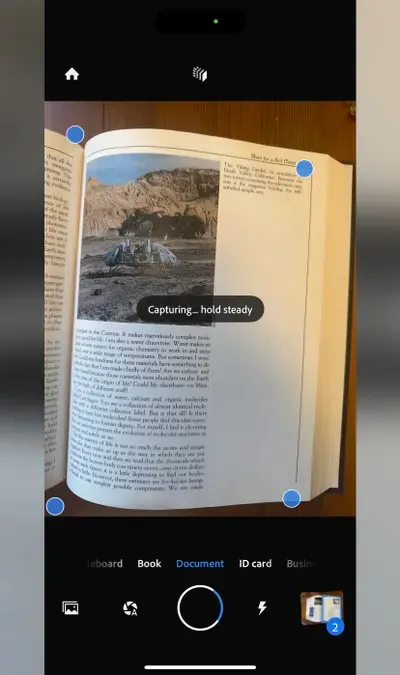 (opens full size in a new tab)
Facts
- Price
- From a free plan or $9.99/month
- Users
- About 100M
- Runs on
- iOSAndroid
- Needs
- Adobe ID (free)
- Category
- Apps
- Facts checked
Price checked · Current prices on apps.apple.com ↗
Our verdict
#7 of 7 in Apps for scanning old photos
For documents more than photos
Pros
- Turns printed and handwritten text into searchable text
- Magic eraser removes thumbs, stains, and creases
Cons
- Needs an Adobe account
- Uploads every scan to Adobe's cloud by default
- Saves PDFs unless you change a setting
- No photo mode for prints
About Adobe Scan
Adobe Scan is Adobe’s mobile scanner for iPhone and Android. It is built for documents, receipts, books, IDs, business cards and whiteboards, and saves scans as PDFs in Adobe Document Cloud, with an option to export them as JPEG. It auto-captures, auto-crops and straightens pages, runs OCR and has a Magic eraser for fingers, shadows and stains. It is free to download but needs an Adobe ID, and a Premium subscription adds combining scans, more OCR pages and other tools. It has no separate photo-print mode that Adobe documents.
What users say
The one reviewer read, at TechRadar, calls it very well designed and easy to use but frustrated by glitches, and notes that the best features are behind a subscription. A Google Play reviewer says its background color correction is worse than CamScanner's and leaves documents washed out. Both are single accounts about documents, not photo prints.
2 quotes from users and reviewers
Adobe Scan is a very well designed app, allowing you to scan documents, books, business card, and more with the greatest of ease. The ability to clean up your shots, and even copy and edit the text contained in your scanned documents is impressive, not to mention being able to password protect your scans, or use them to fill in a form. And all for free. You can almost forgive its frustrating glitches. Almost.
Steve Paris, reviewer at TechRadar · techradar.com/pro/software-services/adobe-scan-2025-review · published · checked Disappointed in Adobe. Usually Adobe products are top notched but this one is not as good as that of CamScanner. The background color correction is inferior, much inferior. It adds on background color where there is a slight change in lighting and trying to clean up the image is not possible. The document looks so washed out.
play.google.com/store/apps/details · checked
Ranked in
-
#7 of 7 Apps for scanning old photos For documents more than photos 2.5/5
How it scored
-
Getting through a whole album 3/5
Auto-captures and crops one page at a time and can scan several in quick succession; nothing splits several prints in one frame.
3/5 means: One print per shot, found, cropped and straightened automatically, with quick or automatic repeat capture
By default, Adobe Scan will take a shot automatically for you once you’ve positioned your camera over the document correctly, which can help you scan multiple pages in quick succession (although we also ended up having shots of us turning a page if we weren’t quick enough - something we had to fix later).
Steve Paris, reviewer at TechRadar · techradar.com/pro/software-services/adobe-scan-2025-review · published · checked
-
Quality of the saved scan 2/5
Converts printed photos to PDFs or JPEGs with no separate photo mode, so prints go through document processing. A Play reviewer says its color correction washes out backgrounds; that review is about documents, and no hands-on test of prints was found.
2/5 means: Usable copies with clear problems, such as low resolution or colors processed like a document
Convert paper documents or printed photos into PDFs or JPEGs with the mobile PDF converter and photo scanner app.
play.google.com/store/apps/details · checked Disappointed in Adobe. Usually Adobe products are top notched but this one is not as good as that of CamScanner. The background color correction is inferior, much inferior. It adds on background color where there is a slight change in lighting and trying to clean up the image is not possible. The document looks so washed out.
play.google.com/store/apps/details · checked
-
Glare and reflections 2/5
Adobe says its AI removes glare and shadows, and the Magic eraser removes shadows, stains and creases, but these are tuned for documents and nothing removes glare while capturing a glossy print.
2/5 means: General cleanup tools that can paint out small glare spots after the scan
Clean up scans with Magic eraser: Auto-detect and remove thumbs, shadows, stains and creases so your document scans look clear and professional.
apps.apple.com/us/app/adobe-scan-pdf-doc-scanner/id1199564834 · checked Adobe Scan uses AI to correct image perspective, sharpen handwritten or printed text, and remove glares and shadows.
adobe.com/acrobat/mobile/scanner-app.html · checked
-
Easy for a first-timer 2/5
Needs an Adobe ID before the first scan and saves PDFs to Adobe's cloud by default, so getting photos out takes a setting or an extra export step.
2/5 means: An account to create, or several settings or modes to understand first
Scans are automatically saved to Adobe Document Cloud for instant access and sharing.
apps.apple.com/us/app/adobe-scan-pdf-doc-scanner/id1199564834 · checked You will need an Adobe ID though, which is free too, and you’ll have to log in before you can use Adobe Scan.
Steve Paris, reviewer at TechRadar · techradar.com/pro/software-services/adobe-scan-2025-review · published · checked When scanning the document via Adobe Scan, you can save the original image of that scan directly on the mobile device at the same time. You just need to enable the option “Save original images to Gallery" (Android) or "Save originals to Photos" (iOS) under Adobe Scan preferences.
Meenakshi_Negi, Adobe community team member · community.adobe.com/questions-517/now-save-a-scan-as-an-image-on-a-mobile-device-10995 · published · checked To save some important documents as an image for other references on the device, you can use “Save pages as JPEG” after saving the scan as PDF. You can use this option for both the new scans and old scans that are saved documents in Adobe Scan.
Meenakshi_Negi, Adobe community team member · community.adobe.com/questions-517/now-save-a-scan-as-an-image-on-a-mobile-device-10995 · published · checked
Show all 4
-
Cost to scan a collection 4/5
Free to download and scan. Premium is $9.99 a month and TechRadar says exporting to other formats is a paid feature; whether saving JPEGs is free today is unclear, so this may be lower.
4/5 means: Under $20, or free with a paid tier the reader may want
Convert paper documents or printed images into PDFs or JPEGs with the mobile PDF and photo scanner.
apps.apple.com/us/app/adobe-scan-pdf-doc-scanner/id1199564834 · checked Adobe Scan Premium - Monthly $9.99
apps.apple.com/us/app/adobe-scan-pdf-doc-scanner/id1199564834 · checked You will need an Adobe ID though, which is free too, and you’ll have to log in before you can use Adobe Scan.
Steve Paris, reviewer at TechRadar · techradar.com/pro/software-services/adobe-scan-2025-review · published · checked These features include being able to combine files, export to other formats, password protect your files, edit text in scanned documents, and high-speed scanning, among others. Yes, the coolest features are locked behind a paywall.
Steve Paris, reviewer at TechRadar · techradar.com/pro/software-services/adobe-scan-2025-review · published · checked
Show all 4
-
Scans land in your photo library 3/5
Scans are PDFs saved to Adobe Document Cloud by default. A setting saves each original capture to the phone's photos, and Save pages as JPEG exports a scan, both from a 2020 Adobe community post.
3/5 means: Scans can be saved to the photo library, but only one by one, from a PDF, or while a subscription runs
Scans are automatically saved to Adobe Document Cloud for instant access and sharing.
apps.apple.com/us/app/adobe-scan-pdf-doc-scanner/id1199564834 · checked When scanning the document via Adobe Scan, you can save the original image of that scan directly on the mobile device at the same time. You just need to enable the option “Save original images to Gallery" (Android) or "Save originals to Photos" (iOS) under Adobe Scan preferences.
Meenakshi_Negi, Adobe community team member · community.adobe.com/questions-517/now-save-a-scan-as-an-image-on-a-mobile-device-10995 · published · checked To save some important documents as an image for other references on the device, you can use “Save pages as JPEG” after saving the scan as PDF. You can use this option for both the new scans and old scans that are saved documents in Adobe Scan.
Meenakshi_Negi, Adobe community team member · community.adobe.com/questions-517/now-save-a-scan-as-an-image-on-a-mobile-device-10995 · published · checked
-
Restoring faded and damaged photos 2/5
The Magic eraser cleans stains and creases; there is no color restoration or colorizing.
2/5 means: Basic adjustments, filters or a general cleanup tool
Clean up scans with Magic eraser: Auto-detect and remove thumbs, shadows, stains and creases so your document scans look clear and professional.
apps.apple.com/us/app/adobe-scan-pdf-doc-scanner/id1199564834 · checked
-
Dates, names and captions 2/5
Scans are named and kept as documents; nothing records a photo's real date or caption in the file.
2/5 means: Only a file name or a note kept next to the scan
Scans are automatically saved to Adobe Document Cloud for instant access and sharing.
apps.apple.com/us/app/adobe-scan-pdf-doc-scanner/id1199564834 · checked
-
Privacy and sign-in , counts half 2/5
An Adobe ID is required and scans are uploaded to Adobe Document Cloud automatically.
2/5 means: Account required or photos uploaded to the maker's cloud by default
Scans are automatically saved to Adobe Document Cloud for instant access and sharing.
apps.apple.com/us/app/adobe-scan-pdf-doc-scanner/id1199564834 · checked You will need an Adobe ID though, which is free too, and you’ll have to log in before you can use Adobe Scan.
Steve Paris, reviewer at TechRadar · techradar.com/pro/software-services/adobe-scan-2025-review · published · checked
Top of this ranking
-



Sources
20 quotes from 5 pages; the 13 most useful are below.
-
Pricing 1
On its own, Adobe Scan’s premium side will cost you $10 a month (with a free 7-day trial available).
Steve Paris, reviewer at TechRadar · techradar.com/pro/software-services/adobe-scan-2025-review · published · checked
-
Limits and known issues 3
You will need an Adobe ID though, which is free too, and you’ll have to log in before you can use Adobe Scan.
Steve Paris, reviewer at TechRadar · techradar.com/pro/software-services/adobe-scan-2025-review · published · checked NEW — MAGIC ERASER ENHANCEMENT Scan documents, not the fingers holding them. Instantly auto-detect and automatically remove fingers and their shadows on document scans with new enhancements to the Magic eraser tool.* *Paid subscribers
apps.apple.com/us/app/adobe-scan-pdf-doc-scanner/id1199564834 · checked Subscribe for even more scanning power. Subscriptions work across Scan and Reader mobile apps and Acrobat on the web. • Combine scans into one file so you can take multiple scans and consolidate into one document. • Increase OCR capacity from 5 to 100 pages so that you can find text in multiple images.
apps.apple.com/us/app/adobe-scan-pdf-doc-scanner/id1199564834 · checked
-
What users say 2
Adobe Scan is a very well designed app, allowing you to scan documents, books, business card, and more with the greatest of ease. The ability to clean up your shots, and even copy and edit the text contained in your scanned documents is impressive, not to mention being able to password protect your scans, or use them to fill in a form. And all for free. You can almost forgive its frustrating glitches. Almost.
Steve Paris, reviewer at TechRadar · techradar.com/pro/software-services/adobe-scan-2025-review · published · checked Disappointed in Adobe. Usually Adobe products are top notched but this one is not as good as that of CamScanner. The background color correction is inferior, much inferior. It adds on background color where there is a slight change in lighting and trying to clean up the image is not possible. The document looks so washed out.
play.google.com/store/apps/details · checked
-
Features 5
When scanning the document via Adobe Scan, you can save the original image of that scan directly on the mobile device at the same time. You just need to enable the option “Save original images to Gallery" (Android) or "Save originals to Photos" (iOS) under Adobe Scan preferences.
Meenakshi_Negi, Adobe community team member · community.adobe.com/questions-517/now-save-a-scan-as-an-image-on-a-mobile-device-10995 · published · checked To save some important documents as an image for other references on the device, you can use “Save pages as JPEG” after saving the scan as PDF. You can use this option for both the new scans and old scans that are saved documents in Adobe Scan.
Meenakshi_Negi, Adobe community team member · community.adobe.com/questions-517/now-save-a-scan-as-an-image-on-a-mobile-device-10995 · published · checked Convert paper documents or printed images into PDFs or JPEGs with the mobile PDF and photo scanner.
apps.apple.com/us/app/adobe-scan-pdf-doc-scanner/id1199564834 · checked Adobe Scan uses AI to correct image perspective, sharpen handwritten or printed text, and remove glares and shadows.
adobe.com/acrobat/mobile/scanner-app.html · checked Convert paper documents or printed photos into PDFs or JPEGs with the mobile PDF converter and photo scanner app.
play.google.com/store/apps/details · checked
-
Platforms and requirements 1
Adobe Scan is compatible with: • iOS 15 or later • Android 8.0 or later You can sign in with your Adobe ID to access the same files on desktop and mobile through the Acrobat web app.
adobe.com/acrobat/mobile/scanner-app.html · checked
-
How widely it is used 1
4.6_star_ 3.05M reviews Everyone info 100M+ Downloads
play.google.com/store/apps/details · checked