
Pic Scanner Gold
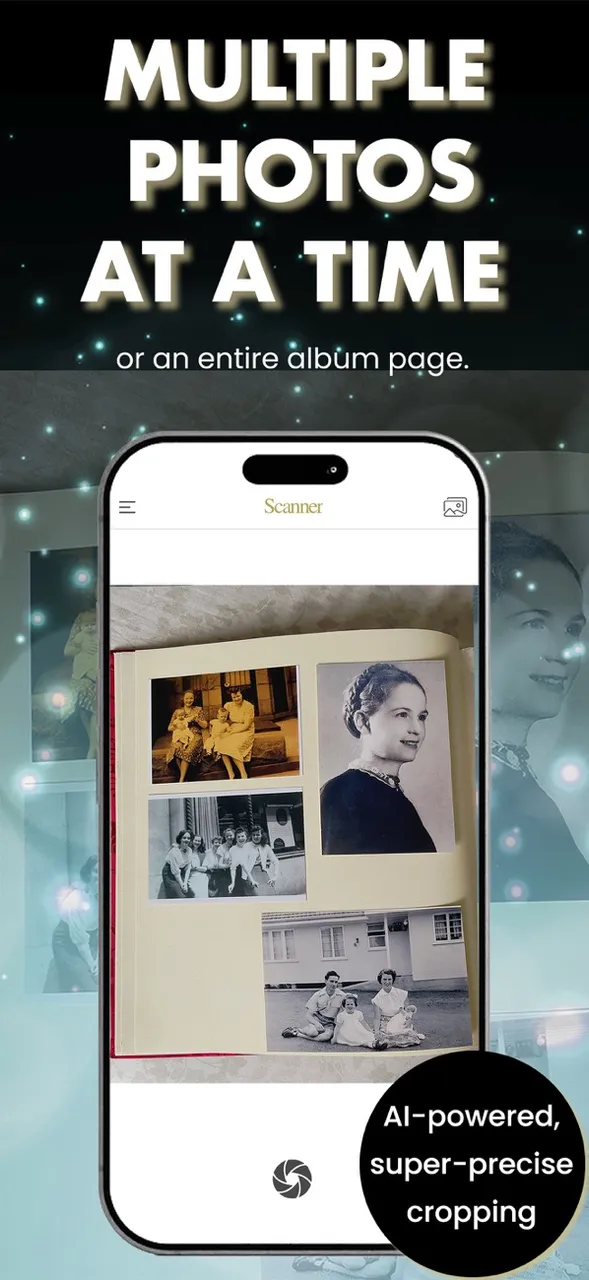
iPhone and iPad app that scans several prints or an album page at once, for a one-time price
 (opens full size in a new tab)
Facts
- Price
- From $9.99 one-time
- Runs on
- iPhoneiPadApple Vision
- Needs
- iOS 17.6 or lateriPadOS 17.6 or later
- License
- Proprietary
- Category
- Apps
- Facts checked
Price checked · Current prices on apps.apple.com ↗
Our verdict
#1 of 7 in Apps for scanning old photos
Best for iPhone albums, paid once
What it does
- Scans several prints or a whole album page in one shot and saves each photo separately
- Sets the real date and place on many photos at once and writes them into the files
- Saves to Apple Photos and exports whole albums as folders
Pros
- One-time price with no subscription, ads, or in-app purchases
- Works entirely on the phone, with no account
- Detailed copies, up to 48 megapixels on recent Pro iPhones
Cons
- iPhone and iPad only
- No glare removal
- No free trial
About Pic Scanner Gold
Pic Scanner Gold, by App Initio Limited, is an iPhone and iPad app for digitizing printed photos. It scans several prints or a whole album page in one shot, auto-crops each photo into a separate file and enhances it, and saves at 300 DPI. It can edit dates and locations on many photos at once and add captions, and it runs entirely on the device with no account. It is a one-time purchase with no subscription, ads or in-app purchases. It runs only on Apple devices, and it is proprietary.
What users say
The few reviews on the App Store are favorable. One reviewer, a former museum collections worker, says the scans are close to professional scanner quality, and another says cropping is near perfect but resolution drops when scanning several photos at once. Reviewers repeatedly praise developer support. These are single reviews from a small sample (408 US ratings).
3 quotes from users and reviewers
It does scan up to 4 photos at a time but as should be expected the resolution drops. I’ve done a few hundred scans and transferred to my PC.
Papsview, App Store reviewer, self-described 'old IT guy' · apps.apple.com/us/app/pic-scanner-gold-scan-photos/id1124131441 · published · checked I used to work in the collections management department of several museums and the scans I’ve gotten with this app are just about as good as the scans I’ve had using professional scanners.
merrittk, App Store reviewer, former museum collections worker and genealogy researcher · apps.apple.com/us/app/pic-scanner-gold-scan-photos/id1124131441 · published · checked 4.3 out of 5 408 Ratings
apps.apple.com/us/app/pic-scanner-gold-scan-photos/id1124131441 · checked
Ranked in
-
#1 of 7 Apps for scanning old photos Best for iPhone albums, paid once 3.6/5
How it scored
-
Getting through a whole album 5/5
Scans several photos or a whole album page with one click and auto-crops each into its own file. A reviewer reports up to four photos per shot with lower resolution each.
5/5 means: Several prints or a whole album page per shot, each cropped, straightened and saved as its own photo
Pic Scanner Gold scans multiple photos - or an entire album page - with one click. It auto-crops, auto-enhances, and saves individual photos at 300 DPI.
apps.apple.com/us/app/pic-scanner-gold-scan-photos/id1124131441 · checked It does scan up to 4 photos at a time but as should be expected the resolution drops. I’ve done a few hundred scans and transferred to my PC.
Papsview, App Store reviewer, self-described 'old IT guy' · apps.apple.com/us/app/pic-scanner-gold-scan-photos/id1124131441 · published · checked
-
Quality of the saved scan 4/5
Saves at 300 DPI and captures at up to 48 MP on recent Pro iPhones. A former museum collections worker says the scans are about as good as professional scanners, but the vendor itself says to scan one or two prints at a time for high-resolution work, so a full page per shot gives less detail per print.
4/5 means: Detailed, natural-looking copies good enough for reprints, with small weaknesses
Max-Resolution Scanning: Up to 48 MP on iPhone 14 Pro or Max and newer Pro/Max models (Most apps only offer 12 MP). * True 300 DPI Scans: High-quality. Great for reprints, photo books, scrapbooks, family history (Other apps only do 72 DPI).
apps.apple.com/us/app/pic-scanner-gold-scan-photos/id1124131441 · checked I used to work in the collections management department of several museums and the scans I’ve gotten with this app are just about as good as the scans I’ve had using professional scanners.
merrittk, App Store reviewer, former museum collections worker and genealogy researcher · apps.apple.com/us/app/pic-scanner-gold-scan-photos/id1124131441 · published · checked
-
Glare and reflections 1/5
Neither the App Store listing nor the vendor's site describes any glare removal; a reviewer's advice is to scan on a flat surface in good light. No source states it is absent.
1/5 means: Nothing for glare; the reader has to find lighting that avoids it
I used to work in the collections management department of several museums and the scans I’ve gotten with this app are just about as good as the scans I’ve had using professional scanners.
merrittk, App Store reviewer, former museum collections worker and genealogy researcher · apps.apple.com/us/app/pic-scanner-gold-scan-photos/id1124131441 · published · checked
-
Easy for a first-timer 4/5
No account, ads or upsells, and one click captures a page. It has many tools, and there is no free trial to try it before paying.
4/5 means: Open and scan with little to learn, with a few extra screens or steps
No subscriptions. No in-app purchases or hidden fees. No ads. No watermark. One-time purchase for unlimited, lifetime use.
apps.apple.com/us/app/pic-scanner-gold-scan-photos/id1124131441 · checked Pic Scanner Gold scans multiple photos - or an entire album page - with one click. It auto-crops, auto-enhances, and saves individual photos at 300 DPI.
apps.apple.com/us/app/pic-scanner-gold-scan-photos/id1124131441 · checked 100% Privacy: Your family memories belong on your phone, not our servers. No accounts. No tracking. No data harvesting. * AI Automatic Cropping & Enhancement: Highly accurate edge detection. All processing done locally on your device.
apps.apple.com/us/app/pic-scanner-gold-scan-photos/id1124131441 · checked
-
Cost to scan a collection 4/5
A one-time $9.99 purchase on the US App Store with no subscription, in-app purchases or export limits.
4/5 means: Under $20, or free with a paid tier the reader may want
No subscriptions. No in-app purchases or hidden fees. No ads. No watermark. One-time purchase for unlimited, lifetime use.
apps.apple.com/us/app/pic-scanner-gold-scan-photos/id1124131441 · checked Save to Apple Photos • Sync via iCloud • Export to Mac or PC • Bulk-export albums as folders • Share via Messages, AirDrop, email, or social apps • Save in any cloud storage service NO NASTY SURPRISES ----- • No subscription • No in-app purchases • No ads • No watermark • No account required • No export limits
apps.apple.com/us/app/pic-scanner-gold-scan-photos/id1124131441 · checked
-
Scans land in your photo library 4/5
Scans are saved to Apple Photos, sync through iCloud, and whole albums can be bulk-exported as folders. Scans are kept in the app and saved out from there rather than written to Photos at capture.
4/5 means: Scans go to the photo library as ordinary photos automatically once a setting is on, or with a single export
Save to Apple Photos • Sync via iCloud • Export to Mac or PC • Bulk-export albums as folders • Share via Messages, AirDrop, email, or social apps • Save in any cloud storage service NO NASTY SURPRISES ----- • No subscription • No in-app purchases • No ads • No watermark • No account required • No export limits
apps.apple.com/us/app/pic-scanner-gold-scan-photos/id1124131441 · checked
-
Restoring faded and damaged photos 2/5
Auto-enhances each scan and enlarges small prints, with a manual editor. No colorizing, face restoration or damage repair is described.
2/5 means: Basic adjustments, filters or a general cleanup tool
Pic Scanner Gold scans multiple photos - or an entire album page - with one click. It auto-crops, auto-enhances, and saves individual photos at 300 DPI.
apps.apple.com/us/app/pic-scanner-gold-scan-photos/id1124131441 · checked
-
Dates, names and captions 4/5
Date Created and Location can be set on many photos at once, by typing or voice, and the date and captions are written into the scan's EXIF data so photo apps sort them by date. Scanning the back of a print and keeping it with the front isn't described.
4/5 means: The real date and a caption written into the photo file, with dates set for many photos at once
Metadata Editing: The ONLY scanner app with batch-editing of EXIF dates and locations: Vital for organizing old photos. • Captions to Save Memories: EXCLUSIVE! Lets you view and print date, locations, and descriptions below the photos!
apps.apple.com/us/app/pic-scanner-gold-scan-photos/id1124131441 · checked Now you can add 'Date Created' and 'Location' to MULTIPLE photos at a time - by typing or voice dictation! ONLY Pic Scanner Gold offers this powerful feature. Makes the tedious task of metadata editing fast and easy.
apps.apple.com/us/app/pic-scanner-gold-scan-photos/id1124131441 · checked Pic Scanner Gold automatically adds the Date Created and Description from your Captions to the scan's EXIF metadata - Making photos easy to arrange, organize and locate in any photo app.
picscannergold.com · checked
-
Privacy and sign-in , counts half 5/5
No accounts, no tracking, and all processing on the device; the App Store privacy label says Data Not Collected.
5/5 means: No account, processing on the phone, and no data collected
100% Privacy: Your family memories belong on your phone, not our servers. No accounts. No tracking. No data harvesting. * AI Automatic Cropping & Enhancement: Highly accurate edge detection. All processing done locally on your device.
apps.apple.com/us/app/pic-scanner-gold-scan-photos/id1124131441 · checked Pic Scanner Gold is the best photo scanner app for you. No other app has so many features for so low a price. Fast scanning. Accurate cropping. Metadata and captions. Automatic backups in your iCloud storage. No server uploads: Assured privacy. Slideshows and greeting cards. No subscriptions or in-app purchases. Its all-in US$9.99 price is an absolute steal.
picscannergold.com · checked
Top of this ranking
-




Sources
15 quotes from 2 pages; the 6 most useful are below.
-
Pricing 3
No subscriptions. No in-app purchases or hidden fees. No ads. No watermark. One-time purchase for unlimited, lifetime use.
apps.apple.com/us/app/pic-scanner-gold-scan-photos/id1124131441 · checked Pic Scanner Gold is the best photo scanner app for you. No other app has so many features for so low a price. Fast scanning. Accurate cropping. Metadata and captions. Automatic backups in your iCloud storage. No server uploads: Assured privacy. Slideshows and greeting cards. No subscriptions or in-app purchases. Its all-in US$9.99 price is an absolute steal.
picscannergold.com · checked In 2013, we invented multi-scanning for mobile. Pic Scanner was world’s first app for scanning and cropping multiple photos. At US$3.99, it's still a great bargain, especially if you have simple scanning needs or have an older iPhone or iPad.
picscannergold.com · checked
-
What users say 1
It does scan up to 4 photos at a time but as should be expected the resolution drops. I’ve done a few hundred scans and transferred to my PC.
Papsview, App Store reviewer, self-described 'old IT guy' · apps.apple.com/us/app/pic-scanner-gold-scan-photos/id1124131441 · published · checked
-
Features 2
Pic Scanner Gold scans multiple photos - or an entire album page - with one click. It auto-crops, auto-enhances, and saves individual photos at 300 DPI.
apps.apple.com/us/app/pic-scanner-gold-scan-photos/id1124131441 · checked Pic Scanner Gold automatically adds the Date Created and Description from your Captions to the scan's EXIF metadata - Making photos easy to arrange, organize and locate in any photo app.
picscannergold.com · checked