
Beekeeper Studio
SQL editor and database manager for Windows, macOS and Linux, with a free open-source edition
Our verdict
#4 of 5 in Database GUI clients · If you want to read the code of what you pay for
What it does
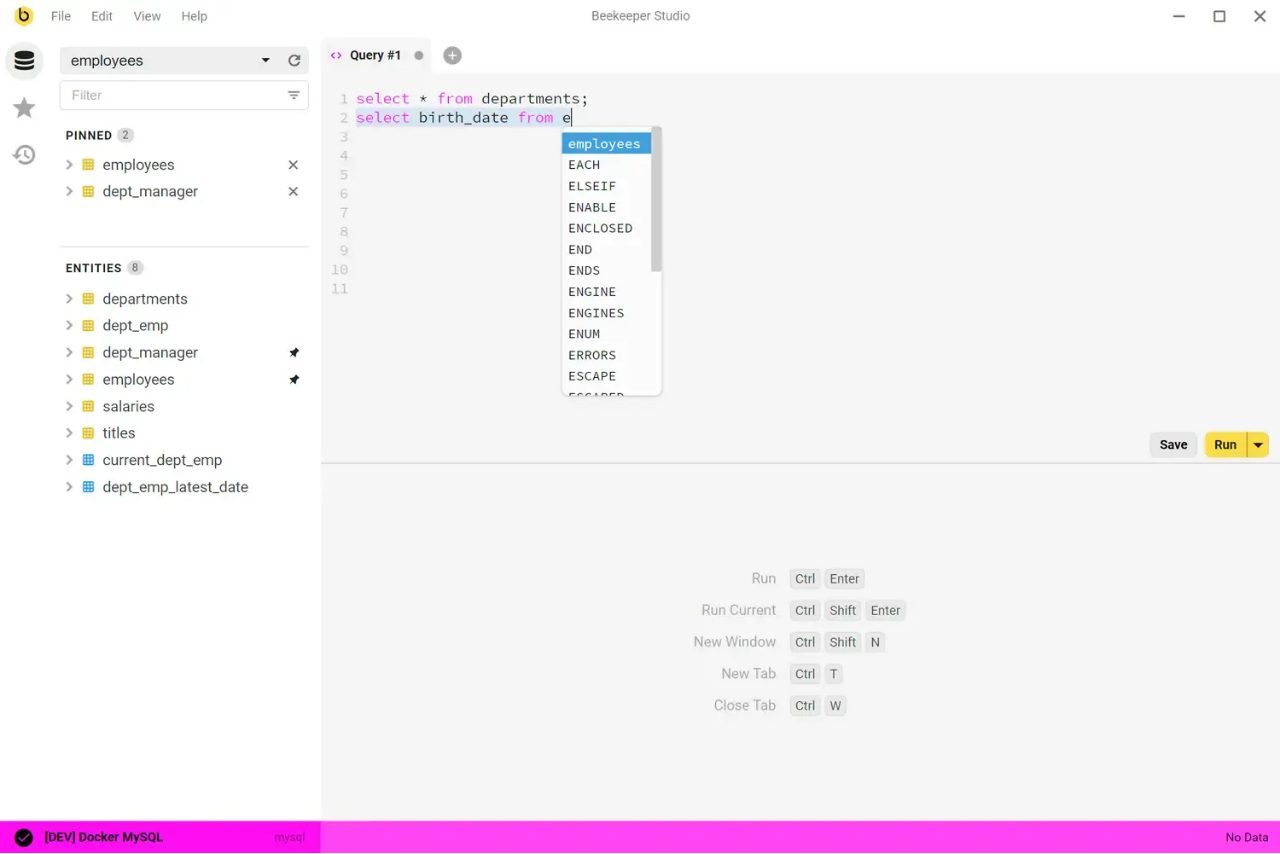
- SQL editor with autocomplete and formatting
- Editable table view that shows changes as SQL before applying them
- ER diagrams on paid plans
- A color per connection
- Same features on Windows, macOS and Linux
Pros
- Free Community Edition under GPLv3
- Read-only mode in every edition, the free one included
- Kerberos, AWS IAM and Entra ID sign-in on the Business plan
- 14-day free trial of the paid features
Cons
- The free edition can't edit query results or import data from files
- Enterprise sign-in methods and Snowflake need the Business plan or above
- No schema or data comparison documented
- No visual query builder documented, and no documented way to search the query history
- Skip if:
- Anyone who needs to import files without paying.
Rankings and alternatives
- Database GUI clients #4 of 5 If you want to read the code of what you pay for
- DBeaver #1 Best free client for work
- JetBrains DataGrip #2 If you'll pay for warehouses, query plans or Kerberos
- DbGate #3 For opening your databases in a browser



Database GUI clients scores
Evaluated Nov 7, 2026 Evidence ↓- SQL databases supported 5
5/5 means: All eight.
All eight are supported, PostgreSQL, MySQL, SQLite, SQL Server, Oracle, ClickHouse, Snowflake and Google BigQuery, though Oracle and ClickHouse need a paid plan and Snowflake the Business plan.
- Non-relational databases supported 4
4/5 means: Three or four of the five.
Four of the five, MongoDB, Redis, Apache Cassandra and DynamoDB (in beta); Elasticsearch and OpenSearch are not among its supported databases.
- What you can do for free 4
4/5 means: Free for any use with no caps, but editing query results or importing and exporting data needs a paid edition.
The free Community Edition has no time limit and unlimited connections, queries and tabs, but editing query results and importing data from files need a paid plan. Larger organizations are asked to buy a license, but no license term forbids their free use.
- Price of the full desktop app for one user 3
3/5 means: $151 to $250.
Business is the only plan with every desktop feature (Kerberos, AWS IAM and Entra ID sign-in, Snowflake) and costs $18 a month per user billed yearly, $216 for the first year.
- Platforms 3
3/5 means: Windows, macOS and Linux.
Desktop apps for Windows, macOS and Linux; there is no web version or mobile app (Cloud Workspaces only sync connections and queries).
- Open-source license 4
4/5 means: An edition is OSI-licensed open source, and the paid features' source is also published, under a commercial or source-available license.
The Community Edition is GPLv3, and the paid features' code is published in the same repository under a commercial source-available license.
- Import and export formats 4
4/5 means: Four or five of the six.
Four of the six, CSV, JSON, Excel (XLSX) and SQL INSERT statements; it apparently supports neither XML nor Parquet.
- Schema tools 3
3/5 means: Two of the four.
An ER diagram (paid plans) and a form for creating and altering tables without SQL; it apparently has no schema comparison or data comparison.
- Query writing help 2
2/5 means: Two of the five.
Autocomplete of table and column names and a SQL formatter. It has a query history, but apparently no way to search it and no visual query builder; a visual query plan comes only from a community plugin.
- Safeguards for live databases 4
4/5 means: Three of the four.
A read-only mode, a color per connection, and staged table edits that can be opened as SQL (Copy To Sql) before you apply them; there is apparently no confirmation step before data-changing queries.
- Secure connection options 5
5/5 means: All five.
All five, SSH tunnels, SSL with your own certificates, AWS IAM, Microsoft Entra ID and Kerberos; the last three need the Business plan.
Pricing
- Community Free Free edition; organizations with 10 or more employees or $1m revenue are asked to buy a license
- Indie $108.00 /year per seat $9 a month billed yearly, or $18 paying monthly; one device
- Professional $168.00 /year per seat $14 a month billed yearly, or $28 paying monthly; multiple devices
- Business $216.00 /year per seat $18 a month billed yearly, or $35 paying monthly; adds Kerberos, AWS IAM and Entra ID sign-in and Snowflake
- Enterprise $4,999.00 /month Starting price, through sales
Prices checked Nov 7, 2026.
Evidence and sources
Database GUI clients scores
Non-relational databases supported 1 quote
-
DynamoDB support is currently in beta. It works well, but you may run into the occasional rough edge — please report any issues.
docs.beekeeperstudio.io/user_guide/connecting/dynamodb · checked
What you can do for free 1 quote
-
Yes. Although our Community Edition is intended for students, individuals, non-profits and small businesses with fewer than 10 employees and/or annual revenue below $1m. If your organization is larger, we ask that you purchase a paid license.
beekeeperstudio.io/pricing · checked
Open-source license 2 quotes
-
Most of the code in this repo is open source under the GPLv3 license. Paid features are also in this repository under a commercial source-available license.
raw.githubusercontent.com/beekeeper-studio/beekeeper-studio/master/README.md · checked -
You can't use the forked commercial code in this repository in your own projects, to sell a competing project, or to use in a non-testing environment for any purpose other than suggesting changes or modifications.
raw.githubusercontent.com/beekeeper-studio/beekeeper-studio/master/LICENSE-COMMERCIAL.md · checked
Facts
License 2 quotes
-
Most of the code in this repo is open source under the GPLv3 license. Paid features are also in this repository under a commercial source-available license.
raw.githubusercontent.com/beekeeper-studio/beekeeper-studio/master/README.md · checked -
You can't use the forked commercial code in this repository in your own projects, to sell a competing project, or to use in a non-testing environment for any purpose other than suggesting changes or modifications.
raw.githubusercontent.com/beekeeper-studio/beekeeper-studio/master/LICENSE-COMMERCIAL.md · checked
Runs on 1 quote
-
Oracle Database libraries and packages are not available yet for Apple Silicon.
docs.beekeeperstudio.io/installation/macos-m1-intel · checked
More from the sources
Pricing 2 quotes
-
Pay for 12 months and you can use the paid features forever, even if you cancel your subscription.
beekeeperstudio.io/pricing · checked -
Yes. Our enterprise plan starts at $4,999/month.
beekeeperstudio.io/pricing · checked
Features 1 quote
-
The AI Shell is included in all paid versions of Beekeeper Studio, with no additional charge.
docs.beekeeperstudio.io/user_guide/sql-ai-shell · checked
Pricing
beekeeperstudio.io/pricing · checked