
Framer
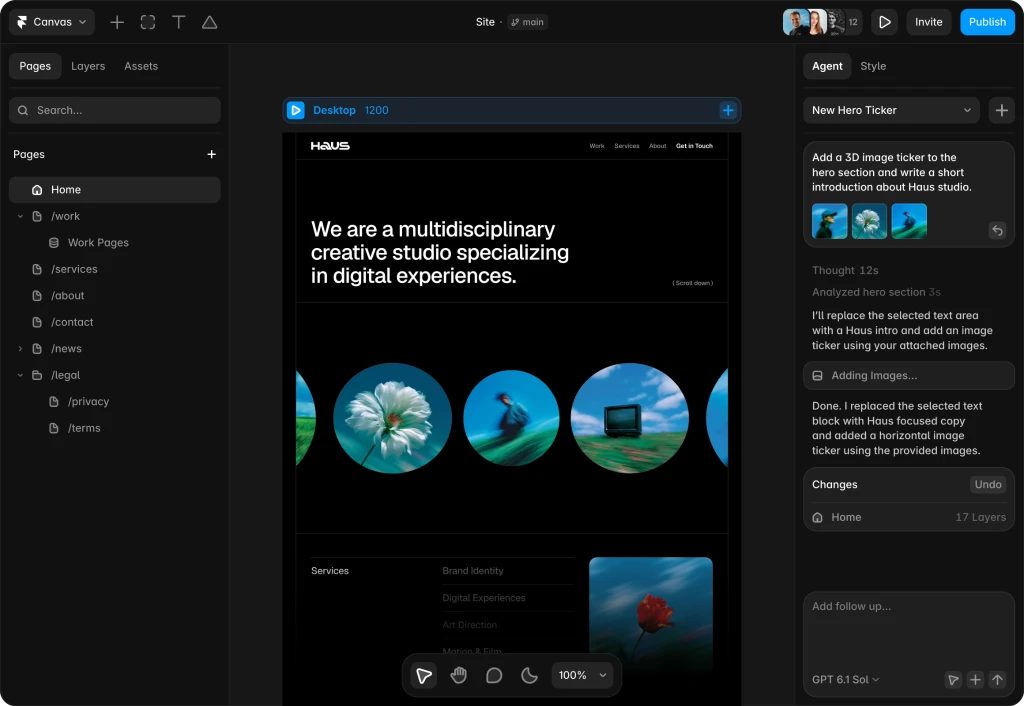
Visual website builder with an AI design agent and a Figma-like canvas
Our verdict
#9 of 10 in Website builders for small business · Striking design on a small yearly budget
Pros
- Standout design and animation
- Low yearly price with a domain included on yearly billing
Cons
- A steep start for non-designers
- No bookings, email campaigns, or full store built in
Framer is a web-based website builder that combines a free-form design canvas with an AI design agent, a CMS, hosting on a global CDN, built-in SEO controls and analytics. It is aimed at designers and design-minded small teams more than at people who want a fixed template-and-blocks editor. Sites are hosted by Framer and sold per site on a monthly or yearly subscription; the editor runs in the browser. Third-party designers sell templates in its marketplace.
What users say
Evidence ↓Reviewers agree Framer gives more design freedom and speed than template builders, but needs more learning than them; the one 2025 hands-on comparison calls it not built for beginners, and a 2024 review calls the learning curve slightly tricky though a first wireframe takes minutes. The sample is two reviewers and one competitor-affiliated review, so it is not a broad user sample.
Rankings and alternatives
- Website builders for small business #9 of 10 Striking design on a small yearly budget
- Wix #1 Best all-in-one pick for service businesses
- Squarespace #2 Easiest editor and the best-looking templates
- WordPress.com #3 Cheapest to run, and the one you can take with you




Small business website builders scores
Evaluated Nov 17, 2026 Evidence ↓- Easy to build and keep updated · counts double 2
2/5 means: Usable by a patient non-designer, but building takes days of learning and updates are fiddly
A design-tool canvas with an AI agent that drafts layouts; reviewers say it is not built for beginners and has no setup wizard, though it is gentler than Webflow. It works poorly in phone browsers.
- Bookings, forms and email marketing 1
1/5 means: A contact form and little else; bookings and email campaigns need outside services
A form element exists, but bookings and email campaigns need outside services.
- How good the site looks 5
5/5 means: Among the best-looking results, from polished templates or full design control
Design freedom and animation that reviewers call unmatched, plus a large marketplace of polished templates.
- Yearly cost after the first year 5
5/5 means: Under $150 a year
Basic is $10 a month billed yearly ($120 a year) with a complimentary domain on yearly billing; even with the domain at about $15 a year after that, the total stays under $150.
- Selling products online 2
2/5 means: Payment buttons, checkout links or paid bookings only; no real cart or inventory
No full store: selling relies on Stripe buy buttons or an embedded Shopify or other checkout, without inventory, shipping or tax tools.
- SEO and local search tools 3
3/5 means: The standard set, with titles, descriptions, editable URLs, redirects and sitemaps
Titles, descriptions, alt text, sitemaps and fast hosting are built in; redirects and some controls are on Pro.
- Help when you're stuck 3
3/5 means: Live chat or phone at limited hours, or chat that starts with an AI assistant before a person
A help center, community and in-app chat that starts with an AI assistant, with no published response times.
- Room to grow, and to leave 3
3/5 means: A modest set of extensions or integrations plus custom code, but leaving means rebuilding
A CMS and a plugin marketplace, but no code export, so leaving means rebuilding.
Pricing
- Free Free Free Framer domain, 1 GB bandwidth, 500 AI credits per month, no custom domain. Framer calls it ideal for non-commercial use (ids 4, 21).
- Basic $10.00 /month Price per site per month with yearly billing selected on Framer's page; the monthly-billing price was not shown. Custom domain connection (a complimentary domain is included on yearly billing), 30 pages, 2 CMS collections, 1,000 CMS items, 50 GB bandwidth, 20 CDN locations, 30 days of analytics, built-in SEO, 1,000 AI credits per month, 10 editor seats (ids 1, 2).
- Pro $30.00 /month Price per site per month with yearly billing selected; the monthly-billing price was not shown. 150 pages, 10 CMS collections, 2,500 CMS items, 100 GB bandwidth, 300+ CDN locations, 90 days of analytics, site redirects, staging, branching, 3,000 AI credits per month, unlimited editor seats. Extras are billed on top, up to 700 pages, 40 collections, 40,000 items and 2 TB bandwidth (ids 2, 3).
- Enterprise Contact sales Custom pricing; unlimited editors, SSO, SCIM, uptime guarantee.
- Additional editor $20.00 /month per seat , extra Design, edit and publish. Content editors (CMS, localization, on-page editing) are $10 per editor; viewers are free (id 5).
- Translation locales $20.00 /month , extra Per locale, up to 20, on Basic or Pro (ids 1, 2).
- Convert (A/B testing) $50.00 /month , extra Per 500,000 events; Pro only.
- Advanced hosting $200.00 /month , extra Multiple sites and custom headers under one domain, up to 6 rewrites and 6 firewall rules; Pro only.
Prices checked Nov 17, 2026.
Evidence and sources
What users say
Summary 3 quotes
-
Framer has a slightly trickier learning curve than some similar UX tools. Getting started is straightforward and you’ll be able to compose a wireframe in a few minutes. However, the specifics of layout require some cross-reference with the Framer support resources.
Christian Cawley, reviewer at TechRadar · techradar.com/pro/framer-review · published · checked -
It’s not built for beginners, and there’s no real onboarding wizard or setup checklist.
Bogdan Rancea, founder of ecomm.design, a showcase of ecommerce sites · ecomm.design/framer-vs-squarespace · published · checked -
Several users have indicated that the platform may lag or not work well on older or less powerful devices.
elegantthemes.com/blog/design/framer-review · checked
Small business website builders scores
Easy to build and keep updated 4 quotes
-
Describe what you need, and the design agent builds layouts, sections, and advanced components in seconds.
framer.com · checked -
Framer has a slightly trickier learning curve than some similar UX tools. Getting started is straightforward and you’ll be able to compose a wireframe in a few minutes. However, the specifics of layout require some cross-reference with the Framer support resources.
Christian Cawley, reviewer at TechRadar · techradar.com/pro/framer-review · published · checked -
Note that while the desktop and browser interface appear to be identical, Framer doesn’t work well on mobile browsers.
techradar.com/pro/framer-review · published · checked -
It’s not built for beginners, and there’s no real onboarding wizard or setup checklist.
Bogdan Rancea, founder of ecomm.design, a showcase of ecommerce sites · ecomm.design/framer-vs-squarespace · published · checked
Bookings, forms and email marketing 1 quote
-
Forms, icons, interactive elements (search boxes) and more can be inserted into a design.
techradar.com/pro/framer-review · published · checked
How good the site looks 2 quotes
-
Everything stays editable. Adjust type, components, breakpoints, and effects until it feels like yours.
framer.com · checked -
Browse polished templates to find the right starting point for your next website.
framer.com · checked
Yearly cost after the first year 3 quotes
-
All prices are monthly and billed according to the billing cycle selected at checkout. Any applicable sales tax will be added at checkout based on your location.
framer.com/pricing · checked -
The Basic plan caters to students, freelancers, and small studios. The Pro plan is designed for teams at agencies, startups, and scale-ups who run their full marketing stack on Framer.
framer.com/pricing · checked -
This makes it easy to explore Framer, use it as a design tool, or create templates. To connect a custom domain, you’ll need to upgrade to a paid plan.
framer.com/pricing · checked
Selling products online 1 quote
-
Cart functionality for multiple products
Bogdan Rancea, founder of ecomm.design · ecomm.design/framer-vs-squarespace · published · checked
SEO and local search tools 3 quotes
-
Hosting, CMS, analytics, SEO, and AEO are already there, so you can go live without a separate build process.
framer.com · checked -
Framer includes basic SEO fields like page titles, meta descriptions, and alt text.
Bogdan Rancea, founder of ecomm.design · ecomm.design/framer-vs-squarespace · published · checked -
Framer includes essential features like sitemaps, robots.txt files, custom metadata, compressed code, and images, as well as caching.
elegantthemes.com/blog/design/framer-review · checked
Help when you're stuck 2 quotes
-
Direct support for Framer users can be gained using a pop-up chat window. For serious issues concerning site publishing issues or a failing live site, an Emergency Support page and chat window is provided.
techradar.com/pro/framer-review · published · checked -
No specific response time is cited on the website. However, the chat bot (which describes itself as an “AI Concierge”) states that the “support team aims to handle requests promptly.”
techradar.com/pro/framer-review · published · checked
Room to grow, and to leave 2 quotes
-
With add-ons you can have up to 40,000 CMS items, 40 CMS collections, 2 TB of bandwidth, 700 pages, and 1.5M events on the Pro plan.
framer.com/pricing · checked -
Hosting, CMS, analytics, SEO, and AEO are already there, so you can go live without a separate build process.
framer.com · checked
Facts
License 1 quote
-
All prices are monthly and billed according to the billing cycle selected at checkout. Any applicable sales tax will be added at checkout based on your location.
framer.com/pricing · checked
Runs on 1 quote
-
Hosting, CMS, analytics, SEO, and AEO are already there, so you can go live without a separate build process.
framer.com · checked
More from the sources
Pricing 1 quote
-
Editors are billed per seat and can be added to your workspace or projects at any time.
framer.com/pricing · checked
Features 2 quotes
-
Every paid plan includes monthly credits that power Agents, Localization, and other AI features.
framer.com/pricing · checked -
Framer scores highly on Core Web Vitals across desktop and mobile — often 90+ on Google’s PageSpeed Insights without any optimization.
Bogdan Rancea, founder of ecomm.design · ecomm.design/framer-vs-squarespace · published · checked
Limits and known issues 1 quote
-
Our Free plan is ideal for non-commercial use.
framer.com/pricing · checked
What users say 1 quote
-
Meanwhile, the generative AI tool is an excellent feature if you need a basic idea automatically creating. The results are good enough to use, but you’ll probably want to spend time on further development.
Christian Cawley, reviewer at TechRadar · techradar.com/pro/framer-review · published · checked
Pricing
framer.com/pricing · checked