
GoDaddy Websites + Marketing
Hosted, section-based website builder with built-in booking, email marketing and a domain in one GoDaddy account
Our verdict
#6 of 10 in Website builders for small business · Phone support and simple bookings, with steep renewals
Pros
- 24/7 phone support, plus chat and email
- Bookings, email marketing, and social tools in one place
- Switch templates without losing content
Cons
- Prices roughly double at renewal
- Dated templates and an editor that won't let you move elements freely
- Basic SEO controls and no app market
- Choose if:
- Being able to phone someone at any hour matters more to you than design
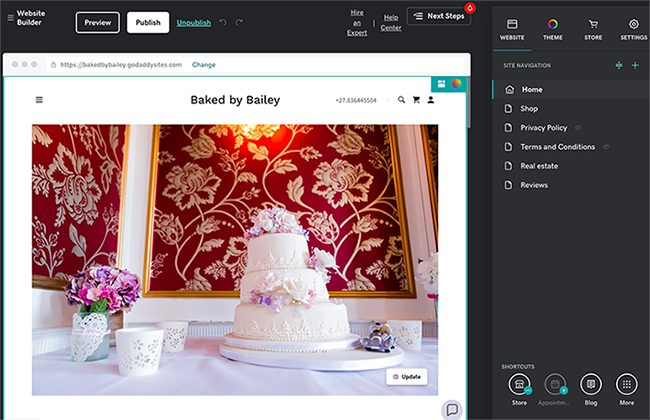
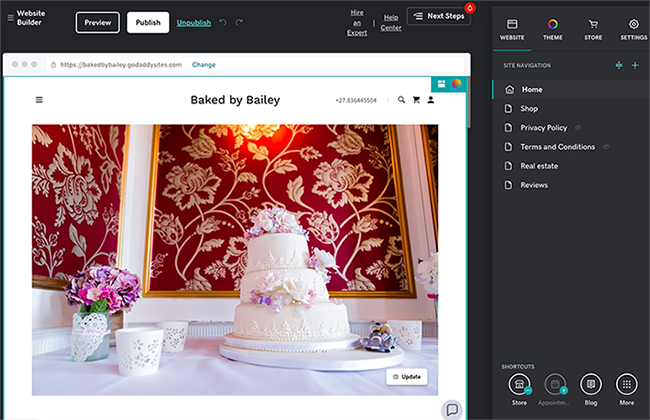
GoDaddy Website Builder is the classic editor inside GoDaddy’s Websites + Marketing plans (Basic, Premium, Commerce). You start from a template or a short AI-guided setup and add and rearrange pre-built sections; it is not drag-and-drop. Hosting, SSL, appointment booking, email marketing, social posting and, on the Commerce plan, an online store with GoDaddy Payments and POS are bundled. It runs in the browser as a closed subscription service, with phone and chat support, and GoDaddy says finished sites cannot be moved to another host. GoDaddy also sells a separate Airo AI Builder (prompt-driven, code export) and Airo for WordPress, which are different products.
What users say
Evidence ↓Reviewers agree the editor is quick and easy for beginners, with guidance and built-in booking and marketing tools, and that it suits small service businesses (three reviewers). The most repeated criticisms are limited design control with no drag-and-drop, templates that look generic or dated, and no app market (two reviewers each), plus basic SEO. The few reader reviews on Tooltester (four, average 2.8) call it basic with poor templates. Reviewers are affiliate-funded sites, not a representative user sample.
Rankings and alternatives
- Website builders for small business #6 of 10 Phone support and simple bookings, with steep renewals
- Wix #1 Best all-in-one pick for service businesses
- Squarespace #2 Easiest editor and the best-looking templates
- WordPress.com #3 Cheapest to run, and the one you can take with you



Small business website builders scores
Evaluated Nov 17, 2026 Evidence ↓- Easy to build and keep updated · counts double 4
4/5 means: Easy for most owners, with one recurring annoyance such as a free canvas that's easy to make messy or sections that can't be rearranged freely
Owners add and rearrange ready-made sections, which is quick and hard to break; elements can't be dragged freely, which makes the editor rigid. Templates can be swapped without losing content.
- Bookings, forms and email marketing 4
4/5 means: Bookings, forms and email campaigns all from the same company, with one gap such as a separately billed scheduler or thin features
Appointments, email marketing and social media tools are built in; Basic allows one-time appointments and 100 marketing emails a month, and recurring bookings, payments and larger email allowances need Premium.
- How good the site looks 2
2/5 means: Clean but generic or dated templates, with limited ways to make them your own
Templates are clean but reviewers call them dated and generic, and the section-based editor offers little room to make one distinctive.
- Yearly cost after the first year 4
4/5 means: $150 to $299 a year
Basic, which takes one-time appointments, renews at about $16.99 a month ($203.88 a year) after a $9.99 intro year, plus the domain after its free year. Renewals run roughly 1.7 to 2 times the intro price.
- Selling products online 3
3/5 means: A real store with cart and inventory, but basic, or with a platform fee on the plan a small shop would buy
Only the Commerce plan sells; it handles unlimited products and marketplace links, but checkout can't be customized and the store tools are basic.
- SEO and local search tools 2
2/5 means: Titles, descriptions and alt text, with gaps such as fixed URLs, no redirects or controls limited to higher plans
Titles and descriptions only on the lowest paid plan, and reviewers report limited control even on higher plans.
- Help when you're stuck 5
5/5 means: 24/7 live chat and phone on every paid plan
24/7 phone, chat and email support, with a published phone number; reviewers found it slow at times.
- Room to grow, and to leave 2
2/5 means: Some integrations or custom code, but no app marketplace and no way to move the site
No app market and no way to move the site to another host; custom HTML, CSS and JavaScript can be added through an HTML element.
Pricing
- Basic $9.99 /month First term only, billed annually, so $119.88 charged upfront (9.99 x 12). Renews at about $16.99 a month ($203.88 a year); about $21.99 a month if billed monthly. Prices are third-party reports; GoDaddy's pricing page could not be read. Free domain for the first year is reported by Tooltester; renewal domain cost not found.
- Premium $14.99 /month First term only, billed annually, so $179.88 charged upfront (14.99 x 12). Renews at about $29.99 a month ($359.88 a year); about $39.99 a month if billed monthly. Lists online booking with payments and deposits, recurring appointments and 25,000 email sends per month. Third-party reports.
- Commerce $20.99 /month First term only, billed annually, so $251.88 charged upfront (20.99 x 12). Renews at about $34.99 a month ($419.88 a year); about $44.99 a month if billed monthly. Cheapest plan with an online store. GoDaddy Payments reported at 2.7% + $0.30 per online card (May 2025). Third-party reports.
- Standard $11.99 /month Listed only by Expert Market in May 2025, renewing at $22.99 a month; the August and September 2026 sources list only Basic, Premium and Commerce, so it may no longer be sold.
Prices checked Nov 17, 2026.
Evidence and sources
What users say
Summary 4 quotes
-
That said, GoDaddy’s editor is a little restrictive, since it’s not possible to change the layout of on-page elements by dragging them to a new spot.
Tatiana Lebreton, senior writer at Expert Market · expertmarket.com/website-builders/godaddy-review · published · checked -
Although GoDaddy’s template designs are perfectly usable, they can sometimes look a little dated and uninspired. Most don’t have the same flair as Squarespace templates.
Tatiana Lebreton, senior writer at Expert Market · expertmarket.com/website-builders/godaddy-review · published · checked -
GoDaddy’s website builder offers a nice and easy editing experience. It follows the convention of most other website builders, with a central dashboard to manage your site, and page sections that you can add and edit directly within the visual editor. As an added bonus, it’s even possible to edit your site on a mobile device. No complaints here, although an ‘undo’ function would be handy.
Tooltester reviewers, website-builder review site (affiliate-funded) · tooltester.com/en/reviews/godaddy-website-builder-review · published · checked -
Very basic website, lack of customization, Templates were poor.
Arlee, reader reviewer on Tooltester · tooltester.com/en/reviews/godaddy-website-builder-review · checked
Small business website builders scores
Easy to build and keep updated 4 quotes
-
That said, GoDaddy’s editor is a little restrictive, since it’s not possible to change the layout of on-page elements by dragging them to a new spot.
Tatiana Lebreton, senior writer at Expert Market · expertmarket.com/website-builders/godaddy-review · published · checked -
GoDaddy’s website builder offers a nice and easy editing experience. It follows the convention of most other website builders, with a central dashboard to manage your site, and page sections that you can add and edit directly within the visual editor. As an added bonus, it’s even possible to edit your site on a mobile device. No complaints here, although an ‘undo’ function would be handy.
Tooltester reviewers, website-builder review site (affiliate-funded) · tooltester.com/en/reviews/godaddy-website-builder-review · published · checked -
it’s not drag-and-drop. It’s therefore not possible to move elements like text and images around by dragging them – instead, you can only add sections by choosing from a list of pre-built layouts
tooltester.com/en/reviews/godaddy-website-builder-review · published · checked -
One thing that sets GoDaddy apart is the ability to switch your template. With GoDaddy, you can change to a completely new theme without losing the content you’ve added.
tooltester.com/en/reviews/godaddy-website-builder-review · published · checked
Bookings, forms and email marketing 4 quotes
-
One area in which GoDaddy shines is its comprehensive booking management features. You’ll be able to accept one-time and recurring appointments, and group classes.
expertmarket.com/website-builders/godaddy-review · published · checked -
However, the entry-level Basic plan only allows you to offer one-time appointments (e.g. consultations). If you want to also offer events and recurring appointments (such as classes and workshops), you’ll need at least the Premium plan. The same is true if you need to accept online payments (which is only possible for sites in the US, Canada, UK, and Australia).
tooltester.com/en/reviews/godaddy-website-builder-review · published · checked -
Premium · $14.99 per month, billed annually · Service businesses and organizations that need booking and stronger marketing tools. · Advanced marketing, 25,000 monthly email-marketing sends, unlimited Meta and Google ads, online booking, payments, and deposits for appointments and events.
macmyths.com/godaddy-website-builder-review-2026-is-it-underrated · published · checked -
SSL security 100 email marketing sends monthly Sales tracking dashboard
expertmarket.com/website-builders/godaddy-review · published · checked
How good the site looks 2 quotes
-
Although GoDaddy’s template designs are perfectly usable, they can sometimes look a little dated and uninspired. Most don’t have the same flair as Squarespace templates.
Tatiana Lebreton, senior writer at Expert Market · expertmarket.com/website-builders/godaddy-review · published · checked -
Very basic website, lack of customization, Templates were poor.
Arlee, reader reviewer on Tooltester · tooltester.com/en/reviews/godaddy-website-builder-review · checked
Yearly cost after the first year 3 quotes
-
Basic · $9.99/month for first term (when on annual billing) $16.99/month (renewal rate, or rate for monthly billing) Standard · $11.99/month for first term (when on annual billing) $22.99/month (renewal rate, or rate for monthly billing) Premium · $14.99/month for first term (when on annual billing) $29.99/month (renewal rate, or rate for monthly billing) Commerce · $20.99/month for first term (when on annual billing) $34.99/month (renewal rate, or rate for monthly billing)
expertmarket.com/website-builders/godaddy-review · published · checked -
However, the entry-level Basic plan only allows you to offer one-time appointments (e.g. consultations). If you want to also offer events and recurring appointments (such as classes and workshops), you’ll need at least the Premium plan. The same is true if you need to accept online payments (which is only possible for sites in the US, Canada, UK, and Australia).
tooltester.com/en/reviews/godaddy-website-builder-review · published · checked -
Basic: about $9.99 a month as a first-year annual price, renewing at about $16.99 a month, or $21.99 billed monthly. Premium: about $14.99 a month first year, about $29.99 at renewal, or $39.99 monthly. Commerce: about $20.99 a month first year, about $34.99 at renewal, or $44.99 monthly. A free trial of about seven days is reported, and GoDaddy bundles the builder with the domains, email, and hosting it already sells.
superdupr.com/blog/godaddy-vs-squarespace.md · published · checked
Selling products online 3 quotes
-
All plans allow you to add a PayPal Button. If you need an online store, you would need the highest plan. This includes some nice extras such as appointment booking, product reviews, and integrations with Amazon, eBay, Etsy and more. There’s even GoDaddy Payments, GoDaddy’s own payment processor, which is available in the US. GoDaddy is really only ideal for small stores, however (<5000 products).
tooltester.com/en/reviews/godaddy-website-builder-review · published · checked -
You can only run an online store with GoDaddy if you choose the $20.99 to $34.99 per month Commerce plan.
expertmarket.com/website-builders/godaddy-review · published · checked -
GoDaddy does offer its own payment processing service, GoDaddy Payments, which has transaction fees of 2.7% + $0.30 for online payments, less than competitor Wix charges for its Wix Payments service. GoDaddy is also among a growing number of website builders to offer POS equipment for selling in-person, although its POS system isn’t as advanced as the ones offered by rivals Shopify and Square.
expertmarket.com/website-builders/godaddy-review · published · checked
SEO and local search tools 1 quote
-
Unfortunately, [GoDaddy’s SEO options] on the free and lowest paid plan are limited to just page titles and descriptions. And even if you upgrade, the optimization options are quite basic. For example, you can’t edit SEO for blog posts. And what’s really baffling is that you can’t change page URLs either – they’re autogenerated, and they change every time you change your page title.
tooltester.com/en/reviews/godaddy-website-builder-review · published · checked
Help when you're stuck 2 quotes
-
While it’s great that there is 24/7 support available, [we found it a bit slow at times]. Other help resources include phone support, a Community forum and a blog.
tooltester.com/en/reviews/godaddy-website-builder-review · published · checked -
There’s a phone line, with the company readily publishing its number online, a live chat, and a knowledge center with videos and tutorials.
expertmarket.com/website-builders/godaddy-review · published · checked
Room to grow, and to leave 3 quotes
-
No. GoDaddy states that classic Website Builder sites cannot be taken to another hosting provider, while WordPress sites can be moved with their files and database. Portability is GoDaddy Website Builder’s clearest structural weakness and should be considered before a business invests heavily in the platform.
macmyths.com/godaddy-website-builder-review-2026-is-it-underrated · published · checked -
it’s one of the few website builders we’ve tested that doesn’t have an app market. This limits the number of apps you can integrate into your GoDaddy website to expand its capabilities beyond built-in tools.
expertmarket.com/website-builders/godaddy-review · published · checked -
HTML, CSS and JavaScript can be added to pages through their dedicated HTML-Element.
tooltester.com/en/reviews/godaddy-website-builder-review · published · checked
Facts
Runs on 1 quote
-
GoDaddy’s website builder offers a nice and easy editing experience. It follows the convention of most other website builders, with a central dashboard to manage your site, and page sections that you can add and edit directly within the visual editor. As an added bonus, it’s even possible to edit your site on a mobile device. No complaints here, although an ‘undo’ function would be handy.
Tooltester reviewers, website-builder review site (affiliate-funded) · tooltester.com/en/reviews/godaddy-website-builder-review · published · checked
Needs 1 quote
-
GoDaddy’s website builder offers a nice and easy editing experience. It follows the convention of most other website builders, with a central dashboard to manage your site, and page sections that you can add and edit directly within the visual editor. As an added bonus, it’s even possible to edit your site on a mobile device. No complaints here, although an ‘undo’ function would be handy.
Tooltester reviewers, website-builder review site (affiliate-funded) · tooltester.com/en/reviews/godaddy-website-builder-review · published · checked
More from the sources
Features 2 quotes
-
This is the original website editor included with a Websites + Marketing plan. You build your site from a template and then add and rearrange sections using a manual editing interface. Some AI-powered features, such as text suggestions and search engine optimization (SEO), are available in places within the editor.
godaddy.com/help/which-godaddy-website-builder-do-i-have-42917 · checked -
In fact, GoDaddy came out first in our [comprehensive comparison of page builder loading speeds]
tooltester.com/en/reviews/godaddy-website-builder-review · published · checked
Pricing
godaddy.com/websites/website-builder · checked