
GroupMe
Free group chat app from Microsoft with groups of up to 5,000 members and SMS participation in the US
 (opens full size in a new tab)
Facts
- Price
- Free plan
- Users
- About 10M
- Runs on
- iOSAndroidWeb
- Company
- Microsoft
- Category
- Apps
- Facts checked
Price checked · Current prices on play.google.com ↗
Our verdict
#3 of 8 in Group chat apps for large groups
US clubs, teams, and campus groups
What it does
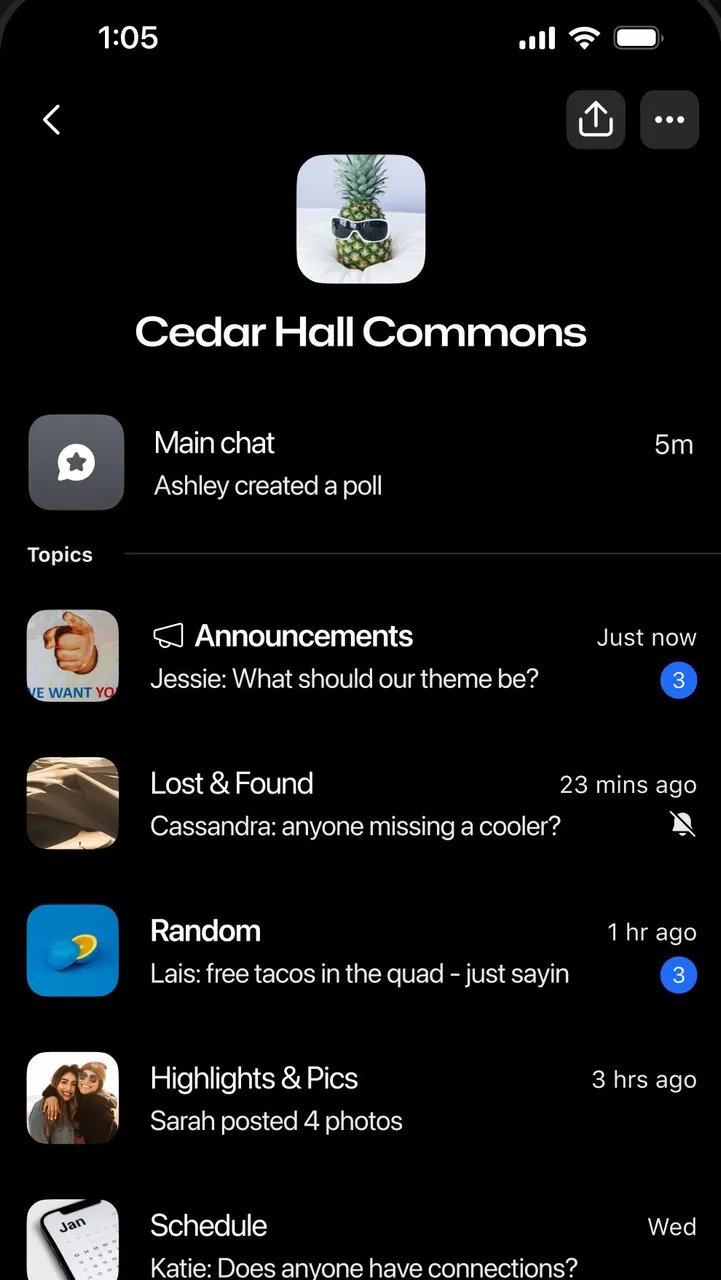
- Topics, plus announcement topics only leaders can post in
- Events with RSVPs, polls, and pinned messages
- Join approval with an optional join question
Pros
- The easiest app here for reluctant members to join
- Holds 5,000 members per group
- Free app with events built in; SMS rates apply to text participants
Cons
- Text message chat works in the US only
- Moderation is limited to approving, removing, and blocking members
- Few people outside US schools and teams already use it
- Choose if:
- Some members need to take part by ordinary text message
- Skip if:
- Your group is mostly outside the US
About GroupMe
GroupMe is a free group messaging app owned by Microsoft, popular with US college students, clubs, teams and churches. Groups hold up to 5,000 members, admins can require approval to join, and people without the app can take part by SMS in the US. It runs on iOS, Android and the web and is still being updated.
What users say
Play Store reviewers describe it as a simple app that does its job well and keeps groups separate from one-to-one texts. Complaints in the reviews shown are bugs after updates, such as missing notifications and errors when adding people. Only a few reviews were read, so the extent of agreement is unknown.
2 quotes from users and reviewers
This is one of my favorite apps. Which is why I am upset with the most frequent update. I don't know what caused it but there are a ton of new bugs: some group members won't load in the member sidebar (which as a result won't let me tag them), I don't get any notifications (even when tagged) and deleting/getting deleted frim a group is faulty.
Google Play reviewer, user of the Android app · play.google.com/store/apps/details · checked Simple app that does the job well. Very useful to have groups and teams separate from messages to individuals.
Google Play reviewer, user of the Android app · play.google.com/store/apps/details · checked
Ranked in
-
#3 of 8 Group chat apps for large groups US clubs, teams, and campus groups 3.8/5
How it scored
-
Keeps a big chat easy to follow , counts double 4/5
Topics add separate chat spaces inside a group, and Announcement Topics let only leaders post. Replies exist but are not followed as threads.
4/5 means: Separate topics or channels inside one group, each with its own history, plus an announcement space, but replies inside a topic can't be followed as threads
With Topics, you can add individual chat spaces to a group to keep things organized. Imagine your running club can add a topic for a special cause, or your class group can create topics for homework questions and swapping choice memes. Members can easily access and manage notifications for any topic added to a group. Additionally, topics support your favorite features such as pinned messages, polls, and calendar events.
support.microsoft.com/en-us/groupme/what-are-topics-in-groupme · checked In an Announcement Topic, everyone can react to messages and RSVP to events but only group leaders can post. Group leaders can also create Announcement groups or convert any existing Topic to an Announcement Topic.
groupme.com/blog/what-s-new-in-groupme-back-to-school · published · checked
-
Members already have it 2/5
Common mainly among US college students; 10M+ Google Play downloads and a vendor claim of use at over 70% of US colleges. No global active-user figure.
2/5 means: Common only among one group, such as US college students or office workers, or fewer than about 50 million active users
10M+ Downloads
play.google.com/store/apps/details · checked Over 70% of US colleges are now using GroupMe
groupme.com/blog/what-s-new-in-groupme-back-to-school · published · checked
-
Easy for newcomers to join and use , counts double 5/5
Join by link or QR code, and people without the app can take part by SMS in the US. SMS is US only.
5/5 means: Everything in 4, and some members can take part without installing anything, such as by text message
When you enable Anyone, any contact can join your group via a join link, QR code, Discover, or Campus Connect. When you enable Approved members, any contact attempting to join your group via a join link, QR code, Discover, or Campus Connect will have to be approved by a group administrator.
support.microsoft.com/en-us/groupme/what-is-who-can-join-in-groupme-and-how-can-i-use-it · checked Add anyone to a group via their phone number or email address. If they are new to GroupMe, they can start chatting over SMS immediately.
play.google.com/store/apps/details · checked NOTE: SMS chat currently available in US only. Standard text messaging rates may apply.
play.google.com/store/apps/details · checked
-
Moderation and admin tools 3/5
Announcement-only topics, join approval with an optional question, admins, and blocking of former members. No slow mode, automatic filtering or per-topic roles were found.
3/5 means: Admin-only posting, join approval, several admins who can remove members and delete messages, but no slow mode, filtering or finer roles
When you enable Anyone, any contact can join your group via a join link, QR code, Discover, or Campus Connect. When you enable Approved members, any contact attempting to join your group via a join link, QR code, Discover, or Campus Connect will have to be approved by a group administrator.
support.microsoft.com/en-us/groupme/what-is-who-can-join-in-groupme-and-how-can-i-use-it · checked If you select Approved members and want potential group members to answer a question before joining the group, select Add a join question or Ask Join Question, then enter the question you want answered.
support.microsoft.com/en-us/groupme/what-is-who-can-join-in-groupme-and-how-can-i-use-it · checked Admin only: Only the group owner or an admin can edit group settings or manage the roster.
support.microsoft.com/en-gb/groupme/what-are-group-permissions-in-groupme · checked Group owners in Admin only groups have an additional layer of control to block or unblock members:
support.microsoft.com/en-gb/groupme/what-are-group-permissions-in-groupme · checked In an Announcement Topic, everyone can react to messages and RSVP to events but only group leaders can post. Group leaders can also create Announcement groups or convert any existing Topic to an Announcement Topic.
groupme.com/blog/what-s-new-in-groupme-back-to-school · published · checked
Show all 5
-
Room to grow 3/5
Official limit is 5,000 members per group.
3/5 means: About 5,000 members
By default, you can have up to 5,000 members in a group. GroupMe can’t support groups larger than 5,000.
support.microsoft.com/en-us/groupme/can-i-increase-the-group-limit-in-groupme · checked
-
What other members see about you unknown
Whether members see each other's phone numbers was not found.
-
Free version covers a large group 4/5
The app is free. The Play notes mention Microsoft promotional offers inside the app.
4/5 means: Free covers what a large group needs; paid extras are mostly convenience, such as bigger uploads, or ads appear in some group spaces
Introducing Microsoft Sweepstakes: Your next RSVP, poll vote, or Campus verification could unlock a chance to win! Look for eligible offers in GroupMe and see each offer for details. - NBA Sports Chats: Follow scores, pick a side, and celebrate the win. - Campus Sports, Refreshed: New school-branded layouts and smoother game pinning.
play.google.com/store/apps/details · checked
-
Events, polls and live gatherings 4/5
Events with RSVP, polls and group calling exist; no live audio or video rooms were found.
4/5 means: Three of the four
Introducing Microsoft Sweepstakes: Your next RSVP, poll vote, or Campus verification could unlock a chance to win! Look for eligible offers in GroupMe and see each offer for details. - NBA Sports Chats: Follow scores, pick a side, and celebrate the win. - Campus Sports, Refreshed: New school-branded layouts and smoother game pinning.
play.google.com/store/apps/details · checked With Topics, you can add individual chat spaces to a group to keep things organized. Imagine your running club can add a topic for a special cause, or your class group can create topics for homework questions and swapping choice memes. Members can easily access and manage notifications for any topic added to a group. Additionally, topics support your favorite features such as pinned messages, polls, and calendar events.
support.microsoft.com/en-us/groupme/what-are-topics-in-groupme · checked Over 70% of US colleges are now using GroupMe
groupme.com/blog/what-s-new-in-groupme-back-to-school · published · checked
-
New members can catch up 4/5
New members can view and send in all topics, and history is visible.
4/5 means: New members can read the full history when admins allow it, and search works
Yes, any member who joins your group will be able to view and send messages to all topics in your group.
support.microsoft.com/en-us/groupme/what-are-topics-in-groupme · checked
Top of this ranking
-




Sources
16 quotes from 6 pages; the 13 most useful are below.
-
Limits and known issues 3
By default, you can have up to 5,000 members in a group. GroupMe can’t support groups larger than 5,000.
support.microsoft.com/en-us/groupme/can-i-increase-the-group-limit-in-groupme · checked While it's possible to have groups with 5,000 members, groups larger than 200 people can get noisy. GroupMe is reply-all, so whenever a member replies to the group number, everyone in the group will get a notification.
support.microsoft.com/en-us/groupme/can-i-increase-the-group-limit-in-groupme · checked NOTE: SMS chat currently available in US only. Standard text messaging rates may apply.
play.google.com/store/apps/details · checked
-
What users say 2
This is one of my favorite apps. Which is why I am upset with the most frequent update. I don't know what caused it but there are a ton of new bugs: some group members won't load in the member sidebar (which as a result won't let me tag them), I don't get any notifications (even when tagged) and deleting/getting deleted frim a group is faulty.
Google Play reviewer, user of the Android app · play.google.com/store/apps/details · checked Simple app that does the job well. Very useful to have groups and teams separate from messages to individuals.
Google Play reviewer, user of the Android app · play.google.com/store/apps/details · checked
-
Features 7
When you enable Anyone, any contact can join your group via a join link, QR code, Discover, or Campus Connect. When you enable Approved members, any contact attempting to join your group via a join link, QR code, Discover, or Campus Connect will have to be approved by a group administrator.
support.microsoft.com/en-us/groupme/what-is-who-can-join-in-groupme-and-how-can-i-use-it · checked If you select Approved members and want potential group members to answer a question before joining the group, select Add a join question or Ask Join Question, then enter the question you want answered.
support.microsoft.com/en-us/groupme/what-is-who-can-join-in-groupme-and-how-can-i-use-it · checked Admin only: Only the group owner or an admin can edit group settings or manage the roster.
support.microsoft.com/en-gb/groupme/what-are-group-permissions-in-groupme · checked Group owners in Admin only groups have an additional layer of control to block or unblock members:
support.microsoft.com/en-gb/groupme/what-are-group-permissions-in-groupme · checked With Topics, you can add individual chat spaces to a group to keep things organized. Imagine your running club can add a topic for a special cause, or your class group can create topics for homework questions and swapping choice memes. Members can easily access and manage notifications for any topic added to a group. Additionally, topics support your favorite features such as pinned messages, polls, and calendar events.
support.microsoft.com/en-us/groupme/what-are-topics-in-groupme · checked Yes, any member who joins your group will be able to view and send messages to all topics in your group.
support.microsoft.com/en-us/groupme/what-are-topics-in-groupme · checked In an Announcement Topic, everyone can react to messages and RSVP to events but only group leaders can post. Group leaders can also create Announcement groups or convert any existing Topic to an Announcement Topic.
groupme.com/blog/what-s-new-in-groupme-back-to-school · published · checked
Show all 7
-
How widely it is used 1
Over 70% of US colleges are now using GroupMe
groupme.com/blog/what-s-new-in-groupme-back-to-school · published · checked