
LMMS
Free pattern-based DAW for beats, MIDI and synths, with no audio-interface recording workflow
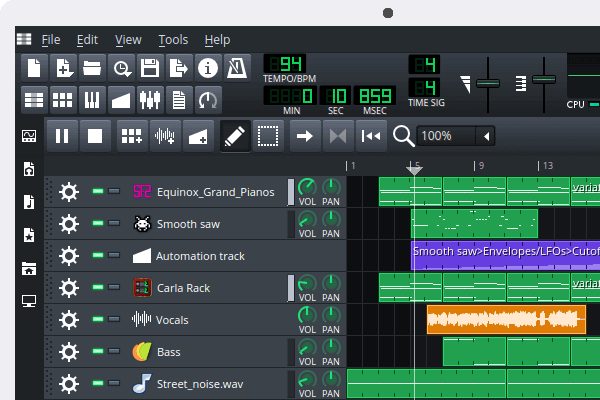
Our verdict
#3 of 7 in Open-source DAWs · Free beat-making with built-in synths
What it does
- Beat+Bassline pattern editor, piano roll and song editor
- 16 built-in synths plus ZynAddSubFX and SoundFont playback
- Mixer with unlimited channels and effects
- Windows, macOS and Linux builds
Pros
- The quickest start here for making beats, with sounds included
- Free with no limits on any system
- A large community and plenty of beginner tutorials
Cons
- The stable release can't record audio from an interface
- Limited plugin support, and no VST plugins at all on macOS
- Stable release dates from 2020, and big projects can crash
- Skip if:
- You plan to record vocals or guitar into the same project
LMMS (formerly Linux MultiMedia Studio) is a free, open-source digital audio workstation for making music from patterns, piano-roll notes, built-in synthesizers, samples and effects, in an FL Studio-like workflow. It suits beginners and electronic or beat producers, and is not aimed at multitrack recording of live instruments. It runs on Windows, macOS and Linux under GPL-2.0-or-later. The current stable release is 1.2.2 from July 2020; 1.3.0-alpha.2 (September 2026) is the recommended preview.
What users say
Evidence ↓Views on ease are mixed. Hardware Busters (2024) found it easy for FL Studio users, and some AlternativeTo commenters call it user-friendly, but others call the learning curve steep and one Mac reviewer needed 6 or 7 tutorials and disliked the multi-window interface. Crashes on large projects and random crashes are reported by a few reviewers and commenters. Reviewers also note shaky VST support, no recording in the stable release, and a stable release that had gone years without updates. These are a handful of reviews and comments, not a survey.
Rankings and alternatives



Open-source DAW scores
Evaluated Nov 17, 2026 Evidence ↓- Audio recording and editing · counts double 1
1/5 means: Can't record from an audio interface in the stable release, or only through a workaround
The stable 1.2.2 release has no working way to record from an audio interface; users record in another program and import the file. Sample-track recording arrives only in the 1.3 alpha and needs the JACK backend.
- MIDI and instrument production · counts double 5
5/5 means: A complete beat and song production environment, with strong note editing, pattern or step tools and a broad set of built-in instruments
Piano roll, a Beat+Bassline pattern editor and song editor, MIDI keyboard input, and 16 built-in synthesizers plus ZynAddSubFX, SoundFont playback and bundled samples and presets: a complete beat and song production environment for its price.
- Mixing, routing and automation 3
3/5 means: A full mixer with sends or groups and automation, with notable gaps in routing or workflow
A mixer with unlimited channels, effect chains and channel sends (from knowledge), plus automation tracks. No plugin delay compensation or advanced routing, so 3.
- Plugin support 2
2/5 means: Older or limited formats only (such as VST2 on one system or LADSPA and DSSI), with no VST3
Stable 1.2.2 loads VST2 on Windows (and through Wine on Linux) and LADSPA; macOS has no VST support, and no VST3 or CLAP is listed. LV2 and native Linux VST arrive only in the 1.3 alpha.
- Ease of getting started 4
4/5 means: Approachable; most newcomers make something in their first session
Reviewers call it easy for beginners and familiar to FL Studio users; bundled sounds let a newcomer make a beat in the first session.
- Stability and project health 2
2/5 means: Stable release is years old or users report frequent crashes, with slow or uncertain development
The stable release dates from July 2020; 1.3 has been in alpha since 2021, with alpha.2 in September 2026. A reviewer reports crashes on large projects.
- Help and community · counts half 4
4/5 means: A large community with a good manual and plenty of tutorials
A large user base (over 10,000 GitHub stars), an active forum and Discord, shared projects on its site, and many beginner video tutorials (from knowledge).
- Platforms 5
5/5 means: Windows, macOS and Linux, with full official builds on each
Builds for Windows, macOS and Linux.
- Cost of a full working copy · counts half 5
5/5 means: Free, unrestricted ready-to-run builds on every system it supports
Free and open source, with unrestricted builds for every supported system.
Pricing
- LMMS Free Free and open source; no paid tier.
Prices checked Nov 17, 2026.
Evidence and sources
What users say
Summary 8 quotes
-
Sampling, cutting, and recording are not possible with LMMS. You will need an editor like Audacity for these.
Hardware Busters reviewer, reviewer at hwbusters.com who uses LMMS on Windows 11 and Linux Mint · hwbusters.com/audio/lmms-a-2024-review-on-the-best-free-daw · checked -
LMMS is a great free option; if you are familiar with FL Studio, you will feel right at home. It is a capable DAW, but it doesn’t come trouble-free.
Hardware Busters reviewer, reviewer at hwbusters.com · hwbusters.com/audio/lmms-a-2024-review-on-the-best-free-daw · checked -
That said, the LMMS is not perfect. Some crashes, bugs, and instabilities remain, especially on bloated and demanding projects.
Hardware Busters reviewer, reviewer at hwbusters.com · hwbusters.com/audio/lmms-a-2024-review-on-the-best-free-daw · checked -
I however don’t know FL studio so I can’t say for sure and I was struggling to get started quite a bit. I needed at least 6 or 7 tutorials to get me started.
Dexxter Clark, music producer and YouTuber, author of learnhowtoproducemusic.com · learnhowtoproducemusic.com/blog-how-to-start-music-production/lmms-best-free-daw-software-for-music-production- · checked -
The multiple window interface doesn’t work well for me, I’m constantly dragging windows out of the way and closing them. Thats especially time consuming on a small 13” laptop screen with a trackpad.
Dexxter Clark, music producer and YouTuber · learnhowtoproducemusic.com/blog-how-to-start-music-production/lmms-best-free-daw-software-for-music-production- · checked -
The learning curve for LMMS is steep, though, but it's still a great free DAW to use if you're a hobbyist and/or you want to challenge yourself with the DAW's limitations.
Richie Scassellati, AlternativeTo user, top positive comment · alternativeto.net/software/lmms/about · published · checked -
It’s an incredibly versatile and user-friendly platform for music production.
Ashledom, AlternativeTo user who says they are a beginner · alternativeto.net/software/lmms/about · published · checked -
Some random crashes tarnish the experience. I think it can be improved but at to this moment, as a musician (hobby, not pro) I use it.
RonKonKola, AlternativeTo user, hobby musician · alternativeto.net/software/lmms/about · published · checked
Open-source DAW scores
Audio recording and editing 3 quotes
-
Sampling, cutting, and recording are not possible with LMMS. You will need an editor like Audacity for these.
Hardware Busters reviewer, reviewer at hwbusters.com who uses LMMS on Windows 11 and Linux Mint · hwbusters.com/audio/lmms-a-2024-review-on-the-best-free-daw · checked -
Afaik that feature does not work. But you can still get recorded samples into your project. You need to record the sample with something like audacity (freware).
musikbear, long-time LMMS forum regular · lmms.io/forum/viewtopic.php · published · checked -
Sample Track Recording with JACK backend
newreleases.io/project/github/LMMS/lmms/release/v1.3.0-alpha.2 · checked
MIDI and instrument production 2 quotes
Mixing, routing and automation 2 quotes
-
Sequence, compose, mix and automate songs in one simple interface
lmms.io · checked -
A Mixer with unlimited mixer channels and arbitrary number of effects
github.com/LMMS/lmms · checked
Plugin support 2 quotes
-
It can use VST plug-ins on Win32, Win64, or Wine32. The nightly versions support LinuxVST. Currently MacOS doesn't support them.
en.wikipedia.org/wiki/LMMS · checked -
users get 8 new native plugins, ARM64 builds, and a long list of headline features. Among the major additions are detachable windows, microtonal alternative tunings with custom keyboard mappings, native LinuxVST support, a Tap Tempo tool
alternativeto.net/news/2026/9/lmms-releases-1-3-0-alpha-2-bringing-the-long-awaited-daw-s-update-closer-to-stable · published · checked
Ease of getting started 1 quote
-
LMMS is a great free option; if you are familiar with FL Studio, you will feel right at home. It is a capable DAW, but it doesn’t come trouble-free.
Hardware Busters reviewer, reviewer at hwbusters.com · hwbusters.com/audio/lmms-a-2024-review-on-the-best-free-daw · checked
Stability and project health 3 quotes
-
1.2.2[2] / 4 July 2020; 6 years ago (4 July 2020)
en.wikipedia.org/wiki/LMMS · checked -
While it is not the stable 1.3.0 release just yet, the project notes that it is considerably more polished than the typical nightly build, and recommends that most users opt for this alpha over the nightlies.
alternativeto.net/news/2026/9/lmms-releases-1-3-0-alpha-2-bringing-the-long-awaited-daw-s-update-closer-to-stable · published · checked -
That said, the LMMS is not perfect. Some crashes, bugs, and instabilities remain, especially on bloated and demanding projects.
Hardware Busters reviewer, reviewer at hwbusters.com · hwbusters.com/audio/lmms-a-2024-review-on-the-best-free-daw · checked
Help and community 1 quote
-
Star10.7k (10.7k)
github.com/LMMS/lmms · checked
Platforms 1 quote
-
Sequence, compose, mix and automate songs in one simple interface
lmms.io · checked
Cost of a full working copy 1 quote
-
It is free and open source software, written in Qt) and released under GPL-2.0-or-later.
en.wikipedia.org/wiki/LMMS · checked
Facts
License 1 quote
-
It is free and open source software, written in Qt) and released under GPL-2.0-or-later.
en.wikipedia.org/wiki/LMMS · checked
Runs on 2 quotes
-
Sequence, compose, mix and automate songs in one simple interface
lmms.io · checked -
macOS (x86_64) · macOS 10.13 (High Sierra) or newer · x86_64-v2 or higher · macOS (arm64) · macOS 11.0 (Big Sur) or newer · Apple M1 or newer
github.com/LMMS/lmms/releases · checked
More from the sources
Limits and known issues 1 quote
-
Since using your own VSTs or AU`s won’t work, you have to rely on what they (or the Linux community plugins) provide for you.
Dexxter Clark, music producer and YouTuber · learnhowtoproducemusic.com/blog-how-to-start-music-production/lmms-best-free-daw-software-for-music-production- · checked
What users say 1 quote
-
Unstable, horrible looking, taking the worst design cues from FL Studio and blindly copying them, the built in stuff sounds cheap.
Melatonin-Samba, AlternativeTo user · alternativeto.net/software/lmms/about · published · checked
Platforms and requirements 1 quote
-
VST plugins (.dll) do not work on Apple (Please see bug #698)
lmms.io/download · checked
Pricing
lmms.io · checked