Top open-source DAWs for recording and making music
Open-source DAWs split cleanly by how you make music. Some record a band or a voice through an audio interface, some build beats out of patterns and synths, and a few let you write notes on a musical staff. MIDI stores those notes as instructions for an instrument to play, rather than as recorded sound.
For most people, the best open-source DAW is Ardour. It’s the only one here that records, edits and mixes a whole song with the depth of a commercial DAW, on Windows, macOS and Linux. One number to know before you download it: the official installer costs at least $1 on Windows and macOS. The free download is a demo that goes silent every so often after 10 minutes, while Linux users get full builds free from their package manager.
If you make beats rather than record instruments, start with LMMS: free, easy, and packed with synths, though its stable release can’t record audio. If you just need to record and clean up a voice, Audacity is still the simplest choice. On Linux, Qtractor is a lighter recorder with broad plugin support.
Quick picks


What “free” gets you
- “Ardour is a free download.” The source code is free, and Linux distributions package it for free. On Windows and macOS you either pay what you like for the official installer or live with the demo’s silences.
- “LMMS is a full DAW.” Its stable release, from July 2020, has no working way to record from a microphone or interface. Recording into sample tracks arrives only in the 1.3 alpha, and only with the JACK audio system.
- “Audacity can stand in for a DAW.” Audacity 4 removed note (MIDI) tracks and the mixer window, and it never hosted virtual instruments. It’s a strong recorder and editor, not a place to arrange a song.
- “Waveform Free is open source.” Tracktion’s free DAW is free and unlimited, but closed source. It appears under “Also considered” below.
Key facts
7 productsLicenses, requirements, and starting prices. Prices as of November 2026.
- License
- GPL-2.0-or-later, open source
- Runs on
- Linux
- macOS
- Windows
- Needs
- Unknown
- Price
- From a free plan or $1.00 one-time or $120.00/year
- License
- GPL-2.0-or-later, open source
- Runs on
- Linux
- Needs
- JACK Audio Connection Kit
- ALSA
- Qt
- libsndfile
- LADSPA headers
- Price
- Free plan
- License
- GPL-2.0-or-later, open source
- Runs on
- Windows
- macOS (Intel build in stable 1.2.2; Apple silicon only in 1.3 alpha)
- Linux
- Needs
- Unknown
- Price
- Free plan
- License
- AGPL-3.0, open source
- Runs on
- Linux
- Windows
- macOS
- FreeBSD
- Needs
- Unknown
- Price
- From a free plan or $18.00 one-time or $50.00/year
- License
- GNU GPLv3, open source
- Runs on
- Windows
- macOS
- Linux
- Needs
- Unknown
- Price
- Free plan
- License
- GPL, open source
- Runs on
- Linux
- Needs
- JACK or ALSA audio
- Price
- Free plan
- License
- GPL-2.0, open source
- Runs on
- Linux
- Needs
- ALSA
- JACK (for audio recording and playback)
- Price
- Free plan



Ardour
Best for recording and mixing a full song
#1 4.5/5
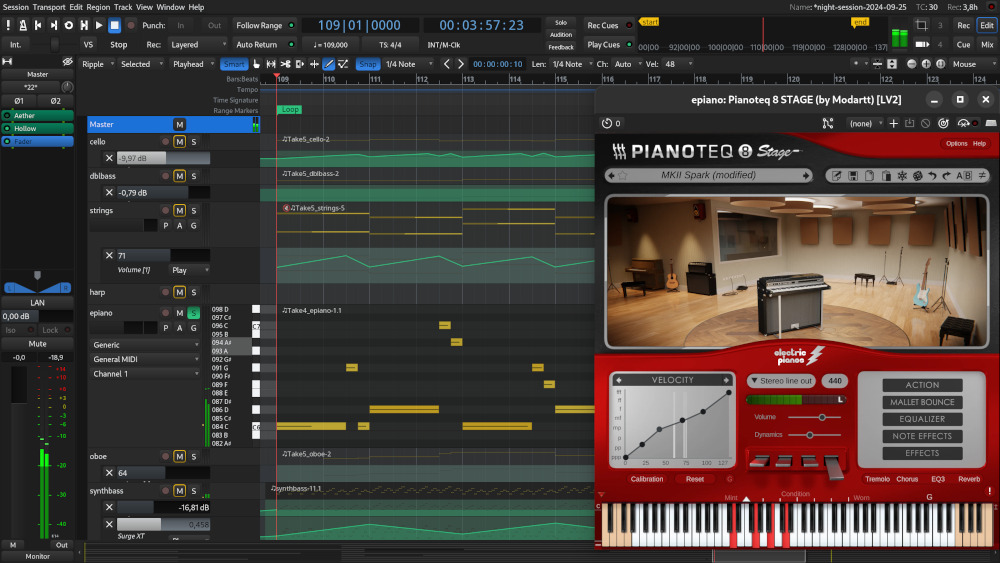
Ardour offers a familiar setup for anyone coming from Pro Tools: a timeline of tracks, a full console-style mixer, and recording tools that hold up when a whole band records at once. Its lead developer, Paul Davis, works on it full time, paid for by more than 5,700 subscribers, and that funding shows in the steady 9.x releases.
Recording is where it pulls away from everything else here. You get punch-in and punch-out, a Recorder view for watching many inputs during a session, and playlists that keep every take so you can combine the best parts of each into one performance, a process called comping. Editing is non-destructive with unlimited undo, and the mixer has shared mixer channels called buses, sends for feeding effects, group volume controls, sidechain routing and a Loudness Assistant that sets your master to a streaming service’s target. It loads VST2, VST3, LV2 and, on macOS, Audio Units, both effects and instruments.
MIDI is good rather than great. There’s a piano roll, step entry, and clip launching from Novation Launchpad or Ableton Push 2, but Ardour ships only a couple of basic synths and has no pattern editor for beats. Producers who build tracks from drum patterns and presets will be happier in LMMS.
The cost is learning time. Ardour’s interface is dense, and ideas like port routing and playlists take a few sessions to sink in. The manual is thorough, which helps.
What it does
- Multitrack recording with punch-in, loop takes and comping
- Mixer with buses, sends, VCA groups and automation
- VST2, VST3, LV2 and Audio Units plugins
- Clip launching and a piano roll for MIDI
Pros
- The most complete recording and mixing tools of any open-source DAW
- Runs on Windows, macOS and Linux
- Funded full-time development and regular releases
Cons
- The official installer for Windows and macOS isn't free, and the free demo goes silent periodically
- Few built-in instruments and no pattern workflow for beats
- A steep first week for newcomers
- Choose if:
- You record real instruments or vocals and want to mix the result in the same program
Qtractor
Lighter multitrack recorder for Linux
#2 3.3/5
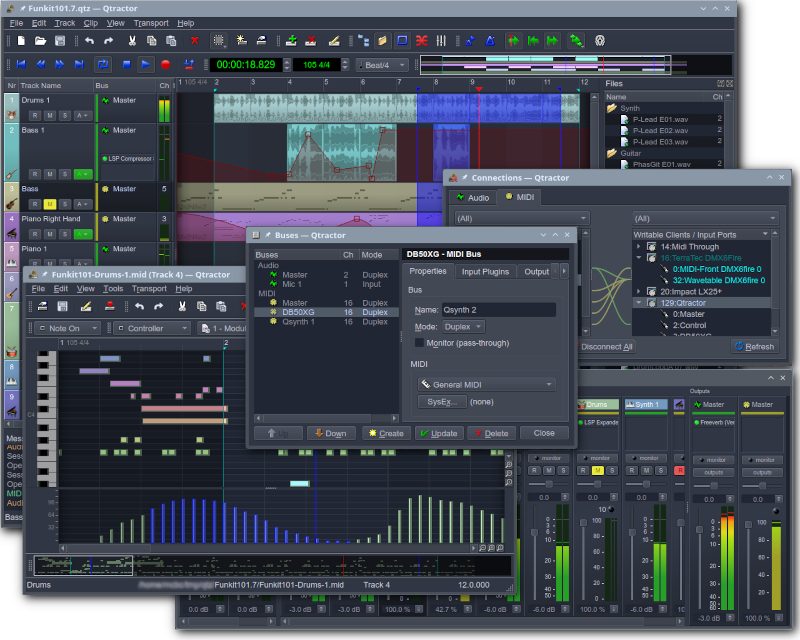
Qtractor is the Linux user’s lighter Ardour. It records audio and MIDI on as many tracks as your computer handles, loop-records into takes, edits clips non-destructively with crossfades, and changes clip length without changing pitch. The newest release adds a basic audio clip editor for gain, normalizing and reversing.
It loads nearly every plugin format Linux has: LADSPA, DSSI, LV2, VST2, VST3 and CLAP, for effects and instruments. Note that distribution packages can be built with some formats left out. The mixer has buses, sends and automation of plugin settings, but its mixing workflow is less capable than Ardour’s.
Two things hold it back. It runs only on Linux, and it expects JACK for audio and ALSA for MIDI, so the first session can turn into an evening of routing connections. Modern distributions that use PipeWire make this easier. It also comes with no instruments of its own, and one developer has built it as a hobby for years, so big new features arrive slowly.
What it does
- Multitrack audio and MIDI recording with loop takes
- Piano-roll MIDI editor
- Mixer with buses, sends and plugin automation
Pros
- Hosts LADSPA, DSSI, LV2, VST2, VST3 and CLAP plugins
- Light and quick on modest hardware
- Free in most Linux distributions' package managers
Cons
- Linux only
- Needs JACK and ALSA set up before it makes a sound
- No built-in instruments, and a small community for help
- Choose if:
- You're on Linux and find Ardour heavier than you need
LMMS
Free beat-making with built-in synths
#3 3.3/5
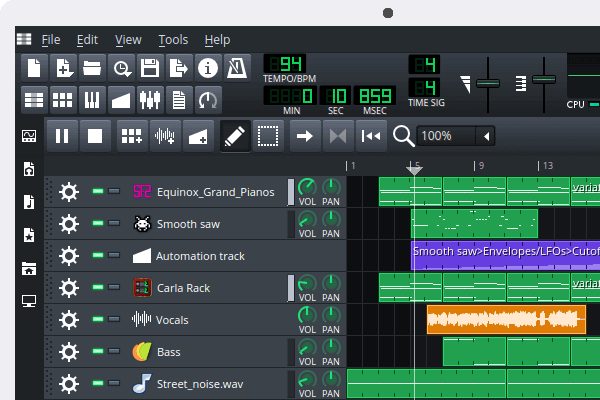
LMMS is the open-source answer to FL Studio, with a similar focus on building songs from patterns. You build drum and bass patterns in the Beat+Bassline editor, write melodies in the piano roll, and arrange the patterns in a song editor. It ships 16 synthesizers, including emulations of the TB-303, the Commodore 64’s SID chip and the Game Boy, plus ZynAddSubFX, a SoundFont player and a library of samples and presets. Nothing else here gets a newcomer to a finished beat as quickly.
The weak side is everything around those instruments. The stable release, unchanged since 2020, can’t record from a microphone or interface, so people record in Audacity and import the file. VST support in that release means VST2 on Windows (or through Wine on Linux), with none at all on macOS, and nothing for VST3. The 1.3 alpha, recommended by the project over nightly builds, adds LV2, native Linux VST and audio recording through JACK, but it’s still an alpha after five years. Expect the odd crash on large projects.
What it does
- Beat+Bassline pattern editor, piano roll and song editor
- 16 built-in synths plus ZynAddSubFX and SoundFont playback
- Mixer with unlimited channels and effects
- Windows, macOS and Linux builds
Pros
- The quickest start here for making beats, with sounds included
- Free with no limits on any system
- A large community and plenty of beginner tutorials
Cons
- The stable release can't record audio from an interface
- Limited plugin support, and no VST plugins at all on macOS
- Stable release dates from 2020, and big projects can crash
- Skip if:
- You plan to record vocals or guitar into the same project
Zrythm
Modern interface and chord tools, still rough
#4 3.2/5
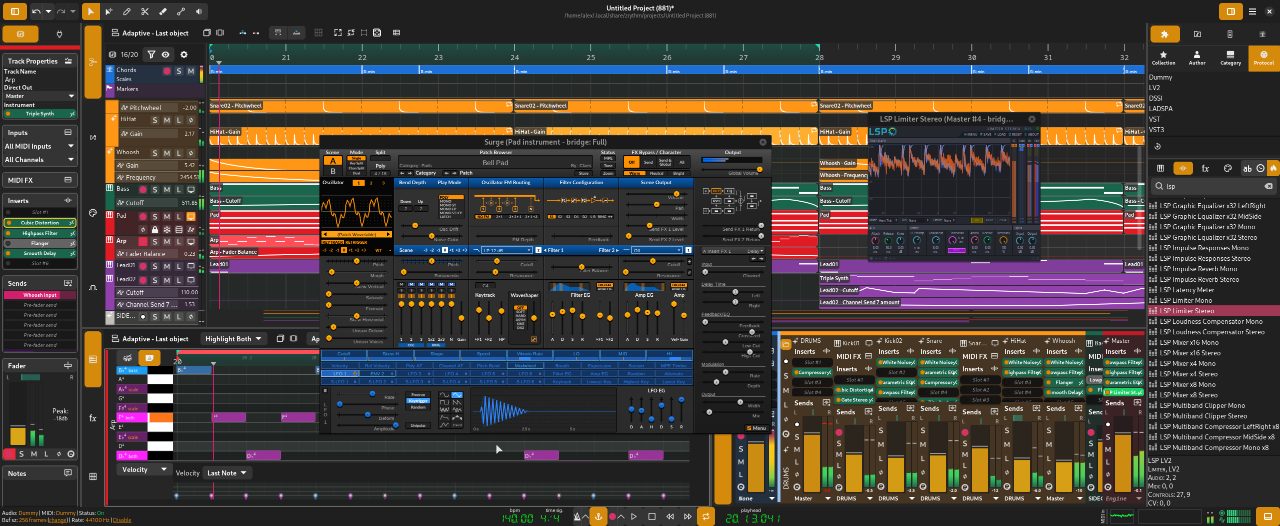
Zrythm looks the most like a current commercial DAW, and on paper it has the widest plugin list here: LV2, VST2, VST3, Audio Units, CLAP and JSFX, with Carla to keep a misbehaving plugin from taking down the whole program. Its standout is songwriting help: a chord pad that generates chords from a scale, a chord track, and chord highlighting in the piano roll. The mixer has group and FX tracks, pre- and post-fader sends and routing from anywhere to anywhere.
Two things make it hard to recommend for finished work. The free official build is capped at 25 tracks; unlimited tracks cost about $18 one-time for v1, or $31 for every v1 and v2 release, billed in Japanese yen. And it’s fragile: a Bedroom Producers Blog reviewer found that specific actions “would always crash the DAW” in v1 on a Mac, and the v2 rewrite is an alpha meant for testing, not for real projects. On Windows, the official build also lacks ASIO, the low-latency driver most audio interfaces use there.
What it does
- Chord pad, chord track and scale highlighting in the piano roll
- LV2, VST2, VST3, AU, CLAP and JSFX plugins
- Group and FX tracks with flexible routing
Pros
- The most modern-looking interface here
- Helpful chord tools for songwriters
Cons
- Free build limited to 25 tracks
- Crash reports in v1, and v2 is still an alpha
- Official Windows build has no ASIO support
- Choose if:
- You want chord-writing help and don't mind paying a few dollars and saving often
Audacity
Quick voice and podcast recording
#5 3.1/5
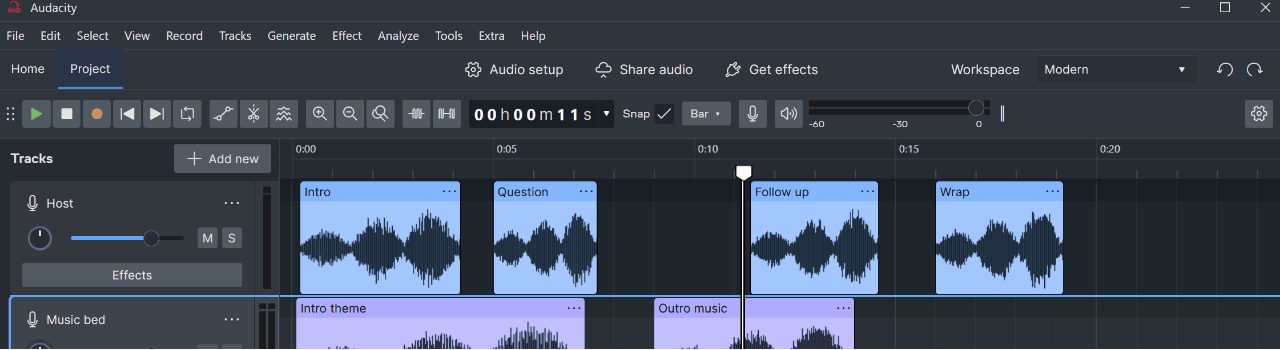
Audacity is one of the most widely used free audio programs, and for recording a voice, an interview or a rough demo it’s still the easiest place to start. You press record, cut, clean up noise, normalize and export. Audacity 4 makes that nicer: clips can overlap and be trimmed back without losing audio, several clips can be stretched at once, and every track has its own level meter.
It isn’t a DAW, and version 4 moved it further away. The release removed note tracks, the mixer window and macros, and dropped VST2 and LADSPA plugins in favor of VST3, LV2 on Linux and Audio Units on macOS. It hosts effects only, never instruments, and there are no takes, buses or sends. If you need any of those, Ardour is the step up. The older Audacity 3 line is still maintained if you depend on VST2 effects.
What it does
- Multitrack recording and non-destructive clip editing
- Noise reduction and other cleanup effects
- VST3, LV2 (Linux) and Audio Units (macOS) effects
Pros
- The easiest program here for recording and editing audio
- Free on Windows, macOS and Linux, including ARM computers
- Huge user base, so most questions already have answers
Cons
- No MIDI, no virtual instruments and no mixer window in Audacity 4
- No VST2 plugins in Audacity 4
- No takes or comping for multitrack music sessions
- Choose if:
- You record speech or simple demos and mostly need to edit and export
MusE
MIDI-heavy work on Linux
#6 2.6/5
MusE is a Linux sequencer that started in the MIDI era and still treats MIDI best. It has a piano roll, a drum editor, a list editor and a score editor, plus two built-in synths: a SoundFont player and an FM synth that emulates Yamaha’s DX11. It records audio as well, on wave tracks with group and aux tracks for mixing, and it loads LV2, Linux VST2, DSSI and LADSPA plugins.
Development is the worry. Its latest release came after a three-year gap, and distribution packages often lag behind, so the AppImage from the project is the way to get the current version. Help is thin: the manual is still a work in progress. For audio-focused work Ardour is the better Linux choice; MusE suits people who write mostly with MIDI and want a drum editor and staves in one place.
Pros
- Piano roll, drum editor and score editor in one program
- Free in most Linux distributions and as an AppImage
Cons
- Linux only, with no VST3 support
- Slow development and a small community
- Choose if:
- You compose mostly in MIDI on Linux and want a drum editor next to the piano roll
Rosegarden
Composing in notation on Linux
#7 2.5/5
Rosegarden is for composers who think in staves. Its notation editor sits next to a piano roll and an event list, all editing the same MIDI, and finished scores export to LilyPond or MusicXML for polishing the printed score. Releases come twice a year from a small team led by Ted Felix, and the project itself has been going for over two decades.
It’s a sequencer first. Audio recording is basic, editing recorded audio requires an external editor, and plugins are LADSPA, DSSI and LV2 (still in beta), with Windows VSTs only through a Wine bridge. Getting sound out of it can be the first hurdle, especially if you’re coming from Windows. For notation-led writing on Linux, though, nothing else among these DAWs comes close.
Pros
- A notation editor tied to the sequencer
- Exports to LilyPond and MusicXML
- Regular releases twice a year
Cons
- Only basic audio recording and editing
- Linux only, and fiddly sound setup for newcomers
- Choose if:
- You write parts on staves and want MIDI playback and a printable score
Also considered
- Tracktion Waveform Free isn’t open source, but it’s the strongest free DAW on Windows and macOS if the license doesn’t matter to you: no track limit, no trial expiry, VST, VST3 and AU plugins, and a Linux build too. Some editing and mixing features are sold as expansion packs.
- Reaper isn’t open source or free, but a $60 license for personal use (or small businesses under $20,000 a year in revenue) after a 60-day full trial makes it a common pick for people who find Ardour’s workflow slow. It also runs on Linux.
- Stargate is an open-source all-in-one DAW with its own instruments and effects, aimed at electronic music, but its last release was in January 2024 and development has stalled.
- Mixxx is excellent open-source DJ software for mixing finished tracks live, not for recording or arranging your own.
Scores
1–5 per criterion · select a score for its reasoning and any sources
| # | Product | Overall | Audio recording and editing , counts double | MIDI and instrument production , counts double | Mixing, routing and automation | Plugin support | Ease of getting started | Stability and project health | Help and community , counts half | Platforms | Cost of a full working copy , counts half |
|---|---|---|---|---|---|---|---|---|---|---|---|
| 1 | Ardour | 4.5 | 5 | 4 | 5 | 5 | 3 | 5 | 4 | 5 | 4 |
| 2 | Qtractor | 3.3 | 4 | 3 | 3 | 5 | 2 | 4 | 2 | 1 | 5 |
| 3 | LMMS | 3.3 | 1 | 5 | 3 | 2 | 4 | 2 | 4 | 5 | 5 |
| 4 | Zrythm | 3.2 | 3 | 3 | 4 | 4 | 3 | 2 | 2 | 4 | 3 |
| 5 | Audacity | 3.1 | 3 | 1 | 2 | 3 | 4 | 4 | 5 | 5 | 5 |
| 6 | MusE | 2.6 | 3 | 3 | 3 | 3 | 2 | 2 | 1 | 1 | 5 |
| 7 | Rosegarden | 2.5 | 2 | 3 | 2 | 2 | 2 | 4 | 2 | 1 | 5 |
Equal displayed overall scores are ordered by the earlier criteria; a known score comes before an unknown score. Identical scores use alphabetical order.
×2 = counts double in the overall score, ×½ = counts half.
How each criterion is scored
Audio recording and editing
Counts double in the overall score: Recording real instruments and voices is one of the two ways readers make music in a DAW, and the one where these programs differ most.
How well the release most people install records real instruments and voices through an audio interface and lets you edit the takes: multitrack recording and overdubbing, punch-in and loop recording, keeping and choosing between takes (comping), non-destructive clip editing, crossfades and time-stretching. Judged from the documented feature set, practitioners' accounts of tracking sessions, and knowledge of how the program behaves.
- 5 A complete studio recording and editing workflow, with punch, loop takes, comping and detailed non-destructive editing
- 4 Full multitrack recording with takes, punch-in and non-destructive editing, short of a professional studio workflow in depth or polish
- 3 Solid multitrack recording and editing for simple sessions, with a clear gap such as no takes management, no punch-in or immature recording
- 2 Records audio, but editing is basic or handed off to an external editor
- 1 Can't record from an audio interface in the stable release, or only through a workaround
MIDI and instrument production
Counts double in the overall score: Building tracks from MIDI and virtual instruments is the other main way readers make music, and most producers choose a DAW by it.
How well it builds music from MIDI and virtual instruments: the piano roll and other note editors, pattern or step tools for beats, recording from a MIDI keyboard, and the instruments it ships with so you can make sounds before adding plugins. Judged from the documented editors and instruments and from producers' accounts.
- 5 A complete beat and song production environment, with strong note editing, pattern or step tools and a broad set of built-in instruments
- 4 Strong note editing plus either a good set of built-in instruments or beat-making tools such as patterns, step entry or clip launching
- 3 A capable note editor and instrument hosting, but thin built-in sounds or no pattern or step workflow
- 2 Basic MIDI editing with few tools and no usable built-in instruments
- 1 No MIDI recording or editing, or no way to play virtual instruments
Mixing, routing and automation
What you can do once the parts are recorded: a mixer with buses, sends and groups, flexible routing including sidechains, automation of volume and plugin parameters, and mastering aids such as loudness metering. Judged from the documented mixer and practitioners' accounts.
- 5 Professional mixing with flexible routing, groups or VCAs, full automation and mastering aids
- 4 A strong mixer with buses, sends, sidechain routing and detailed automation
- 3 A full mixer with sends or groups and automation, with notable gaps in routing or workflow
- 2 A basic mixer with per-track effects but little routing or automation
- 1 No mixer; level changes are limited to clip or track volume envelopes
Plugin support
Which third-party effects and instruments it can load on the systems it runs on: VST3, VST2, CLAP, LV2 and Audio Units, whether it hosts instruments as well as effects, and how reliably plugins load. Judged from the documented formats per system and users' reports of plugin problems.
- 5 VST3 plus other modern formats for effects and instruments on every system it runs on, loading reliably
- 4 VST3 and other modern formats for effects and instruments, with reported reliability problems or one format gap
- 3 Some modern formats but a clear gap, such as effects only, no VST3, or formats missing on one of its systems
- 2 Older or limited formats only (such as VST2 on one system or LADSPA and DSSI), with no VST3
- 1 No third-party plugins, or only an old Linux-only format
Ease of getting started
How quickly a newcomer gets from installation to a finished song or recording: audio setup, how clear the interface is, and how much DAW knowledge it assumes. Judged from reviewers' and users' accounts of learning it and knowledge of its workflow, not from vendor claims alone.
- 5 As easy as the simplest free audio and music apps, with little to set up
- 4 Approachable; most newcomers make something in their first session
- 3 A real learning curve of several sessions, with a conventional layout and good help
- 2 Workable, but audio setup or a dated, dense interface fights newcomers
- 1 Hard to get any sound out of without system audio knowledge; most newcomers give up
Stability and project health
Whether the release you install is stable enough for real projects and whether the project is likely to keep improving: crash reports, how old the current stable release is, release cadence, and how many people and how much funding stand behind it. Judged from release history, project funding and users' accounts of crashes.
- 5 Stable for professional work, with regular releases and a funded, active team
- 4 Stable for most work, with regular releases from a small but steady team
- 3 Usable for real work with known rough edges, and development that is active but thin
- 2 Stable release is years old or users report frequent crashes, with slow or uncertain development
- 1 Abandoned, or crashes make finished projects risky
Help and community
Counts half in the overall score: Help matters most while learning, and the ease of getting started already covers much of what a newcomer needs.
How easy it is to get unstuck: the number of tutorials, videos, forum answers and shared projects for the program, and the quality of its manual. Popularity counts here only because more users means more help.
- 5 A very large community; almost any question already has an answer and a video
- 4 A large community with a good manual and plenty of tutorials
- 3 A moderate community; most common questions have answers
- 2 A small community and a manual with gaps
- 1 Very small community; little help beyond a dated manual
Platforms
Which computers it runs on with official or well-supported builds: Windows, macOS and Linux.
- 5 Windows, macOS and Linux, with full official builds on each
- 4 Windows, macOS and Linux, with an important feature such as low-latency audio drivers missing from one system's official build
- 3 Two of Windows, macOS and Linux
- 2 One system, plus unofficial or community builds for another
- 1 One system only
Cost of a full working copy
Counts half in the overall score: Every product here is free or close to it, so the differences are a few dollars or a track cap rather than the price of a commercial DAW.
What it costs to get a ready-to-run, unrestricted copy on the reader's computer: free downloads, free distribution packages on Linux, paid official builds, demo limits and track caps. Building from source yourself doesn't count.
- 5 Free, unrestricted ready-to-run builds on every system it supports
- 4 Full builds cost a token payment on some systems, or are free only through Linux distribution packages there
- 3 The free build has a limit a real project can hit, and removing it costs a small one-time payment
- 2 Current full builds need an ongoing subscription
- 1 No usable free or token-priced path to a full copy
How to choose
- You record a band, guitar or vocals and want to mix it yourself: Ardour. Pay for the official build on Windows or macOS; it’s the only DAW here with comping, a full mixer and VST3 on every system.
- You make beats from patterns and synths: LMMS. Record any vocals in Audacity and import them, or move to Ardour when recording becomes part of the job.
- You’re on Linux: Ardour from your package manager, free. Qtractor if you want something lighter or need CLAP plugins.
- You record speech or a podcast: Audacity, unless you want music beds, sends and automation, which point back to Ardour.
- You write in notation: Rosegarden on Linux, or MusE if you’d rather have a drum editor alongside the staves.
- You only care that it’s free, not open source: Waveform Free on Windows or macOS.
Frequently asked questions
Can I use my Windows VST plugins on Linux?
Not directly: Linux DAWs load Linux builds of plugins (LV2, Linux VST2, VST3 or CLAP). Many Windows plugins can run through yabridge, a free bridge that uses Wine, in Ardour, Qtractor and other Linux hosts. It works for a lot of plugins, but ones with online copy protection often fail, so check yours before you switch systems.
Do I need JACK to use these DAWs on Linux?
Qtractor, MusE and Rosegarden’s audio features are built around JACK, and Ardour can use it too. On a current distribution that runs PipeWire, PipeWire provides JACK compatibility, so these programs usually work without installing and starting a separate JACK server.