
Audacity
Free, open-source multitrack audio editor and recorder (Audacity 4), with no MIDI or virtual-instrument tracks
Our verdict
#5 of 7 in Open-source DAWs · Quick voice and podcast recording
What it does
- Multitrack recording and non-destructive clip editing
- Noise reduction and other cleanup effects
- VST3, LV2 (Linux) and Audio Units (macOS) effects
Pros
- The easiest program here for recording and editing audio
- Free on Windows, macOS and Linux, including ARM computers
- Huge user base, so most questions already have answers
Cons
- No MIDI, no virtual instruments and no mixer window in Audacity 4
- No VST2 plugins in Audacity 4
- No takes or comping for multitrack music sessions
- Choose if:
- You record speech or simple demos and mostly need to edit and export
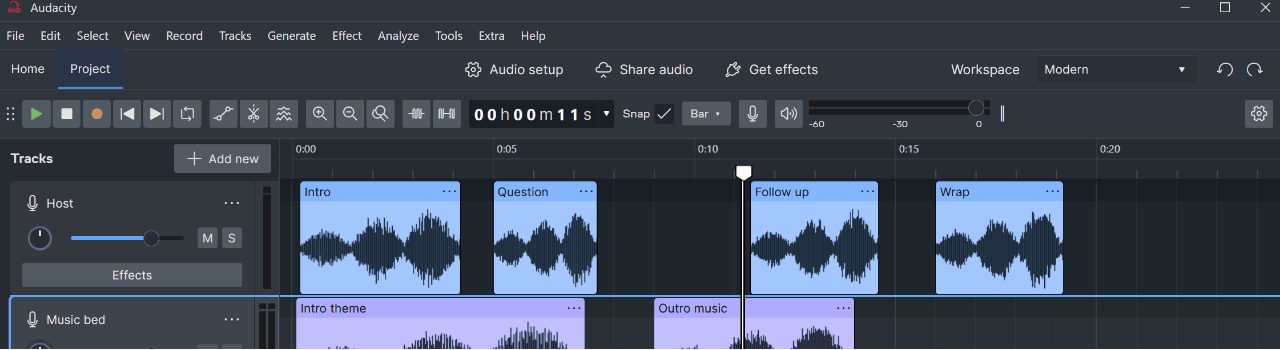
Audacity is a free, open-source audio editor and recorder, owned by Muse Group, that people use for podcasts, voice and simple music recording. It is usually described as an editor rather than a DAW. Audacity 4.0, released in September 2026, has a rebuilt Qt interface with dark mode and non-destructive overlapping clips, grouping, ripple edits and gain envelopes, and runs VST3 and Nyquist plug-ins (plus LV2 on Linux and Audio Units on macOS). It has no Note/MIDI tracks or Mixer in 4.0. It runs on Windows, macOS and Linux under the GNU GPLv3.
What users say
Evidence ↓Reviewers of Audacity 4 mostly welcome the new interface and clip editing, with one Linux and free-software reviewer calling it a night-and-day improvement over 3.7 though a little buggy, and another saying it is cleaner but not instantly intuitive for people coming from 3.x. A trade publication says it usually sits beside a full DAW rather than replacing one, for quick cleanup and export. These are individual reviewers from a handful of sources, mostly on editing and podcast work rather than music production.
Rankings and alternatives



Open-source DAW scores
Evaluated Nov 17, 2026 Evidence ↓- Audio recording and editing · counts double 3
3/5 means: Solid multitrack recording and editing for simple sessions, with a clear gap such as no takes management, no punch-in or immature recording
Multitrack recording and overdubbing with strong waveform editing; Audacity 4 adds overlapping non-destructive clips, multi-clip trimming and time-stretch, and per-track meters. Held at 3 because it has no takes or comping and no true punch-in (from knowledge).
- MIDI and instrument production · counts double 1
1/5 means: No MIDI recording or editing, or no way to play virtual instruments
Note/MIDI tracks are unavailable in Audacity 4.0, and it never recorded MIDI or hosted instruments.
- Mixing, routing and automation 2
2/5 means: A basic mixer with per-track effects but little routing or automation
Per-track volume, pan and real-time effect stacks plus clip-gain envelopes, but the Mixer is unavailable in 4.0 and there are no buses or sends.
- Plugin support 3
3/5 means: Some modern formats but a clear gap, such as effects only, no VST3, or formats missing on one of its systems
VST3 and Nyquist on all systems, LV2 on Linux and Audio Units on macOS, but effects only (no instruments), and VST2 and LADSPA were dropped in 4.0.
- Ease of getting started 4
4/5 means: Approachable; most newcomers make something in their first session
The simplest program here for recording and cleaning up audio; Audacity 4's redesign is easier for newcomers, though returning users need time to adjust.
- Stability and project health 4
4/5 means: Stable for most work, with regular releases from a small but steady team
Maintained by Muse Group with a paid team; 4.0 is new and missing some 3.x features, with 3.7 still maintained alongside it.
- Help and community · counts half 5
5/5 means: A very large community; almost any question already has an answer and a video
From knowledge: one of the most widely used free audio programs, with an official manual, forum and countless tutorials.
- Platforms 5
5/5 means: Windows, macOS and Linux, with full official builds on each
Windows, macOS and Linux, including ARM builds.
- Cost of a full working copy · counts half 5
5/5 means: Free, unrestricted ready-to-run builds on every system it supports
Free for everyone under GPLv3, with no restricted edition.
Pricing
- Audacity Free Free and open source. Official download is promoted through MuseHub (free account).
Prices checked Nov 17, 2026.
Evidence and sources
What users say
Summary 4 quotes
-
In production, it usually sits beside an NLE, finishing system or full DAW rather than replacing one: export audio, make a fast cut, cleanup, normalisation or compression pass, then hand the rendered file back downstream.
Bela Beier, writer at Digital Production (trade publication) · digitalproduction.com/2026/09/08/audacity-4-rebuilds-the-fast-audio-editor · published · checked -
Frankly, Audacity 3's UX design was non-existent by comparison. Things failed to behave with any measure of mental ergonomics. Dragging clips had dozens of gotchas and pain points.
Gardiner Bryant, Linux and free-software YouTuber and blogger; video editor (DaVinci Resolve) user · gardinerbryant.com/audacity-4-0-is-awesome-and-still-a-little-buggy · checked -
The ripple delete action, again, does not behave exactly how I'd expect.
Gardiner Bryant, Linux and free-software YouTuber and blogger · gardinerbryant.com/audacity-4-0-is-awesome-and-still-a-little-buggy · checked -
I wouldn't say the redesign makes everything immediately intuitive, though. Some familiar tools have moved or changed, and anyone coming from Audacity 3 will need a little time to adjust.
Louis Eriakha, reviewer at Techloy · techloy.com/audacity-4-review · published · checked
Open-source DAW scores
Audio recording and editing 1 quote
-
Non-destructive editing, [first explored in Version 3.2], is greatly expanded. Clips can finally overlap, and trimming back will reveal the covered-over audio if you go too far. Multiple clips can be selected and trimmed at once by dragging a single handle. They can also be grouped for complex edits.
Max Miller, writer at Engadget · engadget.com/2250830/audacity-4-new-look-is-finally-here-along-with-its-largest-feature-update-in-years · published · checked
MIDI and instrument production 1 quote
-
The official release notes list Time Tracks, Note/MIDI tracks, Mixer, Macro Manager and the scripting pipe, VAMP and LADSPA hosting, and Play-at-speed as unavailable in 4.0. The team also says some exporting and rendering features, analyzers and effects are still missing.
digitalproduction.com/2026/09/08/audacity-4-rebuilds-the-fast-audio-editor · published · checked
Mixing, routing and automation 2 quotes
-
The official release notes list Time Tracks, Note/MIDI tracks, Mixer, Macro Manager and the scripting pipe, VAMP and LADSPA hosting, and Play-at-speed as unavailable in 4.0. The team also says some exporting and rendering features, analyzers and effects are still missing.
digitalproduction.com/2026/09/08/audacity-4-rebuilds-the-fast-audio-editor · published · checked -
Anyone who has used the automation features inside of Ableton Live or ProTools will instantly recognize the new envelope tool in Audacity 4. Users can click to create a draggable control point for things like gain.
Max Miller, writer at Engadget · engadget.com/2250830/audacity-4-new-look-is-finally-here-along-with-its-largest-feature-update-in-years · published · checked
Plugin support 2 quotes
-
Audacity 4 supports VST3 and Nyquist plug-ins across platforms, LV2 on Linux and Audio Units on macOS.
digitalproduction.com/2026/09/08/audacity-4-rebuilds-the-fast-audio-editor · published · checked -
Audacity 4 supports VST3, Audio Units on macOS, and LV2 on Linux, but it doesn't support some older formats that worked in Audacity 3, including VST2 and LADSPA.
Louis Eriakha, reviewer at Techloy · techloy.com/audacity-4-review · published · checked
Ease of getting started 2 quotes
-
Frankly, Audacity 3's UX design was non-existent by comparison. Things failed to behave with any measure of mental ergonomics. Dragging clips had dozens of gotchas and pain points.
Gardiner Bryant, Linux and free-software YouTuber and blogger; video editor (DaVinci Resolve) user · gardinerbryant.com/audacity-4-0-is-awesome-and-still-a-little-buggy · checked -
I wouldn't say the redesign makes everything immediately intuitive, though. Some familiar tools have moved or changed, and anyone coming from Audacity 3 will need a little time to adjust.
Louis Eriakha, reviewer at Techloy · techloy.com/audacity-4-review · published · checked
Stability and project health 2 quotes
-
The official release notes list Time Tracks, Note/MIDI tracks, Mixer, Macro Manager and the scripting pipe, VAMP and LADSPA hosting, and Play-at-speed as unavailable in 4.0. The team also says some exporting and rendering features, analyzers and effects are still missing.
digitalproduction.com/2026/09/08/audacity-4-rebuilds-the-fast-audio-editor · published · checked -
Audacity released its Version 4.0 update today, bringing a fresh coat of paint and a number of new features for the popular free and open-source audio editor. This is the biggest update since [Version 3.0 caused a ruckus] over five years ago
Max Miller, writer at Engadget · engadget.com/2250830/audacity-4-new-look-is-finally-here-along-with-its-largest-feature-update-in-years · published · checked
Platforms 2 quotes
-
Runs on all major operating systems – Windows, MacOS and Linux.
audacityteam.org · checked -
Current downloads are available for Windows on x86_64 and ARM64, macOS as a Universal build for Apple Silicon and Intel, and Linux as x86_64 and ARM64 AppImages. Audacity remains free and open source under the GNU GPLv3.
digitalproduction.com/2026/09/08/audacity-4-rebuilds-the-fast-audio-editor · published · checked
Cost of a full working copy 2 quotes
-
Yes! Audacity has always been and will always remain free for everyone.
audacityteam.org · checked -
Current downloads are available for Windows on x86_64 and ARM64, macOS as a Universal build for Apple Silicon and Intel, and Linux as x86_64 and ARM64 AppImages. Audacity remains free and open source under the GNU GPLv3.
digitalproduction.com/2026/09/08/audacity-4-rebuilds-the-fast-audio-editor · published · checked
Facts
License 1 quote
-
Current downloads are available for Windows on x86_64 and ARM64, macOS as a Universal build for Apple Silicon and Intel, and Linux as x86_64 and ARM64 AppImages. Audacity remains free and open source under the GNU GPLv3.
digitalproduction.com/2026/09/08/audacity-4-rebuilds-the-fast-audio-editor · published · checked
Runs on 2 quotes
-
Runs on all major operating systems – Windows, MacOS and Linux.
audacityteam.org · checked -
Current downloads are available for Windows on x86_64 and ARM64, macOS as a Universal build for Apple Silicon and Intel, and Linux as x86_64 and ARM64 AppImages. Audacity remains free and open source under the GNU GPLv3.
digitalproduction.com/2026/09/08/audacity-4-rebuilds-the-fast-audio-editor · published · checked
More from the sources
Features 1 quote
-
Audacity 4 is intuitive, customizable, and more flexible than ever. New features include an updated UI, Workspaces and productivity improvements.
audacityteam.org · checked
Limits and known issues 1 quote
-
Audacity 4 introduces a new .aup4 project format. Existing .aup3 projects from Audacity 3 can be opened and converted without modifying the original file, but the converted project cannot be saved back to .aup3.
digitalproduction.com/2026/09/08/audacity-4-rebuilds-the-fast-audio-editor · published · checked
Pricing
audacityteam.org · checked