
Malwarebytes
A free Windows scanner for a second opinion, not a replacement for Defender
Our verdict
#7 of 8 in Antivirus for Mac · Free second-opinion scanner
What it does
- Free on-demand scanner that removes malware and adware
- Paid real-time protection and Browser Guard web blocking
Pros
- The free scanner is a useful second opinion next to any antivirus
- Simple app with a steady price
Cons
- No independent lab results for the Mac version
- The free version doesn't protect in real time
- Choose if:
- You want a free scan to check a Mac that's acting strangely
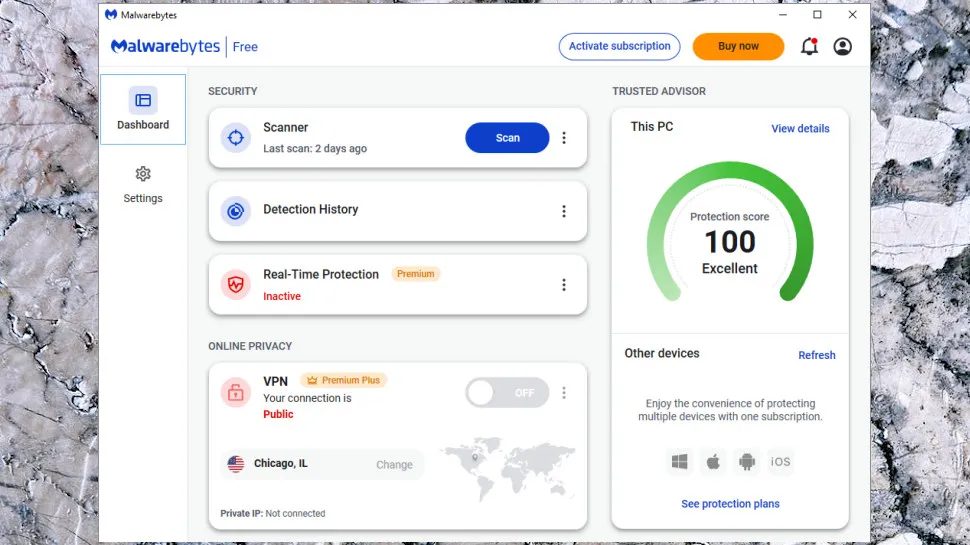
Malwarebytes is a security app for Windows, Mac, Android and iOS from Malwarebytes Inc. The free Windows edition (Malwarebytes Free) scans and removes malware only when you run a scan. It has no real-time protection, so it is meant to run next to another antivirus rather than replace it. After install the app offers a 14-day Premium trial; when that ends it reverts to the manual scanner unless you pay for the paid Standard plan, which adds real-time protection. It is proprietary freeware.
What users say
Evidence ↓The one independent review collected (TechRadar, 2024) calls the free app easy to use and a useful second-opinion scanner, with no real-time protection and few features. The same reviewer found paid-only features clearly labeled rather than nagging, and said several users complained that the Browser Guard extension blocks legitimate sites. This rests on one reviewer, so how widely these views are shared is not established.
Rankings and alternatives
- Antivirus for Mac #7 of 8 Free second-opinion scanner
- ESET HOME Security #1 Top lab results from a clean-record vendor
- Bitdefender Antivirus for Mac #2 Easiest strong pick for one Mac
- Norton 360 #3 Full suite for Macs and PCs, at a renewal price
- Antivirus apps for Android #9 of 9 A second-opinion scanner
- Bitdefender Mobile Security #1 Best paid app for most phones
- ESET Mobile Security for Android #2 Quiet free scanner with a cheap upgrade
- Norton 360 for Mobile #3 For households already paying for Norton 360






Android antivirus scores
Evaluated Nov 17, 2026 Evidence ↓- Stopping scam links, texts and calls · counts double 5
5/5 means: Blocks phishing sites in the main browsers, checks links in texts, chat apps or notifications, and screens scam calls
The paid app scans URLs in texts, emails and messaging apps, adds web protection, flags scam calls and blocks known spam callers, and Scam Guard checks a pasted message or screenshot. Which browsers the web protection covers is not specified.
- Catching Android malware · counts double 2
2/5 means: No independent lab result in the last three years
Its last readable AV-TEST Android result is from 2020, and it isn't in AV-Comparatives' recent mobile reviews; Malwarebytes cites unnamed third-party testing.
- Price of full protection for one phone 2
2/5 means: $40 to $60 a year
Real-time protection needs a paid plan; the cheapest is Standard for one device at $44.99 a year list, and the free mode is a manual scanner.
- Free of ads and upsells 3
3/5 means: No ads, but promotional prompts, add-on offers or a paywall you have to get past
No ads, but the app opens on a trial paywall that asks for a payment method, and the free scanner mode is reached only through "explore features".
- Privacy of the security app itself 4
4/5 means: No record of selling or misusing user data, and the app says it shares no data with third parties for advertising
No record of data misuse, and the Play listing says no data is shared with third parties.
- Anti-theft, app lock and privacy checks · counts half 1
1/5 means: None of these tools
The Android app focuses on malware, scams, VPN and identity tools; no anti-theft, app lock or permission audit is described on its Play listing or Android page.
Mac antivirus scores
Evaluated Nov 17, 2026 Evidence ↓- Catching Mac malware · counts double 2
2/5 means: No current independent lab result, and small reviewer tests or signature-only detection leave real doubt
Scored on the paid real-time product. No AV-TEST or AV-Comparatives Mac result exists, and Comparitech's 2024 test blocked all 3 live samples but only 2 of 4 EICAR files. The free manual scanner is a cleanup tool only.
- Privacy and trust in the vendor · counts double 4
4/5 means: No record of selling or misusing user data, with ordinary telemetry you can limit
Digital Trends says it does not sell data and has no recent security issues. Comparitech objects to the number of data points collected and to support answers that contradicted the policy; no regulator finding was found.
- Blocking scam and phishing sites 3
3/5 means: Blocks dangerous sites in the main browsers through an extension or a filter, but reviewers found it missing many phishing links, or nobody has tested it
Browser Guard covers Safari, Chrome, Firefox and Edge and comes with the paid plan, but no phishing test on Mac was found and the Safari install is awkward (Mac App Store, wrong store opened in one review).
- Free of nags and upsells 3
3/5 means: Some locked features or add-on offers you see now and then
The free scanner and trial lock real-time protection behind the paid plan, and the Mac app shows a paid VPN add-on. Reviewers did not describe pushy prompts, but Mac trial-expiry behavior was not checked.
- Easy for a non-expert 4
4/5 means: Clear and simple for most people, with minor rough edges
Both reviewers call the app simple and quick to set up with a clear dashboard; rough edges are one scan type, few settings and the Safari extension install.
- Price after the first year 4
4/5 means: Under $45 a year
Standard for 1 device is $44.99 a year list, just under the $45 line. Digital Trends says renewals don't jump, but I did not confirm the renewal price on a vendor page.
- Covers the rest of the household · counts half 3
3/5 means: A few devices across Mac, Windows and phones
Standard at $59.99 a year covers 3 devices across Windows, Mac, Android and iOS. A 10-device family plan exists, but it was not priced or checked for the entry level.
Pricing
- Malwarebytes Free (Windows) Free Manual on-demand scan and removal only, no real-time protection. A 14-day Premium trial is offered after install; afterward the app reverts to the manual scanner. Checked for updates every six hours in a 2024 review, against hourly for paid.
- Malwarebytes Free Mode (Android) Free Android scanner only, reached by tapping "explore features" on the paywall (id 34). The app offers a 7-day trial of advanced features first (id 33). No ads label on Google Play (id 33). A paid Android price for one phone was not found on vendor pages; the Android plan is bought through the shared Standard/Plus/Ultimate tiers, which list Android.
- Standard (1 device) $44.99 /year List price for the cheapest paid plan, which adds real-time protection and Browser Guard web protection. The page showed a 50% limited-time promotion, not recorded here. 3 devices start at $59.99 a year.
- Standard (3 devices, includes Mac) $59.99 /year Vendor Mac page list price; covers Windows, Mac, Android or iOS and includes Browser Guard. Plus (adds VPN) is $79.99 a year and Ultimate $139.99 a year for 3 devices.
Prices checked Nov 17, 2026.
Evidence and sources
What users say
Summary 4 quotes
-
Malwarebytes Free is a stripped back version with one significant limit: there’s no real-time protection. It’s not suitable as your main antivirus software, because the app won’t monitor threats as they launch and run, making it unable to stop dangers such as ransomware. The free Malwarebytes is more of a second opinion scanner, something to run alongside another antivirus.
Mike Williams, Lead security reviewer at TechRadar · techradar.com/pro/malwarebytes-free-review · published · checked -
Malwarebytes Free for Windows has various panels, buttons and settings, but most of them are labeled ‘Premium’ and not available to Free users. There’s no real-time protection or VPN, for instance, no Quick Scan, no scheduled scans, and no blocking of malicious websites (although we’ll look at an alternative to that.)
Mike Williams, Lead security reviewer at TechRadar · techradar.com/pro/malwarebytes-free-review · published · checked -
The other Malwarebytes Free advantage is that it clearly highlights paid-only features. Some free apps don’t do this, which means you’re regularly clicking buttons and being told ‘nope, can’t do that unless you pay.’ That’s seriously annoying, but it’s mostly avoided with Malwarebytes, because you can clearly see which features you can use and which you can’t.
Mike Williams, Lead security reviewer at TechRadar · techradar.com/pro/malwarebytes-free-review · published · checked -
Add the complaints we saw from several users about Browser Guard blocking several legitimate sites and it’s not an option we can recommend.
Mike Williams, Lead security reviewer at TechRadar · techradar.com/pro/malwarebytes-free-review · published · checked
Android antivirus scores
Stopping scam links, texts and calls 3 quotes
-
Malwarebytes Scam Guard flags: Phishing messages: fake delivery alerts, bank scams, etc. Malicious links: Real-time scanning of URLs in texts, emails, and messaging apps
play.google.com/store/apps/details · checked -
Flag scam calls and hidden numbers Block known spam callers automatically Whitelist trusted contacts and customize alerts
play.google.com/store/apps/details · checked -
Malwarebytes Mobile Security for Android is one of the only* apps that can detect the most harmful malware, including trojans, spyware, and ransomware, before it installs. This real-time protection helps stop threats before they can infect your device.
malwarebytes.com/android · checked
Catching Android malware 3 quotes
-
Malwarebytes Mobile Security for Android is one of the only* apps that can detect the most harmful malware, including trojans, spyware, and ransomware, before it installs. This real-time protection helps stop threats before they can infect your device.
malwarebytes.com/android · checked -
Our report covers results from malware protection and battery consumption tests, along with reviews assessing the functionality, design, and overall usability of each security app.
av-comparatives.org/tests/mobile-security-review-2025 · checked -
In September 2026 we evaluated 14 mobile security products for Android using their default settings.
av-test.org/en/antivirus/mobile-devices · checked
Price of full protection for one phone 2 quotes
-
Simply antivirus for a single phone, tablet or PC. 1 device $44.99/yr.
malwarebytes.com/pricing · checked -
To use the app in Free Mode and skip the trial, you need to tap "explore features" on the paywall screen, and you can use the Malwarebytes scanner for free!
Malwarebytes, vendor reply to a Google Play review · play.google.com/store/apps/details · published · checked
Free of ads and upsells 2 quotes
-
Enjoy a FREE 7-day trial of advanced features that offer 24/7 protection
play.google.com/store/apps/details · checked -
To use the app in Free Mode and skip the trial, you need to tap "explore features" on the paywall screen, and you can use the Malwarebytes scanner for free!
Malwarebytes, vendor reply to a Google Play review · play.google.com/store/apps/details · published · checked
Privacy of the security app itself 1 quote
-
No data shared with third parties
play.google.com/store/apps/details · checked
Anti-theft, app lock and privacy checks 1 quote
-
Malwarebytes Mobile Security for Android is one of the only* apps that can detect the most harmful malware, including trojans, spyware, and ransomware, before it installs. This real-time protection helps stop threats before they can infect your device.
malwarebytes.com/android · checked
Mac antivirus scores
Catching Mac malware 2 quotes
-
Malwarebytes’ antivirus engine, like its reputation, is fair. It failed to detect two of our virus samples and isn’t rated on AV Comparatives or AV Tests.
Marc Dahan, reviewer at Comparitech (affiliate-funded site) · comparitech.com/antivirus/reviews/malwarebytes-macos-review · published · checked -
I’d prefer to share the results of more robust, ongoing tests from independent security labs. Unfortunately, no third-party test results are available from leading security researchers for the Mac version of Malwarebytes.
Digital Trends reviewer, reviewer at Digital Trends · digitaltrends.com/computing/malwarebytes-for-mac-review · published · checked
Privacy and trust in the vendor 2 quotes
-
Malwarebytes is not recommended at this time.
Marc Dahan, reviewer at Comparitech · comparitech.com/antivirus/reviews/malwarebytes-macos-review · published · checked -
Malwarebytes is quick, easy, and offers consistently low prices. If you bought a multi-device Malwarebytes plan for a Windows PC, the included macOS version is a good way to enhance Apple’s XProtect security for free. If you don’t use Windows, there are better solutions for your Mac.
Digital Trends reviewer, reviewer at Digital Trends · digitaltrends.com/computing/malwarebytes-for-mac-review · published · checked
Blocking scam and phishing sites 3 quotes
-
Malwarebytes Browser Guard is a browser extension that you can install as a plugin to your favorite web browser (Chrome, Firefox, Edge or Safari) that comes free with Malwarebytes Premium Security.
malwarebytes.com/mac · checked -
I did run into a problem with web protection. As I made my way through the guide and selected the Malwarebytes Browser Guard extension, the Chrome Web Store opened instead of Safari. I do have Chrome installed, but I rarely use it. I found the extension in Apple’s macOS App Store and manually installed it in Safari.
Digital Trends reviewer, reviewer at Digital Trends · digitaltrends.com/computing/malwarebytes-for-mac-review · published · checked -
Malwarebytes is not recommended at this time.
Marc Dahan, reviewer at Comparitech · comparitech.com/antivirus/reviews/malwarebytes-macos-review · published · checked
Free of nags and upsells 2 quotes
-
Malwarebytes Free is a cleanup tool for cyberattacks that have already damaged a device. Malwarebytes Premium Security stops these attacks from happening in the first place. It runs automatically on an ongoing basis, giving you peace of mind.
malwarebytes.com/mac · checked -
Malwarebytes’ antivirus engine, like its reputation, is fair. It failed to detect two of our virus samples and isn’t rated on AV Comparatives or AV Tests.
Marc Dahan, reviewer at Comparitech (affiliate-funded site) · comparitech.com/antivirus/reviews/malwarebytes-macos-review · published · checked
Easy for a non-expert 4 quotes
-
Malwarebytes’ antivirus engine, like its reputation, is fair. It failed to detect two of our virus samples and isn’t rated on AV Comparatives or AV Tests.
Marc Dahan, reviewer at Comparitech (affiliate-funded site) · comparitech.com/antivirus/reviews/malwarebytes-macos-review · published · checked -
Malwarebytes is not recommended at this time.
Marc Dahan, reviewer at Comparitech · comparitech.com/antivirus/reviews/malwarebytes-macos-review · published · checked -
Malwarebytes is quick, easy, and offers consistently low prices. If you bought a multi-device Malwarebytes plan for a Windows PC, the included macOS version is a good way to enhance Apple’s XProtect security for free. If you don’t use Windows, there are better solutions for your Mac.
Digital Trends reviewer, reviewer at Digital Trends · digitaltrends.com/computing/malwarebytes-for-mac-review · published · checked -
I did run into a problem with web protection. As I made my way through the guide and selected the Malwarebytes Browser Guard extension, the Chrome Web Store opened instead of Safari. I do have Chrome installed, but I rarely use it. I found the extension in Apple’s macOS App Store and manually installed it in Safari.
Digital Trends reviewer, reviewer at Digital Trends · digitaltrends.com/computing/malwarebytes-for-mac-review · published · checked
Price after the first year 2 quotes
-
Simply antivirus for a single phone, tablet or PC. 1 device $44.99/yr.
malwarebytes.com/pricing · checked -
Unlike most competing solutions, Malwarebytes doesn’t lure you in with a low-cost subscription that increases dramatically the next year. Instead, there’s a discount if you buy a two-year subscription.
Digital Trends reviewer, reviewer at Digital Trends · digitaltrends.com/computing/malwarebytes-for-mac-review · published · checked
Covers the rest of the household 2 quotes
-
Malwarebytes uses App Block technology to prevent malicious developers from bypassing security measures and releasing modified version of harmful apps which infest your system and compromise your data.
malwarebytes.com/mac · checked -
Malwarebytes is quick, easy, and offers consistently low prices. If you bought a multi-device Malwarebytes plan for a Windows PC, the included macOS version is a good way to enhance Apple’s XProtect security for free. If you don’t use Windows, there are better solutions for your Mac.
Digital Trends reviewer, reviewer at Digital Trends · digitaltrends.com/computing/malwarebytes-for-mac-review · published · checked
Facts
License 1 quote
-
For 14 days, Malwarebytes Premium for Windows will keep malware from infecting your computer for free. After that, if you do nothing it reverts to a limited scanner that detects and cleans up malware infections only when you run a manual scan.
malwarebytes.com/trial · checked
Runs on 4 quotes
-
Windows 7 or higher (32/64-bit)
malwarebytes.com/trial · checked -
System requirements for macOS devices Operating System Golden Gate 27 Tahoe 26 Sequoia 15 Sonoma 14 Ventura 13 Monterey 12 Memory: No minimum requirements. Free disk space: No minimum requirements.
help.malwarebytes.com/hc/en-us/articles/31589243089307-System-Requirements-for-Malwarebytes-on-Windows-and-Mac · checked -
Malwarebytes requires Android 10 or later and uses the AccessibilityService API to detect and protect against malicious apps and scams.
play.google.com/store/apps/details · checked -
Android versions 10, 11, 12, 13, 14, 15, 16, 17
help.malwarebytes.com/hc/en-us/articles/31589208398107-Malwarebytes-for-Android-and-iOS-system-requirements-and-features · checked
More from the sources
Features 8 quotes
-
Users are offered a 7 to 14 day Malwarebytes Premium trial during signup, but this is optional, and you can opt out of the trial and use the basic app for free if you prefer.
Mike Williams, Lead security reviewer at TechRadar · techradar.com/pro/malwarebytes-free-review · published · checked -
Malwarebytes Free doesn’t include anti-phishing or any other type of web protection, but the company has another product which could help. Malwarebytes Browser Guard is a free Chrome, Firefox and Edge extension for desktops which blocks ads, trackers, website malware and assorted other scam sites.
Mike Williams, Lead security reviewer at TechRadar · techradar.com/pro/malwarebytes-free-review · published · checked -
We installed Browser Guard and tried to access 100 new phishing sites. The results on Chrome were very good, with the extension blocking 97% of our URLs. A clear warning in our browser window explained the reasons, and gave us the chance to visit if we were sure the site was safe. It was a different story with Edge, unfortunately. Browser Guard appeared to be installed, and displayed information on the current site, but only blocked a fraction of the links we saw on the Chrome version.
Mike Williams, Lead security reviewer at TechRadar · techradar.com/pro/malwarebytes-free-review · published · checked -
Malwarebytes · 92.4% · 98.3% · 99.59% · 23
av-comparatives.org/tests/malware-protection-test-march-2026 · checked -
F-Secure, Malwarebytes · 395 · – · 5 · 98.8% · 1
av-comparatives.org/tests/real-world-protection-test-february-may-2026 · checked -
However, the solutions from K7 Computing, Malwarebytes and EnigmaSoft ran into several issues with detecting the malware. They ended up only scoring individual ratings of 91.7 and 96.2 percent for parts of testing. This led to point deductions for all of them: Malwarebytes scored 5.5 points and K7 Computing 5 points, trailed by EnigmaSoft with only 4.5 points.
av-test.org/en/news/the-best-security-solutions-for-windows-11 · checked -
The security suites from Avast, AVG, Bitdefender, Kaspersky, McAfee, Microsoft, Norton, TotalAV, Malwarebytes and EnigmaSoft placed the systems under a slight load, but hardly enough to make a difference. For this, they all received the maximum 6 points.
av-test.org/en/news/the-best-security-solutions-for-windows-11 · checked -
Browser Guard In-browser scam and web protection Ad and tracking blocker Data breach notifications
malwarebytes.com/pricing · checked
Limits and known issues 5 quotes
-
Malwarebytes took around 29 minutes to scan 30GB of test files, a little behind Avira’s 26:30, but faster than Norton (32 minutes), Avast (36 minutes) and Bitdefender (37:44.)
Mike Williams, Lead security reviewer at TechRadar · techradar.com/pro/malwarebytes-free-review · published · checked -
11. · Malwarebytes · 23 · very many FPs
av-comparatives.org/tests/malware-protection-test-march-2026 · checked -
The following four products with above-average FPs have been downgraded: F-Secure, K7, G Data, Panda, Malwarebytes, and Trend Micro.
av-comparatives.org/tests/real-world-protection-test-february-may-2026 · checked -
12. · Malwarebytes · 75 · 97.4 · 17.6
av-comparatives.org/tests/performance-test-april-2026 · checked -
Quick Scan Time (seconds) · 1 Quick Scan CPU Utilization % 52 Quick Scan Memory Utilization % · 79
Marc Dahan, reviewer at Comparitech · comparitech.com/antivirus/reviews/malwarebytes-macos-review · published · checked
How widely it is used 1 quote
-
60K+ Installations of Malwarebytes every day
malwarebytes.com/trial · checked
Pricing
malwarebytes.com/pricing · checked