
MobileSheets
Sheet music reader and library manager for Android, Windows, iPad and Mac tablets, bought once per platform
Our verdict
#2 of 5 in Sheet music reader apps · The answer for Android and Windows
What it does
- Pedal, half-page, two-page, auto-scroll and face-gesture page turns
- PDFs plus ChordPro and text charts in one library
- Splits fake books into songs and edits the library from a computer
- Links tablets to share songs and setlists across platforms
Pros
- The only full-featured reader on Android and Windows
- Every feature included in a one-time price
- Runs on every major tablet platform, so a mixed band can share one app
Cons
- Takes much longer to learn than forScore
- Android and Windows each need their own purchase
- Markup tools are capable but less refined with an Apple Pencil than forScore's
- Choose if:
- You play from chord charts and notation and want both in one app
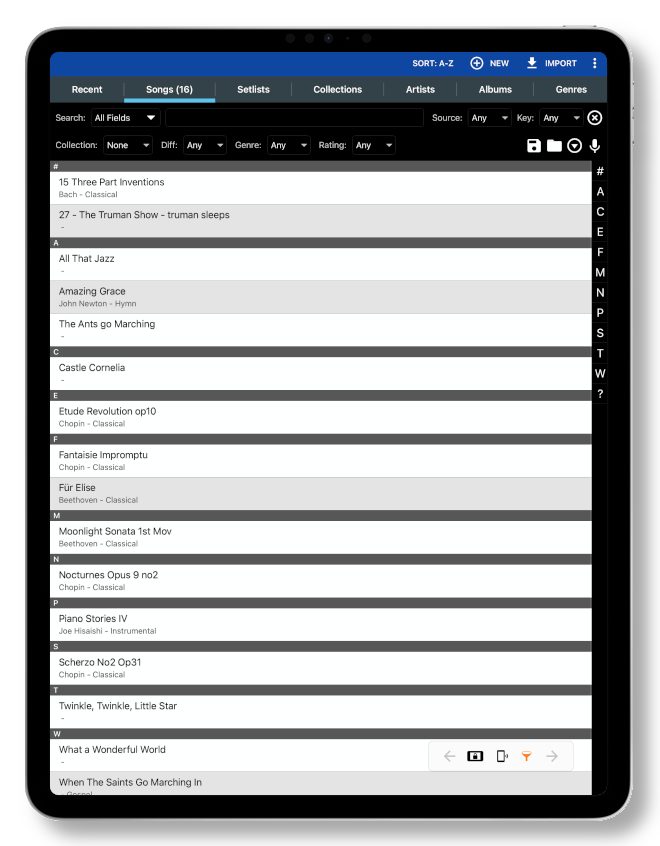
MobileSheets is a sheet music reader and library manager from Zubersoft for musicians who replace paper binders with a tablet. It displays PDFs, images, text and ChordPro files, and offers setlists, a large metadata system, annotations with stylus support, link points for repeats, half-page and two-page views, and page turning by Bluetooth or USB pedal, auto-scroll or face gestures. It also has an audio player with A-B looping, a metronome, MIDI control and a free Windows companion app for editing the library. It started on Android and now also runs on Windows, iPhone, iPad and Apple silicon Macs, with a separate e-ink build for Android. It is a paid app bought separately in each platform’s store, with no subscription.
What users say
Evidence ↓Users on the Google Play, App Store and vendor forum describe it as feature-rich and reliable on stage, praising its metadata, filtering and setlists, and some who switched from forScore prefer it for supporting ChordPro and not charging for extra features. The most repeated caution is a steep learning curve (one Google Play reviewer, endorsed by 65 helpful votes). Individual reviewers report an iPad sync that deleted files on the PC without a warning, occasional crashes while annotating, and a wish for more Apple Pencil options. Most of these accounts come from the vendor's forum or store reviews from enthusiasts, so they skew favorable.
Rankings and alternatives



Sheet music reader apps scores
Evaluated Nov 17, 2026 Evidence ↓- Page turns on stage · counts double 5
5/5 means: Pedal turns, half-page turns, repeat links and a hands-free option such as face gestures, with a record of dependable use on stage
Bluetooth and USB pedals, half-page turns, link points for repeats, auto-scroll and face gestures are all listed. A three-year gigging user reports no crashes on stage, though one reports occasional crashes while annotating.
- Marking up parts 4
4/5 means: Pens, stamps, text and layers, with some complaints about precision or missing tools
Freehand drawing, shapes, text and stamps are listed, and a third party mentions layers and stylus support. A reviewer wants more Apple Pencil options; no hands-on source compares precision.
- Polish and ease of use 3
3/5 means: Capable but cluttered; users say it takes real time to learn, while praising what it does
Users praise power and reliability but widely say the learning curve is steep. Speed with large PDFs was not documented.
- Library and setlists 5
5/5 means: As 4, plus splitting large books into separate pieces and bulk editing from a computer or companion tool
Extensive metadata, tags, filtering, setlists, CSV index import to split large PDF books, and a free companion app for editing the library.
- Sharing with a band or ensemble 4
4/5 means: As 3, plus linking nearby tablets so page turns or song changes follow one device
Connect Tablets links devices over WiFi or Bluetooth and shares songs and setlists across platforms, with synced annotations in book mode. A shared director-managed library is not documented, and leader/follower turning is not stated explicitly.
- Cost of the full reader 5
5/5 means: Free, or one-time purchase of 40 US dollars or less, with every reader feature included
One-time purchase (iOS and Apple platforms $15.99) with no subscription and no paywalled features according to users. Android and Windows prices were not verified but are believed similar.
- Tablets it runs on · counts half 5
5/5 means: Native apps on iPad, Android and Windows, with sync
Native apps on Android, Windows, iPad, iPhone and Mac, with sync over WiFi, Bluetooth or cloud. One reviewer reports a risky sync on iPad.
- Practice tools · counts half 4
4/5 means: Three or four of the five
Built-in metronome, audio player with A-B looping linked to scores, and chord transposition in text and ChordPro files. No tuner or recording in the sources.
Pricing
- MobileSheets for iOS, iPadOS and macOS $15.99 one-time
- MobileSheets Trial for Android Free
Prices checked Nov 17, 2026.
Evidence and sources
What users say
Summary 6 quotes
-
If you use Android or Windows, MobileSheets is the strongest all-rounder
violetrecording.com/best-sheet-music-reader-apps · published · checked -
MobileSheets has a steeper-than-usual learning curve, but is powerful and worth the effort you put into learning how to use it.
play.google.com/store/apps/details · checked -
On occasion it will crash when entering annotations, and requires a very quick restart, but it has NEVER crashed on a gig when calling up a song or any of the sets that I have entered.
OpenETuning, App Store reviewer, three years of use on iPad · apps.apple.com/us/app/mobilesheets/id1620569987 · checked -
First attempt to sync from my Windows version to iPad and.... with horror, realized it was deleting from my computer rather than adding to my iPad.
rogueReviews, App Store reviewer, long-time Windows user · apps.apple.com/us/app/mobilesheets/id1620569987 · published · checked -
There are a few features I’d like to see (mainly around Apple Pencil/annotation options) but they’re minor.
Euphorbia Monstrose, App Store reviewer who switched from forScore · apps.apple.com/us/app/mobilesheets/id1620569987 · published · checked -
I used forScore for quite awhile, and it is a nice app with some slick features...but the really slick features cost extra, and forScore only supports PDF files, no ChordPro. MobileSheets is a clear winner over forScore.
jlgtx, forum user on the vendor's own MobileSheets forum · zubersoft.com/mobilesheets/forum/post-34248.html · published · checked
Sheet music reader apps scores
Page turns on stage 3 quotes
-
Hands-free page turns using any bluetooth or usb devices (including two and four pedal models), through the automatic scrolling feature, or through face gestures such as an open mouth or smile.
play.google.com/store/apps/details · checked -
Multiple modes of operation including two pages side-by-side, half page turns, and vertically scrolling pages.
play.google.com/store/apps/details · checked -
On occasion it will crash when entering annotations, and requires a very quick restart, but it has NEVER crashed on a gig when calling up a song or any of the sets that I have entered.
OpenETuning, App Store reviewer, three years of use on iPad · apps.apple.com/us/app/mobilesheets/id1620569987 · checked
Marking up parts 3 quotes
-
Annotations for marking up music including support for freeform drawing, basic shapes, text and stamps
play.google.com/store/apps/details · checked -
It is packed with features: single, two-page, half-page and vertical scrolling views, layered annotations with stylus support, an audio player with A-B looping, MIDI control, and the ability to link several tablets so one musician turns pages for everyone.
violetrecording.com/best-sheet-music-reader-apps · published · checked -
There are a few features I’d like to see (mainly around Apple Pencil/annotation options) but they’re minor.
Euphorbia Monstrose, App Store reviewer who switched from forScore · apps.apple.com/us/app/mobilesheets/id1620569987 · published · checked
Polish and ease of use 3 quotes
-
MobileSheets has a steeper-than-usual learning curve, but is powerful and worth the effort you put into learning how to use it.
play.google.com/store/apps/details · checked -
On occasion it will crash when entering annotations, and requires a very quick restart, but it has NEVER crashed on a gig when calling up a song or any of the sets that I have entered.
OpenETuning, App Store reviewer, three years of use on iPad · apps.apple.com/us/app/mobilesheets/id1620569987 · checked -
I used forScore for quite awhile, and it is a nice app with some slick features...but the really slick features cost extra, and forScore only supports PDF files, no ChordPro. MobileSheets is a clear winner over forScore.
jlgtx, forum user on the vendor's own MobileSheets forum · zubersoft.com/mobilesheets/forum/post-34248.html · published · checked
Library and setlists 1 quote
-
Support for importing CSV index files to break up large PDF songbooks
play.google.com/store/apps/details · checked
Sharing with a band or ensemble 2 quotes
-
Connect multiple tablets over WiFi or bluetooth in book mode to display two pages at once
apps.apple.com/us/app/mobilesheets/id1620569987 · checked -
It is packed with features: single, two-page, half-page and vertical scrolling views, layered annotations with stylus support, an audio player with A-B looping, MIDI control, and the ability to link several tablets so one musician turns pages for everyone.
violetrecording.com/best-sheet-music-reader-apps · published · checked
Cost of the full reader 3 quotes
-
$15.99 · Designed for iPad
apps.apple.com/us/app/mobilesheets/id1620569987 · checked -
It is a one-off purchase; on Android and Windows you need a licence per device, while an App Store purchase covers iPhone, iPad and Mac. Android users can test it first with the free MobileSheets Trial app, and there is an e-ink version for BOOX-style tablets.
violetrecording.com/best-sheet-music-reader-apps · published · checked -
I used forScore for quite awhile, and it is a nice app with some slick features...but the really slick features cost extra, and forScore only supports PDF files, no ChordPro. MobileSheets is a clear winner over forScore.
jlgtx, forum user on the vendor's own MobileSheets forum · zubersoft.com/mobilesheets/forum/post-34248.html · published · checked
Tablets it runs on 3 quotes
-
Available on MacOS, iOS, Android, and Windows.
zubersoft.com/mobilesheets · checked -
Synchronize device libraries using WiFi, bluetooth or the cloud - Multiple modes of operation including two pages side-by-side, half page turns, and vertically scrolling pages.
apps.apple.com/us/app/mobilesheets/id1620569987 · checked -
First attempt to sync from my Windows version to iPad and.... with horror, realized it was deleting from my computer rather than adding to my iPad.
rogueReviews, App Store reviewer, long-time Windows user · apps.apple.com/us/app/mobilesheets/id1620569987 · published · checked
Practice tools 2 quotes
-
A custom audio player for playing audio tracks with your scores. Audio player supports a-b looping and multiple sizes.
play.google.com/store/apps/details · checked -
Support for multiple file types including images, PDFs, text files and chord pro files.
play.google.com/store/apps/details · checked
Facts
Runs on 3 quotes
-
Available on MacOS, iOS, Android, and Windows.
zubersoft.com/mobilesheets · checked -
For E-Ink devices, a special e-ink version is available. Contact [email protected] for more information.
play.google.com/store/apps/details · checked -
Requires macOS 15 or later and a Mac with Apple M1 chip or later.
apps.apple.com/us/app/mobilesheets/id1620569987 · checked
Needs 2 quotes
-
NOTE: This application is designed and optimized for 7" and larger tablets.
play.google.com/store/apps/details · checked -
Requires macOS 15 or later and a Mac with Apple M1 chip or later.
apps.apple.com/us/app/mobilesheets/id1620569987 · checked
Users 1 quote
-
100K+
play.google.com/store/apps/details · checked
More from the sources
Pricing 1 quote
-
If you purchase MobileSheets through one of the major app stores (Google Play, Microsoft Store, Apple App Store), then you can install that version on each device you own running the same platform (Android, Windows, iPadOS). This is only for personal use however (i.e. groups should be purchasing licenses through my FastSpring store so that each individual user is licensed). If you want to install it on an Android tablet and a laptop, for instance, then you would need to purchase twice (once through Google Play, and once through the Microsoft Store).
Zubersoft, MobileSheets developer posting on the vendor forum · zubersoft.com/mobilesheets/forum/post-54063.html · published · checked
Features 1 quote
-
Then you can transfer your work to your tablet either by creating a backup and transferring it to your table or by syncing between your desktop (server) to your tablet (device).
play.google.com/store/apps/details · checked