Plan to Eat
Recipe organizer, drag-and-drop meal planner and aisle-sorted grocery list on iPhone, Android and the web, for one flat subscription
Our verdict
#5 of 8 in Meal planning apps for families · Ad-free planner for recipe collectors
What it does
- Recipe Clipper for websites, Instagram, TikTok and Pinterest
- Drag-and-drop planner with leftovers and frozen meals
- Grocery list organized by store and aisle
- One account shared by the household on phones and the web
Pros
- No ads and no feature tiers
- Planner handles leftovers, frozen meals and smaller nights
- Comfortable web app for planning
Cons
- No free plan after the trial
- Duplicate ingredients merge only on an exact match
- Starts empty, with no recipes to browse
Plan to Eat is a subscription meal planning app for households. You save recipes you find (browser clipper, share sheet, photos, manual entry), drag them onto a meal calendar, and it builds a grocery list sorted by category and store. It has no built-in recipes or meal suggestions, so everything is your own library. One account is shared by the household on as many devices as you like. It runs on iPhone, Android and the web, with a 14-day free trial and no free tier.
What users say
Evidence ↓Few independent sources were read. A Fortune tester found the app easy to start but nearly empty, with no built-in recipes, and saw repeated ingredients not combined on the list; one App Store reviewer, a two-working-parent family, says planning on the weekend makes weeknights easy. An older 2019 review complains about slowness with 1,000+ recipes. These are single accounts, not a measured consensus.
Rankings and alternatives
- Meal planning apps for families #5 of 8 Ad-free planner for recipe collectors
- Samsung Food #1 Best free pick for most families
- AnyList #2 The shared grocery list both parents will use
- Prepear #3 Free planner with pantry and delivery hand-off




Meal planning apps for families scores
Evaluated Nov 17, 2026 Evidence ↓- Plans the week for you 1
1/5 means: Nothing built in; every recipe and every plan comes from you
No built-in recipes, suggested meals or generated plans; Fortune says there are no base recipes and you must import your own. The drag-and-drop planner only schedules recipes you saved.
- Saving your own recipes 5
5/5 means: A long-trusted importer for websites and other sources (share sheet, browser, photos or social posts), with editing, scaling and organizing
Long-established clipper, share sheet, photo import and manual entry, with scaling (including decimals) and categories. Fortune notes import is one recipe at a time and building a library takes effort.
- Grocery list from the plan · counts double 4
4/5 means: Builds the list from the week's plan, combines duplicates, sorts by aisle and is easy to edit
Built from the plan, sorted into categories that act as aisles, editable, with custom category order and per-store lists. But duplicates merge only when title and unit match, and a Fortune tester saw salt and pepper repeated, so it falls short of the combining that level 5 assumes.
- Sharing with your partner 4
4/5 means: Plan and list on both phones with automatic sync on iPhone and Android, with one subscription or one shared login covering the household
One shared household account on many devices, included in the single subscription, syncing plan and list across iOS, Android and web. It is a shared login rather than separate member accounts, and live-update speed was not independently confirmed.
- Allergies and picky eaters 1
1/5 means: Nothing beyond your own tags and notes
Only your own tags and categories; nutrition and macros exist but there are no allergy or dislike settings.
- Easy to live with 4
4/5 means: Clear and reliable, with only minor complaints
4.8 on the App Store and 4.7 on Google Play per the vendor, easy sign-up and tutorial, no ads. Fortune scored it 3.5/5, and the app starts empty; an old review cites slowness with 1000+ recipes. Few independent sources.
- Yearly cost for a family 3
3/5 means: About $30 to $60 a year
$49 a year or $5.95 a month for everything including household sharing; no free tier, only a 14-day trial. Fortune lists $54.99, still within this band.
- Grocery ordering and pantry · counts half 3
3/5 means: One of them done well, such as hand-off to several major US grocers, or both in basic form
Sends the list to grocery delivery or pickup per the help center. Pantry is only a static Staples List, and Fortune says it has no pantry feature, so that half is basic.
Pricing
- Monthly $5.95/month
- Yearly $49.00/year
Prices checked Nov 17, 2026.
Evidence and sources
What users say
Summary 4 quotes
-
However, if multiple recipes use the same ingredient, instead of collating and adding up the amount of the ingredient, the ingredient will be shown multiple times on the grocery list. An example of this would be common seasonings like salt and pepper, which show up in almost every recipe.
Pete, tester for Fortune · fortune.com/article/best-meal-planning-apps · checked -
When you open the app, it is nearly blank aside from three labeled tabs—cook, plan, and shop. “You’ll have to find recipes online and import them into the app,” he added.
Pete, tester for Fortune · fortune.com/article/best-meal-planning-apps · checked -
As a family with both parents working sometimes the hardest decision is what to have for dinner after a busy day. Plan To Eat takes all the guess work out and let’s you be creative with meal selection on the weekend so weekday meals are easy.
CW@2014$&@, App Store reviewer (Australian storefront) · apps.apple.com/au/app/plan-to-eat/id1215348056 · published · checked -
I know have over 1000 recipes saved but it should not slow down performing basic functions. Speaking of slow the app is getting slower and slower.
Nonnicruising, App Store reviewer · apps.apple.com/au/app/plan-to-eat/id1215348056 · published · checked
Meal planning apps for families scores
Plans the week for you 1 quote
-
When you open the app, it is nearly blank aside from three labeled tabs—cook, plan, and shop. “You’ll have to find recipes online and import them into the app,” he added.
Pete, tester for Fortune · fortune.com/article/best-meal-planning-apps · checked
Saving your own recipes 3 quotes
-
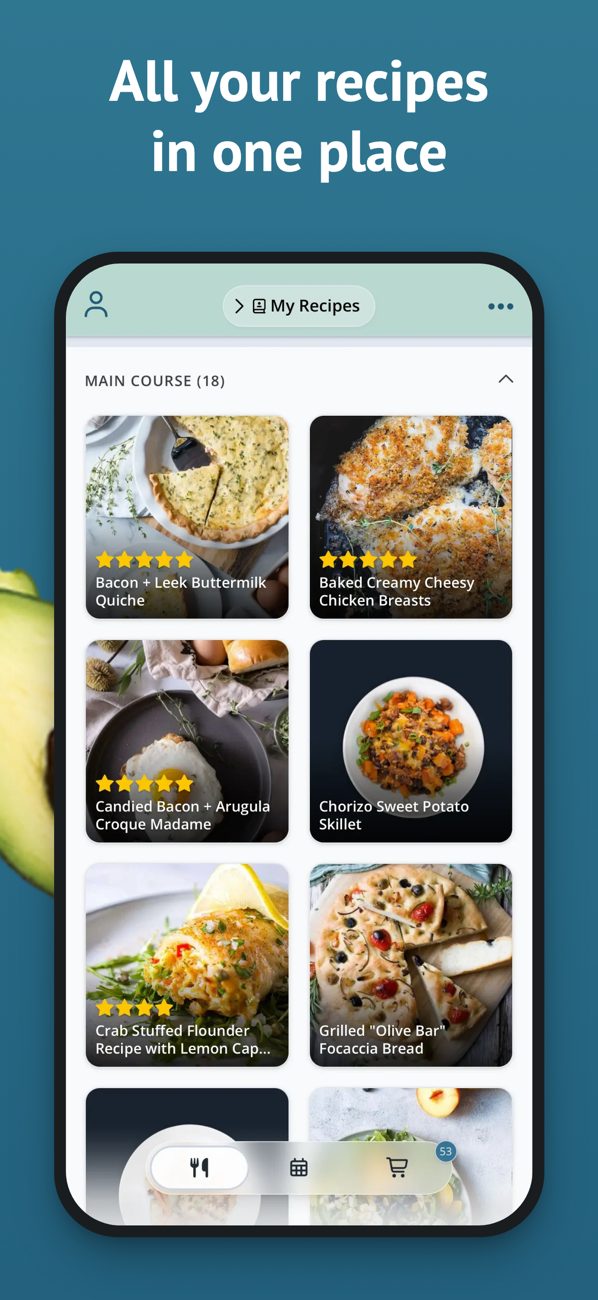
ALL YOUR RECIPES IN ONE PLACE: Tap the share icon in your web browser to import recipes from the web, or enter your family recipes manually in the app. - PERSONALIZED PLANNING: Create meal plans that work for you and your schedule. You can scale servings, reschedule recipes, plan leftovers, and track frozen meals.
apps.apple.com/au/app/plan-to-eat/id1215348056 · checked -
Save from any website, Instagram, TikTok, Pinterest and more with the Recipe Clipper.
plantoeat.com/pricing · checked -
When you open the app, it is nearly blank aside from three labeled tabs—cook, plan, and shop. “You’ll have to find recipes online and import them into the app,” he added.
Pete, tester for Fortune · fortune.com/article/best-meal-planning-apps · checked
Grocery list from the plan 4 quotes
-
UPGRADE YOUR SHOPPING LIST: The shopping list auto-generates an organized grocery list based on the ingredients in your meal plan. You can also add extra items to your list, add frequently purchased items from the staples list, customize and re-order your list categories, and create lists for specific stores.
apps.apple.com/au/app/plan-to-eat/id1215348056 · checked -
Built from your meal plan and organized by store and aisle, with grocery delivery.
plantoeat.com/pricing · checked -
Ingredients merge when their title and unit match.
learn.plantoeat.com/help/shopping-list · checked -
However, if multiple recipes use the same ingredient, instead of collating and adding up the amount of the ingredient, the ingredient will be shown multiple times on the grocery list. An example of this would be common seasonings like salt and pepper, which show up in almost every recipe.
Pete, tester for Fortune · fortune.com/article/best-meal-planning-apps · checked
Sharing with your partner 2 quotes
-
Use one Plan to Eat account on as many devices as you like and share it with the people in your household.
plantoeat.com/pricing · checked -
STAY IN SYNC: Your Plan to Eat account automatically syncs your recipes, planner, and shopping list across all of your devices, and your family's, too! Sign in on all of your mobile devices, and at plantoeat.com, to share recipes, meal plans, and shopping lists.
apps.apple.com/au/app/plan-to-eat/id1215348056 · checked
Allergies and picky eaters 1 quote
-
When you open the app, it is nearly blank aside from three labeled tabs—cook, plan, and shop. “You’ll have to find recipes online and import them into the app,” he added.
Pete, tester for Fortune · fortune.com/article/best-meal-planning-apps · checked
Easy to live with 4 quotes
-
However, if multiple recipes use the same ingredient, instead of collating and adding up the amount of the ingredient, the ingredient will be shown multiple times on the grocery list. An example of this would be common seasonings like salt and pepper, which show up in almost every recipe.
Pete, tester for Fortune · fortune.com/article/best-meal-planning-apps · checked -
When you open the app, it is nearly blank aside from three labeled tabs—cook, plan, and shop. “You’ll have to find recipes online and import them into the app,” he added.
Pete, tester for Fortune · fortune.com/article/best-meal-planning-apps · checked -
As a family with both parents working sometimes the hardest decision is what to have for dinner after a busy day. Plan To Eat takes all the guess work out and let’s you be creative with meal selection on the weekend so weekday meals are easy.
CW@2014$&@, App Store reviewer (Australian storefront) · apps.apple.com/au/app/plan-to-eat/id1215348056 · published · checked -
I know have over 1000 recipes saved but it should not slow down performing basic functions. Speaking of slow the app is getting slower and slower.
Nonnicruising, App Store reviewer · apps.apple.com/au/app/plan-to-eat/id1215348056 · published · checked
Yearly cost for a family 3 quotes
-
$5.95/ month
plantoeat.com/pricing · checked -
$49/ year
plantoeat.com/pricing · checked -
If you're not paying for the product, you're the product. Plan to Eat is fully customer-funded, so we can focus on you instead of selling your data or showing ads.
plantoeat.com/pricing · checked
Grocery ordering and pantry 4 quotes
-
Built from your meal plan and organized by store and aisle, with grocery delivery.
plantoeat.com/pricing · checked -
Ingredients merge when their title and unit match.
learn.plantoeat.com/help/shopping-list · checked -
The Staples list is a static list of frequently purchased items that can be used as a kitchen inventory.
learn.plantoeat.com/help/shopping-list · checked -
When you open the app, it is nearly blank aside from three labeled tabs—cook, plan, and shop. “You’ll have to find recipes online and import them into the app,” he added.
Pete, tester for Fortune · fortune.com/article/best-meal-planning-apps · checked
Facts
Runs on 2 quotes
-
Every feature, on every device, for one simple price. Start with a free 14-day trial. No credit card required, so there's nothing to cancel if Plan to Eat isn't for you.
plantoeat.com/pricing · checked -
STAY IN SYNC: Your Plan to Eat account automatically syncs your recipes, planner, and shopping list across all of your devices, and your family's, too! Sign in on all of your mobile devices, and at plantoeat.com, to share recipes, meal plans, and shopping lists.
apps.apple.com/au/app/plan-to-eat/id1215348056 · checked
Users 1 quote
-
Try the app trusted by 50k+ meal planners to streamline their planning process.
plantoeat.com · checked
More from the sources
Pricing 1 quote
-
No tiers, no add-ons, no ads. One subscription unlocks all of it.
plantoeat.com/pricing · checked
Features 1 quote
-
Version 4 is here, with a fresh look and feel across the app! What's new: - Recipes are now organized into clear, editable sections, so it's easier to scan and update - Drag and drop planning is smoother - Plan a full day at once, moving recipes to multiple mealtimes in one step
apps.apple.com/au/app/plan-to-eat/id1215348056 · checked
Pricing
plantoeat.com/pricing · checked