Way of Life
Habit tracker where you mark each day green, red or skip and watch chains and charts build up
Our verdict
#6 of 9 in Habit tracker apps for iPhone · Green, red or skip, with charts to match
What it does
- Done, not done or skip for each habit each day
- Chains, a weekly and monthly scoreboard, and trend charts
- A note on any entry
- Export to CSV, Excel or JSON
Pros
- Fast to log a whole day
- Clear about bad days as well as good ones
- No account, with data kept on your phone
Cons
- No Apple Watch app or Apple Health link
- No sync between devices and no iPad app
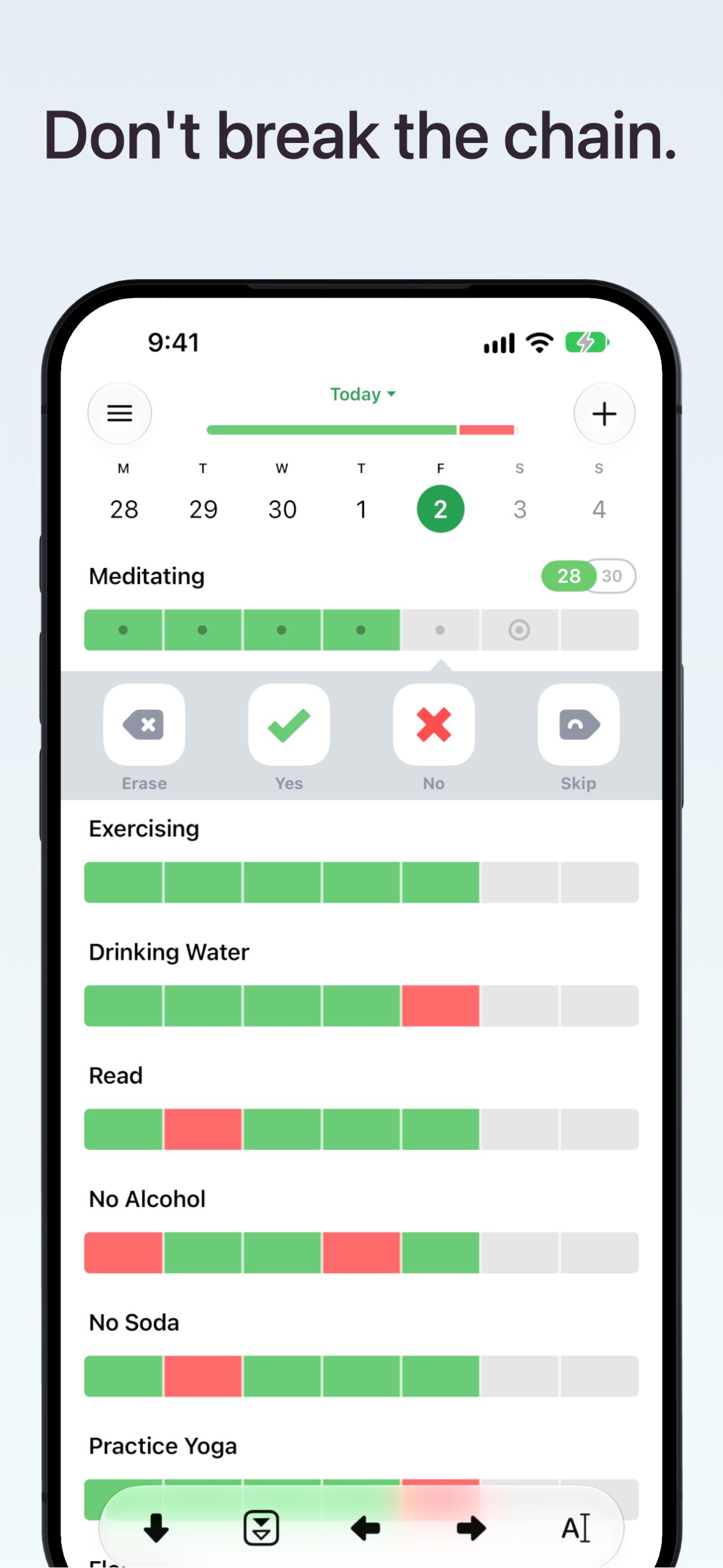
Way of Life is a habit tracker from Way of Life ApS, a small Danish company, available since 2010. You mark each habit as done (green), not done (red) or skipped for the day, and the app keeps chains, a scoreboard, trend charts, a frequency chart by weekday and an optional note on each entry. It covers both good habits and habits you want to break. It runs on iPhone (iOS 17.6 or later), on Mac with an Apple silicon chip and on Apple Vision, and there is a separate Android app. It is free to download with an optional Premium in-app purchase that unlocks unlimited habits. It is proprietary software.
What users say
Evidence ↓App Store reviewers and the developer's own testimonials mostly praise how fast it is to log a day and the clear data and charts, and several say they have used it for years. The most repeated complaint in the reviews read is the lack of sync across devices and iPad. A competitor's review calls the design dated and notes no Apple Health connection and no numeric goals. These are individual accounts and one vendor's review, not a sampled measure.
Rankings and alternatives




iPhone habit tracker apps scores
Evaluated Nov 17, 2026 Evidence ↓- Pleasant and motivating every day · counts double 4
4/5 means: Well liked and well designed, with minor or narrow complaints
4.8 out of 5 from about 5.3K US ratings and reviewers who have used it for years praise the fast green/red/skip logging and clear data. A competitor's review calls the design dated, and no sync or iPad is a recurring complaint.
- Quick logging 2
2/5 means: Widgets that show progress or open the app, and perhaps Siri or Shortcuts, but no way to check off from the Home Screen or Watch
The listing names widgets, Siri and Shortcuts, but no Apple Watch app is listed and it is not stated that widgets can check off habits. A notification update path exists per v4.0.4 notes. Could be 3 if the widgets are interactive.
- Flexible schedules and forgiveness 3
3/5 means: Chosen days plus one or two of weekly targets, skips or pauses that keep progress, counted goals, or habits to break
Has Skip, habits to break, chains and flexible reminder schedules. Chosen days or weekly targets for habits are not documented, a competitor says there are no numeric goals, and it is unclear whether Skip protects a chain.
- Apple Health auto-tracking 1
1/5 means: No connection to Apple Health
The App Store listing does not mention Apple Health, and one competitor review says there is no integration. Not an established absence.
- Cost for the full app unknown
US Premium purchases are listed at $4.99, $14.99 and $29.99 without saying which are subscriptions; a competitors review says $4.99 a month with no one-time option. That reading gives level 2 and the others level 4, so it is left unscored.
- Stats and history 5
5/5 means: Detailed charts and trends, notes on entries, and export to a spreadsheet file
Pie charts, bar charts with trend lines, a weekday frequency chart, a scoreboard, notes on each entry and export to CSV, Excel and JSON.
- Privacy 4
4/5 means: No account, data on your device or your own cloud, with some analytics collected
No account is mentioned, data stays on the device with backup to a cloud provider of your choice. The unverified label lists purchases, user ID, usage data and diagnostics as collected but not linked to you.
Pricing
- Free Free Free to download. Premium is needed for unlimited habits. A competitor's review says the free tier is limited to three habits; the App Store listing does not state the number.
- Premium $4.99 /month The US App Store lists several in-app purchases all named "Premium" ($4.99, $14.99 and $29.99 three times) without saying which is a subscription and which is one-time. A competitor's review says the iOS plan is $4.99 per month with no one-time option; that is not confirmed on the developer's pages. Version history says subscriptions were introduced in version 4.0 (May 2023) and that Premium bought earlier remains valid. Family Sharing is supported for some purchases.
Prices checked Nov 17, 2026.
Evidence and sources
What users say
Summary 4 quotes
-
I find it causes me more anxiety to deal with all the bells and whistles of the other apps than just straightforward check boxes - I did it / I didn’t / I’m skipping. For others I felt like I needed a habit app just to do all it took to record my habits! However what makes this a gold standard is that in addition to the simple and intuitive interface, it has one of the best data outputs of any of the apps I’ve tried.
Synctrouble, App Store reviewer · apps.apple.com/us/app/way-of-life-habit-tracker/id393159800 · published · checked -
I have used this app for years. I don’t even know how many. I feel like at least 10 years.
Zuzuzuzuzz, App Store reviewer · apps.apple.com/us/app/way-of-life-habit-tracker/id393159800 · published · checked -
Having a really quick and easy way to log my patterns and behaviors each day allows me to be more aware and accountable to myself. Visible seeing exactly how many days in a month I log a “bad” habit makes me more inspired to improve it, and seeing the number count up on my streaks makes me want to keep them going
SmithyWerbermanjainson, App Store reviewer · apps.apple.com/us/app/way-of-life-habit-tracker/id393159800 · published · checked -
The design feels dated. Not broken, but not current. The interface hasn't caught up to what users expect in 2025 — no dynamic widgets beyond the basic ones that came back in version 4.1.2, no integration with Apple Health or Google Fit natively, no way to track numeric goals (how many glasses of water, how many pages read) rather than just yes/no completion.
Mary, author at Macaron · macaron.im/blog/way-of-life-habit-tracker-review · checked
iPhone habit tracker apps scores
Pleasant and motivating every day 4 quotes
-
I find it causes me more anxiety to deal with all the bells and whistles of the other apps than just straightforward check boxes - I did it / I didn’t / I’m skipping. For others I felt like I needed a habit app just to do all it took to record my habits! However what makes this a gold standard is that in addition to the simple and intuitive interface, it has one of the best data outputs of any of the apps I’ve tried.
Synctrouble, App Store reviewer · apps.apple.com/us/app/way-of-life-habit-tracker/id393159800 · published · checked -
I have used this app for years. I don’t even know how many. I feel like at least 10 years.
Zuzuzuzuzz, App Store reviewer · apps.apple.com/us/app/way-of-life-habit-tracker/id393159800 · published · checked -
Having a really quick and easy way to log my patterns and behaviors each day allows me to be more aware and accountable to myself. Visible seeing exactly how many days in a month I log a “bad” habit makes me more inspired to improve it, and seeing the number count up on my streaks makes me want to keep them going
SmithyWerbermanjainson, App Store reviewer · apps.apple.com/us/app/way-of-life-habit-tracker/id393159800 · published · checked -
The design feels dated. Not broken, but not current. The interface hasn't caught up to what users expect in 2025 — no dynamic widgets beyond the basic ones that came back in version 4.1.2, no integration with Apple Health or Google Fit natively, no way to track numeric goals (how many glasses of water, how many pages read) rather than just yes/no completion.
Mary, author at Macaron · macaron.im/blog/way-of-life-habit-tracker-review · checked
Quick logging 3 quotes
-
Chains: challenge yourself not to break a streak • Charts: pie charts, bar graphs with trend lines, and frequency distribution • Scoreboard: instant weekly and monthly feedback • Notes: jot down what went well, or what didn't • Reminders with flexible schedules and custom messages • Tags to organize your habits • Widgets, Siri, and Shortcuts • URL schemes for working with other apps • Themes: Dark, Light, Rose, Serenity, Retro C64, and more • Color-blind mode
apps.apple.com/us/app/way-of-life-habit-tracker/id393159800 · checked -
Requires iOS 17.6 or later. - iPhone Requires iOS 17.6 or later. - Mac Requires macOS 13.0.0 or later and a Mac with Apple M1 chip or later. - Apple Vision Requires visionOS 1.3 or later.
apps.apple.com/us/app/way-of-life-habit-tracker/id393159800 · checked -
The design feels dated. Not broken, but not current. The interface hasn't caught up to what users expect in 2025 — no dynamic widgets beyond the basic ones that came back in version 4.1.2, no integration with Apple Health or Google Fit natively, no way to track numeric goals (how many glasses of water, how many pages read) rather than just yes/no completion.
Mary, author at Macaron · macaron.im/blog/way-of-life-habit-tracker-review · checked
Flexible schedules and forgiveness 3 quotes
-
Chains: challenge yourself not to break a streak • Charts: pie charts, bar graphs with trend lines, and frequency distribution • Scoreboard: instant weekly and monthly feedback • Notes: jot down what went well, or what didn't • Reminders with flexible schedules and custom messages • Tags to organize your habits • Widgets, Siri, and Shortcuts • URL schemes for working with other apps • Themes: Dark, Light, Rose, Serenity, Retro C64, and more • Color-blind mode
apps.apple.com/us/app/way-of-life-habit-tracker/id393159800 · checked -
4.6.0 Oct 2 - Faster than ever • Way of Life now launches much faster. • Scrolling is smoother, the app uses the disk less, and it's easier on your battery. New: Frequency Distribution chart See your greens and reds by day of the week.
apps.apple.com/us/app/way-of-life-habit-tracker/id393159800 · checked -
The design feels dated. Not broken, but not current. The interface hasn't caught up to what users expect in 2025 — no dynamic widgets beyond the basic ones that came back in version 4.1.2, no integration with Apple Health or Google Fit natively, no way to track numeric goals (how many glasses of water, how many pages read) rather than just yes/no completion.
Mary, author at Macaron · macaron.im/blog/way-of-life-habit-tracker-review · checked
Apple Health auto-tracking 2 quotes
-
Chains: challenge yourself not to break a streak • Charts: pie charts, bar graphs with trend lines, and frequency distribution • Scoreboard: instant weekly and monthly feedback • Notes: jot down what went well, or what didn't • Reminders with flexible schedules and custom messages • Tags to organize your habits • Widgets, Siri, and Shortcuts • URL schemes for working with other apps • Themes: Dark, Light, Rose, Serenity, Retro C64, and more • Color-blind mode
apps.apple.com/us/app/way-of-life-habit-tracker/id393159800 · checked -
The design feels dated. Not broken, but not current. The interface hasn't caught up to what users expect in 2025 — no dynamic widgets beyond the basic ones that came back in version 4.1.2, no integration with Apple Health or Google Fit natively, no way to track numeric goals (how many glasses of water, how many pages read) rather than just yes/no completion.
Mary, author at Macaron · macaron.im/blog/way-of-life-habit-tracker-review · checked
Cost for the full app 2 quotes
-
Premium on iOS runs $4.99/month, with no lifetime or one-time option currently available on that platform. Android users have reported a one-time purchase of around $6.49 — a meaningfully different model.
Mary, author at Macaron · macaron.im/blog/way-of-life-habit-tracker-review · checked -
In-App Purchases Yes - Premium $29.99 - Premium $4.99 - Premium $29.99 - Premium $14.99 - Premium $29.99 - Super-shake $4.99
apps.apple.com/us/app/way-of-life-habit-tracker/id393159800 · checked
Stats and history 3 quotes
-
Chains: challenge yourself not to break a streak • Charts: pie charts, bar graphs with trend lines, and frequency distribution • Scoreboard: instant weekly and monthly feedback • Notes: jot down what went well, or what didn't • Reminders with flexible schedules and custom messages • Tags to organize your habits • Widgets, Siri, and Shortcuts • URL schemes for working with other apps • Themes: Dark, Light, Rose, Serenity, Retro C64, and more • Color-blind mode
apps.apple.com/us/app/way-of-life-habit-tracker/id393159800 · checked -
Way of Life doesn't pry into, sell, or share your data. Lock the app with a passcode, Face ID, or Touch ID. Back up to your preferred cloud storage provider, and export your data anytime as CSV, Excel, or JSON. SIMPLE PREMIUM No maze of paywalls. Everything above is included. Premium simply unlocks unlimited habits.
apps.apple.com/us/app/way-of-life-habit-tracker/id393159800 · checked -
4.6.0 Oct 2 - Faster than ever • Way of Life now launches much faster. • Scrolling is smoother, the app uses the disk less, and it's easier on your battery. New: Frequency Distribution chart See your greens and reds by day of the week.
apps.apple.com/us/app/way-of-life-habit-tracker/id393159800 · checked
Privacy 1 quote
-
Way of Life doesn't pry into, sell, or share your data. Lock the app with a passcode, Face ID, or Touch ID. Back up to your preferred cloud storage provider, and export your data anytime as CSV, Excel, or JSON. SIMPLE PREMIUM No maze of paywalls. Everything above is included. Premium simply unlocks unlimited habits.
apps.apple.com/us/app/way-of-life-habit-tracker/id393159800 · checked
Facts
Runs on 2 quotes
-
The Way of Life app helps you building good habits or breaking bad ones.
wayoflifeapp.com · checked -
Requires iOS 17.6 or later. - iPhone Requires iOS 17.6 or later. - Mac Requires macOS 13.0.0 or later and a Mac with Apple M1 chip or later. - Apple Vision Requires visionOS 1.3 or later.
apps.apple.com/us/app/way-of-life-habit-tracker/id393159800 · checked
Needs 1 quote
-
Requires iOS 17.6 or later. - iPhone Requires iOS 17.6 or later. - Mac Requires macOS 13.0.0 or later and a Mac with Apple M1 chip or later. - Apple Vision Requires visionOS 1.3 or later.
apps.apple.com/us/app/way-of-life-habit-tracker/id393159800 · checked
More from the sources
Features 1 quote
-
Back up to your preferred cloud storage provider
apps.apple.com/us/app/way-of-life-habit-tracker/id393159800 · checked
Limits and known issues 1 quote
-
Fixes bug introduced in previous release that may have caused premium status issues for users who purchased premium years ago. - Fixes rare issue for some subscribers temporarily losing premium status.
apps.apple.com/us/app/way-of-life-habit-tracker/id393159800 · checked
Pricing
apps.apple.com/us/app/way-of-life-habit-tracker/id393159800 · checked