Abogen
Free desktop app that turns EPUB, PDF and text files into audiobooks with Kokoro voices and synced subtitles.
Our verdict
#4 of 9 in Local text-to-speech apps · For audiobooks on an ordinary laptop
What it does
- Converts EPUB, PDF, TXT, Markdown and subtitle files into audio
- M4B with chapters, MP3, FLAC, WAV and OPUS, plus subtitles
- A voice mixer for blending Kokoro voices
- A queue for several books
Pros
- Fast on an ordinary laptop processor
- Kokoro voices you can use commercially
- A simple window with sensible defaults
Cons
- espeak-ng has to be installed separately, and Mac and Linux need the terminal
- No voice cloning
- Only Kokoro's handful of languages
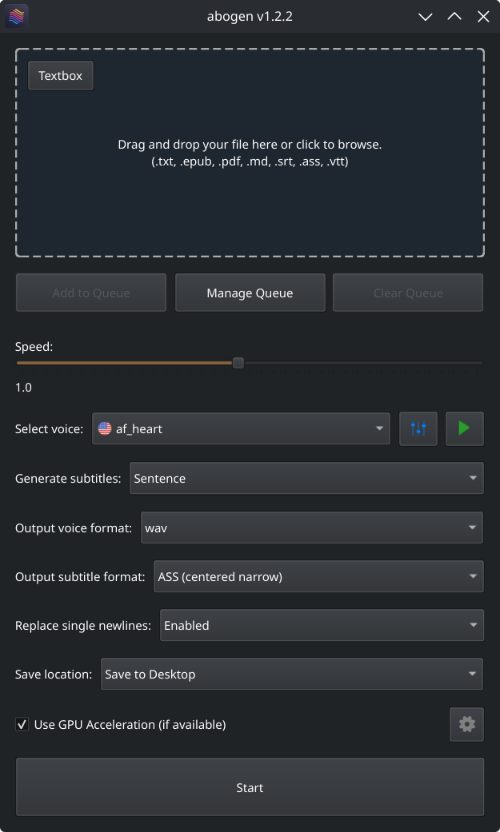
Abogen is an open-source app that converts EPUB, PDF, text, Markdown and subtitle files into audio files, with matching SRT or ASS subtitles. Its desktop app (PyQt6, started with the abogen command) uses the Kokoro-82M voice model, which runs locally on CPU or GPU. A separate web interface (abogen-web, for Docker or headless use) adds a second engine, Supertonic TTS, plus LLM text clean-up, pronunciation overrides and Audiobookshelf upload. It converts files rather than reading aloud live. On Windows a double-click batch script installs it, though espeak-ng must be installed separately. On Mac and Linux it installs from the command line with uv. It is MIT licensed and free.
What users say
Evidence ↓Only one practitioner account was read, a blogger on Windows with an Nvidia GPU. He found the desktop app easy to use, liked voice blending and M4B output with chapters, and reported it about 12x faster on his GPU than on CPU. He found it much faster than a command-line Kokoro tool he could not get onto his GPU. No critical practitioner view was found in the pages read.
Rankings and alternatives
- Local text-to-speech apps #4 of 9 For audiobooks on an ordinary laptop
- ebook2audiobook #1 Best for turning books into audiobooks
- Voicebox #2 For narration and cloned voices on Mac or Windows
- TTS WebUI #3 For trying every new voice model



Local text-to-speech apps scores
Evaluated Nov 16, 2026 Evidence ↓- How natural the voices sound · counts double 4
4/5 means: Natural voices you can listen to for hours, with occasional mispronunciations or glitches
Kokoro-82M is well regarded for natural voices, and the voice mixer adds variety. Small-model glitches and occasional mispronunciations remain, and no long-listening ratings were found, so this rests mostly on the model's reputation.
- Getting it running 3
3/5 means: A graphical or web interface, but installing it means typing commands or adding system tools by hand
Windows has a double-click script that installs Python and CUDA, then a desktop window opens. espeak-ng must still be installed by hand, and Mac and Linux need Homebrew or apt plus uv commands. A 4 on Windows alone.
- Long text and documents 5
5/5 means: Opens ebooks and PDFs, splits them by chapter and saves a chaptered audiobook such as M4B
Opens EPUB, PDF, TXT and Markdown, selects chapters, and saves M4B with chapters or separate files, with a queue and subtitles. It converts to files and does not read aloud live.
- Works without a graphics card 4
4/5 means: Its main voices run faster than playback on an ordinary laptop processor
Kokoro-82M is small and generally runs faster than playback on a laptop CPU, and the plain install runs CPU-only. The README publishes only a GPU figure, and a blogger found the GPU about 12x faster than his CPU, so CPU speed rests on knowledge of the model.
- Windows, Mac and Linux 4
4/5 means: All three with documented installs, but graphics-card acceleration on only some of them
Windows, macOS and Linux all have documented installs. NVIDIA CUDA is documented on Windows and Linux, and AMD ROCm on Linux. Apple Silicon acceleration is not documented.
- Custom and cloned voices 2
2/5 means: Blending preset voices, or training a new voice from a large set of recordings
Voice mixer blends Kokoro's preset voices with weights and saves profiles. No cloning from a sample in the desktop app.
- Languages 3
3/5 means: Around eight to ten major languages
Kokoro's set of American and British English, Spanish, French, Hindi, Italian, Brazilian Portuguese, Japanese and Mandarin, which is about nine languages.
- Free use of the audio 5
5/5 means: Every engine and voice it offers allows commercial use of the audio
The desktop app runs only Kokoro-82M, whose weights are Apache-2.0 with commercial use welcomed per the model card, and the app is MIT. The Kokoro license was supplied by the requester, not read on a page in this run.
Pricing
- Free Free Open source, no paid tier.
Prices checked Nov 16, 2026.
Evidence and sources
What users say
Summary 2 quotes
-
Enter Abogen, which has a nice cross-platform PyQt desktop GUI and is much faster, utilising my GPU rather than CPU only.
mybyways, blogger who installed Abogen v1.1.6 on Windows with an Nvidia GPU · mybyways.com/blog/kokoro-tts-and-abogen-on-windows · published · checked -
Abogen is about 12x fater on my GPU than with just my CPU!
mybyways, blogger who installed Abogen v1.1.6 on Windows with an Nvidia GPU · mybyways.com/blog/kokoro-tts-and-abogen-on-windows · published · checked
Local text-to-speech apps scores
How natural the voices sound 3 quotes
-
Abogen is a powerful text-to-speech conversion tool that makes it easy to turn ePub, PDF, text, markdown, or subtitle files into high-quality audio with matching subtitles in seconds. Use it for audiobooks, voiceovers for Instagram, YouTube, TikTok, or any project that needs natural-sounding text-to-speech, using Kokoro-82M.
github.com/denizsafak/abogen · checked -
With voice mixer, you can create custom voices by mixing different voice models. You can adjust the weight of each voice and save your custom voice as a profile for future use.
github.com/denizsafak/abogen · checked -
Enter Abogen, which has a nice cross-platform PyQt desktop GUI and is much faster, utilising my GPU rather than CPU only.
mybyways, blogger who installed Abogen v1.1.6 on Windows with an Nvidia GPU · mybyways.com/blog/kokoro-tts-and-abogen-on-windows · published · checked
Getting it running 3 quotes
-
This method handles everything automatically - installing all dependencies including CUDA in a self-contained environment without requiring a separate Python installation. (You still need to install espeak-ng.)
github.com/denizsafak/abogen · checked -
For AMD GPUs or without GPU - If you have AMD GPU, you need to use Linux for GPU acceleration, because ROCm is not available on Windows. uv tool install --python 3.12 abogen
github.com/denizsafak/abogen · checked -
Install espeak-ng brew install espeak-ng For Silicon Mac (M1, M2 etc.) uv tool install --python 3.13 abogen --with "kokoro @ git+https://github.com/hexgrad/kokoro.git,numpy<2" For Intel Mac uv tool install --python 3.12 abogen --with "kokoro @ git+https://github.com/hexgrad/kokoro.git,numpy<2"
github.com/denizsafak/abogen · checked
Long text and documents 2 quotes
-
Input Box · Drag and drop ePub, PDF, .TXT, .MD, .SRT, .ASS or .VTT files (or use built-in text editor)
github.com/denizsafak/abogen · checked -
Output voice format · .WAV, .FLAC, .MP3, .OPUS (best compression) and M4B (with chapters)
github.com/denizsafak/abogen · checked
Works without a graphics card 3 quotes
-
For AMD GPUs or without GPU - If you have AMD GPU, you need to use Linux for GPU acceleration, because ROCm is not available on Windows. uv tool install --python 3.12 abogen
github.com/denizsafak/abogen · checked -
Here’s Abogen in action: in this demo, it processes ∼3,000 characters of text in just 11 seconds and turns it into 3 minutes and 28 seconds of audio, and I have a low-end RTX 2060 Mobile laptop GPU. Your results may vary depending on your hardware.
github.com/denizsafak/abogen · checked -
Abogen is about 12x fater on my GPU than with just my CPU!
mybyways, blogger who installed Abogen v1.1.6 on Windows with an Nvidia GPU · mybyways.com/blog/kokoro-tts-and-abogen-on-windows · published · checked
Windows, Mac and Linux 3 quotes
-
This method handles everything automatically - installing all dependencies including CUDA in a self-contained environment without requiring a separate Python installation. (You still need to install espeak-ng.)
github.com/denizsafak/abogen · checked -
For AMD GPUs or without GPU - If you have AMD GPU, you need to use Linux for GPU acceleration, because ROCm is not available on Windows. uv tool install --python 3.12 abogen
github.com/denizsafak/abogen · checked -
Install espeak-ng brew install espeak-ng For Silicon Mac (M1, M2 etc.) uv tool install --python 3.13 abogen --with "kokoro @ git+https://github.com/hexgrad/kokoro.git,numpy<2" For Intel Mac uv tool install --python 3.12 abogen --with "kokoro @ git+https://github.com/hexgrad/kokoro.git,numpy<2"
github.com/denizsafak/abogen · checked
Custom and cloned voices 1 quote
-
With voice mixer, you can create custom voices by mixing different voice models. You can adjust the weight of each voice and save your custom voice as a profile for future use.
github.com/denizsafak/abogen · checked
Languages 1 quote
-
🇺🇸 'a' => American English, 🇬🇧 'b' => British English 🇪🇸 'e' => Spanish es 🇫🇷 'f' => French fr-fr 🇮🇳 'h' => Hindi hi 🇮🇹 'i' => Italian it 🇯🇵 'j' => Japanese: pip install misaki[ja] 🇧🇷 'p' => Brazilian Portuguese pt-br 🇨🇳 'z' => Mandarin Chinese: pip install misaki[zh]
github.com/denizsafak/abogen · checked
Free use of the audio 2 quotes
-
github.com/denizsafak/abogen · checked -
Abogen is a powerful text-to-speech conversion tool that makes it easy to turn ePub, PDF, text, markdown, or subtitle files into high-quality audio with matching subtitles in seconds. Use it for audiobooks, voiceovers for Instagram, YouTube, TikTok, or any project that needs natural-sounding text-to-speech, using Kokoro-82M.
github.com/denizsafak/abogen · checked
Facts
License 2 quotes
-
github.com/denizsafak/abogen · checked -
abogen-1.3.1.tar.gz · 662.1 kB · Feb 6, 2026
pypi.org/project/abogen · checked
Runs on 3 quotes
-
This method handles everything automatically - installing all dependencies including CUDA in a self-contained environment without requiring a separate Python installation. (You still need to install espeak-ng.)
github.com/denizsafak/abogen · checked -
For AMD GPUs or without GPU - If you have AMD GPU, you need to use Linux for GPU acceleration, because ROCm is not available on Windows. uv tool install --python 3.12 abogen
github.com/denizsafak/abogen · checked -
Install espeak-ng brew install espeak-ng For Silicon Mac (M1, M2 etc.) uv tool install --python 3.13 abogen --with "kokoro @ git+https://github.com/hexgrad/kokoro.git,numpy<2" For Intel Mac uv tool install --python 3.12 abogen --with "kokoro @ git+https://github.com/hexgrad/kokoro.git,numpy<2"
github.com/denizsafak/abogen · checked
Needs 3 quotes
-
This method handles everything automatically - installing all dependencies including CUDA in a self-contained environment without requiring a separate Python installation. (You still need to install espeak-ng.)
github.com/denizsafak/abogen · checked -
For AMD GPUs or without GPU - If you have AMD GPU, you need to use Linux for GPU acceleration, because ROCm is not available on Windows. uv tool install --python 3.12 abogen
github.com/denizsafak/abogen · checked -
Install espeak-ng brew install espeak-ng For Silicon Mac (M1, M2 etc.) uv tool install --python 3.13 abogen --with "kokoro @ git+https://github.com/hexgrad/kokoro.git,numpy<2" For Intel Mac uv tool install --python 3.12 abogen --with "kokoro @ git+https://github.com/hexgrad/kokoro.git,numpy<2"
github.com/denizsafak/abogen · checked
More from the sources
Features 5 quotes
-
Speed · Adjust speech rate from 0.1x to 2.0x
github.com/denizsafak/abogen · checked -
Abogen offers two interfaces, but currently they have different feature sets. The Web UI contains newer features that are still being integrated into the desktop application.
github.com/denizsafak/abogen · checked -
abogen-web · Flask Web UI · Core features + Supertonic TTS, LLM Normalization, Audiobookshelf Integration and more!
github.com/denizsafak/abogen · checked -
Pre-download models and voices for offline use · Opens a window that displays the available models and voices. Click Download all button to download all required models and voices, allowing you to use Abogen completely offline without any internet connection.
github.com/denizsafak/abogen · checked -
Added Supertonic TTS engine support with GPU acceleration. Added entity analysis and pronunciation override system for proper nouns. Added speaker/role assignment for multi-voice "theatrical" audiobooks.
github.com/denizsafak/abogen/releases · checked
Limits and known issues 2 quotes
-
Abogen supports subtitle generation for all languages. However, word-level subtitle modes (e.g., "1 word", "2 words", "3 words", etc.) are only available for English because [Kokoro provides timestamp tokens only for English text]
github.com/denizsafak/abogen · checked -
Add OCR scan feature for PDF files using docling/teserract.
github.com/denizsafak/abogen · checked
How widely it is used 1 quote
-
"stargazers_count": 6234
api.github.com/repos/denizsafak/abogen · checked
Pricing
github.com/denizsafak/abogen · checked