
ebook2audiobook
Free open-source ebook-to-audiobook converter with a local web interface, many selectable TTS engines and optional voice cloning.
Our verdict
#1 of 9 in Local text-to-speech apps · Best for turning books into audiobooks
What it does
- Opens EPUB, MOBI, PDF, DOCX, HTML and more, with chapter detection
- Saves M4B audiobooks with chapters, plus MP3, FLAC, WAV and others
- Dozens of engines, including XTTS v2, Piper, Kokoro, Chatterbox and Qwen3-TTS
- Voice cloning from your own sample, and resumable conversions
Pros
- The most complete path from an ebook to an audiobook on your own computer
- Huge language coverage
- Launcher scripts install the missing tools for you
Cons
- The most natural engines are very slow without a graphics card
- XTTS v2 output can't be used commercially
- Engines download on first use and take gigabytes of disk
- Skip if:
- You want text read aloud as you listen rather than converted to files first.
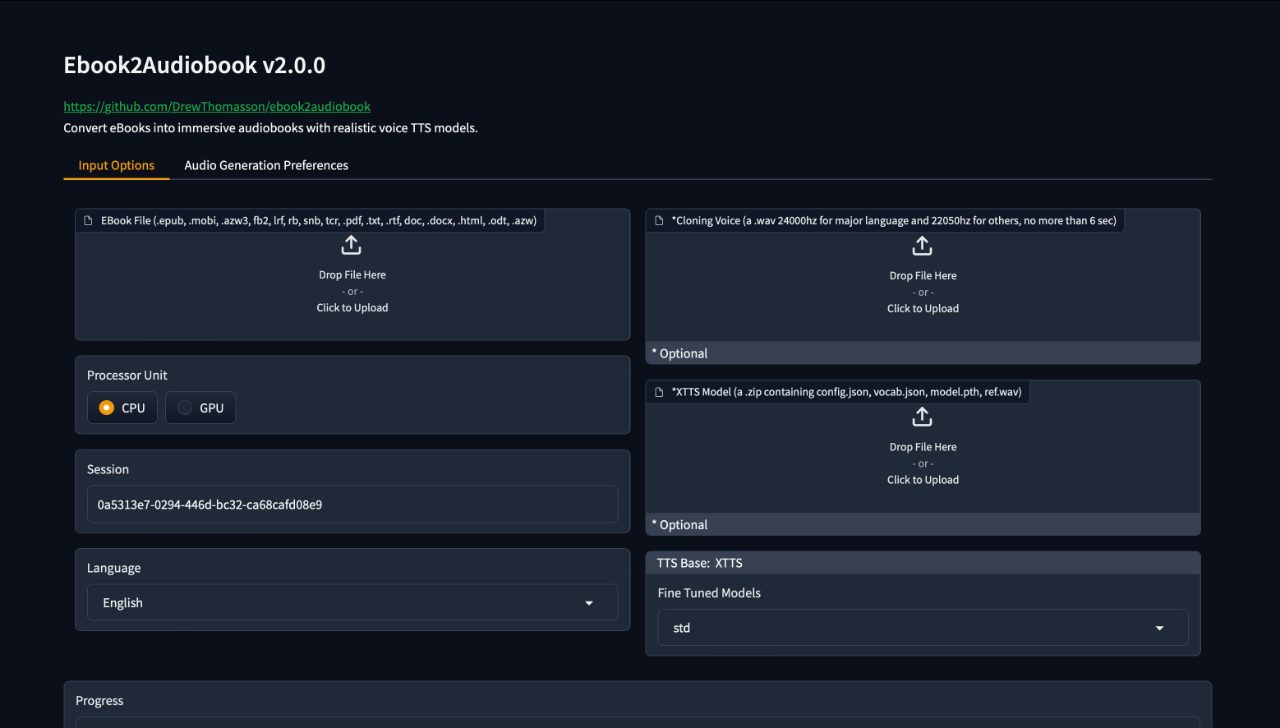
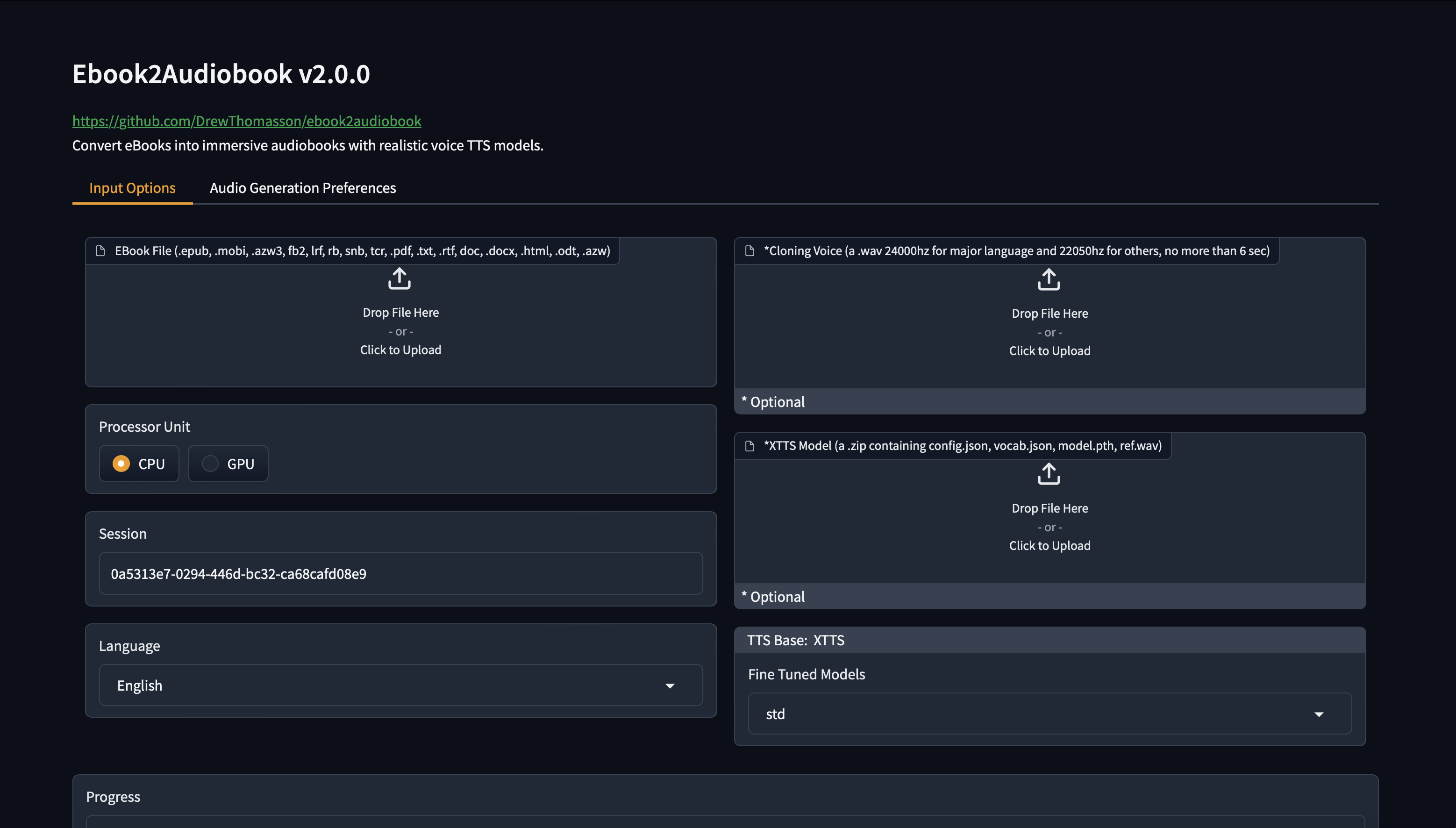
ebook2audiobook (E2A) is an open-source Python app that turns ebooks and documents (EPUB, PDF, MOBI, DOCX and many more, with OCR for scanned pages) into audiobooks with chapters and metadata, saved as M4B by default or MP3, FLAC, WAV and others. You run it on your own computer through a launcher script (ebook2audiobook.cmd on Windows, ebook2audiobook.command on macOS and Linux), pip, or a Docker image, and use it in a Gradio web page at localhost:7860. It is a front end over many speech engines (the README lists XTTSv2, Piper, Bark, Fairseq/MMS, VITS, Tacotron2, YourTTS, Kokoro, Chatterbox and dozens more), with the default engine chosen by language. Some engines clone a voice from a sample file. It converts files rather than reading aloud live. The app is Apache-2.0; each engine has its own licence and limits.
What users say
Evidence ↓Only two third-party write-ups were read, so this is a thin sample. A GIGAZINE reviewer found the voice natural overall in a Japanese EPUB converted on CPU, but noted slightly unnatural transitions between text chunks and mispronounced loanwords and numerals. A blog write-up warns that CPU-only conversion with the heaviest engines can take many times the book's length, that cloning quality varies with the sample, and that EPUBs often need manual text cleanup.
Rankings and alternatives

Local text-to-speech apps scores
Evaluated Nov 16, 2026 Evidence ↓- How natural the voices sound · counts double 5
5/5 means: Near-human, expressive delivery from the most natural open speech models available
Writer's calibration: its engine list includes the most natural open models (Chatterbox and Qwen3-TTS) alongside XTTS v2 and Kokoro. A reviewer found the default voice natural overall, with odd accents at chunk transitions and mispronounced loanwords and numerals; Fairseq/MMS voices for rare languages are much less natural.
- Getting it running 4
4/5 means: A launcher script or package manager sets up everything it needs, then a graphical or web interface opens
A launcher script (.cmd or .command) installs missing programs (scoop or homebrew) and Python dependencies, then opens a web UI. A git clone or pip step is still needed first, and models download on first use, so it is not a one-click installer.
- Long text and documents 5
5/5 means: Opens ebooks and PDFs, splits them by chapter and saves a chaptered audiobook such as M4B
Opens EPUB, PDF, MOBI and many other formats, detects chapters (best with EPUB or MOBI), and saves a chaptered M4B by default. It resumes sessions and has OCR. It only converts files and does not read aloud live, which the scale does not require.
- Works without a graphics card 3
3/5 means: Offers a fast voice engine for the processor, but its best voices need a graphics card or an Apple Silicon Mac to be practical
Writer's calibration: it offers engines that are fast on a processor (Piper, Kokoro, Tacotron2, YourTTS), but its best voices, such as XTTS v2 and the newest engines, are far slower than playback without a graphics card, per one reviewer and one blog estimate.
- Windows, Mac and Linux 4
4/5 means: All three with documented installs, but graphics-card acceleration on only some of them
Documented launchers for Windows, macOS and Linux, including ARM and Apple Silicon (MPS). CUDA and ROCm are documented, but Docker on a Mac cannot use MPS, and NVIDIA acceleration is only documented generally rather than per OS.
- Custom and cloned voices 5
5/5 means: As 4, plus fine-tuning on your own recordings or a saved library of cloned voices across several engines
Clones a voice from a short sample file in XTTS v2 and several other engines, offers fine-tuned preset models and custom model zips, and keeps a library of voices. Cloning quality varies with the sample, and not every engine supports it.
- Languages 5
5/5 means: Dozens of languages or more
The README claims 1696 languages, with the breadth supplied by Fairseq/MMS. Neural voices in about 28 main languages come from engines such as XTTS v2. The rare-language voices are lower in quality.
- Free use of the audio 2
2/5 means: The main or default engine is non-commercial, though some other engines it offers allow commercial use
The app is Apache-2.0, but its main engine XTTS v2 has non-commercial weights (Coqui Public Model License, from background knowledge). Fairseq/MMS is also non-commercial (CC-BY-NC), and engines such as Piper, Kokoro and others have varied licences that must be checked one by one. Some offered engines allow commercial use. Engine licences were not read in this research.
Pricing
- Free Free No paid tier. Open source; engine models download on first use and can take gigabytes (several TB for a full preload).
Prices checked Nov 16, 2026.
Evidence and sources
What users say
Summary 5 quotes
-
Overall, the voice sounds natural.
log1c_sh, reviewer at GIGAZINE · gigazine.net/gsc_news/en/20260516-ebook2audiobook · published · checked -
Because the text is divided into smaller parts for speech synthesis, the transitions between sections have a slightly unnatural accent.
log1c_sh, reviewer at GIGAZINE · gigazine.net/gsc_news/en/20260516-ebook2audiobook · published · checked -
Processing time is another reality check. On CPU-only systems, XTTSv2 processes text at roughly 0.1-0.2x real-time—meaning a 10-hour audiobook takes 50-100 hours to generate.
Rob Ragan, author at Starlog (offensive security researcher) · starlog.pages.dev/articles/infrastructure/drewthomasson-ebook2audiobook · published · checked -
Voice cloning quality varies wildly based on source material.
Rob Ragan, author at Starlog (offensive security researcher) · starlog.pages.dev/articles/infrastructure/drewthomasson-ebook2audiobook · published · checked -
EPUB format lacks any standard structure like what is a chapter, paragraph, preface etc. So you should first remove manually any text you don't want to be converted in audio.
github.com/DrewThomasson/ebook2audiobook · checked
Local text-to-speech apps scores
How natural the voices sound 4 quotes
-
Overall, the voice sounds natural.
log1c_sh, reviewer at GIGAZINE · gigazine.net/gsc_news/en/20260516-ebook2audiobook · published · checked -
Because the text is divided into smaller parts for speech synthesis, the transitions between sections have a slightly unnatural accent.
log1c_sh, reviewer at GIGAZINE · gigazine.net/gsc_news/en/20260516-ebook2audiobook · published · checked -
Voice cloning quality varies wildly based on source material.
Rob Ragan, author at Starlog (offensive security researcher) · starlog.pages.dev/articles/infrastructure/drewthomasson-ebook2audiobook · published · checked -
TTS Engines supported: XTTSv2, Bark, Fairseq, VITS, Tacotron2, Tortoise, GlowTTS, YourTTS, Piper, Zonos, GPT-SoVITS, OmniVoice, Breeze TTS, Chatterbox, Confucius4 TTS, CosyVoice3, Dots TTS, DramaBox, FireRed Audio, FireRedTTS3, Fish Audio, Higgs Audio TTS, Index TTS2, Irodori TTS, Kokoro TTS, KugelAudio, Magpie TTS, Maya1, MioTTS, Moss TTS Local, Moss TTS Nano, NeuTTS, Pocket TTS, Qwen3 TTS, Supertonic, VibeVoice, VoxCPM2, Voxtral TTS, F5-TTS, Orpheus-TTS, ChatTTS, Spark-TTS, OpenVoice, MeloTTS, ZipVoice (LuxTTS)
github.com/DrewThomasson/ebook2audiobook · checked
Getting it running 4 quotes
-
Windows ebook2audiobook.cmd or Double click ebook2audiobook.cmd Note for Windows users: scoop is installed to install missing programs without administrator privileges.
github.com/DrewThomasson/ebook2audiobook · checked -
Install the command from PyPI pipx install ebook2audiobook
github.com/DrewThomasson/ebook2audiobook · checked -
preload_models to load a maximum of models and be free to convert offline (warning depending your language it can take several TB)
github.com/DrewThomasson/ebook2audiobook/releases · checked -
Overall, the voice sounds natural.
log1c_sh, reviewer at GIGAZINE · gigazine.net/gsc_news/en/20260516-ebook2audiobook · published · checked
Long text and documents 4 quotes
-
Audiobook output formats: mono or stereo aac, flac, mp3, m4b, m4a, mp4, mov, ogg, wav, webm
github.com/DrewThomasson/ebook2audiobook · checked -
Best results: .epub or .mobi for automatic chapter detection
github.com/DrewThomasson/ebook2audiobook · checked -
EPUB format lacks any standard structure like what is a chapter, paragraph, preface etc. So you should first remove manually any text you don't want to be converted in audio.
github.com/DrewThomasson/ebook2audiobook · checked -
--session SESSION Session to resume the conversion in case of interruption, crash, or reuse of custom models and custom cloning voices.
github.com/DrewThomasson/ebook2audiobook · checked
Works without a graphics card 4 quotes
-
Note that the latest TTS engines are extremely slow when run on a CPU, so if speed is a concern, you should use lower-quality TTS engines such as YourTTS or Tacotron2.
log1c_sh, reviewer at GIGAZINE · gigazine.net/gsc_news/en/20260516-ebook2audiobook · published · checked -
Processing time is another reality check. On CPU-only systems, XTTSv2 processes text at roughly 0.1-0.2x real-time—meaning a 10-hour audiobook takes 50-100 hours to generate.
Rob Ragan, author at Starlog (offensive security researcher) · starlog.pages.dev/articles/infrastructure/drewthomasson-ebook2audiobook · published · checked -
2GB RAM min, 8GB recommended. - 1GB VRAM min, 4GB recommended. - Virtualization enabled if running on windows (Docker only). - CPU, XPU (intel, AMD, ARM)*. - CUDA, ROCm, JETSON - MPS (Apple Silicon CPU)
github.com/DrewThomasson/ebook2audiobook · checked -
TTS Engines supported: XTTSv2, Bark, Fairseq, VITS, Tacotron2, Tortoise, GlowTTS, YourTTS, Piper, Zonos, GPT-SoVITS, OmniVoice, Breeze TTS, Chatterbox, Confucius4 TTS, CosyVoice3, Dots TTS, DramaBox, FireRed Audio, FireRedTTS3, Fish Audio, Higgs Audio TTS, Index TTS2, Irodori TTS, Kokoro TTS, KugelAudio, Magpie TTS, Maya1, MioTTS, Moss TTS Local, Moss TTS Nano, NeuTTS, Pocket TTS, Qwen3 TTS, Supertonic, VibeVoice, VoxCPM2, Voxtral TTS, F5-TTS, Orpheus-TTS, ChatTTS, Spark-TTS, OpenVoice, MeloTTS, ZipVoice (LuxTTS)
github.com/DrewThomasson/ebook2audiobook · checked
Windows, Mac and Linux 3 quotes
-
2GB RAM min, 8GB recommended. - 1GB VRAM min, 4GB recommended. - Virtualization enabled if running on windows (Docker only). - CPU, XPU (intel, AMD, ARM)*. - CUDA, ROCm, JETSON - MPS (Apple Silicon CPU)
github.com/DrewThomasson/ebook2audiobook · checked -
Windows ebook2audiobook.cmd or Double click ebook2audiobook.cmd Note for Windows users: scoop is installed to install missing programs without administrator privileges.
github.com/DrewThomasson/ebook2audiobook · checked -
Install the command from PyPI pipx install ebook2audiobook
github.com/DrewThomasson/ebook2audiobook · checked
Custom and cloned voices 3 quotes
-
Optional voice cloning using your own voice file
github.com/DrewThomasson/ebook2audiobook · checked -
Voice cloning quality varies wildly based on source material.
Rob Ragan, author at Starlog (offensive security researcher) · starlog.pages.dev/articles/infrastructure/drewthomasson-ebook2audiobook · published · checked -
TTS Engines supported: XTTSv2, Bark, Fairseq, VITS, Tacotron2, Tortoise, GlowTTS, YourTTS, Piper, Zonos, GPT-SoVITS, OmniVoice, Breeze TTS, Chatterbox, Confucius4 TTS, CosyVoice3, Dots TTS, DramaBox, FireRed Audio, FireRedTTS3, Fish Audio, Higgs Audio TTS, Index TTS2, Irodori TTS, Kokoro TTS, KugelAudio, Magpie TTS, Maya1, MioTTS, Moss TTS Local, Moss TTS Nano, NeuTTS, Pocket TTS, Qwen3 TTS, Supertonic, VibeVoice, VoxCPM2, Voxtral TTS, F5-TTS, Orpheus-TTS, ChatTTS, Spark-TTS, OpenVoice, MeloTTS, ZipVoice (LuxTTS)
github.com/DrewThomasson/ebook2audiobook · checked
Languages 1 quote
-
Supports voice cloning and 1696 languages!
github.com/DrewThomasson/ebook2audiobook · checked
Free use of the audio 2 quotes
-
Apache License Version 2.0, January 2004
raw.githubusercontent.com/DrewThomasson/ebook2audiobook/main/LICENSE · checked -
TTS Engines supported: XTTSv2, Bark, Fairseq, VITS, Tacotron2, Tortoise, GlowTTS, YourTTS, Piper, Zonos, GPT-SoVITS, OmniVoice, Breeze TTS, Chatterbox, Confucius4 TTS, CosyVoice3, Dots TTS, DramaBox, FireRed Audio, FireRedTTS3, Fish Audio, Higgs Audio TTS, Index TTS2, Irodori TTS, Kokoro TTS, KugelAudio, Magpie TTS, Maya1, MioTTS, Moss TTS Local, Moss TTS Nano, NeuTTS, Pocket TTS, Qwen3 TTS, Supertonic, VibeVoice, VoxCPM2, Voxtral TTS, F5-TTS, Orpheus-TTS, ChatTTS, Spark-TTS, OpenVoice, MeloTTS, ZipVoice (LuxTTS)
github.com/DrewThomasson/ebook2audiobook · checked
Facts
License 1 quote
-
Apache License Version 2.0, January 2004
raw.githubusercontent.com/DrewThomasson/ebook2audiobook/main/LICENSE · checked
Runs on 3 quotes
-
Windows ebook2audiobook.cmd or Double click ebook2audiobook.cmd Note for Windows users: scoop is installed to install missing programs without administrator privileges.
github.com/DrewThomasson/ebook2audiobook · checked -
Install the command from PyPI pipx install ebook2audiobook
github.com/DrewThomasson/ebook2audiobook · checked -
2GB RAM min, 8GB recommended. - 1GB VRAM min, 4GB recommended. - Virtualization enabled if running on windows (Docker only). - CPU, XPU (intel, AMD, ARM)*. - CUDA, ROCm, JETSON - MPS (Apple Silicon CPU)
github.com/DrewThomasson/ebook2audiobook · checked
Needs 2 quotes
-
Low-resource friendly — runs on 2 GB RAM / 1 GB VRAM (minimum)
github.com/DrewThomasson/ebook2audiobook · checked -
2GB RAM min, 8GB recommended. - 1GB VRAM min, 4GB recommended. - Virtualization enabled if running on windows (Docker only). - CPU, XPU (intel, AMD, ARM)*. - CUDA, ROCm, JETSON - MPS (Apple Silicon CPU)
github.com/DrewThomasson/ebook2audiobook · checked
More from the sources
Features 3 quotes
-
Default depends on the selected language. The tts engine should be compatible with the chosen language
github.com/DrewThomasson/ebook2audiobook · checked -
[pause:N] — fixed pause (N sec.)
github.com/DrewThomasson/ebook2audiobook · checked -
Added 38 new TTS engines!
github.com/DrewThomasson/ebook2audiobook/releases · checked
Limits and known issues 1 quote
-
--tts_engine {XTTS,BARK,VITS,FAIRSEQ,TACOTRON,YOURTTS,xtts,bark,vits,fairseq,tacotron,yourtts}
github.com/DrewThomasson/ebook2audiobook · checked
How widely it is used 1 quote
-
Star20.6k (20.6k)
github.com/DrewThomasson/ebook2audiobook · checked
Pricing
github.com/DrewThomasson/ebook2audiobook · checked