Apple Mail
The Mail app built into macOS, with Apple Intelligence features, categories and iPhone companion
Our verdict
#1 of 10 in Mac email clients · Best for most Mac users
What it does
- Snooze (Remind Me), scheduled sending and reply reminders for every account
- Automatic categories for receipts, updates and promotions
- Mail Privacy Protection, which hides your IP address and when you open a message
- Apple Intelligence summaries, replies and plain-language search on supported Macs
Pros
- Free and already installed
- No third party between you and your mail
- The same app on iPhone and iPad
Cons
- Gmail labels behave like folders
- No calendar inside the app
- Little for keyboard-driven or automated workflows
- Skip if:
- All your mail is Gmail and you want it to behave exactly like Gmail
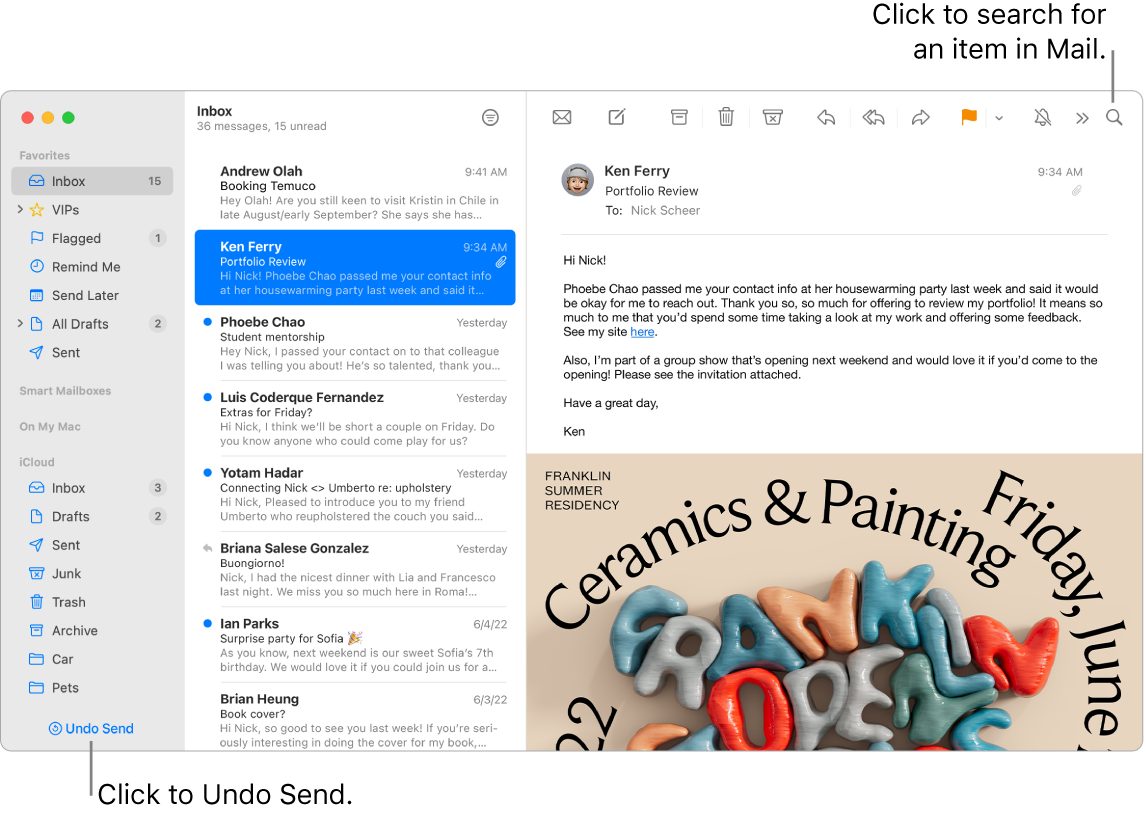
Apple Mail is the email app that comes with macOS (the current release is macOS 27 Golden Gate), with a companion Mail app on iPhone and iPad. It is proprietary and free with the operating system. Mail on macOS 27 sorts messages into Primary, Transactions, Updates and Promotions categories, suggests actions such as adding a calendar event, and offers Apple Intelligence writing help on supported Macs and languages. Apple says macOS 27 adds a new ranking system for Mail search.
What users say
Evidence ↓The evidence collected is thin and dated. In a 2024 MacRumors thread, forum members criticized Mail as under-developed and barely updated, one blaming the loss of plug-in support, and said Mac and iPad lagged iPhone when categories arrived. Others said categories can be switched back to a list. Each view comes from one or two posters, so how widely they are shared is unknown.
Rankings and alternatives
- Mac email clients #1 of 10 Best for most Mac users
- Spark Mail by Readdle #2 Smarter inbox, free on every device
- Superhuman Mail #3 For people who live in email
- eM Client #4 Pay once, strong with Exchange


Mac email clients scores
Evaluated Nov 17, 2026 Evidence ↓- Fast and pleasant every day · counts double 4
4/5 means: Fast, clean and dependable, with only minor complaints
Built into macOS, light, native and dependable for most people, with mail categories and a reworked search ranking in recent releases. Long-running complaints about weak search and slow development, plus Gmail's labels showing up as folders, keep it from the top level.
- Works with all your accounts 4
4/5 means: Gmail, iCloud, Microsoft 365 and IMAP in a combined inbox, with a known weak spot for one of them
Adds iCloud, Gmail, Microsoft Exchange and Microsoft 365, Yahoo and any IMAP account and shows them in one combined inbox. Gmail works over IMAP, so labels appear as folders and archiving behaves differently from Gmail on the web; that is its known weak spot.
- Tools for getting through the inbox 4
4/5 means: Four of the five
Remind Me (its snooze), Send Later, Follow Up suggestions for sent mail with no reply, and automatic categories (Primary, Transactions, Updates, Promotions). It has no screening of mail from new senders.
- Same app on your iPhone 4
4/5 means: A full iPhone app, but accounts or settings are set up separately on each device
Mail on iPhone and iPad has the same Remind Me, Send Later and categories, and VIPs sync over iCloud, but accounts, signatures and Mac rules are set up on each device.
- Mail stays between you and your provider 5
5/5 means: Direct between your devices and your provider, tracking pixels blocked, and any AI runs on the device or in a private cloud with published guarantees
Connects straight to your provider, Mail Privacy Protection loads remote content privately so tracking pixels can't see when or where you opened a message, and Apple Intelligence runs on the Mac or on Apple's Private Cloud Compute, which Apple publishes guarantees for.
- Cost over three years 5
5/5 means: Free, with no ads and nothing most personal users need held back
Comes free with every Mac, with no ads or paid tier.
- Calendar built in · counts half 2
2/5 means: Answers invitations or adds events, but the calendar lives in another app
Invitations and suggested events go to the separate Calendar app; Mail has no calendar view of its own.
- Keyboard and automation · counts half 3
3/5 means: Shortcuts for most actions, plus some automation or a command palette
Covers most actions with shortcuts and adds rules, smart mailboxes, AppleScript and Shortcuts, but it isn't built around the keyboard and old-style plug-ins are gone.
- AI help · counts half 5
5/5 means: All of 4 plus replies drafted for you in your own style
On Macs that support Apple Intelligence, Mail sorts mail into categories, summarizes threads, suggests replies, finds mail when you ask in plain language and, in macOS 27, writes in your own style. Needs an Apple Intelligence Mac and a supported language.
Pricing
- Apple Mail Free Included with macOS at no extra charge. Apple Intelligence features need a supported Mac and language.
Prices checked Nov 17, 2026.
Evidence and sources
What users say
Summary 2 quotes
-
Mail is one of the most under-developed apps Apple has ever released, and subsequently barely touched. And what they have done has actually hurt usability (such as removing the ability to use most all extensions/plug-ins). Leaving it out of the macOS upgrade is just infuriating to me.
MacGizmo, MacRumors forum member · forums.macrumors.com/threads/ios-18-2-mail-sorting-features-strangely-absent-on-ipad-and-mac.2445210/page-5 · published · checked -
This feature was smartly implemented in iOS - accurate and well designed - and I was looking forward to seeing it in iPadOS as well, but alas... What a big disappointment. I now also have two completely different unread mail counts across my devices, which is frustrating.
Onetwodrew, MacRumors forum member · forums.macrumors.com/threads/ios-18-2-mail-sorting-features-strangely-absent-on-ipad-and-mac.2445210/page-5 · published · checked
Mac email clients scores
Fast and pleasant every day 3 quotes
-
A new ranking system brings the most relevant results to the top to help you find what you need right away — even if it’s buried deep in your inbox.
apple.com/os/macos · checked -
Mail automatically sorts your messages into categories—Primary, Transactions, Updates, and Promotions.
support.apple.com/guide/mail/mlhlb072c8be/mac · checked -
Mail is one of the most under-developed apps Apple has ever released, and subsequently barely touched. And what they have done has actually hurt usability (such as removing the ability to use most all extensions/plug-ins). Leaving it out of the macOS upgrade is just infuriating to me.
MacGizmo, MacRumors forum member · forums.macrumors.com/threads/ios-18-2-mail-sorting-features-strangely-absent-on-ipad-and-mac.2445210/page-5 · published · checked
Tools for getting through the inbox 1 quote
-
Mail automatically sorts your messages into categories—Primary, Transactions, Updates, and Promotions.
support.apple.com/guide/mail/mlhlb072c8be/mac · checked
Same app on your iPhone 1 quote
-
This feature was smartly implemented in iOS - accurate and well designed - and I was looking forward to seeing it in iPadOS as well, but alas... What a big disappointment. I now also have two completely different unread mail counts across my devices, which is frustrating.
Onetwodrew, MacRumors forum member · forums.macrumors.com/threads/ios-18-2-mail-sorting-features-strangely-absent-on-ipad-and-mac.2445210/page-5 · published · checked
Calendar built in 1 quote
-
Messages and Mail offer suggestions to help you take quick actions based on context from your conversation — add a calendar event or search for a photo with just a click. Available in English.
apple.com/os/macos · checked
Keyboard and automation 1 quote
-
Mail is one of the most under-developed apps Apple has ever released, and subsequently barely touched. And what they have done has actually hurt usability (such as removing the ability to use most all extensions/plug-ins). Leaving it out of the macOS upgrade is just infuriating to me.
MacGizmo, MacRumors forum member · forums.macrumors.com/threads/ios-18-2-mail-sorting-features-strangely-absent-on-ipad-and-mac.2445210/page-5 · published · checked
AI help 4 quotes
-
And in Messages and Mail, Siri AI can match your writing style, punctuation, and tone — so you sound like you.
apple.com/os/macos · checked -
Siri AI can find relevant answers to what you’re looking for just by asking. Search for a photo from years ago, easily locate an email buried in your inbox, or pull up a note you saved on your Mac.
apple.com/os/macos · checked -
Mail automatically sorts your messages into categories—Primary, Transactions, Updates, and Promotions.
support.apple.com/guide/mail/mlhlb072c8be/mac · checked -
requires an Apple Intelligence–enabled device set to a supported language
support.apple.com/guide/mail/welcome/mac · checked
Facts
License 1 quote
-
Mail automatically sorts your messages into categories—Primary, Transactions, Updates, and Promotions.
support.apple.com/guide/mail/mlhlb072c8be/mac · checked
Runs on 2 quotes
-
Mail automatically sorts your messages into categories—Primary, Transactions, Updates, and Promotions.
support.apple.com/guide/mail/mlhlb072c8be/mac · checked -
This feature was smartly implemented in iOS - accurate and well designed - and I was looking forward to seeing it in iPadOS as well, but alas... What a big disappointment. I now also have two completely different unread mail counts across my devices, which is frustrating.
Onetwodrew, MacRumors forum member · forums.macrumors.com/threads/ios-18-2-mail-sorting-features-strangely-absent-on-ipad-and-mac.2445210/page-5 · published · checked
Needs 1 quote
-
requires an Apple Intelligence–enabled device set to a supported language
support.apple.com/guide/mail/welcome/mac · checked
Pricing
apple.com/os/macos · checked