Spark Mail by Readdle
Free Mac email client with a unified Smart Inbox for iCloud, Gmail and Outlook accounts, plus paid AI and team plans
Our verdict
#2 of 10 in Mac email clients · Smarter inbox, free on every device
What it does
- Smart Inbox that separates people from newsletters and notifications
- Snooze, Send Later and reminders on the free plan
- Built-in calendar
- Gatekeeper screening of new senders on paid plans
Pros
- Generous free plan with unlimited accounts
- Mail and calendar in one app
- Accounts and settings follow you to iPhone, Android and Windows
Cons
- Readdle's servers hold a login token for every account
- Gatekeeper and most AI need the $99-a-year plan
- Occasional sync bugs with Microsoft 365 accounts
- Choose if:
- You also use an Android phone or a Windows PC
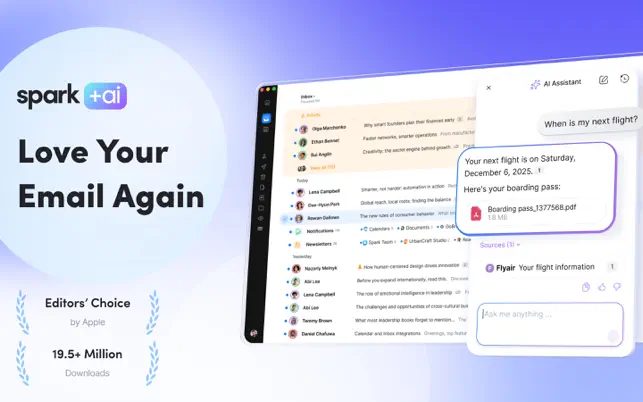
Spark Mail is Readdle’s email client for Mac, with companion apps for iPhone and iPad, Windows and Android. It connects Gmail, Microsoft 365 and Outlook, iCloud, Yahoo, AOL, GMX and other IMAP accounts into one unified inbox with a Smart Inbox that groups newsletters and notifications, Gatekeeper screening of new senders, snooze, send later, reminders, Set Aside and a built-in calendar. The app is free to download with unlimited accounts. The paid Plus and Pro plans add the optional Spark +AI writing and assistant features, which run on third-party AI providers in the cloud, along with team features such as shared inboxes. It is proprietary software. Readdle’s privacy policy says login credentials are stored as a token on its systems and that features such as send later are processed on its servers.
What users say
Evidence ↓The few practitioner views found are Mac App Store reviews, one review each, so they show individual experiences rather than a consensus. One reviewer calls the Mac app paired with the iOS app "sublime" and values its reminders and multiple accounts. Another says account setup carried over from older Spark installs on the Mac and iOS apps. A critical reviewer says its AI writing is behind competitors and finds the full AI set expensive at $20 a month. Readdle's own release notes show frequent fixes for Outlook and Microsoft 365 sync and for slowdowns with many accounts.
Rankings and alternatives
- Mac email clients #2 of 10 Smarter inbox, free on every device
- Apple Mail #1 Best for most Mac users
- Superhuman Mail #3 For people who live in email
- eM Client #4 Pay once, strong with Exchange


Mac email clients scores
Evaluated Nov 17, 2026 Evidence ↓- Fast and pleasant every day · counts double 4
4/5 means: Fast, clean and dependable, with only minor complaints
The most widely recommended third-party Mac email app among users, praised for a clean, quick inbox and for working well alongside the iPhone app. Release notes show recurring fixes for Microsoft 365 sync and slowdowns with many accounts, so it isn't at the top level.
- Works with all your accounts 4
4/5 means: Gmail, iCloud, Microsoft 365 and IMAP in a combined inbox, with a known weak spot for one of them
Gmail, Outlook and Microsoft 365, iCloud, Yahoo and IMAP accounts in one unified inbox, with unlimited accounts on the free plan. Microsoft 365 accounts have needed repeated sync fixes.
- Tools for getting through the inbox 4
4/5 means: Four of the five
The free plan has snooze, scheduled sending, reminders and the Smart Inbox that sorts people from newsletters and notifications. Gatekeeper, which screens new senders, is listed with the paid plans' features.
- Same app on your iPhone 5
5/5 means: A full iPhone app, with accounts and settings carried over between Mac and iPhone
Full apps for iPhone and iPad, and signing in with your Spark account brings your email accounts and settings along to each device.
- Mail stays between you and your provider 2
2/5 means: The app maker's servers hold your login or process your mail for everyday features by default
Readdle stores a token for each connected account on its servers to power push notifications and Send Later, and keeps recent emails on its systems for four hours; cloud AI is off by default.
- Cost over three years 4
4/5 means: Free with ads or limits, or under $80
The free plan covers unlimited accounts, the Smart Inbox, snooze, Send Later and the calendar, but holds back Gatekeeper, templates and most AI. Plus costs $99 a year.
- Calendar built in · counts half 4
4/5 means: A built-in calendar for Google, Microsoft and iCloud accounts
A built-in calendar on the free plan that connects calendars from the same providers as your mail.
- Keyboard and automation · counts half 3
3/5 means: Shortcuts for most actions, plus some automation or a command palette
Shortcuts for most actions and a command palette, but no scripting and limited customization.
- AI help · counts half 2
2/5 means: One small AI feature, such as AI sorting or writing help, or a small trial allowance
The free plan gets only a limited preview of the AI assistant; Spark +AI writing, summaries and drafts come with Plus or Pro.
Pricing
- Free Free Smart Inbox, unlimited email accounts, smart notifications, essential email productivity (snooze, send later, reminders, Set Aside) and calendar. AI Assistant is a limited preview only, with 5 lifetime meeting notes.
- Plus $99.00 /year per seat Billed $99 per year (about $8.25 per month), or $10 per month billed monthly ($120 per year). Adds Priority, Gatekeeper, templates, integrations, Spark +AI with monthly credits, AI Assistant with 1 year of history and 40 AI meeting notes per month. 7-day free trial.
- Pro $199.00 /year per seat Billed $199 per year (about $16.58 per month), or $20 per month billed monthly. Adds higher AI credits, unlimited meeting notes, Autopilot, Auto-Drafts, read statuses, advanced team collaboration, HubSpot integration and Spark CLI triage access. 7-day free trial.
- Enterprise Contact sales Contact sales. Adds security controls, a dedicated success manager and coaching.
Prices checked Nov 17, 2026.
Evidence and sources
What users say
Summary 4 quotes
-
This paired with the iOS app is simply sublime
ArchLT Bailey, Mac App Store reviewer · apps.apple.com/us/app/spark-mail-ai-email-inbox/id6445813049 · published · checked -
Spark Mail has genuinely made some improvements lately. The AI features are now using newer models, so the writing more closely reflects my personal writing style, but it is still behind the competition.
Sacariah, Mac App Store reviewer · apps.apple.com/us/app/spark-mail-ai-email-inbox/id6445813049 · published · checked -
I was particularly pleased that when I downloaded the most recent version of Spark’s email clients for iOS and MacOS they were able to pull all of the configuration details of my email accounts from my old installations of Spark - making the conversion back to it easy as pie!
ORTNPalms, Mac App Store reviewer · apps.apple.com/us/app/spark-mail-ai-email-inbox/id6445813049 · published · checked -
Fixed an issue where Spark could freeze on Mac when snoozed emails returned to large Outlook and Microsoft 365 accounts.
apps.apple.com/us/app/spark-mail-ai-email-inbox/id6445813049 · checked
Mac email clients scores
Fast and pleasant every day 3 quotes
-
This paired with the iOS app is simply sublime
ArchLT Bailey, Mac App Store reviewer · apps.apple.com/us/app/spark-mail-ai-email-inbox/id6445813049 · published · checked -
I was particularly pleased that when I downloaded the most recent version of Spark’s email clients for iOS and MacOS they were able to pull all of the configuration details of my email accounts from my old installations of Spark - making the conversion back to it easy as pie!
ORTNPalms, Mac App Store reviewer · apps.apple.com/us/app/spark-mail-ai-email-inbox/id6445813049 · published · checked -
Fixed an issue where Spark could freeze on Mac when snoozed emails returned to large Outlook and Microsoft 365 accounts.
apps.apple.com/us/app/spark-mail-ai-email-inbox/id6445813049 · checked
Works with all your accounts 3 quotes
-
Free plan includes - Smart Inbox - Unlimited Email Accounts - Smart Notifications - Essential Email Productivity - Calendar
sparkmailapp.com/pricing · checked -
Connect all your emails — including Gmail, Microsoft Outlook, AOL, Yahoo, Hotmail, IMAP, GMX, and iCloud — in one unified inbox.
apps.apple.com/us/app/spark-mail-ai-email-inbox/id6445813049 · checked -
Fixed an issue where Spark could freeze on Mac when snoozed emails returned to large Outlook and Microsoft 365 accounts.
apps.apple.com/us/app/spark-mail-ai-email-inbox/id6445813049 · checked
Tools for getting through the inbox 4 quotes
-
Free plan includes - Smart Inbox - Unlimited Email Accounts - Smart Notifications - Essential Email Productivity - Calendar
sparkmailapp.com/pricing · checked -
Priority Gatekeeper Group by Sender & Domain Smart Folders Mute Threads Templates
sparkmailapp.com/pricing · checked -
Pre-screen new senders with Gatekeeper and block unwanted contacts instantly.
apps.apple.com/us/app/spark-mail-ai-email-inbox/id6445813049 · checked -
Schedule emails to send later — even if your device is off.
apps.apple.com/us/app/spark-mail-ai-email-inbox/id6445813049 · checked
Same app on your iPhone 2 quotes
-
This paired with the iOS app is simply sublime
ArchLT Bailey, Mac App Store reviewer · apps.apple.com/us/app/spark-mail-ai-email-inbox/id6445813049 · published · checked -
I was particularly pleased that when I downloaded the most recent version of Spark’s email clients for iOS and MacOS they were able to pull all of the configuration details of my email accounts from my old installations of Spark - making the conversion back to it easy as pie!
ORTNPalms, Mac App Store reviewer · apps.apple.com/us/app/spark-mail-ai-email-inbox/id6445813049 · published · checked
Mail stays between you and your provider 3 quotes
-
To use the App, you have to connect at least one email account to Spark. Spark does not create a new email address for you but helps manage your existing email inboxes. Your login credentials are stored as a token, and we cannot retrieve or access them.
sparkmailapp.com/legal/privacy-app · checked -
This data is mainly processed on your device. The data may also be processed in Spark systems if necessary for a feature to function. For example, if you use such features as shared emails, shared drafts, emails to send later, etc., we will process your data on our servers.
sparkmailapp.com/legal/privacy-app · checked -
Recent emails · For four (4) hours · Send Later emails (incl. attachments and relevant contacts) · Until the email is sent
sparkmailapp.com/legal/privacy-app · checked
Cost over three years 2 quotes
-
Free plan includes - Smart Inbox - Unlimited Email Accounts - Smart Notifications - Essential Email Productivity - Calendar
sparkmailapp.com/pricing · checked -
Plus $8.25 / month per user $120 $99 / year
sparkmailapp.com/pricing · checked
Calendar built in 1 quote
-
Free plan includes - Smart Inbox - Unlimited Email Accounts - Smart Notifications - Essential Email Productivity - Calendar
sparkmailapp.com/pricing · checked
AI help 1 quote
-
Spark +AI is available on our Premium, Plus, and Pro plans. Each plan has a set monthly quota, which will cover most of your usage needs to generate emails, summarize threads, transcribe and summarize meeting notes, and submit requests to AI Assistant.
sparkmailapp.com/pricing · checked
Facts
License 1 quote
-
Requires macOS 12.0.0 or later.
apps.apple.com/us/app/spark-mail-ai-email-inbox/id6445813049 · checked
Runs on 1 quote
-
Requires macOS 12.0.0 or later.
apps.apple.com/us/app/spark-mail-ai-email-inbox/id6445813049 · checked
Needs 1 quote
-
Requires macOS 12.0.0 or later.
apps.apple.com/us/app/spark-mail-ai-email-inbox/id6445813049 · checked
More from the sources
Pricing 3 quotes
-
Plus $10 / month per user $120 / year
sparkmailapp.com/pricing · checked -
Pro Everything in Plus and ... Unlimited AI Meeting Notes Autopilot Auto-Drafts Read Statuses Advanced Team Collaboration HubSpot integration Spark CLI with triage access
sparkmailapp.com/pricing · checked -
Features and usage may be different for Spark users on legacy plans.
sparkmailapp.com/pricing · checked
Features 3 quotes
-
Spark encrypts your data, relies on Google Cloud’s secure infrastructure, and is fully GDPR compliant.
apps.apple.com/us/app/spark-mail-ai-email-inbox/id6445813049 · checked -
For AI features, Spark leverages AI models that operate locally on your device and/or provided by third-party AI providers such as Azure OpenAI Service by Microsoft Corporation, OpenAI by OpenAI LLC, Claude by Anthropic, and Vertex AI by Google.
sparkmailapp.com/legal/privacy-app · checked -
Read access stays free. Triage is included with Spark Pro.
apps.apple.com/us/app/spark-mail-ai-email-inbox/id6445813049 · checked
Limits and known issues 1 quote
-
We do not use your data to train any AI model. AI providers may only retain your inputs for up to thirty (30) days as part of their abuse and misuse monitoring.
sparkmailapp.com/legal/privacy-app · checked
Pricing
sparkmailapp.com/pricing · checked