ChatGPT alternatives for writing, cited research, and slides
ChatGPT is OpenAI’s chatbot and, for most people, the default way to use AI: a free plan with unlimited everyday text chat, image generation, voice, and deep research, plus a $20 Plus plan with the stronger models. When people leave, it’s usually for something specific. Its writing can sound like a template and its code can need a lot of fixing. Personal plans train on your chats unless you switch that off, and the Free and $8 Go plans may show ads. Students want answers backed by papers they can cite, and some readers want a model that never leaves their computer.
One thing most alternatives lists get wrong: switching to Claude isn’t a privacy upgrade on its own. Anthropic can train on personal-plan chats too, unless you say no. If privacy is why you’re leaving, you’re choosing between changing one setting in ChatGPT and running a model on your own machine.
The short answer, by what you want:
- Better writing and coding for the same $20: Claude.
- A free chatbot without ads: Claude, if you can live with much tighter limits.
- Answers cited from real papers: Elicit for literature reviews, Consensus for quick evidence questions, Semantic Scholar if it has to be free.
- Slide decks that look designed: Gamma.
- Chats that never leave your computer: a local model app, such as Ollama or LM Studio, under “Also considered” below.
- Staying put: stay with ChatGPT if you rely on image generation, voice, or unlimited free chat.
Switch to Claude, or stay with ChatGPT
For everyday chat, writing, and coding, Claude is the closest swap, at the same price. The choice between them comes down to output quality against headroom.

Claude
For better writing and coding at the same price
Ranking: ChatGPT against Gamma and Claude for presentations
#2 3.5/5
Where ChatGPT’s drafts tend to come back as tidy bullet points in the same upbeat voice, Claude’s read more like a person wrote them. It’s better at matching the tone of a draft you paste in, and more willing to tell you a paragraph doesn’t work. If the writing is what you’re unhappy with, start here.
Coding is the other draw. Every paid Claude plan includes Claude Code, Anthropic’s coding agent, which works across a whole project from the terminal or your editor instead of one pasted snippet at a time. ChatGPT Plus includes OpenAI’s Codex, so both subscriptions now come with an agent; for long changes across many files, we’d pick Claude Code. Claude also makes decks: Claude Slides drafts a designed presentation from your notes on every plan, Free included, and exports it to PowerPoint, Google Slides, or PDF.
Claude Pro costs $20 a month, or $17 a month billed yearly (as of November 2026), the same as ChatGPT Plus. Anthropic has also said Claude will stay ad-free, a direct contrast with ChatGPT’s Free and Go plans.
What you give up is headroom. Claude meters your use over a five-hour session and a weekly cap, and Anthropic publishes no message counts for either. On the free plan, Engadget’s rule of thumb is about 15 to 40 messages every five hours, against unlimited everyday text chat on ChatGPT Free.
Pro gives at least five times Free’s usage per session, but Claude Code draws on the same allowance as your chats, so a long coding session can lock you out of chat until the window resets. Claude can’t generate images at all, and Research, its counterpart to deep research, isn’t on the free plan.
On privacy, you’re roughly where you started. On Free, Pro, and Max, you choose whether your chats help train Anthropic’s models; if you allow it, Anthropic keeps them for up to five years instead of 30 days. Depending on when you signed up, the “Help improve Claude” setting may already be on, so check it in your privacy settings.
Moving over is easier than it used to be. Claude’s memory import gives you a prompt to run in ChatGPT; you paste ChatGPT’s answer back, and Claude learns what ChatGPT had saved about you, which can take up to a day. Your old conversations don’t come with it, so request ChatGPT’s data export before you cancel if you want to keep them.
What it does
- Chat on web, desktop, and mobile, with web search and file uploads on every plan
- Claude Code and Research on paid plans
- Claude Slides decks that export to PowerPoint, Google Slides, and PDF
- Memory import from ChatGPT and other chatbots
Pros
- Writing that follows your tone and reads less like a template
- A strong coding agent included with every paid plan
- No ads, on any plan
Cons
- Tighter usage limits than ChatGPT, especially on the free plan
- No image generation
- Chats can be used for training unless you opt out
- Skip if:
- You're under 18; Claude requires every user to be 18 or older.

ChatGPT
Stay for images, voice, and unlimited free chat
Ranking: ChatGPT against research assistants built on paper databases
#4 2.5/5
Before you cancel, count what you’d lose. ChatGPT Free has no cap on everyday text chat, which matters if you lean on it all day without paying. Uploads, images, voice, and deep research are limited on Free, with only three file uploads a day, but they’re all there. Images are where ChatGPT leads: OpenAI’s image model holds first place on Arena’s leaderboard for image generation, and it handles short text in an image, such as a headline, well. Claude can’t make images at all.
The plans are easy to step through. Go costs $8 a month and may show ads; Plus costs $20 with the newer models, more deep research, and the Codex coding agent; Pro starts at $100. Plus and up are ad-free. For heavy daily chat, you’re less likely to hit a limit here than on Claude.
If privacy is what bothers you, you can fix most of it without leaving. Turn off “Improve the model for everyone” under Settings, then Data controls, and you keep your chat history. ChatGPT Business, at $25 a seat billed monthly with a two-seat minimum, doesn’t train on your data.
Where ChatGPT is weakest is backing up what it says. Deep research cites the pages it read, but for academic work it isn’t the right tool, which the next section covers.
What it does
- Unlimited everyday text chat on the free plan
- Image generation, voice chat, and deep research
- Codex coding agent with Plus
- Projects, memory, scheduled tasks, and custom GPTs
Pros
- Unlimited everyday text chat without paying
- Top-rated image generation
- A cheap Go plan between Free and Plus
Cons
- Personal plans train on your chats unless you opt out
- Ads may appear on Free and Go
- Deep research draws on the open web, not scholarly databases
For answers cited from real papers
ChatGPT’s deep research writes a long report with a citation or link for each claim, and for a quick overview of a topic it’s good. For coursework or a literature review, it has two problems. It searches the open web and the files you give it, so most paywalled journals are out of reach, and it doesn’t say which databases it searched, so nobody can repeat the search.
And its references still need checking. A 2023 Scientific Reports study found that 18% of GPT-4’s citations were invented. Deep research does much better because it cites pages it actually opened: in a 2026 study of physics literature reviews it invented none of its references, but it found few of the papers the human experts had chosen.
The tools below search an index of academic papers instead of the web, so every citation points to a paper that exists. The risk moves to whether a summary represents its paper fairly, and since these tools mostly read paywalled papers from the abstract, open the paper before you cite it.
1–5 per criterion · select a score for its reasoning and any sources
| # | Product | Overall | Finding the papers that matter , counts double | Answers you can check , counts double | Answers and reports | Coverage and full-text reading | What the free plan covers | Citation chasing and alerts | Screening and data extraction | Working with your own papers , counts half |
|---|---|---|---|---|---|---|---|---|---|---|
| 1 | Elicit | 3.9 | 4 | 5 | 4 | 3 | 3 | 2 | 5 | 4 |
| 2 | Semantic Scholar | 3.8 | 4 | 4 | 4 | 4 | 5 | 4 | 2 | 2 |
| 3 | Consensus | 3.4 | 4 | 4 | 4 | 4 | 3 | 2 | 2 | 3 |
| 4 | ChatGPT | 2.5 | 2 | 3 | 5 | 2 | 2 | 2 | 1 | 3 |



×2 = counts double in the overall score, ×½ = counts half.
How each criterion is scored
Finding the papers that matter
Counts double in the overall score: Finding the right papers is the job every reader of this page needs done first; a fine summary of the wrong papers wastes the work.
Judged: how well a search for a research question or topic turns up the relevant scholarly papers, near the top, including ones a keyword search would miss. Judged from published recall tests (independent ones count more than the vendor's own), librarians' and researchers' comparisons, and how the search works: whether it reformulates the question, follows citations and judges each paper's relevance, or matches keywords once. A tool that only searches the open web scores low even when its answer reads well.
- 5 Searches in many passes, following citations and checking each paper's relevance, with tested recall well above ordinary academic search
- 4 Searches in several passes or by meaning and relevance, and finds most of the relevant papers for a well-defined question
- 3 A solid single search, keyword or semantic, that finds well-known papers but misses many that use other words
- 2 Finds some relevant papers but misses much of the core literature; results often off-topic or not peer-reviewed
- 1 Mostly web pages and popular sources rather than papers, or no search for papers at all
Answers you can check
Counts double in the overall score: Readers come to these tools to avoid made-up and misquoted citations; a claim they can't check costs them more time than it saves.
Judged: how reliably what the tool tells you about the literature traces back to real scholarly papers, and how easy it is to check. Counts whether every claim links to a specific paper and to the passage behind it, whether its sources are papers rather than web pages, how often citations are reported wrong, misattributed or made up, and whether it shows when it read only the abstract. A tool that only lists real papers with its notes on each is judged on how accurate those notes are. Scored null for a tool that makes no claims about the papers.
- 5 Every claim links to the exact sentence or passage in a real paper, so checking takes a click
- 4 Claims link to specific real papers, with notes or labels that show what each paper says
- 3 Claims link to real sources, mostly papers, but not to the passage, and citations sometimes don't support the claim
- 2 Real sources, but often web pages or secondary sources, and claims not tied to a specific source
- 1 Can cite papers that don't exist or don't say what it claims, with no way to see the passage
Answers and reports
Judged: how good the written answer or report is for a research question: whether it covers the main findings, compares studies, notes disagreements and gaps, and organizes what it found, and how many papers it draws on. Judged from independent side-by-side tests and reviews and the vendor's description of what a report contains. A tool that only lists papers scores low.
- 5 A long structured report that independent testers rate among the best for depth and coverage
- 4 A structured report from dozens of papers that compares findings and points out gaps or disagreements
- 3 A useful summary answer from about 10 to 20 papers, with little comparison between studies
- 2 Short notes on single papers, or a brief answer from a handful of papers
- 1 No written answer; it only lists or maps papers
Coverage and full-text reading
How much of the scholarly literature the tool searches, and how much of it the tool reads beyond the abstract: index size and sources, whether it reads full text of open-access papers, full text licensed from publishers, papers you upload, and links to your library's subscriptions. Coverage that mixes in web pages without telling papers apart counts against a tool.
- 5 The largest scholarly index, with full text from most major publishers and links to your library's copies
- 4 A scholarly index of about 200 million records, with full text of open-access papers or publisher partners
- 3 A scholarly index of about 100 million papers or more, read mainly from titles and abstracts
- 2 The open web plus some papers, without telling peer-reviewed papers apart, or a narrow single-field index
- 1 The open web only, with no scholarly index
What the free plan covers
How much of the tool's main research work a student can do without paying: searches, AI answers or reports, and chat with papers, and whether the limits renew. A free trial that turns into a subscription is not a free plan.
- 5 Everything free, with no paid plan
- 4 Free with no published limit on the main features, but with paid extras or a daily cap on the AI part
- 3 Unlimited basic search and paper chat, with the main AI reports or agent limited each month
- 2 A free plan with a small monthly allowance of the main AI feature, such as a few reports or credits
- 1 No free plan, or a trial only
Citation chasing and alerts
How well the tool helps you work outward from papers you already have: citing and cited papers, similar papers, maps of how papers connect, and alerts when new papers on a topic or citing a paper appear.
- 5 Built around it, with seed-paper collections, citation maps and alerts on new papers
- 4 Citation lists, recommendations and alerts that you can work from a collection of papers
- 3 Cited-by and reference lists or related papers, plus alerts
- 2 One of them, such as alerts or a cited-by list
- 1 None of these
Screening and data extraction
Support for systematic and scoping reviews: screening papers against inclusion criteria, extracting data from many papers into a table, exporting results to reference managers and review software (RIS, BibTeX, CSV), and an audit trail of the search and decisions. Judged from documented features and published accuracy tests.
- 5 A review workflow with screening against criteria, extraction tables, exports and an audit trail
- 4 Screening or extraction across many papers with exports, but without a full review workflow
- 3 Extraction into a table across many papers, but no screening workflow
- 2 Bulk export of results or collections, but no screening or extraction
- 1 None of these; results can only be copied or exported one by one
Working with your own papers
Counts half in the overall score: Most readers already keep papers in a reference manager, so this saves some copying but rarely decides which research tool to use.
How well it fits the papers you already have: uploading PDFs and asking questions of them, importing from or syncing with Zotero or another reference manager, and exporting citations. Counts what the cheapest paid plan includes.
- 5 PDF upload with chat across many papers, reference-manager sync, and a browser extension or reader for papers you open
- 4 PDF upload with chat, plus reference-manager import or export
- 3 Two of upload and chat, reference-manager import or sync, and citation export
- 2 Citation export only
- 1 None of these
ChatGPT still writes the most readable synthesis of the group. It just isn’t where you should find the papers. The fuller field, including Google Scholar, scite, and Undermind, is in our guide to AI research assistants for academic papers.
Elicit
For literature reviews and data extraction
Ranking: ChatGPT against research assistants built on paper databases
#1 3.9/5
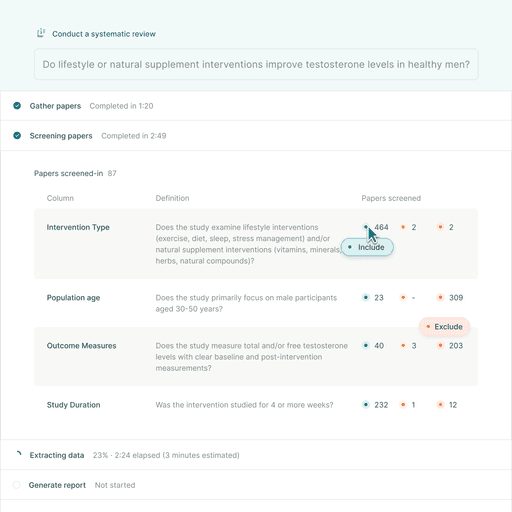
Say your thesis chapter needs every relevant trial on a treatment, not five good ones. That’s Elicit’s job. It searches more than 138 million papers and about 545,000 clinical trials by meaning, so you don’t need the exact keywords, and every AI-written claim links to the sentence or figure it came from. Tables pull the same details, such as sample size, method, and outcome, out of dozens of papers at once, and the Pro plan adds a systematic review workflow that screens up to 5,000 papers against your inclusion criteria.
The free Basic plan includes unlimited search and chat with papers, with a limited number of research reports. Plus, at $11 a month billed yearly (as of November 2026), adds export to RIS, BibTeX, and CSV, which is what keeps your reading list usable in Zotero or EndNote if you ever stop paying for Elicit.
For a formal systematic review, Deakin University’s library points out that Elicit’s semantic searches can’t be reproduced exactly, so use them alongside keyword searches of databases such as PubMed rather than instead of them. Data extraction from full text works only on open-access papers.
What it does
- Semantic search across 138 million papers and 545,000 clinical trials
- Extraction tables across many papers at once
- Cited research reports
- Systematic review screening on Pro
Pros
- Every claim tied to the sentence it came from
- Built for the whole review, from search to extraction
- A free plan with unlimited search
Cons
- Semantic searches can't be reproduced for formal review reporting
- Reference export needs a paid plan
- Full-text extraction is limited to open-access papers
Consensus
For quick, evidence-backed answers
Ranking: ChatGPT against research assistants built on paper databases
#3 3.4/5
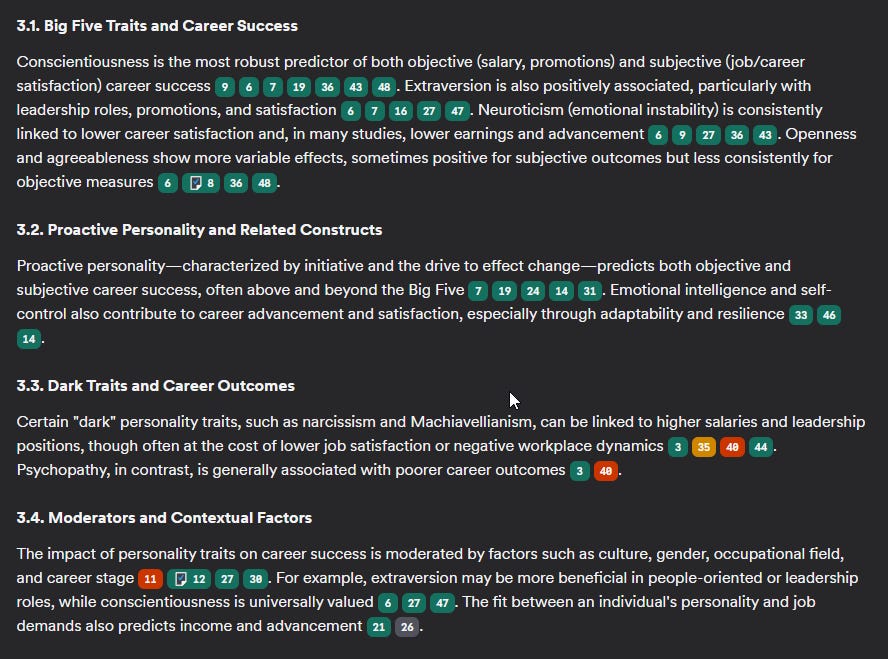
Consensus is the closest of these to asking ChatGPT a question. Ask something like “does creatine improve memory?” and it answers in a paragraph that cites the papers it used, labels each one by study type, and adds a Consensus Meter showing how many papers found yes, no, or mixed results. Deep Search writes a longer literature report. It draws on about 200 million papers, mostly from OpenAlex and Semantic Scholar.
Be careful with the Meter. It counts papers rather than weighing them, so ten small studies can outvote one large trial. Read it as a map of where the literature leans, not a verdict.
The free plan gives 10 Pro messages and up to 3 Deep reviews a month. Pro costs $12 a month billed yearly, or about $20 month to month, and students and faculty with a school email get up to 40% off.
What it does
- Plain-language questions answered from about 200 million papers
- Study-type labels on cited papers
- Consensus Meter of yes, no, and mixed findings
- Deep Search literature reports
Pros
- The most familiar feel for a ChatGPT user
- Fast answers to research questions with a yes or no answer
- Up to 40% off for students and faculty
Cons
- The Meter counts studies without weighing their quality
- Paywalled papers are mostly read from the abstract
- The free plan's Pro messages run out quickly
Semantic Scholar
For free paper search from a nonprofit
Ranking: ChatGPT against research assistants built on paper databases
#2 3.8/5
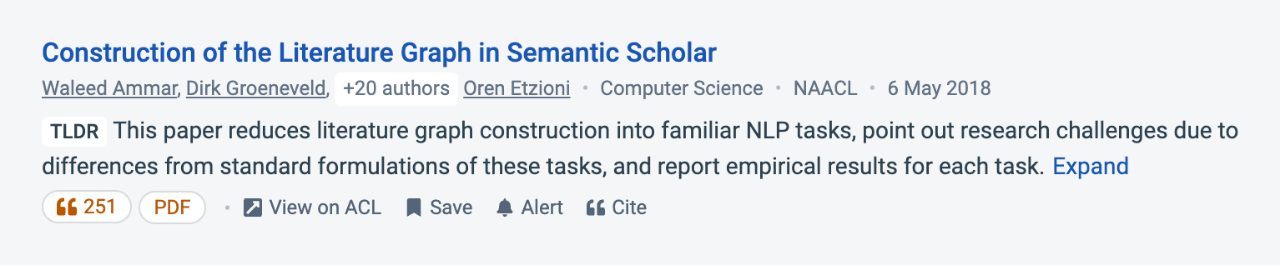
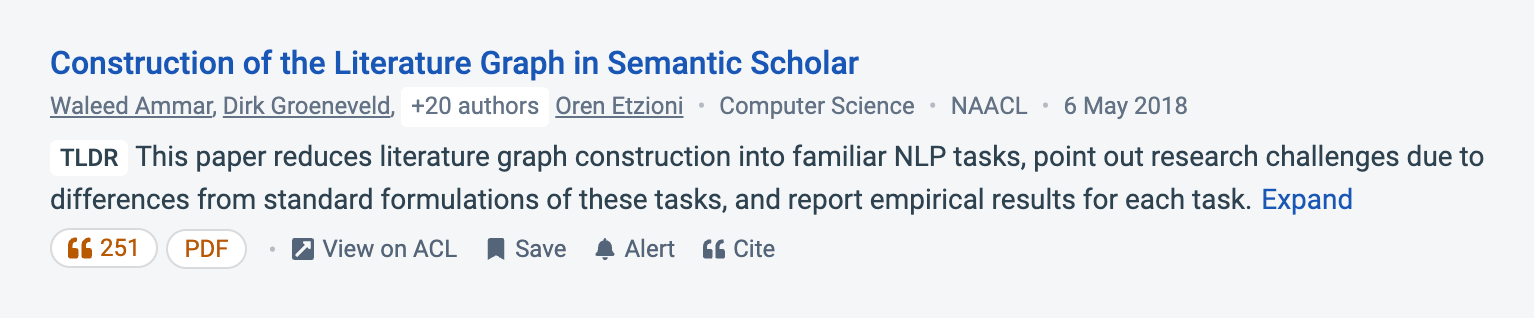
Semantic Scholar works differently from the other two. It’s a free search engine for more than 200 million papers, run by Ai2, the nonprofit Allen Institute for AI, and it isn’t a chatbot. Each paper gets a one-sentence TLDR, the citation graph flags which citations are highly influential, and feeds email you when new papers match your interests. Citations copy out as BibTeX, APA, MLA, or Chicago.
For chatbot-style questions, Ai2’s separate Asta app finds papers and explains why each one matches, and writes literature summaries in which each claim carries a citation, usually with an excerpt from the paper. Both are free, and the nonprofit behind them has run Semantic Scholar for years.
What it lacks is the review workflow: no screening against criteria and no extraction tables, which is where Elicit earns its price. Asta is also newer and less proven than Semantic Scholar itself.
What it does
- Free search across more than 200 million papers
- TLDR summaries and influential-citation flags
- Library, research feeds, and email alerts
- Asta for cited literature summaries
Pros
- Completely free
- Run by a nonprofit research institute
- Easy citation export
Cons
- No screening or extraction workflow
- The AI assistant lives in a separate app
For slide decks that look designed
Ask ChatGPT for a presentation in an ordinary chat and you get a .pptx file with your outline on it. A PowerPoint trainer who tested it called the result “all text with no design features.” OpenAI now has a proper deck editor, ChatGPT Slides, but only on Pro, Business, and Enterprise, and a PowerPoint add-in on every plan that builds slides inside your own copy of PowerPoint. If you want decks that look designed without a $100 plan, a dedicated tool or Claude does better.
1–5 per criterion · select a score for its reasoning and any sources
| # | Product | Overall | How good the generated slides look , counts double | How good the outline and words are | Fixing the draft | Works with PowerPoint and Google Slides | What you get free | Price of a plan for regular use | Brand and team features | Presenting and sharing , counts half |
|---|---|---|---|---|---|---|---|---|---|---|
| 1 | Gamma | 4.2 | 5 | 4 | 5 | 3 | 3 | 5 | 4 | 4 |
| 2 | Claude | 3.5 | 4 | 4 | 4 | 4 | 4 | 3 | 2 | 2 |
| 3 | ChatGPT | 3.1 | 2 | 4 | 4 | 4 | 4 | 2 | 3 | 2 |

×2 = counts double in the overall score, ×½ = counts half.
How each criterion is scored
How good the generated slides look
Counts double in the overall score: A better-looking first draft is the main thing readers want from an AI deck maker over their usual slide app.
Judged from reviewers' side-by-side tests and examples of decks the tool generates from a plain prompt, before anyone edits them: layout variety, typography, how well images and colors fit the topic, and whether slides are crowded. It scores the tool's own output in the form most readers use, not what a skilled designer could build in its editor.
- 5 Distinctive design that looks made for the topic, with layouts and images a designer would choose
- 4 Polished, varied layouts with fitting images; looks professionally designed
- 3 A clean, consistent theme with some layout variety and images; looks like a decent template
- 2 A basic theme with little layout variety; most slides are bullets and need design work
- 1 Plain text slides with no design applied
How good the outline and words are
Judged from reviewers' tests and users' reports: whether the generated deck tells a sensible story for its audience, whether the slide text is specific or generic filler, and how well it uses source material you give it. Invented figures are a risk with every tool and are not scored here.
- 5 Reads like a strong first draft from someone who knows the topic and the audience
- 4 A well-organized story with specific points that uses your material, needing light edits
- 3 A sensible structure and serviceable text that needs a normal editing pass
- 2 A usable structure, but shallow, generic text that needs heavy rewriting
- 1 Generic filler that needs rewriting almost entirely
Fixing the draft
How easily you can change what the AI made: manual control over text, images and layout, and AI edits aimed at one slide or element without regenerating the whole deck.
- 5 Free-form editing plus AI edits to a chosen slide or element and AI revisions across the whole deck
- 4 Full direct editing plus AI edits to a chosen slide
- 3 Full direct editing or targeted AI edits, but not both, or editing held back by a fixed layout system or a hard-to-learn format
- 2 Direct editing of text and images, but little layout control and no targeted AI edits
- 1 Changes mostly mean re-prompting or regenerating; little direct editing
Works with PowerPoint and Google Slides
How well the deck carries into PowerPoint or Google Slides as an ordinary, editable presentation: whether the tool builds natively in them or exports editable files, on which plans, and whether exported slides keep real layouts and placeholders (so you can restyle the deck from the slide master) or arrive as loose text boxes on blank slides.
- 5 Builds natively in PowerPoint or Google Slides using your own template's layouts and slide masters
- 4 Builds natively in PowerPoint or Google Slides, or exports to both with the deck's structure intact
- 3 Exports editable PowerPoint and Google Slides files, but slides land on blank layouts without placeholders
- 2 Export only on paid plans, or the format loses much of the deck in conversion
- 1 No PowerPoint or Google Slides export
What you get free
How much deck generation the free plan allows and whether you can take the deck elsewhere. A free trial that ends or needs a card is not a free plan.
- 5 Renewing free generation with no meaningful cap
- 4 An AI allowance that renews (monthly or on rolling limits), with export
- 3 A one-time AI allowance that includes PowerPoint export
- 2 A one-time AI allowance, with no PowerPoint export or with presentations that must be public
- 1 No free way to generate decks; trial only, or a paid plan is required
Price of a plan for regular use
Price per person per month, at annual billing where offered, of the cheapest plan one person can buy that makes AI decks regularly rather than under a "limited" free allowance. A euro price is compared at face value. Where the plan is a bundle (such as Microsoft 365 or Google Workspace), the bundle's price counts.
- 5 Under 10 a month
- 4 10 to 14.99 a month
- 3 15 to 19.99 a month
- 2 20 to 29.99 a month
- 1 30 or more a month
Brand and team features
Counts what lets a team keep decks on brand and work on them together: a brand theme or company template the AI uses, real-time co-editing, shared libraries of templates, slides or assets, and admin controls that lock brand elements. Features on any plan count.
- 5 All of 4, plus admin controls that lock brand elements or approve decks
- 4 All of 3, plus shared team libraries of templates, slides or assets
- 3 A brand theme or company template the AI uses, and real-time co-editing
- 2 Either a brand theme or company template, or real-time co-editing
- 1 Neither a brand theme nor real-time co-editing
Presenting and sharing
Counts half in the overall score: Matters mainly to sales and client-facing readers; most readers present in a meeting or send a file.
What the tool offers for presenting and sending the deck itself: present mode, share links with access control, and analytics on who viewed the deck and which slides they spent time on.
- 5 All of 3, plus slide-by-slide engagement tracking per link or viewer
- 4 All of 3, plus viewer analytics on some plan
- 3 Present from the app and share links with access control
- 2 Present from the app, or share a view link, but not both with access control
- 1 No way to present or share except exporting a file
Claude’s write-up is above. If you’re switching chatbots anyway, Claude Slides is the cheapest step up. For more deck makers, including Canva and Copilot in PowerPoint, see our guide to the best AI presentation makers.
Gamma
For polished decks from a prompt or notes
Ranking: ChatGPT against Gamma and Claude for presentations
#1 4.2/5
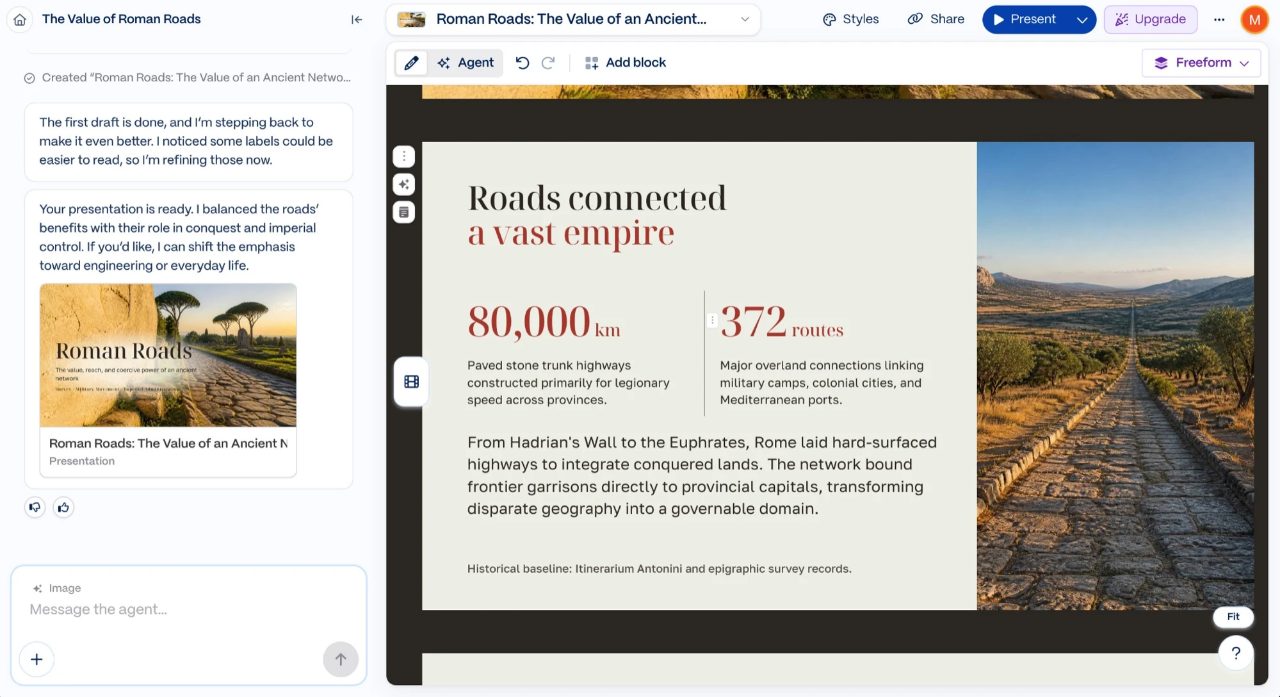
Gamma’s first drafts look the most finished of any AI deck maker. Paste notes or a document, approve the outline, and it builds a themed deck with images; then you edit by chatting with its AI agent or by hand. Decks present from a shareable link, or export to PowerPoint, Google Slides, PDF, or PNG.
The free plan is really a trial: 400 AI credits that don’t refill, up to 10 slides per prompt, and Gamma branding on your decks. Plus costs $9 a month billed yearly (as of November 2026) for 1,500 credits a month and no branding.
The weak point is the exit. Gamma’s PowerPoint export puts every slide on a blank layout with no placeholders, so restyling the file in PowerPoint means editing slide by slide. If your deck has to end up in a company template, the PowerPoint add-ins from ChatGPT or Claude, which work inside that template, fit better.
What it does
- Designed decks from a prompt, notes, or an imported file
- Editing by chat with its AI agent or by hand
- Shareable links for presenting
- Export to PowerPoint, Google Slides, PDF, and PNG
Pros
- The most polished first drafts
- Plus is cheap at $9 a month billed yearly
- Easy to share and present from the browser
Cons
- PowerPoint exports are hard to restyle
- Free credits don't refill
- AI edits can change slides you didn't ask it to touch
Which way to go depends on why you’re leaving. If it’s better writing or code, Claude is the swap, at the same price, as long as you can work within its tighter limits and don’t need images. If it’s citations you can trust, don’t look for a better chatbot; use a tool that searches papers, Elicit for a serious review, Consensus for quick questions, and Semantic Scholar when it has to cost nothing.
If it’s privacy, turning off training in ChatGPT does most of what a switch would, and only a local model keeps your chats on your own computer. And if you came for images, voice, and a free plan you never run out of, ChatGPT is still the one to keep.
Also considered
- Gemini: Google’s chatbot suits people who live in Gmail and Docs, since Google AI Pro, at $19.99 a month, puts Gemini inside them and adds 5 TB of storage, and AI Plus costs $4.99. The free plan includes Deep Research and image generation. It’s the weakest pick for privacy: human reviewers read some personal chats, and the chats they review are kept for up to three years, even after you delete your history.
- Perplexity: For cited answers from the web rather than from papers, every answer carries numbered sources inline, and Pro, at $17 a month billed yearly, lets you choose models from OpenAI, Anthropic, Google, and others. The free plan has unlimited basic searches but only three Pro Searches a day. It’s a search tool first and no substitute for ChatGPT at long drafting.
- Ollama: The strongest privacy answer. It runs open models on your own computer, free and open source, on macOS, Windows, and Linux, and prompts you run locally never reach Ollama. It also offers cloud models, so turn those off if you want everything local. Local models trail ChatGPT’s best, and a computer with little RAM limits you to small ones.
- LM Studio: A desktop app for the same idea, built around browsing, downloading, and chatting with open models in one window. It’s free to use but closed source, and on a Mac it needs Apple Silicon.
- Le Chat: Mistral’s chatbot, now called Vibe, costs $14.99 a month for Pro, less than ChatGPT Plus, and comes from a French company. The free plan is restrictive, and your chats can train Mistral’s models unless you opt out.





Frequently asked questions
Which ChatGPT alternative doesn’t train on my chats?
None of the big chatbots’ personal plans rule it out for you. ChatGPT, Claude, and Gemini can use personal-plan chats to improve their models unless you turn that off, and Le Chat and Perplexity’s paid plans offer an opt-out too. The business plans from OpenAI and Anthropic don’t train on your data by default. If you want chats that never reach a company at all, run a local model with Ollama or LM Studio.
Can I take my ChatGPT history with me?
Partly. ChatGPT’s data export, under Settings and then Data controls, emails you a file with all your conversations, so you keep a copy whatever you switch to. Claude can import what ChatGPT saved about you in memory, but not the conversations themselves, so you start new threads there. Custom GPTs don’t move to any other service.