
Gamma
AI presentation maker that drafts a designed deck from a prompt, notes or a file, then lets you edit by chat or by hand
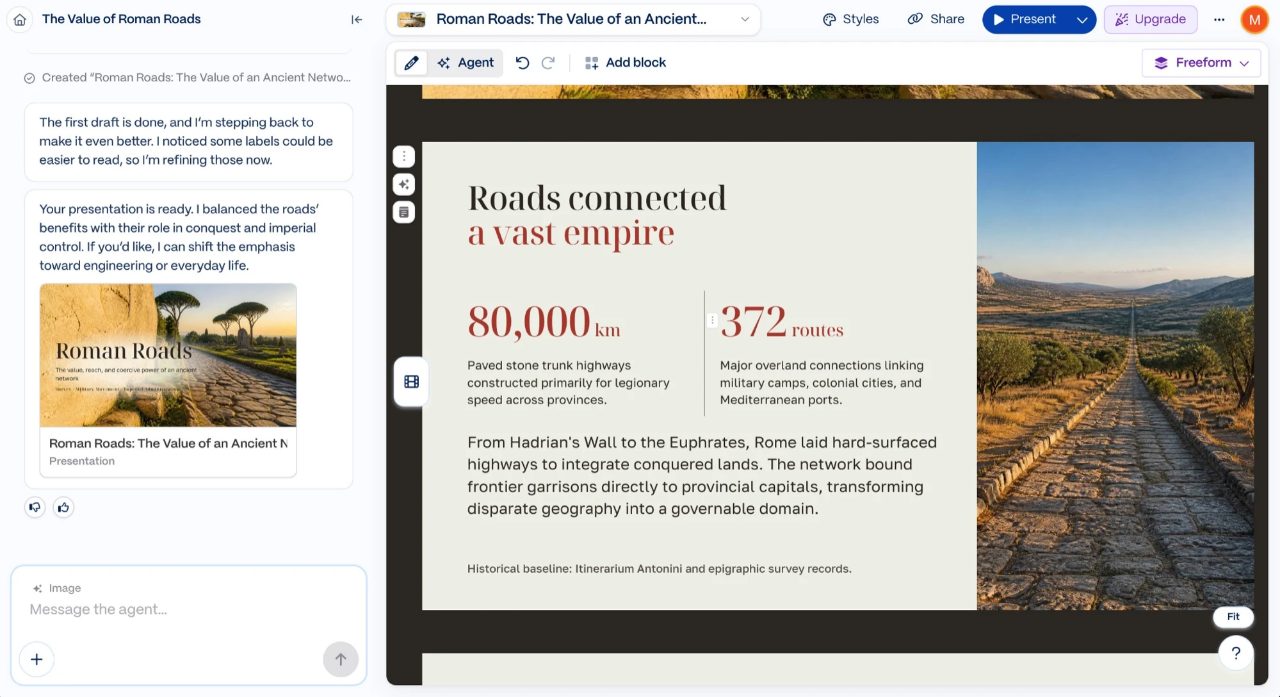
Our verdict
#1 of 10 in AI presentation makers · Best-looking drafts for most decks
What it does
- Asks about audience, tone and text density, then shows an editable outline before building
- Edit by chat, with smart layouts, or freeform
- Imports PowerPoint and PDF files and pulls content from connected tools
- Presents and shares as a link, with viewer analytics on Pro
Pros
- The most polished, least template-looking first drafts here
- PowerPoint and Google Slides export even on the free plan
- Plus is $9 a month with 1,500 credits that roll over
Cons
- Exported PowerPoint slides sit on blank layouts with no placeholders
- Free credits are one-time and decks carry a Gamma badge
- Individual plans may train on your content unless you opt out
- Skip if:
- Your deck must be restyled on a company PowerPoint template
Gamma is a web app that generates presentations, documents, websites and social posts with AI. You give it a topic, pasted notes or an imported PowerPoint or PDF, approve an outline, and it builds a themed deck with images; you then edit through its AI agent, smart layouts or freeform editing. Decks can be presented and shared as links from Gamma or exported to PowerPoint, Google Slides, PDF or PNG. It is proprietary, runs in the browser, and is free to start with a one-time allowance of AI credits; paid plans add monthly credits and remove Gamma branding.
What users say
Evidence ↓Reviewers widely agree Gamma's first drafts look the most polished and modern of the AI deck makers; Zapier and a PowerPoint trainer both singled out its design and its questions about audience and tone before generating. The same trainer found its PowerPoint export lands on blank layouts with no placeholders, so the file is hard to restyle in PowerPoint, and Geekflare's reviewer reported AI edits sometimes changing other cards.
Rankings and alternatives
All Gamma alternatives →- AI presentation makers #1 of 10 Best-looking drafts for most decks
- Canva #2 For decks that share a brand kit with your other designs Gamma vs Canva →
- Copilot in PowerPoint #3 For decks that must stay in PowerPoint
- Beautiful.ai #4 Layouts that rearrange themselves



AI presentation makers scores
Evaluated Nov 17, 2026 Evidence ↓- How good the generated slides look · counts double 5
5/5 means: Distinctive design that looks made for the topic, with layouts and images a designer would choose
Reviewers consistently rate Gamma's generated decks the most polished and modern of the field; a PowerPoint trainer's four-tool test and Zapier's 40-app roundup both singled out its look, with themes and AI images matched to the topic.
- How good the outline and words are 4
4/5 means: A well-organized story with specific points that uses your material, needing light edits
It asks about audience, tone and text density and shows an outline before building, and it can draw on imported files and connected tools, so drafts are well organized; text still needs the usual checking for specifics.
- Fixing the draft 5
5/5 means: Free-form editing plus AI edits to a chosen slide or element and AI revisions across the whole deck
An AI agent edits a chosen card or the whole deck, smart layouts can be swapped in, and a freeform mode allows moving anything; one reviewer reported AI edits sometimes touching other cards.
- Works with PowerPoint and Google Slides 3
3/5 means: Exports editable PowerPoint and Google Slides files, but slides land on blank layouts without placeholders
Exports PPTX and Google Slides on every plan, free included, but a PowerPoint trainer found every exported slide on a blank layout with no placeholders, so restyling it in PowerPoint is manual work.
- What you get free 3
3/5 means: A one-time AI allowance that includes PowerPoint export
The free plan gives 400 credits once, which do not refill, and still includes PPTX and Google Slides export, with Gamma branding on decks.
- Price of a plan for regular use 5
5/5 means: Under 10 a month
Plus is $9 per month billed annually ($108 a year) with 1,500 monthly credits and no Gamma branding.
- Brand and team features 4
4/5 means: All of 3, plus shared team libraries of templates, slides or assets
Custom themes and branding (Pro), workspace templates and brand controls, and real-time collaboration on shared projects; no evidence of admin locks on brand elements outside Enterprise.
- Presenting and sharing · counts half 4
4/5 means: All of 3, plus viewer analytics on some plan
Decks are presented from Gamma or shared as private, team or public links, and Pro adds detailed analytics and advanced sharing; per-slide tracking per viewer is not documented.
Pricing
- Free Free 400 AI credits at signup that do not refill, up to 10 slides per prompt, Gamma branding on decks. Export to PDF, PPTX, PNG and Google Slides.
- Plus $108.00 /year per seat $9 per month billed annually. 1,500 AI credits per month (unused credits roll over up to 3,000), up to 100 slides per prompt, removes Gamma branding.
- Pro $216.00 /year per seat $18 per month billed annually. 4,000 AI credits per month, premium image models, custom branding, detailed analytics and advanced sharing, custom domains.
- Ultra $1,080.00 /year per seat $90 per month billed annually. 20,000 AI credits per month and the most advanced text, image and video models.
Prices checked Nov 17, 2026.
Evidence and sources
What users say
Summary 4 quotes
-
The exported PowerPoint file does not use placeholders or any other basic PowerPoint template features. Every slide lands on a blank layout, so you cannot bulk-edit the deck on the Slide Master.
Taylor Croonquist, PowerPoint trainer and co-founder of Nuts & Bolts Speed Training · nutsandboltsspeedtraining.com/tutorials/best-ai-presentation-tools-for-powerpoint-a-designers-4-tool-experiment-review · checked -
Gamma builds the most visually modern deck of the four and asks the right questions before it starts
Taylor Croonquist, PowerPoint trainer and co-founder of Nuts & Bolts Speed Training · nutsandboltsspeedtraining.com/tutorials/best-ai-presentation-tools-for-powerpoint-a-designers-4-tool-experiment-review · checked -
No jarring color differences, no weird layouts, no slides more overcrowded than a Taylor Swift concert.
Miguel Rebelo, reviewer at Zapier · zapier.com/blog/best-ai-presentation-maker · published · checked -
AI edits can unexpectedly change unrelated slides—using "Rewrite" or "Preserve" sometimes alters content on other cards without warning
Rohit Mane, reviewer at Geekflare · geekflare.com/guides/best-ai-presentation-makers · published · checked
AI presentation makers scores
How good the generated slides look 2 quotes
-
Gamma builds the most visually modern deck of the four and asks the right questions before it starts
Taylor Croonquist, PowerPoint trainer and co-founder of Nuts & Bolts Speed Training · nutsandboltsspeedtraining.com/tutorials/best-ai-presentation-tools-for-powerpoint-a-designers-4-tool-experiment-review · checked -
No jarring color differences, no weird layouts, no slides more overcrowded than a Taylor Swift concert.
Miguel Rebelo, reviewer at Zapier · zapier.com/blog/best-ai-presentation-maker · published · checked
How good the outline and words are 3 quotes
-
Import PowerPoints and PDFs and they arrive the way you built them. Pull real content from Slack, Notion, Dropbox, and 25+ tools.
gamma.app · checked -
Ask Gamma's agent for changes, drop in smart layouts, or move anything anywhere with freeform editing.
gamma.app · checked -
Gamma builds the most visually modern deck of the four and asks the right questions before it starts
Taylor Croonquist, PowerPoint trainer and co-founder of Nuts & Bolts Speed Training · nutsandboltsspeedtraining.com/tutorials/best-ai-presentation-tools-for-powerpoint-a-designers-4-tool-experiment-review · checked
Fixing the draft 2 quotes
-
Ask Gamma's agent for changes, drop in smart layouts, or move anything anywhere with freeform editing.
gamma.app · checked -
AI edits can unexpectedly change unrelated slides—using "Rewrite" or "Preserve" sometimes alters content on other cards without warning
Rohit Mane, reviewer at Geekflare · geekflare.com/guides/best-ai-presentation-makers · published · checked
Works with PowerPoint and Google Slides 2 quotes
-
Export to PDF, PPTX, PNG & Google Slides
gamma.app/pricing · checked -
The exported PowerPoint file does not use placeholders or any other basic PowerPoint template features. Every slide lands on a blank layout, so you cannot bulk-edit the deck on the Slide Master.
Taylor Croonquist, PowerPoint trainer and co-founder of Nuts & Bolts Speed Training · nutsandboltsspeedtraining.com/tutorials/best-ai-presentation-tools-for-powerpoint-a-designers-4-tool-experiment-review · checked
What you get free 2 quotes
-
Free plan includes 400 starter credits that do not refill. Free plan users can invite friends and earn credits when they join.
gamma.app/pricing · checked -
Export to PDF, PPTX, PNG & Google Slides
gamma.app/pricing · checked
Price of a plan for regular use 1 quote
-
$108 billed annually
gamma.app/pricing · checked
Brand and team features 1 quote
-
$216 billed annually
gamma.app/pricing · checked
Presenting and sharing 1 quote
-
$216 billed annually
gamma.app/pricing · checked
Facts
Runs on 1 quote
-
No standalone mobile app for iOS or Android; mobile editing requires accessing Gamma.app through a web browser, which feels clunky on smaller screens
Rohit Mane, reviewer at Geekflare · geekflare.com/guides/best-ai-presentation-makers · published · checked
Users 1 quote
-
Join our community of 100+ million users
gamma.app · checked
More from the sources
Pricing 5 quotes
-
Unused credits roll over up to 2× the monthly amount. Example: Plus can hold up to 3,000.
gamma.app/pricing · checked -
If you run out of credits, you can still edit your gammas by hand.
help.gamma.app/en/articles/7834324-how-do-ai-credits-work-in-gamma · checked -
The Monthly tab shows the higher month-to-month rate with no annual commitment.
help.gamma.app/en/articles/8077107-how-can-i-upgrade-my-gamma-subscription · checked -
Annual plans include the same monthly credits as monthly subscriptions but at a 28% discount.
help.gamma.app/en/articles/8077107-how-can-i-upgrade-my-gamma-subscription · checked -
Gamma Business supports teams that create together in Gamma. It includes everything in Pro, plus SSO authentication, more credits for every member, our most advanced AI image models, SOC 2 documentation, and locked training opt-out.
help.gamma.app/en/articles/11594955-what-options-does-gamma-offer-for-business · checked
Features 10 quotes
-
For Business and Enterprise workspaces, content is automatically excluded from AI training. For individual Free, Plus, Pro, and Ultra workspaces, content may be used to train AI features by default, but you can opt out in your account settings.
gamma.app · checked -
In the Page Setup menu, locate the Slide Size dropdown. Select a fixed height option to maintain consistency.
help.gamma.app/en/articles/11029115-how-do-i-control-slide-sizes-and-adjust-page-setups · checked -
Speaker notes are private notes attached to each slide in your gamma that are visible only to you in presenter view.
help.gamma.app/en/articles/11047307-can-i-use-speaker-notes-while-presenting-in-gamma · checked -
Then put your text in a text box and give it a Background fill color, so it sits on top like a card.
help.gamma.app/en/articles/11029115-how-do-i-control-slide-sizes-and-adjust-page-setups · checked -
Select Import file. Upload your file — either directly from your computer or from Google Drive. Only pptx and Google Slides are supported at this time.
help.gamma.app/en/articles/11029150-how-do-i-customize-themes-colors-and-fonts-in-gamma · checked -
Custom fonts, headers/footers, password protection, and more
help.gamma.app/en/articles/8077107-how-can-i-upgrade-my-gamma-subscription · checked -
Web image search or Stock photos – Find an image to use.
help.gamma.app/en/articles/11028379-how-do-i-add-and-edit-images-in-gamma · checked -
Edit - Users can view, comment, and edit.
help.gamma.app/en/articles/11047226-how-do-collaboration-and-sharing-settings-work-in-gamma · checked -
If you're rolling out Gamma across a larger organization and need admin controls, SCIM provisioning, audit logs, invoiced billing, or dedicated support, our Enterprise plan is likely the right fit.
help.gamma.app/en/articles/11594955-what-options-does-gamma-offer-for-business · checked -
Full analytics access is only available to users on the Pro plan or higher. Users on the Free or Plus plan have limited or no access.
help.gamma.app/en/articles/11047329-how-do-i-track-my-gamma-s-performance-using-analytics · checked
Limits and known issues 6 quotes
-
Export it as a PowerPoint file, then upload it to Google Slides.
help.gamma.app/en/articles/8022861-how-to-export-gammas · checked -
Exports reflect Present Mode, not Edit Mode, so some visual differences are expected.
help.gamma.app/en/articles/15939201-why-doesnt-my-exported-pdf-or-powerpoint-match-what-i-see-in-gamma · checked -
Some cards end up too tall/big and don't fit properly for PowerPoint export.
Ben Holloway, Gamma user on Gamma's feedback board · ideas.gamma.app/ideas/p/fixed-height-cards-the-cards-are-not-have-different-heights-and-sizes-16-9 · checked -
Style sizes are a default, not a lock. If text still shrinks on a slide, turn off Scale content to fit.
help.gamma.app/en/articles/11029150-how-do-i-customize-themes-colors-and-fonts-in-gamma · checked -
No offline mode — the app requires an active connection and will redirect to login if you're not authenticated.
help.gamma.app/en/articles/11016450-does-gamma-have-a-mobile-app · checked -
You cannot freely drag and position individual text boxes or images. Layouts are selected from Gamma's available options for each card rather than being built freeform.
gamma.app/explore/content/guides/gamma-ai-presentation-tool-flexible-layout-customization-guide · checked
What users say 1 quote
-
I'd love to just be able to drag an image somewhere on the slide. There is a really steep learning curve going from PPT and G Slides to Gamma, and mimicking some of that functionality would be a huge help
Alex Cohen, Gamma user on Gamma's feedback board · ideas.gamma.app/ideas/p/allow-free-image-placement · checked
Platforms and requirements 2 quotes
-
The Gamma mobile app lets you view, generate, edit, present, and share your gammas from your phone. It's available on iOS and Android and includes a native dashboard, deep linking, and AI-powered editing through Agent.
help.gamma.app/en/articles/11016450-does-gamma-have-a-mobile-app · checked -
Yes, there is a Microsoft Store app, but this is simply a Windows app plugin that allows Gamma to be used more seamlessly on Windows devices.
help.gamma.app/en/articles/11016450-does-gamma-have-a-mobile-app · checked
Pricing
gamma.app/pricing · checked