
Copilot in PowerPoint
Microsoft's Copilot AI built into PowerPoint, which drafts and edits real PowerPoint decks from a prompt or a document
Our verdict
#3 of 10 in AI presentation makers · For decks that must stay in PowerPoint
What it does
- Builds a deck from a prompt or an attached Word, Excel or PDF file
- Uses a company's branded template and its layouts
- Agent mode adds, rewrites and reorganizes slides in the open deck
Pros
- Real PowerPoint slides with placeholders, ready for the slide master
- Included with Microsoft 365 Personal, which also gets you the Office apps
- Good at turning a structured document into a sensible deck
Cons
- Plainer design than the dedicated deck makers
- No free option; on Family plans only the owner gets Copilot
- Skip if:
- You want a striking design and nobody needs the PowerPoint file
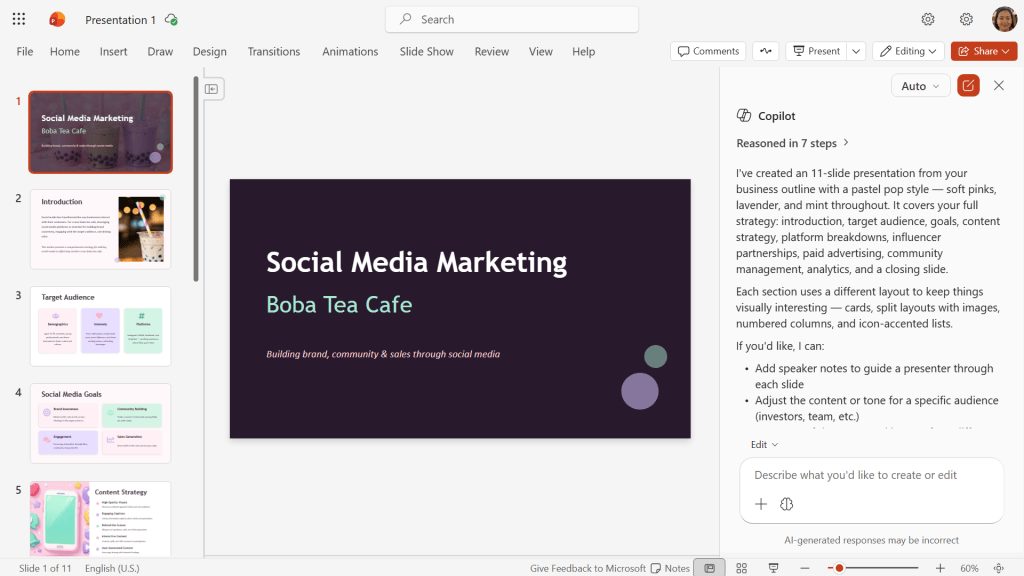
Copilot in PowerPoint is Microsoft’s AI assistant inside the PowerPoint app. From a sidebar it builds a new presentation from a prompt or from an attached Word, Excel or PDF file, can start from a company’s branded template, and edits existing decks by adding slides, rewriting text, generating images and summarizing. The result is an ordinary PowerPoint file using the app’s own layouts and placeholders. It comes with Microsoft 365 Personal, Family, Premium and Pro subscriptions, with monthly AI limits, and with Microsoft 365 Copilot business licenses; it is proprietary and runs in PowerPoint for Windows, Mac, the web and mobile.
What users say
Evidence ↓A PowerPoint trainer who tested four AI tools found Copilot's deck the most editable in PowerPoint, with real placeholders and transitions, though its look was basic. Zapier's reviewer dropped Copilot from its list, judging dedicated AI deck makers ahead on output quality and ease of use.
Rankings and alternatives
- AI presentation makers #3 of 10 For decks that must stay in PowerPoint
- Gamma #1 Best-looking drafts for most decks
- Canva #2 For decks that share a brand kit with your other designs
- Beautiful.ai #4 Layouts that rearrange themselves



AI presentation makers scores
Evaluated Nov 17, 2026 Evidence ↓- How good the generated slides look · counts double 3
3/5 means: A clean, consistent theme with some layout variety and images; looks like a decent template
A PowerPoint trainer found Copilot's slides visually pleasing at a basic level, with divider slides and simple transitions; Zapier's reviewer judged dedicated AI deck makers ahead on output quality.
- How good the outline and words are 4
4/5 means: A well-organized story with specific points that uses your material, needing light edits
Asks follow-up questions and builds from attached Word, Excel or PDF files, which makes it good at turning a structured document into a sensible deck; like every tool, it can invent statistics when asked for them.
- Fixing the draft 5
5/5 means: Free-form editing plus AI edits to a chosen slide or element and AI revisions across the whole deck
The result is an ordinary PowerPoint deck with the full editor, and agent mode adds slides, rewrites text on a chosen slide and revises the whole deck.
- Works with PowerPoint and Google Slides 5
5/5 means: Builds natively in PowerPoint or Google Slides using your own template's layouts and slide masters
Builds natively in PowerPoint with real placeholders, and can start from a company's branded template; a trainer found it the most editable output of four tools.
- What you get free 1
1/5 means: No free way to generate decks; trial only, or a paid plan is required
Copilot in PowerPoint needs a Microsoft 365 subscription that includes Copilot; the free web PowerPoint does not include it, aside from limited Copilot Chat in some business setups.
- Price of a plan for regular use 5
5/5 means: Under 10 a month
Microsoft 365 Personal at $99.99 a year (about $8.33 a month) includes Copilot in PowerPoint with monthly AI limits, plus the Office apps.
- Brand and team features 4
4/5 means: All of 3, plus shared team libraries of templates, slides or assets
Uses company templates and an organization asset library, with co-authoring in PowerPoint; brand locks depend on an organization's own template setup.
- Presenting and sharing · counts half 3
3/5 means: Present from the app and share links with access control
Present in PowerPoint and share through OneDrive or SharePoint with permissions; no viewer analytics for a shared deck, from established knowledge of PowerPoint.
Pricing
- Microsoft 365 Personal $99.99 /year Or $9.99 per month. One person. Includes Copilot in PowerPoint, Word, Excel and Outlook with monthly AI credits and feature limits.
- Microsoft 365 Family $129.99 /year Or $12.99 per month. Apps shared with up to 6 people, but Copilot in the apps works only for the subscription owner.
- Microsoft 365 Premium $199.99 /year Or $19.99 per month. Higher Copilot usage limits and features exclusive to Premium.
- Microsoft 365 Copilot Business $21.00 /month per seat , extra Add-on to a Microsoft 365 business plan, per user per month paid yearly ($25.20 billed monthly); discounted to $18 at the time of checking.
Prices checked Nov 17, 2026.
Evidence and sources
What users say
Summary 3 quotes
-
Microsoft Copilot produced the most PowerPoint-editable deck of the four tools, with real placeholders, divider slides, and basic transitions, making it my recommended AI presentation tool for beginner PowerPoint users.
Taylor Croonquist, PowerPoint trainer and co-founder of Nuts & Bolts Speed Training · nutsandboltsspeedtraining.com/tutorials/best-ai-presentation-tools-for-powerpoint-a-designers-4-tool-experiment-review · checked -
The slides it produced were visually pleasing (albeit at a basic level) and it included basic fade transitions and animations to the slides.
Taylor Croonquist, PowerPoint trainer and co-founder of Nuts & Bolts Speed Training · nutsandboltsspeedtraining.com/tutorials/best-ai-presentation-tools-for-powerpoint-a-designers-4-tool-experiment-review · checked -
new AI presentation builders offer high output quality and a smooth user experience that neither tech giant has been able to fully achieve yet.
Miguel Rebelo, reviewer at Zapier · zapier.com/blog/best-ai-presentation-maker · published · checked
AI presentation makers scores
How good the generated slides look 2 quotes
-
The slides it produced were visually pleasing (albeit at a basic level) and it included basic fade transitions and animations to the slides.
Taylor Croonquist, PowerPoint trainer and co-founder of Nuts & Bolts Speed Training · nutsandboltsspeedtraining.com/tutorials/best-ai-presentation-tools-for-powerpoint-a-designers-4-tool-experiment-review · checked -
new AI presentation builders offer high output quality and a smooth user experience that neither tech giant has been able to fully achieve yet.
Miguel Rebelo, reviewer at Zapier · zapier.com/blog/best-ai-presentation-maker · published · checked
How good the outline and words are 1 quote
-
You can attach a document (such as a Word document, Excel spreadsheet, or PDF) and prompt Copilot to generate a presentation based on its contents.
Howard Wen, contributing writer at Computerworld · computerworld.com/article/4194634/10-cool-things-copilot-can-do-in-powerpoint.html · published · checked
Fixing the draft 1 quote
-
By default, Copilot can build a new presentation or make changes to an existing one in the main PowerPoint window. This is known as “agent mode.”
Howard Wen, contributing writer at Computerworld · computerworld.com/article/4194634/10-cool-things-copilot-can-do-in-powerpoint.html · published · checked
Works with PowerPoint and Google Slides 2 quotes
-
If that’s the case at your organization, simply open the appropriate company template as your first step. Then you can upload docs and type a prompt as described above. Copilot will create a presentation using the branded template.
Howard Wen, contributing writer at Computerworld · computerworld.com/article/4194634/10-cool-things-copilot-can-do-in-powerpoint.html · published · checked -
Microsoft Copilot produced the most PowerPoint-editable deck of the four tools, with real placeholders, divider slides, and basic transitions, making it my recommended AI presentation tool for beginner PowerPoint users.
Taylor Croonquist, PowerPoint trainer and co-founder of Nuts & Bolts Speed Training · nutsandboltsspeedtraining.com/tutorials/best-ai-presentation-tools-for-powerpoint-a-designers-4-tool-experiment-review · checked
What you get free 3 quotes
-
Copilot is available in Microsoft 365 Personal, Family, Premium, and Pro subscriptions, helping you to enhance your skills and uncover new possibilities.
support.microsoft.com/en-us/microsoft-365-copilot/copilot-in-microsoft-365-personal-family-and-premium · checked -
For deeper integration across Microsoft 365 apps like Word, Excel, PowerPoint, and Outlook, Copilot is included with eligible Microsoft 365 subscriptions, which provide additional features and expanded AI usage allowances.
microsoft.com/en-us/copilot/pricing/individuals · checked -
Users at organizations with fewer than 2,000 users can use Copilot within M365 apps even without the M365 Copilot add-on licenses, but there are
Howard Wen, contributing writer at Computerworld · computerworld.com/article/4194634/10-cool-things-copilot-can-do-in-powerpoint.html · published · checked
Price of a plan for regular use 2 quotes
-
For deeper integration across Microsoft 365 apps like Word, Excel, PowerPoint, and Outlook, Copilot is included with eligible Microsoft 365 subscriptions, which provide additional features and expanded AI usage allowances.
microsoft.com/en-us/copilot/pricing/individuals · checked -
AI usage limits vary by plan. Microsoft 365 Personal and Family include AI credits and feature limits, while Microsoft 365 Premium includes higher limits, and Microsoft 365 Pro offers the highest limits.
microsoft.com/en-us/copilot/pricing/individuals · checked
Brand and team features 1 quote
-
If that’s the case at your organization, simply open the appropriate company template as your first step. Then you can upload docs and type a prompt as described above. Copilot will create a presentation using the branded template.
Howard Wen, contributing writer at Computerworld · computerworld.com/article/4194634/10-cool-things-copilot-can-do-in-powerpoint.html · published · checked
Facts
Needs 2 quotes
-
Copilot is available in Microsoft 365 Personal, Family, Premium, and Pro subscriptions, helping you to enhance your skills and uncover new possibilities.
support.microsoft.com/en-us/microsoft-365-copilot/copilot-in-microsoft-365-personal-family-and-premium · checked -
Originally starting from $21.00 now starting from $18.00
microsoft.com/en-us/copilot/pricing/business · checked
More from the sources
Limits and known issues 1 quote
-
However, Copilot features in apps like Word, Excel, PowerPoint, and Outlook are available only to the subscription owner and can't be shared with other family members.
microsoft.com/en-us/copilot/pricing/individuals · checked