
Coggle
Browser-based collaborative mind mapping with a free plan of three private diagrams
Our verdict
#5 of 9 in Free mind mapping software · Free group brainstorming in a browser
What it does
- Real-time co-editing with people you invite
- Exports to PDF, images, text, and FreeMind files
- Runs in any desktop browser
Pros
- Free co-editing in a dedicated mind mapper
- Exports you can reuse in other mind mappers
Cons
- Only three private maps; the rest are public
- Needs an internet connection and an account
- No phone app
- Choose if:
- Your maps are group work you don't mind being public
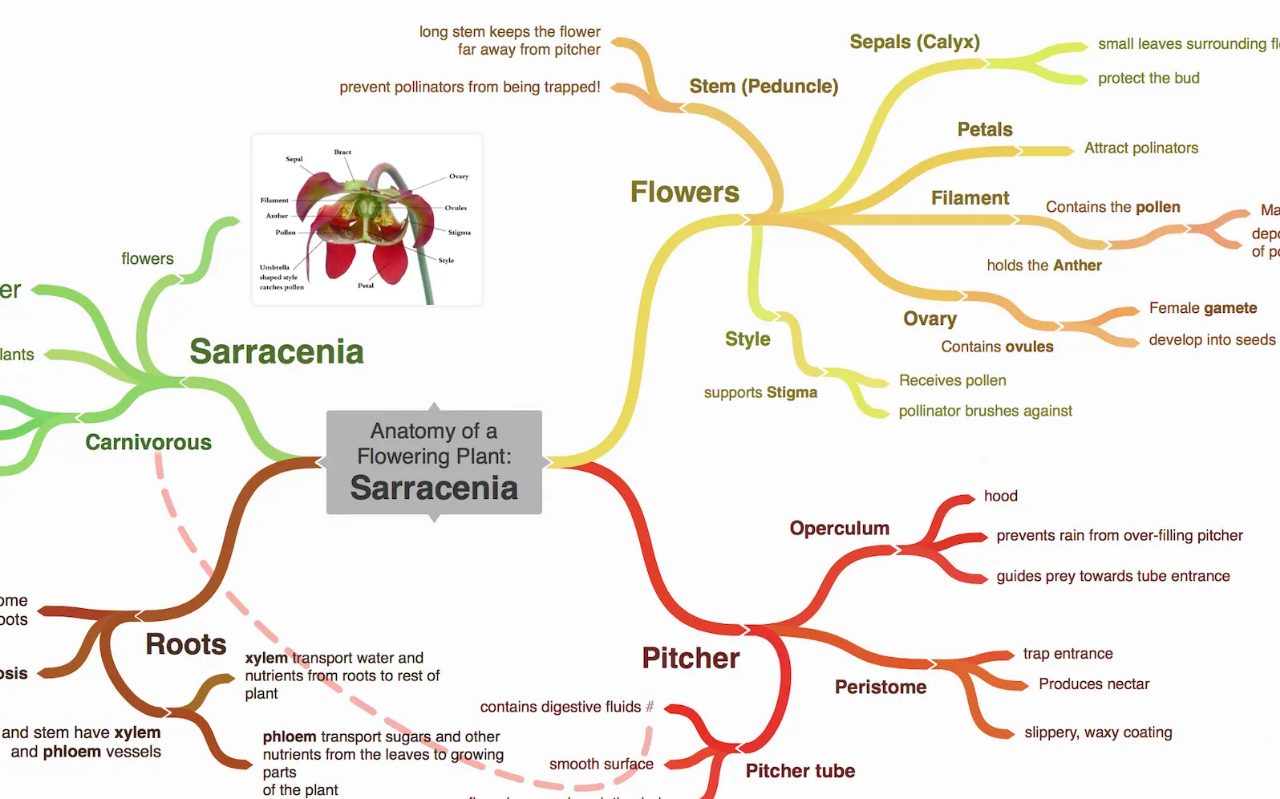
Coggle is a web app for mind maps, with flowcharts as a paid extra. It runs in a browser, including on phones, and has no desktop app. Maps live in Coggle’s cloud, and signing in with a Google, Microsoft, Apple or email account is required. The free plan has real-time collaboration, unlimited image uploads and free export to PDF, image, .mm, text and Visio, but only three private diagrams; further diagrams must be public. It is proprietary software.
Rankings and alternatives



Free mind mapping software scores
Evaluated Nov 21, 2026 Evidence ↓- Quick and pleasant to map in · counts double 4
4/5 means: Clean and quick, with one-key topics and automatic layout, and only minor complaints
Reviewer praises minimal contextual menus and one-click + to add topics, with auto-arranged branches; only one reviewer sampled, and add-by-key shortcuts rest on knowledge.
- How much you can map for free · counts double 3
3/5 means: Around ten maps, or unlimited maps with a cap on something most people use, such as private maps
Unlimited maps and no size limits, but only 3 private diagrams; the rest must be public.
- Room for detail 3
3/5 means: Notes or an outline plus a few extras, with others such as images or attachments paid
Images, links, markdown text and floating notes are free; no outline view. Folding and search not verified here.
- Getting your maps out 4
4/5 means: Image or PDF plus an outline or a format other mind mappers open
PDF, image, .mm and text export plus Visio, free; no watermark documented. No OPML or Word.
- Your maps on every device 2
2/5 means: One maker's devices only, or computers only with no way onto a phone
Runs in a browser on any computer, with no native desktop or phone apps; a phone browser works for small edits only. Maps sync because they live in Coggle's cloud.
- Mapping with other people, free 4
4/5 means: Real-time co-editing with any number of people, with a cap on maps or missing extras such as comments
Real-time co-editing free, by email invite; no stated collaborator cap but edit-by-link is paid and comments are limited.
- Offline and under your control 2
2/5 means: Online only, but you can download copies of your maps in a reusable format
Online only, account required, maps in Coggle's cloud; .mm and text export give reusable copies.
Pricing
- Free Forever Free 3 private diagrams and unlimited public diagrams. Real-time collaboration, sharing by link or QR code, unlimited image uploads, auto-arrange, full change history, PDF and image download, .mm and text export and import, Visio export. No time limit.
- Awesome $5.00 /month Unlimited private diagrams, more item shapes, line style and path control, full chat history, high-res image uploads, collaboration by secret link or QR code. A reviewer reports $50 per year as an annual option.
- Organisation $8.00 /month per seat Awesome plus SAML single sign-on, consolidated billing, bulk export and user and data management.
Prices checked Nov 22, 2026.
Evidence and sources
Free mind mapping software scores
Quick and pleasant to map in 1 quote
-
The menus are minimal, contextual, and for most of the time, hidden. This approach lets you simply get on with the job of composing a flowchart or expressing a mind map.
Christian Cawley, reviewer at TechRadar · techradar.com/pro/coggle-flowchart-and-mind-mapping-tool-review · published · checked
How much you can map for free 2 quotes
-
3 private diagrams Unlimited public diagrams Real-time collaboration Share by link or QR code
coggle.it · checked -
Supercharge your thinking with Coggle Awesome. Control line styles, use more shapes, and create more private Coggles that won't be indexed by search engines.
coggle.it/awesome · checked
Room for detail 1 quote
-
PDF & Image download Dynamic calculations Export as .mm and text Export for Microsoft Visio Import .mm and text
coggle.it · checked
Getting your maps out 1 quote
-
PDF & Image download Dynamic calculations Export as .mm and text Export for Microsoft Visio Import .mm and text
coggle.it · checked
Your maps on every device 2 quotes
-
This is a browser-based application, which requires a login using a Google, Apple, or Microsoft account. There is no desktop version of Coggle.
Christian Cawley, reviewer at TechRadar · techradar.com/pro/coggle-flowchart-and-mind-mapping-tool-review · published · checked -
We tried Coggle in Firefox and Chrome on a Samsung Z Fold4. Aside from a minor revision to the UI, it worked perfectly.
Christian Cawley, reviewer at TechRadar · techradar.com/pro/coggle-flowchart-and-mind-mapping-tool-review · published · checked
Mapping with other people, free 2 quotes
Offline and under your control 3 quotes
-
PDF & Image download Dynamic calculations Export as .mm and text Export for Microsoft Visio Import .mm and text
coggle.it · checked -
Currently we support Google, Microsoft, Sign in with Apple, and Email login for personal accounts.
coggle.it/login · checked -
This is a browser-based application, which requires a login using a Google, Apple, or Microsoft account. There is no desktop version of Coggle.
Christian Cawley, reviewer at TechRadar · techradar.com/pro/coggle-flowchart-and-mind-mapping-tool-review · published · checked
Facts
License 1 quote
-
This is a browser-based application, which requires a login using a Google, Apple, or Microsoft account. There is no desktop version of Coggle.
Christian Cawley, reviewer at TechRadar · techradar.com/pro/coggle-flowchart-and-mind-mapping-tool-review · published · checked
Runs on 2 quotes
-
This is a browser-based application, which requires a login using a Google, Apple, or Microsoft account. There is no desktop version of Coggle.
Christian Cawley, reviewer at TechRadar · techradar.com/pro/coggle-flowchart-and-mind-mapping-tool-review · published · checked -
We tried Coggle in Firefox and Chrome on a Samsung Z Fold4. Aside from a minor revision to the UI, it worked perfectly.
Christian Cawley, reviewer at TechRadar · techradar.com/pro/coggle-flowchart-and-mind-mapping-tool-review · published · checked
Needs 1 quote
-
Currently we support Google, Microsoft, Sign in with Apple, and Email login for personal accounts.
coggle.it/login · checked
Users 1 quote
-
Trusted by Over 10,000,000 People and Businesses Like You
coggle.it · checked
More from the sources
Limits and known issues 1 quote
-
(Note that the free plan does not support creating flowcharts; however, you can edit flowchart templates.)
Christian Cawley, reviewer at TechRadar · techradar.com/pro/coggle-flowchart-and-mind-mapping-tool-review · published · checked
Pricing
coggle.it · checked