
GitMind
Cloud mind mapping app with AI map generation, free for up to 10 maps
Our verdict
#3 of 9 in Free mind mapping software · Ten synced maps on every device
What it does
- Apps for Windows, Mac, iPhone, and Android, plus a web version, all synced
- Shared space for up to five people
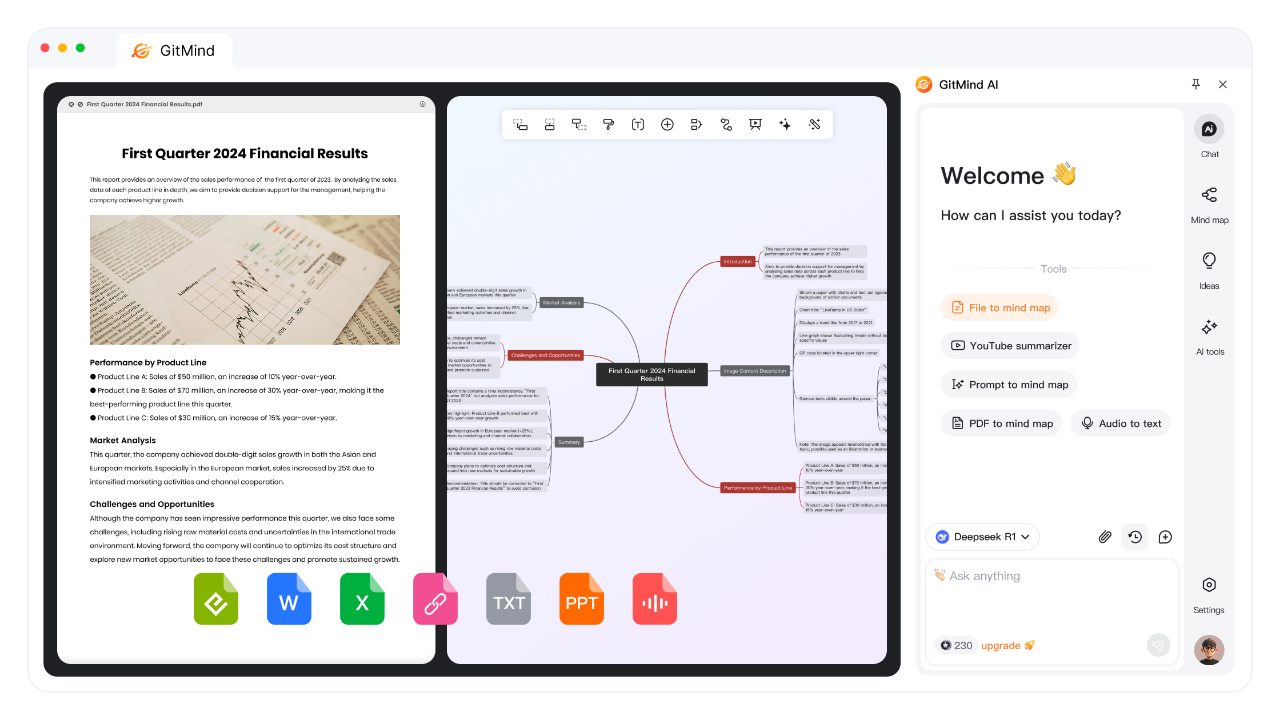
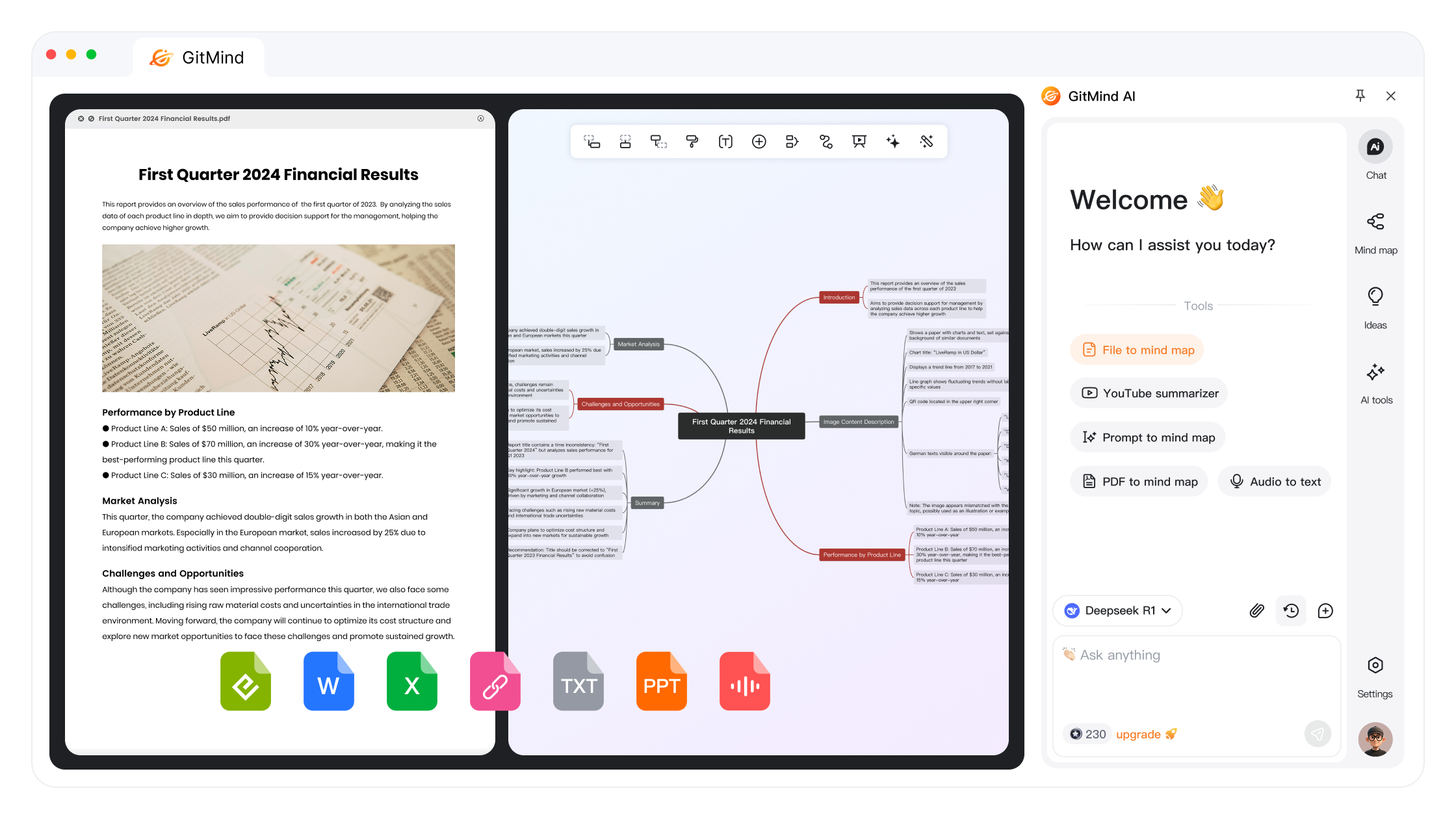
- AI that turns documents and videos into maps
Pros
- Same maps on every device on the free plan
- Quick to build in, with keyboard shortcuts
Cons
- Stops at 10 maps or whiteboards
- Online only, with maps stored on GitMind's servers
- Canceling a paid plan takes a support ticket
- Choose if:
- You switch between a computer and a phone and keep only a handful of maps
GitMind is a cloud-based mind map, flowchart and whiteboard app from Wangxu, the company behind Apowersoft, now marketed as an AI workspace that also turns text, files, videos and audio into maps. It runs in the browser and as Windows, Mac, iOS, iPadOS and Android apps, and maps sync through the vendor’s cloud. The free Basic plan allows 10 maps or whiteboards, one shared space for up to five members, and standard-format export. The software is proprietary.
What users say
Evidence ↓A TechRadar reviewer found GitMind easy to use, with Tab and Enter shortcuts for adding nodes, a clean workspace and stylish templates. A review site summarizing user reviews notes minimal onboarding but occasional lag in large collaborations. Reported downsides are a reviewer's trouble getting free AI credits with a Google sign-up in 2024. I found no independent user threads on upgrade prompts or billing, so these views come from two reviews only.
Rankings and alternatives



Free mind mapping software scores
Evaluated Nov 22, 2026 Evidence ↓- Quick and pleasant to map in · counts double 4
4/5 means: Clean and quick, with one-key topics and automatic layout, and only minor complaints
TechRadar calls it easy to use, with Tab and Enter shortcuts for nodes, a clean modern workspace and stylish templates; a review site notes minimal onboarding but some lag in large collaborations. Only two reviews and no store ratings were read, so not 5.
- How much you can map for free · counts double 3
3/5 means: Around ten maps, or unlimited maps with a cap on something most people use, such as private maps
The free plan caps maps and whiteboards at 10; after that a notice blocks new maps, while existing ones stay accessible. Upgrade prompts exist (the vendor's own pricing page describes the pop-up).
- Room for detail 4
4/5 means: Notes, links, images and folding free, with one notable gap such as no outline view
Free maps hold up to 30 images each, and a review mentions tasks, notes and priorities on nodes; slide show is unlimited. Whether notes, outline view and search are free, and large-map performance, were not verified.
- Getting your maps out 3
3/5 means: Image and PDF without a watermark, but no outline or mind-map file formats
Free plan has "regular format" export (PNG, PDF and text per a review site), with HD export and more formats paid. The page says watermark is not supported on Basic, but that wording is ambiguous. No outline or mind-map file formats confirmed as free.
- Your maps on every device 5
5/5 means: Windows, Mac, the web and both phone platforms, synced on the free plan
Web, Windows, Mac, iPhone and iPad, and Android apps, with sync across all of them on the free plan.
- Mapping with other people, free 3
3/5 means: Real-time co-editing, but on very few maps or with tight member limits
Real-time co-editing and link sharing exist, but free is limited to 1 planet with up to 5 members.
- Offline and under your control 2
2/5 means: Online only, but you can download copies of your maps in a reusable format
Cloud-only with an account required, and a review says no offline use. Maps can be exported to images, PDF and text, but no importable mind-map file export was confirmed.
Pricing
- Basic Free Up to 10 mind maps or whiteboards (new ones blocked after 10, existing stay accessible); up to 30 images per mind map and 10 per whiteboard; 1 shared space (planet) with up to 5 members; 1 image as map background; no watermark; regular-format export; unlimited slide show; sync across all platforms. A 2024 TechRadar review put free AI credits at 30 (quote 8); credits cannot be bought without a subscription.
- Monthly $9.00 /month Unlimited maps; up to 500 images per mind map; 5 planets of up to 30 members; 12 background images; HD export; watermark option; priority support. Auto-renews; 7-day money-back guarantee; cancel by support ticket.
- Annual $4.08 /month Billed annually, 4.08 x 12 = 48.96 USD upfront; same features as Monthly. Auto-renews; 30-day money-back guarantee; cancel by support ticket.
- 3 Years $79.00 one-time Non-subscription, 79 USD for 3 years; listed as a Black Friday offer (Nov. 21 to Dec. 12), so may not remain.
Prices checked Nov 22, 2026.
Evidence and sources
What users say
Summary 3 quotes
-
Most importantly, GitMind is easy to use. It relies on the established keyboard shortcuts of Tab, Enter, and Backspace to aid the easy creation of nodes on your mind map. The selection of built-in templates are stylish, and the work area itself looks good, feels modern, and is big enough to use
Christian Cawley, reviewer at TechRadar · techradar.com/pro/gitmind-review · published · checked -
Initial testing of GitMind was performed using a Google account. While the sign up process for this is naturally more streamlined, we found that it didn’t have any free trial AI credits. Instead, we had to use a different private email account to access free AI credits.
Christian Cawley, reviewer at TechRadar · techradar.com/pro/gitmind-review · published · checked -
User reviews often highlight the minimal onboarding required and the intuitive layout, though some note occasional lag during large collaborations.
Galen Low, reviewer at The Digital Project Manager · thedigitalprojectmanager.com/tools/gitmind-review · published · checked
Free mind mapping software scores
Quick and pleasant to map in 2 quotes
-
Most importantly, GitMind is easy to use. It relies on the established keyboard shortcuts of Tab, Enter, and Backspace to aid the easy creation of nodes on your mind map. The selection of built-in templates are stylish, and the work area itself looks good, feels modern, and is big enough to use
Christian Cawley, reviewer at TechRadar · techradar.com/pro/gitmind-review · published · checked -
User reviews often highlight the minimal onboarding required and the intuitive layout, though some note occasional lag during large collaborations.
Galen Low, reviewer at The Digital Project Manager · thedigitalprojectmanager.com/tools/gitmind-review · published · checked
How much you can map for free 2 quotes
-
Basic includes: Up to 10 mind maps / whiteboards; Upload up to 10 images in a whiteboard; Upload up to 30 images in a mindmap; Create up to 1 planet; Invite up to 5 members per planet; Upload 1 image as a mindmap background; Watermark is not supported; Support regular format export; Unlimited use of slide show; Seamlessly sync; All platforms
gitmind.com/pricing · checked -
When you create 10 mind maps, it will pop up a notice that you cannot create mind maps any more. If you don’t upgrade, you still have access to your current mind maps.
gitmind.com/pricing · checked
Room for detail 3 quotes
-
Basic includes: Up to 10 mind maps / whiteboards; Upload up to 10 images in a whiteboard; Upload up to 30 images in a mindmap; Create up to 1 planet; Invite up to 5 members per planet; Upload 1 image as a mindmap background; Watermark is not supported; Support regular format export; Unlimited use of slide show; Seamlessly sync; All platforms
gitmind.com/pricing · checked -
Yes, you can export mind maps as PNG images, PDFs, or text files for easy inclusion in presentations, documentation, or reports. Paid plans offer more export formats and higher resolution options.
thedigitalprojectmanager.com/tools/gitmind-review · published · checked -
User reviews often highlight the minimal onboarding required and the intuitive layout, though some note occasional lag during large collaborations.
Galen Low, reviewer at The Digital Project Manager · thedigitalprojectmanager.com/tools/gitmind-review · published · checked
Getting your maps out 3 quotes
-
Basic includes: Up to 10 mind maps / whiteboards; Upload up to 10 images in a whiteboard; Upload up to 30 images in a mindmap; Create up to 1 planet; Invite up to 5 members per planet; Upload 1 image as a mindmap background; Watermark is not supported; Support regular format export; Unlimited use of slide show; Seamlessly sync; All platforms
gitmind.com/pricing · checked -
First, the free trial. This affords 10 files, 1 “planet,” and 30 credits for AI. You also get access to a basic chat model, and can export images in a standard resolution.
Christian Cawley, reviewer at TechRadar · techradar.com/pro/gitmind-review · published · checked -
Yes, you can export mind maps as PNG images, PDFs, or text files for easy inclusion in presentations, documentation, or reports. Paid plans offer more export formats and higher resolution options.
thedigitalprojectmanager.com/tools/gitmind-review · published · checked
Your maps on every device 3 quotes
-
Basic includes: Up to 10 mind maps / whiteboards; Upload up to 10 images in a whiteboard; Upload up to 30 images in a mindmap; Create up to 1 planet; Invite up to 5 members per planet; Upload 1 image as a mindmap background; Watermark is not supported; Support regular format export; Unlimited use of slide show; Seamlessly sync; All platforms
gitmind.com/pricing · checked -
GitMind is available as a web app, a Chrome extension, Windows and Mac apps, iOS and iPadOS apps, and an Android app. Membership is valid across all platforms.
gappsy.com/tools/gitmind · published · checked -
Along with the cloud app, you can download GitMind to run on Windows, Mac, iPhone and iPad, and Android. Because the software is cloud-based, your planet and files can be accessed from any device that you’re signed in through.
Christian Cawley, reviewer at TechRadar · techradar.com/pro/gitmind-review · published · checked
Mapping with other people, free 1 quote
-
Basic includes: Up to 10 mind maps / whiteboards; Upload up to 10 images in a whiteboard; Upload up to 30 images in a mindmap; Create up to 1 planet; Invite up to 5 members per planet; Upload 1 image as a mindmap background; Watermark is not supported; Support regular format export; Unlimited use of slide show; Seamlessly sync; All platforms
gitmind.com/pricing · checked
Offline and under your control 3 quotes
-
Along with the cloud app, you can download GitMind to run on Windows, Mac, iPhone and iPad, and Android. Because the software is cloud-based, your planet and files can be accessed from any device that you’re signed in through.
Christian Cawley, reviewer at TechRadar · techradar.com/pro/gitmind-review · published · checked -
No, GitMind is a cloud-based tool and requires an internet connection for access and collaboration. All changes are saved in real time to the cloud.
thedigitalprojectmanager.com/tools/gitmind-review · published · checked -
Yes, you can export mind maps as PNG images, PDFs, or text files for easy inclusion in presentations, documentation, or reports. Paid plans offer more export formats and higher resolution options.
thedigitalprojectmanager.com/tools/gitmind-review · published · checked
Facts
License 1 quote
-
Basic includes: Up to 10 mind maps / whiteboards; Upload up to 10 images in a whiteboard; Upload up to 30 images in a mindmap; Create up to 1 planet; Invite up to 5 members per planet; Upload 1 image as a mindmap background; Watermark is not supported; Support regular format export; Unlimited use of slide show; Seamlessly sync; All platforms
gitmind.com/pricing · checked
Runs on 2 quotes
-
GitMind is available as a web app, a Chrome extension, Windows and Mac apps, iOS and iPadOS apps, and an Android app. Membership is valid across all platforms.
gappsy.com/tools/gitmind · published · checked -
Along with the cloud app, you can download GitMind to run on Windows, Mac, iPhone and iPad, and Android. Because the software is cloud-based, your planet and files can be accessed from any device that you’re signed in through.
Christian Cawley, reviewer at TechRadar · techradar.com/pro/gitmind-review · published · checked
Needs 2 quotes
-
Along with the cloud app, you can download GitMind to run on Windows, Mac, iPhone and iPad, and Android. Because the software is cloud-based, your planet and files can be accessed from any device that you’re signed in through.
Christian Cawley, reviewer at TechRadar · techradar.com/pro/gitmind-review · published · checked -
No, GitMind is a cloud-based tool and requires an internet connection for access and collaboration. All changes are saved in real time to the cloud.
thedigitalprojectmanager.com/tools/gitmind-review · published · checked
Users 1 quote
-
10M+ users 20M+ app downloads 15M+ tasks completed 160+ countries worldwide
gitmind.com · checked
More from the sources
Pricing 2 quotes
-
Monthly plan includes: Unlimited mind maps / whiteboards; Upload up to 30 images in a whiteboard; Upload up to 500 images in a mindmap; Create up to 5 planets; Invite up to 30 members per planet; Upload 12 images as mindmap backgrounds; Add watermark; Support HD format export
gitmind.com/pricing · checked -
To cancel a recurring subscription, please submit a ticket to Support Center.
gitmind.com/pricing · checked
Features 1 quote
-
Yes, GitMind allows you to import mind maps in common formats like XMind and FreeMind.
thedigitalprojectmanager.com/tools/gitmind-review · published · checked
Limits and known issues 2 quotes
-
GitMind credits are available to all users to unlock separate features.
gitmind.com/pricing · checked -
Note that while it might seem that credit add-ons are useful for the free plan, you can’t buy them without a subscription.
Christian Cawley, reviewer at TechRadar · techradar.com/pro/gitmind-review · published · checked
Pricing
gitmind.com/pricing · checked