
Databricks Genie
Natural-language questions on governed Databricks data, answered with SQL you can inspect, in a chat for business users.
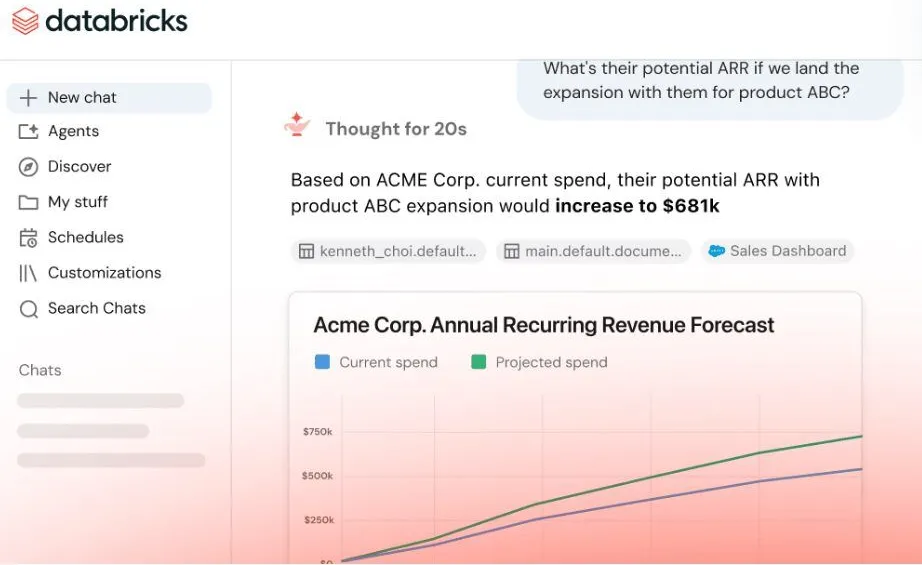 (opens full size in a new tab)
Facts
- Price
- Contact sales
- Runs on
- WebiOSAndroidSlackMicrosoft Teams
- Needs
- Databricks workspaceUnity CatalogPro or serverless SQL warehouse
- Category
- AI
- Facts checked
Price checked · Current prices on databricks.com ↗
Our verdict
#4 of 10 in AI data analysis tools
For teams whose data lives in Databricks
What it does
- Genie One chat for business users across your Databricks data
- Genie Agents that a data team curates with example queries and instructions
- Shows and reruns the SQL behind each answer
- Works in Slack, Teams, and mobile apps
Pros
- Inherits Unity Catalog permissions, row filters, and column masks
- No per-user fee
- Answers save straight to dashboards
Cons
- Works only on data in Databricks
- Needs a data team to curate each agent before sharing
- The basic chat doesn't interpret results or suggest next steps
About Databricks Genie
Databricks Genie is the AI layer of the Databricks platform. Genie One is the chat home for business users, Genie Agents (formerly Genie Spaces) are curated question-and-answer environments that data teams build over Unity Catalog tables, and Genie Code is a coding assistant. Genie translates a plain-language question into SQL, runs it on a SQL warehouse, and returns a table, chart and summary with the generated code available to inspect and rerun. It runs only inside a Databricks account and works on data registered in Unity Catalog, with each user’s existing permissions applied. It is proprietary and billed by usage.
Ranked in
-
#4 of 10 AI data analysis tools For teams whose data lives in Databricks 3.7/5
How it scored
-
Correct answers , counts double 4/5
Runs generated SQL on a warehouse, grounded in curated example queries, instructions, trusted assets and metric views. The vendor warns of hallucinations, non-deterministic output and wrongly matched trusted queries. No independent benchmark was read.
4/5 means: Runs SQL or code grounded in shared definitions a team curates (a semantic model, verified queries or endorsed tables), with reported mistakes mainly on data nobody curated
Genie's model for translating text into SQL uses Chain-of-Thought reasoning to break each question into clear steps. First, it identifies the relevant columns and instructions; next, it plans the SQL generation; and finally, it combines the parts into a single query.
docs.databricks.com/aws/en/genie-agents/talk-to-genie · checked Before sharing the agent with users, Databricks recommends adding example SQL queries, instructions, and knowledge store configurations to improve response accuracy.
docs.databricks.com/aws/en/genie-agents/set-up · checked Genie can sometimes respond with hallucinations or errors, as with other large language models (LLM) tools. Check the accuracy of the provided responses.
docs.databricks.com/aws/en/genie-agents/talk-to-genie · checked Genie, like other large language models (LLMs), can exhibit non-deterministic behaviors. This means that you might receive different outputs when submitting the same prompt multiple times.
docs.databricks.com/aws/en/genie-agents/talk-to-genie · checked Occasionally, Genie can match your question to an incorrect function or query. Review the details to check that the provided answer corresponds to your question.
docs.databricks.com/aws/en/genie-agents/talk-to-genie · checked
Show all 5
-
Shows its work 4/5
Show code displays the SQL, and it can be rerun in place. Genie's own docs describe filters editable in the answer. Results are not a saved notebook, so not a 5.
4/5 means: Shows the query or code and lets the analyst edit or rerun it in place
Result table: Displays the results from the generated query in table format. Click Show code to inspect the query Genie generated.
docs.databricks.com/aws/en/genie-agents/talk-to-genie · checked Rerun the SQL query: Click Show generated code. Then, click Run to rerun the query without having Genie reprocess the request.
docs.databricks.com/aws/en/genie-agents/talk-to-genie · checked
-
Depth of analysis 3/5
SQL-based multi-step questions with charts, plus an Agent mode that does multi-step research reports. Standard chat does not interpret results; Python forecasting and modeling sit in Genie Code and notebooks, a separate tool.
3/5 means: Multi-step SQL questions and charts, with statistics or forecasting limited or in a separate tool
Genie's model for translating text into SQL uses Chain-of-Thought reasoning to break each question into clear steps. First, it identifies the relevant columns and instructions; next, it plans the SQL generation; and finally, it combines the parts into a single query.
docs.databricks.com/aws/en/genie-agents/talk-to-genie · checked Agent mode answers complex, exploratory questions using multi-step reasoning.
docs.databricks.com/aws/en/genie-agents/talk-to-genie · checked
-
Connects to your data 2/5
Works on Unity Catalog data in Databricks only. Non-Databricks data would need federation.
2/5 means: Data in one vendor's platform only, perhaps with file uploads
Unity Catalog: The data for the Genie Agent must be registered to Unity Catalog. You can add up to 50 tables, views, or metric views to a Genie Agent.
docs.databricks.com/aws/en/genie-agents/set-up · checked A Genie Agent uses only the data sources explicitly attached under its Sources. Genie does not query tables or Unity Catalog functions that are not attached
docs.databricks.com/aws/en/genie-agents/set-up · checked
-
Sharing with the team 5/5
Saves charts to AI/BI dashboards, shares agents and conversations by link, runs in Slack and Teams, and view-only consumer access exists. Scheduled reports are mentioned on the product page.
5/5 means: Interactive dashboards or apps, scheduled delivery, Slack or Teams, and separate access for people who only view
You can save a visualization from a Genie Agent response to a new or existing dashboard.
docs.databricks.com/aws/en/genie-agents/talk-to-genie · checked Genie works on web and mobile, inside Slack and Microsoft Teams, and in any MCP-connected tool.
databricks.com/product/genie · checked Entitlements: The consumer access or Databricks SQL workspace entitlement.
docs.databricks.com/aws/en/genie-agents/set-up · checked
-
Security and data governance 5/5
Inherits Unity Catalog row filters, column masks and privileges per user, with admin budgets and audit logs.
5/5 means: Inherits the warehouse's row- and column-level permissions and masking for every user, with no training and enterprise identity controls
Compute access to the SQL warehouse uses the embedded credentials of the author who configured the warehouse, so end users do not need warehouse permissions. Data access is always evaluated as the end user's own Unity Catalog identity: users see only the data they are authorized to access
docs.databricks.com/aws/en/genie-agents/set-up · checked Genie inherits row-level security, column masking and object privileges directly from Unity Catalog, so every chat, agent and document respects the access controls your data team already manages. Admins can monitor usage, set budget limits and track consumption through Unity Gateway.
databricks.com/product/genie · checked
-
Price per analyst 4/5
No seat fee; each user gets 150 DBUs of Genie LLM usage free a month (free entirely until Jan 31, 2027), on a platform the company already runs. The SQL warehouse compute is billed separately and not priced here.
4/5 means: About $26 to $50 an analyst a month, or usage billing with a free allowance per user on a platform the company already runs
Genie usage is charged for consumption, based on actual LLM usage. There are no seat-based or user-based fees.
databricks.com/product/pricing/genie · checked PROMOTION - FREE (1) UNTIL JAN 31, 2027 ... On February 1, 2027: Every user gets 150 DBUs of free usage every month (2) Beyond your free usage $0.070 / DBU Plus underlying compute costs, billed separately.
databricks.com/product/pricing/genie · checked No. The 150 DBUs of free usage applies to Genie's LLM usage only. Running Genie's queries and dashboards also uses compute (for example, a SQL warehouse), which is billed separately as usual.
databricks.com/product/pricing/genie · checked
-
Works without a data team 2/5
Needs an existing Databricks workspace and Unity Catalog, and a pro or serverless SQL warehouse set up by admins. Authors curate the agent and docs recommend this before sharing.
2/5 means: A data team must model or curate the data first; an analyst alone gets unreliable answers
Unity Catalog: The data for the Genie Agent must be registered to Unity Catalog. You can add up to 50 tables, views, or metric views to a Genie Agent.
docs.databricks.com/aws/en/genie-agents/set-up · checked Compute: Genie Agents require a pro or serverless SQL warehouse.
docs.databricks.com/aws/en/genie-agents/set-up · checked Before sharing the agent with users, Databricks recommends adding example SQL queries, instructions, and knowledge store configurations to improve response accuracy.
docs.databricks.com/aws/en/genie-agents/set-up · checked
Top of this ranking
- Hex #1
- Claude #2
- ThoughtSpot #3
-




Sources
23 quotes from 5 pages; the 13 most useful are below.
-
Pricing 4
Genie usage is charged for consumption, based on actual LLM usage. There are no seat-based or user-based fees.
databricks.com/product/pricing/genie · checked PROMOTION - FREE (1) UNTIL JAN 31, 2027 ... On February 1, 2027: Every user gets 150 DBUs of free usage every month (2) Beyond your free usage $0.070 / DBU Plus underlying compute costs, billed separately.
databricks.com/product/pricing/genie · checked No. The 150 DBUs of free usage applies to Genie's LLM usage only. Running Genie's queries and dashboards also uses compute (for example, a SQL warehouse), which is billed separately as usual.
databricks.com/product/pricing/genie · checked Genie One and Genie Agents usage by users is free through January 31, 2027. Service principals are excluded from the promotion, and their usage is billed.
docs.databricks.com/aws/en/genie · checked
-
Limits and known issues 4
Unity Catalog: The data for the Genie Agent must be registered to Unity Catalog. You can add up to 50 tables, views, or metric views to a Genie Agent.
docs.databricks.com/aws/en/genie-agents/set-up · checked Compute: Genie Agents require a pro or serverless SQL warehouse.
docs.databricks.com/aws/en/genie-agents/set-up · checked Genie can sometimes respond with hallucinations or errors, as with other large language models (LLM) tools. Check the accuracy of the provided responses.
docs.databricks.com/aws/en/genie-agents/talk-to-genie · checked Genie, like other large language models (LLMs), can exhibit non-deterministic behaviors. This means that you might receive different outputs when submitting the same prompt multiple times.
docs.databricks.com/aws/en/genie-agents/talk-to-genie · checked
-
Features 5
Genie is the Databricks AI experience for users. It gives every user in your organization a single place to ask data questions in natural language, explore AI/BI dashboards, and run Databricks Apps. Every answer is grounded in your organization's data and governed through Unity Catalog.
docs.databricks.com/aws/en/genie · checked Genie Agents were formerly known as Genie Spaces.
docs.databricks.com/aws/en/genie-agents/set-up · checked Result table: Displays the results from the generated query in table format. Click Show code to inspect the query Genie generated.
docs.databricks.com/aws/en/genie-agents/talk-to-genie · checked Genie inherits row-level security, column masking and object privileges directly from Unity Catalog, so every chat, agent and document respects the access controls your data team already manages. Admins can monitor usage, set budget limits and track consumption through Unity Gateway.
databricks.com/product/genie · checked Genie works on web and mobile, inside Slack and Microsoft Teams, and in any MCP-connected tool.
databricks.com/product/genie · checked