
ThoughtSpot
Cloud BI platform with Spotter, an AI analyst that answers plain-language questions on live warehouse data
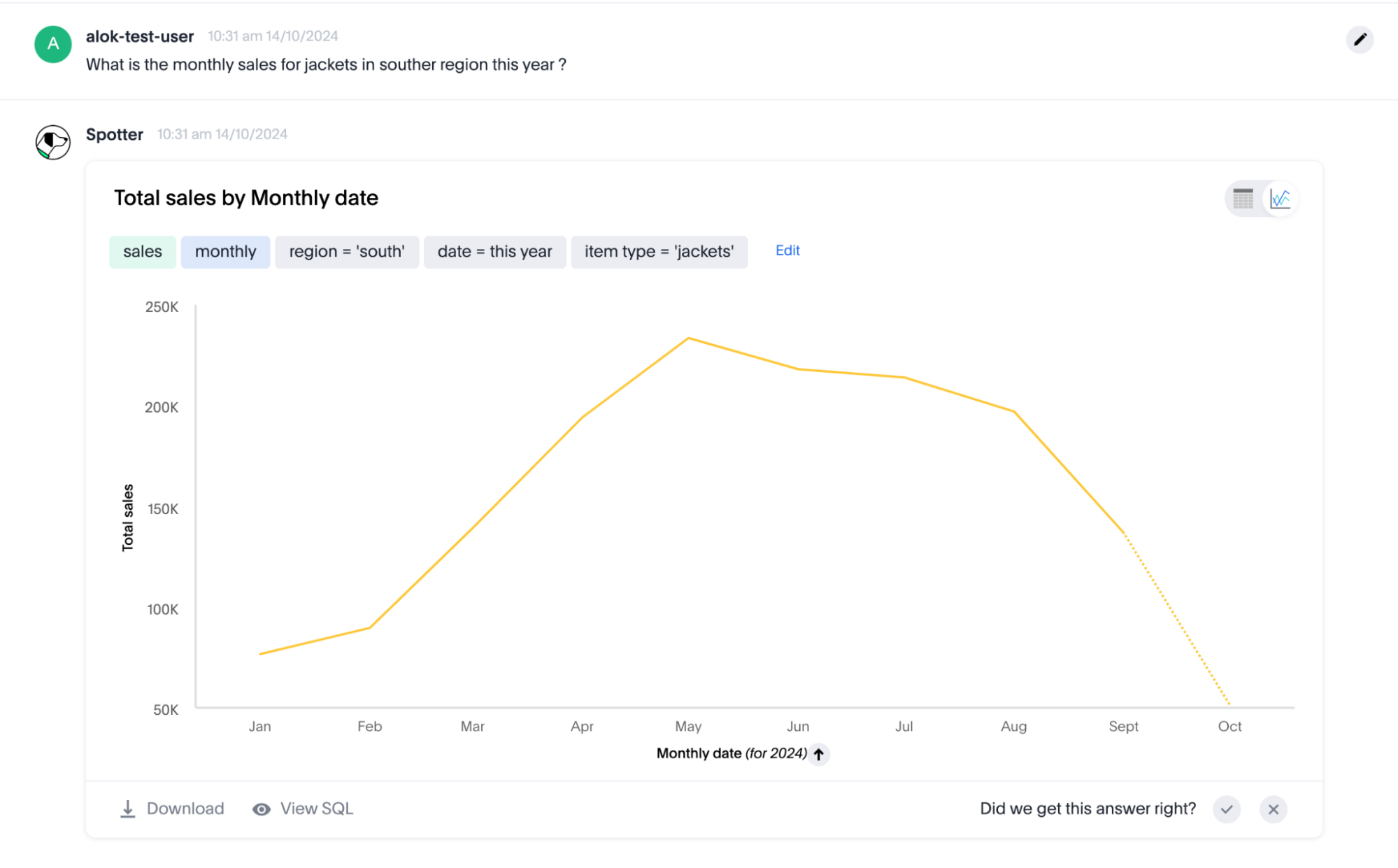
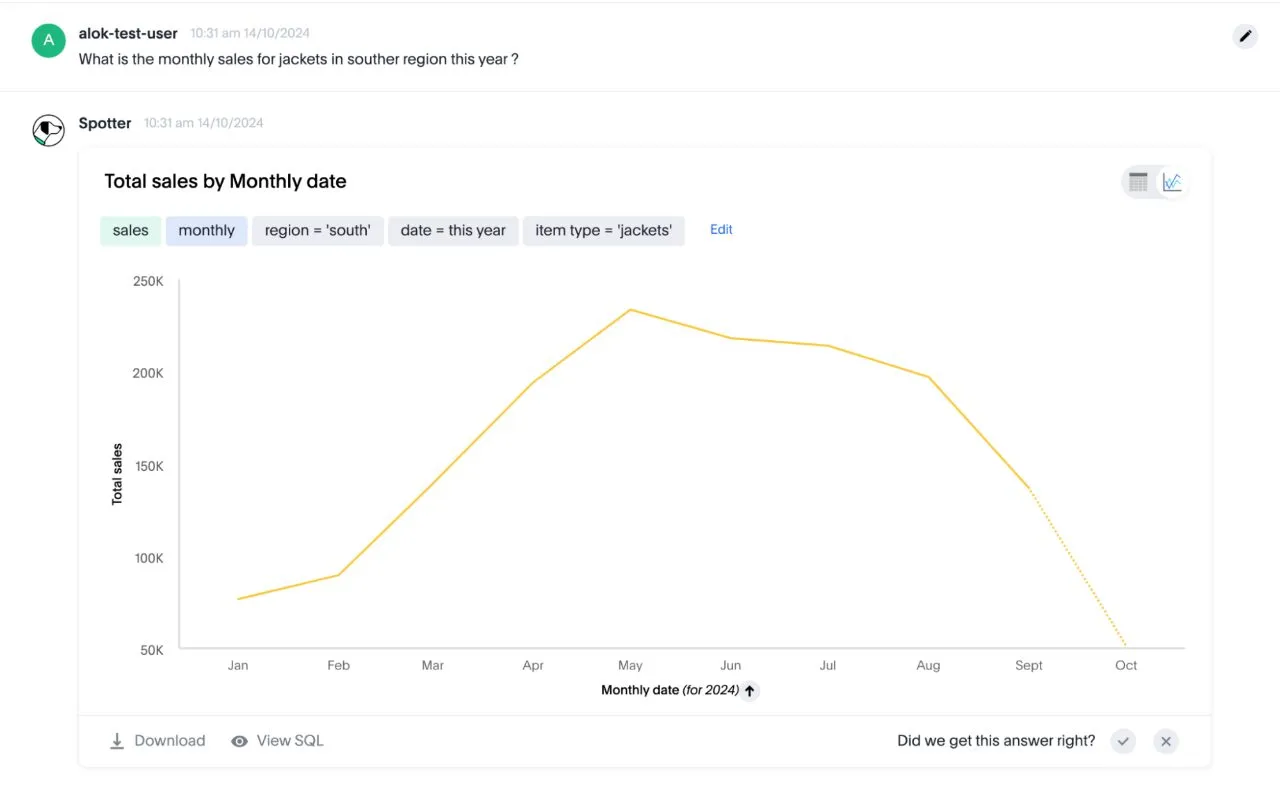 (opens full size in a new tab)
Facts
- Price
- From $25.00/month or $0.10 one-time
- Runs on
- WebiOSAndroid
- Category
- AI
- Facts checked
Price checked · Current prices on thoughtspot.com ↗
Our verdict
#3 of 10 in AI data analysis tools
Search-style self-serve for business users
What it does
- Spotter agent that answers questions with live queries on your warehouse
- Shows every query as editable search tokens, with the SQL a click away
- Liveboards, ThoughtSpot's shared dashboards
Pros
- Business users can check and fix a query without knowing SQL
- Live connections to most major warehouses
- Row-level security and single sign-on for company-wide rollout
Cons
- Pro plan caps Spotter at 25 questions per user a month
- Needs a data model before answers are reliable
- Python and R analysis cost extra through Analyst Studio
- Choose if:
- Business users need to check and fix a query without reading SQL
About ThoughtSpot
ThoughtSpot is a cloud business intelligence and analytics platform sold as a subscription. Its Spotter AI agent answers plain-language questions against data in warehouses such as Snowflake, Databricks, BigQuery and Redshift, builds charts and Liveboards (shareable dashboards), and shows each answer’s query in a simplified token syntax so users can check it. Answers draw on the semantic data model a data team sets up. It runs as a hosted web service with iOS and Android apps and is closed source. Per-user plans start at $25 per user per month (Essentials) and $50 (Pro) billed annually, with a usage-based Pro option and custom Enterprise pricing.
Ranked in
-
#3 of 10 AI data analysis tools Search-style self-serve for business users 3.7/5
How it scored
-
Correct answers , counts double 4/5
Spotter compiles questions into queries run against the warehouse and is grounded in the data model a team maintains; the docs admit it can misread a term such as 'southern region'. No independent accuracy tests were found.
4/5 means: Runs SQL or code grounded in shared definitions a team curates (a semantic model, verified queries or endorsed tables), with reported mistakes mainly on data nobody curated
Spotter is built on top of the BI industry’s leading relational search model, which adds business context from your underlying data model to deliver highly interpretable results with unmatched accuracy.
docs.thoughtspot.com/cloud/26.11.0.cl/spotter · checked We recommend that you always check the search data query, as it provides an easy way to validate all the important choices of the column values picked by the system and how it is using them to build the answer.
docs.thoughtspot.com/cloud/26.11.0.cl/spotter-validate · checked
-
Shows its work 4/5
Every answer shows its query as editable tokens, and the product shows a View SQL link; answers can be saved to Liveboards. The tokens are a simplified syntax, not raw SQL.
4/5 means: Shows the query or code and lets the analyst edit or rerun it in place
Every answer generated by Spotter also shows the query in a simplified syntax. The simplified representation presents only the most meaningful information that you can validate easily.
docs.thoughtspot.com/cloud/26.11.0.cl/spotter-validate · checked We recommend that you always check the search data query, as it provides an easy way to validate all the important choices of the column values picked by the system and how it is using them to build the answer.
docs.thoughtspot.com/cloud/26.11.0.cl/spotter-validate · checked
-
Depth of analysis 3/5
Spotter 3 plans and iterates multi-step analysis, but SQL, R and Python analysis is a separate Analyst Studio add-on and joins across connections are unsupported.
3/5 means: Multi-step SQL questions and charts, with statistics or forecasting limited or in a separate tool
Spotter 3 adds the capability to query structured and unstructured data together, gaining a better understanding of your data. Spotter 3 can plan, reason, iterate, and execute complex analysis like a human analyst.
docs.thoughtspot.com/cloud/26.11.0.cl/spotter · checked Connections does not support joins across connections.
docs.thoughtspot.com/cloud/26.11.0.cl/connections · checked Data prep, mashups, and modeling (Analyst Studio) add-on Advanced analysis with SQL, R, and Python (Analyst Studio) add-on
thoughtspot.com/pricing · checked
-
Connects to your data 4/5
Live connections to Snowflake, Databricks, Redshift, BigQuery, Postgres and many more, but no joins across connections. CSV upload also exists.
4/5 means: Most major warehouses and databases natively, with files, though one answer works on one connection or model at a time
After your connection is complete, it becomes a linked data source in ThoughtSpot, so you can query the external database directly.
docs.thoughtspot.com/cloud/26.11.0.cl/connections · checked Connections does not support joins across connections.
docs.thoughtspot.com/cloud/26.11.0.cl/connections · checked Live pre-built data connections - Snowflake, Databricks, Redshift...
thoughtspot.com/pricing · checked
-
Sharing with the team 5/5
Liveboards (shared interactive dashboards), KPI alerts and monitoring appear in the plan table; scheduled Liveboard delivery by email, Slack integration and view-only access are also available.
5/5 means: Interactive dashboards or apps, scheduled delivery, Slack or Teams, and separate access for people who only view
Live pre-built data connections - Snowflake, Databricks, Redshift...
thoughtspot.com/pricing · checked
-
Security and data governance 4/5
Plan table lists row-level security, SAML/OAuth/OIDC SSO, encryption and a semantic layer; SOC 2 and no-training terms also apply.
4/5 means: No training, SOC 2 and admin controls, plus shared definitions or per-user data permissions set in the tool or its connections
Live pre-built data connections - Snowflake, Databricks, Redshift...
thoughtspot.com/pricing · checked
-
Price per analyst 3/5
The $50 per user per month Pro plan is the lowest priced tier with Spotter and caps it at 25 queries per user per month; the unlimited add-on and overage rate are unpublished, and Essentials at $25 may not include Spotter.
3/5 means: About $51 to $100 an analyst a month; or a low seat price plus a separately billed capacity, usage billing with no free allowance, or a cap on AI questions a daily user will hit
Starting as low as $25 per user / per month (billed annually) - Dynamic interactive dashboards - Actionable insights - From 5 to 50 users - Up to 25M rows of data
thoughtspot.com/pricing · checked Starting as low as $50 per user / per month (billed annually) - AI-powered dashboards and automated insights - Natural-language search and data exploration) - Spotter AI Agents (25 queries/month per user) - Up to 1000 users and 250M rows of data
thoughtspot.com/pricing · checked Spotter AI Agent queries are capped at 25 per user/month on Pro. Exceeding this requires upgrading to usage-based pricing or Enterprise, where costs become unpredictable.
toolradar.com/tools/thoughtspot/pricing · checked
-
Works without a data team 2/5
Answers depend on a curated data model and Toolradar reports onboarding is billed separately; no docs on one analyst starting alone were read, so this is a judgment.
2/5 means: A data team must model or curate the data first; an analyst alone gets unreliable answers
Onboarding and implementation services are priced separately, ThoughtSpot does not include them in the subscription.
toolradar.com/tools/thoughtspot/pricing · checked Spotter is built on top of the BI industry’s leading relational search model, which adds business context from your underlying data model to deliver highly interpretable results with unmatched accuracy.
docs.thoughtspot.com/cloud/26.11.0.cl/spotter · checked
Top of this ranking
- Hex #1
- Claude #2
- Databricks Genie #4
-



Sources
15 quotes from 5 pages; the 12 most useful are below.
-
Pricing 3
Starting as low as $25 per user / per month (billed annually) - Dynamic interactive dashboards - Actionable insights - From 5 to 50 users - Up to 25M rows of data
thoughtspot.com/pricing · checked Starting as low as $50 per user / per month (billed annually) - AI-powered dashboards and automated insights - Natural-language search and data exploration) - Spotter AI Agents (25 queries/month per user) - Up to 1000 users and 250M rows of data
thoughtspot.com/pricing · checked Onboarding and implementation services are priced separately, ThoughtSpot does not include them in the subscription.
toolradar.com/tools/thoughtspot/pricing · checked
-
Limits and known issues 4
Unlimited LLM tokens included. ThoughtSpot does not meter or charge for LLM tokens. Platform use is governed by your subscription. If you use your own LLM provider, that provider’s fees may apply.
thoughtspot.com/pricing · checked Spotter AI Agent queries are capped at 25 per user/month on Pro. Exceeding this requires upgrading to usage-based pricing or Enterprise, where costs become unpredictable.
toolradar.com/tools/thoughtspot/pricing · checked We recommend that you always check the search data query, as it provides an easy way to validate all the important choices of the column values picked by the system and how it is using them to build the answer.
docs.thoughtspot.com/cloud/26.11.0.cl/spotter-validate · checked Connections does not support joins across connections.
docs.thoughtspot.com/cloud/26.11.0.cl/connections · checked
-
Features 5
Spotter is included with all-new ThoughtSpot Analytics per-user and consumption plans. For ThoughtSpot Embedded and legacy row-based or unlimited plans, Spotter is available as an add-on.
docs.thoughtspot.com/cloud/26.11.0.cl/spotter · checked Spotter is built on top of the BI industry’s leading relational search model, which adds business context from your underlying data model to deliver highly interpretable results with unmatched accuracy.
docs.thoughtspot.com/cloud/26.11.0.cl/spotter · checked Spotter 3 adds the capability to query structured and unstructured data together, gaining a better understanding of your data. Spotter 3 can plan, reason, iterate, and execute complex analysis like a human analyst.
docs.thoughtspot.com/cloud/26.11.0.cl/spotter · checked Every answer generated by Spotter also shows the query in a simplified syntax. The simplified representation presents only the most meaningful information that you can validate easily.
docs.thoughtspot.com/cloud/26.11.0.cl/spotter-validate · checked After your connection is complete, it becomes a linked data source in ThoughtSpot, so you can query the external database directly.
docs.thoughtspot.com/cloud/26.11.0.cl/connections · checked