
Hex
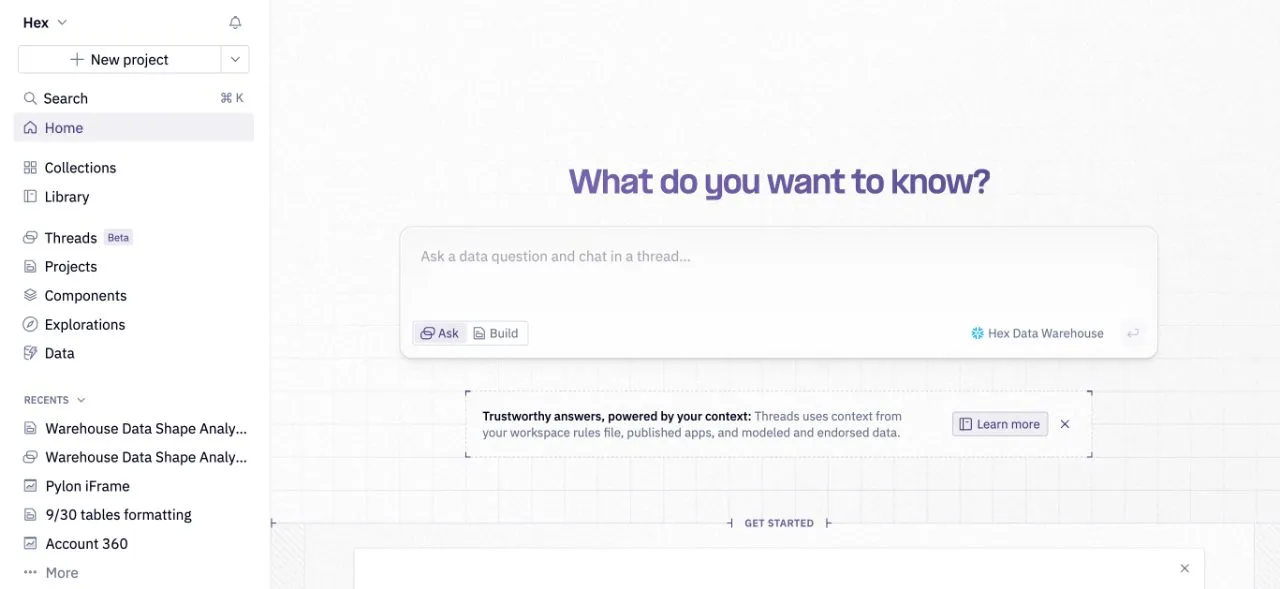
Collaborative notebook with AI agents and chat-style self-serve analytics on your warehouse data
Facts
- Price
- From a free plan or $36.00/month
- Runs on
- Web
- License
- Proprietary
- Category
- AI
- Facts checked
Price checked · Current prices on hex.tech ↗
Our verdict
#1 of 10 in AI data analysis tools
Best for analysts who write some SQL
What it does
- AI agent that writes SQL, Python, and chart cells in a notebook
- Threads, a chat for teammates who don't write SQL, backed by a notebook
- Joins uploaded CSVs with warehouse data
- Publishes interactive apps and scheduled reports to Slack
Pros
- Every step is code you can edit and rerun later
- Grounds answers in endorsed tables and semantic models when your team sets them up
- No training on customer data
Cons
- AI credits run out fast for daily use on the Professional plan
- Scheduled runs need the Team plan, and single sign-on needs Enterprise
- Gets the most out of people comfortable reading SQL
- Skip if:
- You don't read SQL, and nobody on your team will check the queries for you
About Hex
Hex is a cloud-hosted AI analytics platform that combines a multiplayer SQL, Python and no-code notebook with AI agents, published data apps and Threads, a chat interface where people ask data questions in plain language. Analysts use the Notebook Agent to write and edit cells they can audit, and non-technical colleagues use Threads against endorsed data and semantic models the data team curates. It runs as a web service and is a proprietary paid product with a free Community tier.
Ranked in
-
#1 of 10 AI data analysis tools Best for analysts who write some SQL 4.3/5
How it scored
-
Correct answers , counts double 4/5
The agent generates and executes SQL, and Threads is grounded on endorsed data, semantic models and an agent rules file that admins curate, with Governed mode restricting it to those sources. No independent accuracy test or published benchmark was found, so 5 is not supported.
4/5 means: Runs SQL or code grounded in shared definitions a team curates (a semantic model, verified queries or endorsed tables), with reported mistakes mainly on data nobody curated
Other examples of tools include searching for semantic columns, creating visualizations, generating and executing SQL, and looking at visualization results. When the agent returns a response, the tool calls and thinking text will be collapsed automatically. You can always expand the tool calls and thinking text to understand how the agent arrived at a particular result.
learn.hex.tech/docs/explore-data/threads · checked When Governed mode is on, Threads works from the sources your Admins have configured: endorsed data, semantic models only, or a custom set of warehouse data, semantic models, and projects.
learn.hex.tech/docs/explore-data/threads · checked
-
Shows its work 5/5
Tool calls and SQL are expandable in the thread, and every thread is backed by a notebook (an unlisted project) of editable SQL, Python and chart cells that Editors can open, rerun and save.
5/5 means: Every step is a saved, editable SQL or Python cell that anyone can rerun later, as in a notebook
Other examples of tools include searching for semantic columns, creating visualizations, generating and executing SQL, and looking at visualization results. When the agent returns a response, the tool calls and thinking text will be collapsed automatically. You can always expand the tool calls and thinking text to understand how the agent arrived at a particular result.
learn.hex.tech/docs/explore-data/threads · checked Every Thread is backed by an unlisted project that the agent uses to answer questions. Editors and above can navigate between the Thread, Notebook, and App view from the top of the page:
learn.hex.tech/docs/explore-data/threads · checked The Notebook agent is intended to be used by technical users who can audit the SQL and code that the agent suggests.
learn.hex.tech/docs/getting-started/ai-overview · checked
-
Depth of analysis 5/5
Full SQL and Python notebook with chart and pivot cells and agent-built apps; the credits doc's examples include correlation analysis and a 12-month ARR forecast.
5/5 means: Full SQL and Python with statistics, forecasting and modeling, in a workspace where a long analysis builds up step by step
How many customers do we have? · ~1 credit Build me a subscription retention line chart broken out by pricing plan · ~2 credits What user actions correlate most strongly with 30-day retention? · ~3 credits Build me a 12-month ARR forecast. · ~5 credits
learn.hex.tech/docs/administration/credits · checked The Notebook agent is intended to be used by technical users who can audit the SQL and code that the agent suggests.
learn.hex.tech/docs/getting-started/ai-overview · checked Every Thread is backed by an unlisted project that the agent uses to answer questions. Editors and above can navigate between the Thread, Notebook, and App view from the top of the page:
learn.hex.tech/docs/explore-data/threads · checked
-
Connects to your data 5/5
Pricing page says any data source can be connected, Threads can query several connections in one conversation, and CSV uploads can be joined with warehouse data. Warehouses include Snowflake, BigQuery, Postgres, Redshift and Databricks.
5/5 means: All major warehouses and databases plus file uploads, with file and warehouse data usable together
Community For hobbyists completing small projects and showcasing work. Free
hex.tech/pricing · checked Upload and analyze CSV data with Threads. Users can upload CSVs and the agent can craft queries based on the file provided. The agent is also capable of joining the CSV data with existing warehouse data, enabling cross-source insights through a simple file upload.
learn.hex.tech/docs/explore-data/threads · checked
-
Sharing with the team 5/5
Published interactive apps, threads shared with users or groups, scheduled runs and alerts (Team), Slack delivery and Tasks, and view-only access through Explorer and viewer roles. Scheduling is on Team ($75), not Professional.
5/5 means: Interactive dashboards or apps, scheduled delivery, Slack or Teams, and separate access for people who only view
Team For companies collaborating with data and automating manual work. $75 per Editor / month [Try 14 days free]
hex.tech/pricing · checked Everything in Team, plus: Explorer seat add-on Audit logs Premium credits OAuth database connections
hex.tech/pricing · checked Hex’s Slack integration enables you to interact with Hex Threads directly in your Slack workspace.
learn.hex.tech/docs/explore-data/threads · checked
-
Security and data governance 4/5
No training on customer data, SOC 2 Type II and HIPAA audits, semantic models and Governed mode. SSO (OIDC), audit logs, BYOK and OAuth database connections are Enterprise only; per-user warehouse permission inheritance is only through OAuth connections, so 5 is not supported.
4/5 means: No training, SOC 2 and admin controls, plus shared definitions or per-user data permissions set in the tool or its connections
Everything in Team, plus: Explorer seat add-on Audit logs Premium credits OAuth database connections
hex.tech/pricing · checked When Governed mode is on, Threads works from the sources your Admins have configured: endorsed data, semantic models only, or a custom set of warehouse data, semantic models, and projects.
learn.hex.tech/docs/explore-data/threads · checked Hex's AI providers do not train on customer data. By default, Hex's AI providers operate under zero data retention agreements.
learn.hex.tech/docs/getting-started/ai-overview · checked We are audited annually for SOC 2 Type II and HIPAA compliance and are dedicated to safeguarding your data.
hex.tech/pricing · checked
Show all 4
-
Price per analyst 3/5
Professional is $36 per Editor and any source can connect, but it has 30 credits a month (about 30 simple questions) with $0.50 per credit top-ups, and scheduled runs and unlimited apps need Team at $75. A daily user would hit the credit cap, so this lands at the 3 level. Explorer seat price is unpublished.
3/5 means: About $51 to $100 an analyst a month; or a low seat price plus a separately billed capacity, usage billing with no free allowance, or a cap on AI questions a daily user will hit
Professional For individuals accelerating data insights and solo workflows. $36 per Editor / month
hex.tech/pricing · checked Team For companies collaborating with data and automating manual work. $75 per Editor / month [Try 14 days free]
hex.tech/pricing · checked Community · Editor · 5 credits/month Professional · Editor · 30 credits/month Team · Editor · 40 credits/month Team · Explorer · 10 credits/month Enterprise · Explorer & Editor · Specified on order form
learn.hex.tech/docs/administration/credits · checked How many customers do we have? · ~1 credit Build me a subscription retention line chart broken out by pricing plan · ~2 credits What user actions correlate most strongly with 30-day retention? · ~3 credits Build me a 12-month ARR forecast. · ~5 credits
learn.hex.tech/docs/administration/credits · checked Enabling auto top-ups will automatically purchase a 50-credit pack ($25) for the workspace pool when the balance falls below 25 credits.
learn.hex.tech/docs/administration/credits · checked
Show all 5
-
Works without a data team 4/5
Self-serve signup with a free tier and a 14-day Team trial; an analyst can connect data and use the Notebook Agent alone. Docs say Threads quality depends on admins endorsing data and curating context, which improves answers but isn't required. No source on solo setup time.
4/5 means: An analyst can connect a warehouse or upload files and get good answers the same day, and curation improves them
Community For hobbyists completing small projects and showcasing work. Free
hex.tech/pricing · checked The Notebook agent is intended to be used by technical users who can audit the SQL and code that the agent suggests.
learn.hex.tech/docs/getting-started/ai-overview · checked Threads is available on all plans, which include monthly per-seat credit grants that can be used towards Hex AI features. Users require an Explorer role or higher to use Threads.
learn.hex.tech/docs/explore-data/threads · checked
Top of this ranking
- Claude #2
- ThoughtSpot #3
- Databricks Genie #4
-



Sources
19 quotes from 5 pages; the 13 most useful are below.
-
Pricing 3
Professional For individuals accelerating data insights and solo workflows. $36 per Editor / month
hex.tech/pricing · checked Team For companies collaborating with data and automating manual work. $75 per Editor / month [Try 14 days free]
hex.tech/pricing · checked Enabling auto top-ups will automatically purchase a 50-credit pack ($25) for the workspace pool when the balance falls below 25 credits.
learn.hex.tech/docs/administration/credits · checked
-
Limits and known issues 4
AI features in Hex consume credits based on the effort required to complete the task. All paid plans include a credit grant, with the option to purchase add-on credits.Professional and Team plans include monthly per-seat credit grants that are assigned to each paid user, refresh monthly and don't roll over.
hex.tech/pricing · checked Community · Editor · 5 credits/month Professional · Editor · 30 credits/month Team · Editor · 40 credits/month Team · Explorer · 10 credits/month Enterprise · Explorer & Editor · Specified on order form
learn.hex.tech/docs/administration/credits · checked How many customers do we have? · ~1 credit Build me a subscription retention line chart broken out by pricing plan · ~2 credits What user actions correlate most strongly with 30-day retention? · ~3 credits Build me a 12-month ARR forecast. · ~5 credits
learn.hex.tech/docs/administration/credits · checked Hex's AI providers do not train on customer data. By default, Hex's AI providers operate under zero data retention agreements.
learn.hex.tech/docs/getting-started/ai-overview · checked
-
Features 6
The Notebook agent is intended to be used by technical users who can audit the SQL and code that the agent suggests.
learn.hex.tech/docs/getting-started/ai-overview · checked Use Threads to self-serve data questions based on curated data in a conversational interface. The Threads agent highly prioritizes endorsed and semantically modeled data. The Threads agent is intended to be used by non-technical members outside the data team, but can be used by any users with an Explorer role or higher.
learn.hex.tech/docs/getting-started/ai-overview · checked Threads is available on all plans, which include monthly per-seat credit grants that can be used towards Hex AI features. Users require an Explorer role or higher to use Threads.
learn.hex.tech/docs/explore-data/threads · checked Other examples of tools include searching for semantic columns, creating visualizations, generating and executing SQL, and looking at visualization results. When the agent returns a response, the tool calls and thinking text will be collapsed automatically. You can always expand the tool calls and thinking text to understand how the agent arrived at a particular result.
learn.hex.tech/docs/explore-data/threads · checked Every Thread is backed by an unlisted project that the agent uses to answer questions. Editors and above can navigate between the Thread, Notebook, and App view from the top of the page:
learn.hex.tech/docs/explore-data/threads · checked Hex is an AI analytics platform for anyone to explore, analyze and build with data through conversation—grounded in trusted, governed context.
hex.tech/capability/ai · checked
Show all 6