
EasyEDA
Free browser-based PCB design tool, with a desktop client, tied to LCSC parts and JLCPCB ordering
Our verdict
#2 of 9 in PCB design software for hobbyists · Quickest route from idea to assembled board
What it does
- Runs in a browser, with desktop apps for Windows, macOS, and Linux
- LCSC parts with stock and price shown while you design
- One-click ordering of boards and assembly from JLCPCB
- Gerber, BOM, and pick-and-place export for other fabs
Pros
- The fastest start of any tool here
- Footprints for parts JLCPCB stocks are rarely a chore
- Free for commercial use, with no project limits
Cons
- Account required, ads on the free plan
- Proprietary files with no direct KiCad export
- User-contributed parts vary in quality
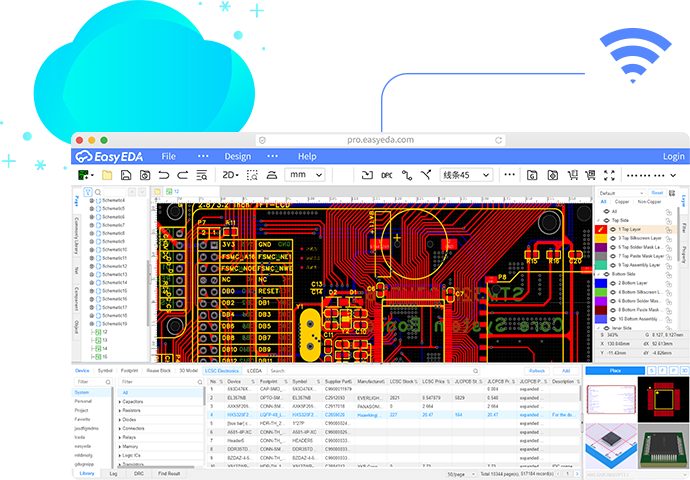
EasyEDA is a free schematic and PCB design tool from the JLCPCB and LCSC group. It runs in the browser and, for Windows, macOS and Linux, as a desktop client. It comes in two editions that can be used side by side. EasyEDA Pro is the recommended edition and the one being developed; the older EasyEDA Standard is simpler but has fewer routing and library tools. Parts come from the LCSC catalog, and boards and assembly can be ordered from JLCPCB in one click, while Gerber, BOM and pick-and-place files can be exported for other fabs. An account is required. The software is free, including for commercial use, with an optional paid subscription for extra cloud storage, private libraries and support. It is not open source.
What users say
Evidence ↓In one July 2026 EEVblog thread of about a dozen posters, hobbyists agree EasyEDA is quicker to learn than KiCad or Eagle and convenient for JLCPCB assembly orders. Critics there say its libraries are poor, its autorouter weak, and that web-hosted tools can disappear. Posters recommend local backups. Users of the older Standard edition are split on Pro, some finding it a hassle or relearning shortcuts, while others value its reuse blocks and BGA fanout, and note projects cannot move from Pro back to Standard. These are forum posts from a small sample, not a survey.
Rankings and alternatives
- PCB design software for hobbyists #2 of 9 Quickest route from idea to assembled board
- KiCad #1 Free, unlimited, and worth the learning curve
- DipTrace #3 Polished desktop app with one-time pricing
- Horizon EDA #4 KiCad's router with stricter libraries




Hobbyist PCB design software scores
Evaluated Nov 17, 2026 Evidence ↓- Layout and routing power · counts double 4
4/5 means: Strong interactive routing with differential pairs and length tuning, and one notable weakness in speed, polish or rule setup
Pro has differential pair and equal-length managers, network classes, multi-way routing, fan-out, DFM check, DRC, blind/buried vias, 3D preview and STEP export. Its autorouter is called weak, and from knowledge its interactive router is less capable than KiCad's push-and-shove, so one notable weakness remains.
- Free-use headroom 5
5/5 means: Free with no layer, size or pin limits, and selling boards is allowed
All editor features and the desktop client are free with unlimited projects, and commercial use is allowed. Layer and board-size caps were not found and Pro handles very large designs. Minor strings are public libraries, ads and 0.5GB cloud storage, which do not limit designs.
- Ease of a first board 5
5/5 means: The easiest path from a blank page to an ordered board, with little setup and clear guidance
Several forum users report first boards in hours to weeks, and find it easier than KiCad or Eagle. Pro is called more of a hassle than Standard for simple projects, and library symbols often need fixing. Writer calibration: among these tools EasyEDA is the one reviewers and users most consistently name as the quickest route from a blank page to an ordered board, which is the level 5 description.
- Parts libraries 5
5/5 means: A vast library tied to real purchasable parts, so drawing footprints is rarely needed
The library is tied to LCSC's purchasable parts, with stock and price shown in the editor, so footprints are rarely drawn for JLCPCB-stocked parts. Critics report poor symbol quality and gaps for through-hole and non-LCSC parts, though making parts is easy. Writer calibration: a vast library tied to LCSC stock, so drawing footprints is rarely needed for parts a hobbyist orders through JLCPCB, matches level 5 despite uneven symbol quality.
- Path to manufactured boards 5
5/5 means: One-click ordering of boards and assembly, with parts sourcing linked to the fab's stock
One-click PCB and SMT ordering, with Gerber, BOM and coordinate export for other fabs and library parts linked to LCSC stock.
- Ownership of your designs 3
3/5 means: Local files or an offline mode, but a proprietary format, an account requirement or one-way migration
Pro has a fully offline client with local project storage, and imports KiCad, Altium and Eagle. The format is proprietary, an account is required, and the vendor table shows exports to Altium and PADS only. Migration from Standard to Pro is one-way.
- Help and community 4
4/5 means: A large community with plenty of tutorials and shared projects
From general knowledge, EasyEDA has many YouTube tutorials, the JLCPCB-backed docs and a large shared-project site (OSHWLab). A forum poster notes little chatter on EEVblog. No tutorial counts or user numbers were read.
- Platforms · counts half 5
5/5 means: Windows, macOS and Linux natively, or a full browser editor plus native clients
Full browser editor plus native Windows, Linux and macOS (Intel and Apple Silicon) clients.
Pricing
- Free Free All editor features, Standard and Pro editions and the desktop client. Unlimited projects, libraries and team members, and commercial use of boards allowed. 0.5GB cloud storage, public libraries only, ads shown in the editor and workspace, 7-day operation logs and 2 free part drawings per month.
- Premium (individual) $19.90 /month Billed annually only, so 19.9 x 12 = 238.8 USD per year paid upfront. Adds 10GB cloud storage, private libraries, no ads, 6 free part drawings per month, 30-day logs, multinode backup and a PCB layout service discount. Editor features are the same as the free plan. The Enterprise plan is listed as coming soon.
Prices checked Nov 17, 2026.
Evidence and sources
What users say
Summary 9 quotes
-
Long time Eagle user. I switched to EasyEDA about a year ago because of the Eagle EOL… and because it is so easy to smda through JLC.
rpschultz13, EEVblog forum member and hobbyist · eevblog.com/forum/eda/easyeda/msg6303026 · published · checked -
Started to learn EasyEDA, within weeks I was very comfortable, it’s very intuitive to learn.
rpschultz13, EEVblog forum member and hobbyist · eevblog.com/forum/eda/easyeda/msg6306606 · published · checked -
Because it actually lives up to the “easy” in its name. IMHO EasyEDA is far more intuitive than KiCad. KiCad is more powerful, but it’s got a steeper learning curve.
tooki, EEVblog forum member · eevblog.com/forum/eda/easyeda/msg6318004 · published · checked -
The auto router did not strike me as any good.
pcprogrammer, EEVblog forum member, about 8 years of EasyEDA use · eevblog.com/forum/eda/easyeda/msg6303692 · published · checked -
Yes the libraries are very bad, but making your own symbols and footprints is rather easy.
pcprogrammer, EEVblog forum member, about 8 years of EasyEDA use · eevblog.com/forum/eda/easyeda/msg6303692 · published · checked -
I've seen far to many products being discontinued after a number of years. When that happens you loose access to your projects, and all the time you invested in learning the software is also wasted.
Doctorandus_P, EEVblog forum member · eevblog.com/forum/eda/easyeda/msg6303504 · published · checked -
easyeda pro is too much of a hassle for simple projects. i keep using std edition as long as i can. but that bga-fanout feature is nice tho
gamerpaddy, EEVblog forum member · eevblog.com/forum/eda/easyeda/msg6303510 · published · checked -
But there is a big downside for me: while there is a utility you can use to import Standard projects into Pro, the reverse feature is not available. That means that once you’ve created a project in Pro, you have committed to it.
Electro-Tech-Online forum member, forum user · electro-tech-online.com/threads/anyone-jumped-from-easyeda-std-to-easyeda-pro.167882 · published · checked -
The Component Libraries in Pro are more geared toward LCSC-compatible and JLCPCB-verified parts for direct manufacturing integration. That makes them powerful for production but lacking in diversity—especially through-hole components, or more general parts not stocked by LCSC.
ahsrabrifat, Electro-Tech-Online forum member · electro-tech-online.com/threads/anyone-jumped-from-easyeda-std-to-easyeda-pro.167882 · published · checked
Hobbyist PCB design software scores
Layout and routing power 6 quotes
-
Equal Length Net Group Manager · × · √
prodocs.easyeda.com/en/introduction/std-vs-pro · checked -
Auto-routing · √ · √
prodocs.easyeda.com/en/introduction/std-vs-pro · checked -
Check DFM · × · √
prodocs.easyeda.com/en/introduction/std-vs-pro · checked -
3D file-Step · × · √ · Standard version entrance: File-Export-3D model
prodocs.easyeda.com/en/introduction/std-vs-pro · checked -
One-click placement of blind buried holes and batch placement of sutured holes
pro.easyeda.com · checked -
The auto router did not strike me as any good.
pcprogrammer, EEVblog forum member, about 8 years of EasyEDA use · eevblog.com/forum/eda/easyeda/msg6303692 · published · checked
Free-use headroom 7 quotes
-
EasyEDA charges only for the service, and the software features are entirely free for every user.
easyeda.com/page/pricing · checked -
There is no limitation on the number of projects and libraries created by individual users or teams, or on the number of team members.
easyeda.com/page/pricing · checked -
PCBs designed with EasyEDA are available for commercial use.
easyeda.com/page/pricing · checked -
Individuals ($19.9/mo) Annual billing only Buy Now
easyeda.com/page/pricing · checked -
Libraries are generally public, but paid accounts can set the library to private.
easyeda.com/page/pricing · checked -
Google Ads are not-removable on the editor and workspace for free version.
easyeda.com/page/pricing · checked -
The process supports design scales of 300
easyeda.com/page/download · checked
Ease of a first board 5 quotes
-
Long time Eagle user. I switched to EasyEDA about a year ago because of the Eagle EOL… and because it is so easy to smda through JLC.
rpschultz13, EEVblog forum member and hobbyist · eevblog.com/forum/eda/easyeda/msg6303026 · published · checked -
Started to learn EasyEDA, within weeks I was very comfortable, it’s very intuitive to learn.
rpschultz13, EEVblog forum member and hobbyist · eevblog.com/forum/eda/easyeda/msg6306606 · published · checked -
Because it actually lives up to the “easy” in its name. IMHO EasyEDA is far more intuitive than KiCad. KiCad is more powerful, but it’s got a steeper learning curve.
tooki, EEVblog forum member · eevblog.com/forum/eda/easyeda/msg6318004 · published · checked -
easyeda pro is too much of a hassle for simple projects. i keep using std edition as long as i can. but that bga-fanout feature is nice tho
gamerpaddy, EEVblog forum member · eevblog.com/forum/eda/easyeda/msg6303510 · published · checked -
My main gripe is that many of the keyboard shortcuts which by now are firmly ingrained into muscle memory, are now different.
schmitt trigger, Electro-Tech-Online forum member, long-time Standard user · electro-tech-online.com/threads/anyone-jumped-from-easyeda-std-to-easyeda-pro.167882 · published · checked
Parts libraries 3 quotes
-
Integrate millions of component libraries and packages of Lichuang Mall, no need to draw packages by yourself
pro.easyeda.com · checked -
Yes the libraries are very bad, but making your own symbols and footprints is rather easy.
pcprogrammer, EEVblog forum member, about 8 years of EasyEDA use · eevblog.com/forum/eda/easyeda/msg6303692 · published · checked -
The Component Libraries in Pro are more geared toward LCSC-compatible and JLCPCB-verified parts for direct manufacturing integration. That makes them powerful for production but lacking in diversity—especially through-hole components, or more general parts not stocked by LCSC.
ahsrabrifat, Electro-Tech-Online forum member · electro-tech-online.com/threads/anyone-jumped-from-easyeda-std-to-easyeda-pro.167882 · published · checked
Path to manufactured boards 4 quotes
-
One-click PCB/SMT order · √ · √
prodocs.easyeda.com/en/introduction/std-vs-pro · checked -
Export PCB board making file Gerber · √ · √ · Professional version entrance: Export-PCB board making file
prodocs.easyeda.com/en/introduction/std-vs-pro · checked -
Integrate millions of component libraries and packages of Lichuang Mall, no need to draw packages by yourself
pro.easyeda.com · checked -
The auto router did not strike me as any good.
pcprogrammer, EEVblog forum member, about 8 years of EasyEDA use · eevblog.com/forum/eda/easyeda/msg6303692 · published · checked
Ownership of your designs 7 quotes
-
Free activation and authorization, you can use it by registering and logging in, and you don't have to endure the cracked EDA anymore.
easyeda.com/page/download · checked -
Fully offline mode · × · √
prodocs.easyeda.com/en/introduction/std-vs-pro · checked -
Local · × · √
prodocs.easyeda.com/en/introduction/std-vs-pro · checked -
KiCAD · √ · √
prodocs.easyeda.com/en/introduction/std-vs-pro · checked -
AltiumDesigner · √ · √
prodocs.easyeda.com/en/introduction/std-vs-pro · checked -
EasyEDA Standard Edition · √ · ×
prodocs.easyeda.com/en/introduction/std-vs-pro · checked -
I've seen far to many products being discontinued after a number of years. When that happens you loose access to your projects, and all the time you invested in learning the software is also wasted.
Doctorandus_P, EEVblog forum member · eevblog.com/forum/eda/easyeda/msg6303504 · published · checked
Help and community 1 quote
-
Long time Eagle user. I switched to EasyEDA about a year ago because of the Eagle EOL… and because it is so easy to smda through JLC.
rpschultz13, EEVblog forum member and hobbyist · eevblog.com/forum/eda/easyeda/msg6303026 · published · checked
Platforms 3 quotes
-
Windows-AMD64 · √ · √
prodocs.easyeda.com/en/introduction/std-vs-pro · checked -
MAC-ARM64 · × · √
prodocs.easyeda.com/en/introduction/std-vs-pro · checked -
Browser-based operation, high efficiency, no need to download, just open the website and start designing
pro.easyeda.com · checked
Facts
License 1 quote
-
EasyEDA charges only for the service, and the software features are entirely free for every user.
easyeda.com/page/pricing · checked
Runs on 3 quotes
-
Windows-AMD64 · √ · √
prodocs.easyeda.com/en/introduction/std-vs-pro · checked -
MAC-ARM64 · × · √
prodocs.easyeda.com/en/introduction/std-vs-pro · checked -
Browser-based operation, high efficiency, no need to download, just open the website and start designing
pro.easyeda.com · checked
Needs 1 quote
-
Free activation and authorization, you can use it by registering and logging in, and you don't have to endure the cracked EDA anymore.
easyeda.com/page/download · checked
More from the sources
Features 3 quotes
-
Do not limit the editor edition, the std and pro edition can be used at the same time, we recommended to use the professional edition, we will focus on the development of professional edition.
easyeda.com/page/pricing · checked -
Real-time Collaboration · × · × · Professional Edition 2025 Support
prodocs.easyeda.com/en/introduction/std-vs-pro · checked -
Simulation · √ · × · Professional version 2025 support
prodocs.easyeda.com/en/introduction/std-vs-pro · checked
What users say 1 quote
-
I have been using it for many years (~8 years) now and made the switch to the pro version when it was shown that the standard version was no longer maintained.
pcprogrammer, EEVblog forum member · eevblog.com/forum/eda/easyeda/msg6303474 · published · checked
Platforms and requirements 1 quote
-
Semi-offline mode · × · √ · Standard version projects are offline, libraries are online; Professional version only has system libraries online, others are offline
prodocs.easyeda.com/en/introduction/std-vs-pro · checked
Pricing
easyeda.com/page/pricing · checked