
KiCad
Free open-source desktop suite for schematic capture and PCB layout
Our verdict
#1 of 9 in PCB design software for hobbyists · Free, unlimited, and worth the learning curve
What it does
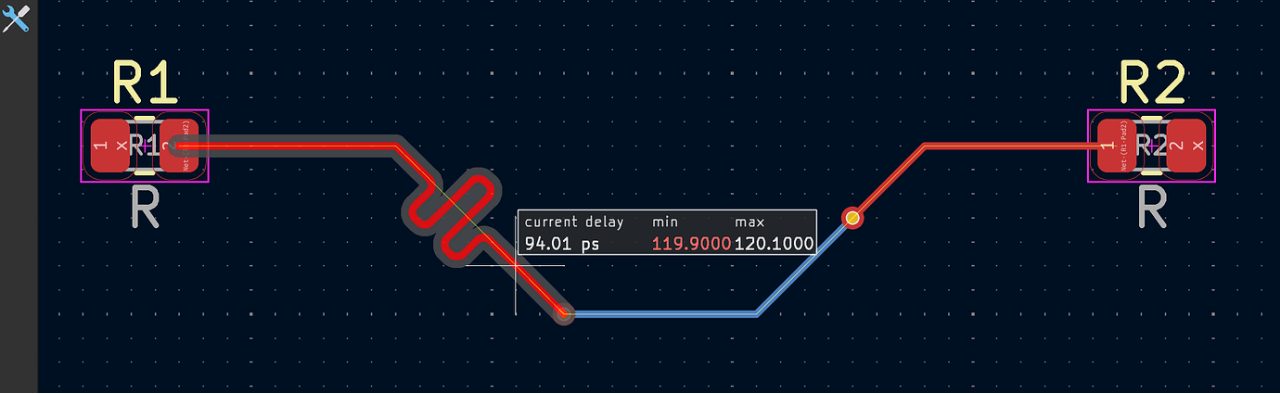
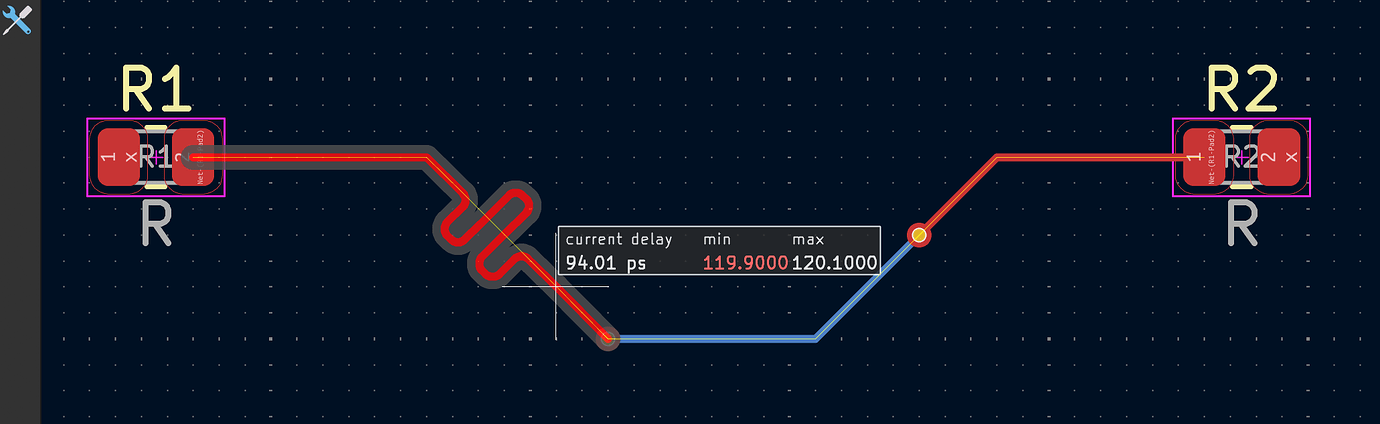
- Push-and-shove routing, differential pairs, and length tuning
- Large official symbol, footprint, and 3D model libraries
- Plugin manager with fab, parts, and autorouter plugins
- Built-in SPICE simulation and 3D viewer with STEP export
Pros
- No limits on layers, size, pins, or selling boards
- Local, open files you can keep without renewing a license
- The biggest community and the most tutorials of any free tool
Cons
- Takes a few evenings before a first board feels natural
- Library setup and linking symbols to footprints trip up newcomers
- No built-in autorouter
- Skip if:
- You want boards ordered this weekend and never plan a second design
KiCad is a free, open-source desktop suite for electronic design automation: schematic capture, PCB layout with a 3D viewer, and Gerber output, plus a symbol and footprint editor and a SPICE simulator. The current major version is 10 (released March 2026). It runs on Windows, Linux and macOS under the GNU GPL v3, and is funded by donations and governed by a volunteer lead development team.
What users say
Evidence ↓The two third-party articles read are release coverage rather than hands-on tests. Both are favorable, calling KiCad a favorite of hobbyists and professionals on a zero budget and noting it keeps its open-source accessibility while gaining professional features. No critical practitioner view was collected, so this is not a measure of how learners find it.
Rankings and alternatives
- PCB design software for hobbyists #1 of 9 Free, unlimited, and worth the learning curve
- EasyEDA #2 Quickest route from idea to assembled board
- DipTrace #3 Polished desktop app with one-time pricing
- Horizon EDA #4 KiCad's router with stricter libraries



Hobbyist PCB design software scores
Evaluated Nov 17, 2026 Evidence ↓- Layout and routing power · counts double 5
5/5 means: Professional-grade routing and rule handling that comfortably covers dense four-layer and controlled-impedance hobby boards
Known push-and-shove and walkaround router, differential pair routing, up to 32 copper layers, 3D viewer with STEP export, and v10 adds time-domain tuning, a graphical DRC rule editor and DRC fix suggestions. Weakness is no built-in autorouter (Freerouting via plugin) and rule setup still being custom-rule based. Router specifics rest on prior knowledge, not a quote. Writer calibration: no built-in autorouter is not a requirement of any level, and KiCad's interactive router, diff-pair routing and tuning are the professional-grade tools the top level describes, so 5.
- Free-use headroom 5
5/5 means: Free with no layer, size or pin limits, and selling boards is allowed
GPL v3, free to download, no layer, size or pin limits, and boards can be sold. The pages read state the license and zero cost but do not list the absence of limits.
- Ease of a first board 3
3/5 means: A real learning curve of a few evenings before a first board, with good help available
From prior knowledge, a few evenings of learning (library tables, symbol-footprint assignment, annotation) with good official getting-started docs and many tutorials. No learner account was read, so this is uncertain.
- Parts libraries 4
4/5 means: A broad, reliable library plus easy import of missing parts
Large official libraries, 952 symbols, 1216 footprints and 386 3D models added in the last cycle, with most footprints generated from data. SnapEDA and Ultra Librarian import and LCSC/JLCPCB part plugins via the Plugin and Content Manager are from prior knowledge. Parts are not tied to purchasable stock as in 5.
- Path to manufactured boards 4
4/5 means: Complete output plus built-in or plugin ordering of boards from at least one fab
Gerber, drill, BOM and position files, and IPC-2581 output are documented. JLCPCB and PCBWay fabrication plugins exist (prior knowledge) but ordering is not one-click with stock-linked sourcing.
- Ownership of your designs 5
5/5 means: Open-source, local, documented files that other tools can import, with a healthy project behind them
Open-source GPL, local text-based documented files, and importers for Altium, Allegro, PADS and gEDA. Long-lived donor-funded project with a multi-person lead team. Eagle and EasyEDA import rests on prior knowledge.
- Help and community 5
5/5 means: A very large community; almost any question already has an answer and a video
From prior knowledge, a very large forum, video tutorial base and conferences (KiCons in Europe and Asia). No published user count was found, so this rests on knowledge, not quotes.
- Platforms · counts half 5
5/5 means: Windows, macOS and Linux natively, or a full browser editor plus native clients
Native on Windows, Linux and macOS.
Pricing
- KiCad Free Free to download; donations are optional.
Prices checked Nov 17, 2026.
Evidence and sources
What users say
Summary 2 quotes
-
When you need to design a printed circuit board and your budget for electronic design automation software is $0, it’s hard to beat KiCad. This software suite is a favorite of hobbyists and professional electronics engineers around the globe
Nick Bild, writer at Hackster.io · hackster.io/news/what-s-new-in-kicad-10-63372efa034c · published · checked -
the KiCad 10 release keeps pushing the tool further into serious day-to-day PCB design territory without losing the open-source accessibility that got many users into it in the first place.
Brian Tristam Williams, writer at Elektor Magazine · elektormagazine.com/news/kicad-10-release · published · checked
Hobbyist PCB design software scores
Layout and routing power 2 quotes
-
Time-domain tuning: James Jackson did a complete overhaul of KiCad’s track tuning system, including upgrades to the algorithms to make things more consistent between the router and DRC, support for defining time-domain constraints instead of just length constraints, and support for Tuning Profiles, which let users define per-layer routing parameters for signals.
kicad.org/blog/2026/03/Version-10.0.0-Released · checked -
Graphical DRC Rule editor: Seth Hillbrand and Damjan Prerad built a new rule editor dialog that enables users to create custom design rules in a graphical workflow. Rules created with the editor are fully compatible with the existing Custom Rules language, allowing users to start with graphical definitions and grow into more advanced rules as they get more familiar with the system.
kicad.org/blog/2026/03/Version-10.0.0-Released · checked
Free-use headroom 2 quotes
-
The suite runs on Windows, Linux and macOS and is licensed under GNU GPL v3.
kicad.org/about/kicad · checked -
When you need to design a printed circuit board and your budget for electronic design automation software is $0, it’s hard to beat KiCad. This software suite is a favorite of hobbyists and professional electronics engineers around the globe
Nick Bild, writer at Hackster.io · hackster.io/news/what-s-new-in-kicad-10-63372efa034c · published · checked
Ease of a first board 1 quote
-
the KiCad 10 release keeps pushing the tool further into serious day-to-day PCB design territory without losing the open-source accessibility that got many users into it in the first place.
Brian Tristam Williams, writer at Elektor Magazine · elektormagazine.com/news/kicad-10-release · published · checked
Parts libraries 1 quote
-
starting with KiCad version 10 we are shipping STEP files only - this dramatically reduces the install size of the 3D models and gives better geometric accuracy and fewer differences between visualization and exports. We have added new user contributions amounting to 952 new symbols, 1216 new footprints, and 386 new 3D models to the libraries.
kicad.org/blog/2026/03/Version-10.0.0-Released · checked
Path to manufactured boards 1 quote
-
Variants: Wayne Stambaugh and Seth Hillbrand added support for design variants: a way to track different versions of a single project that share a schematic but have property changes (for example, a different bill of materials).
kicad.org/blog/2026/03/Version-10.0.0-Released · checked
Ownership of your designs 3 quotes
-
The suite runs on Windows, Linux and macOS and is licensed under GNU GPL v3.
kicad.org/about/kicad · checked -
KiCad 10 can now import designs from Allegro, PADS, and gEDA / Lepton PCB.
kicad.org/blog/2026/03/Version-10.0.0-Released · checked -
Last year, you helped us raise $100,000+ from more than 2,500 donors.
kicad.org/blog/2026/01/2025-End-of-Year-Fund-Drive-The-Year-We-Lost-Count · published · checked
Help and community 1 quote
-
Last year, you helped us raise $100,000+ from more than 2,500 donors.
kicad.org/blog/2026/01/2025-End-of-Year-Fund-Drive-The-Year-We-Lost-Count · published · checked
Platforms 1 quote
-
The suite runs on Windows, Linux and macOS and is licensed under GNU GPL v3.
kicad.org/about/kicad · checked
Facts
License 1 quote
-
The suite runs on Windows, Linux and macOS and is licensed under GNU GPL v3.
kicad.org/about/kicad · checked
Runs on 1 quote
-
The suite runs on Windows, Linux and macOS and is licensed under GNU GPL v3.
kicad.org/about/kicad · checked
Pricing
kicad.org/download · checked