
FreshBooks
Cloud invoicing and accounting for freelancers, with built-in time tracking
Our verdict
#6 of 7 in Accounting software for small businesses · Easiest invoicing for client work
What it does
- Deposits, recurring invoices, reminders, and a client portal on every plan
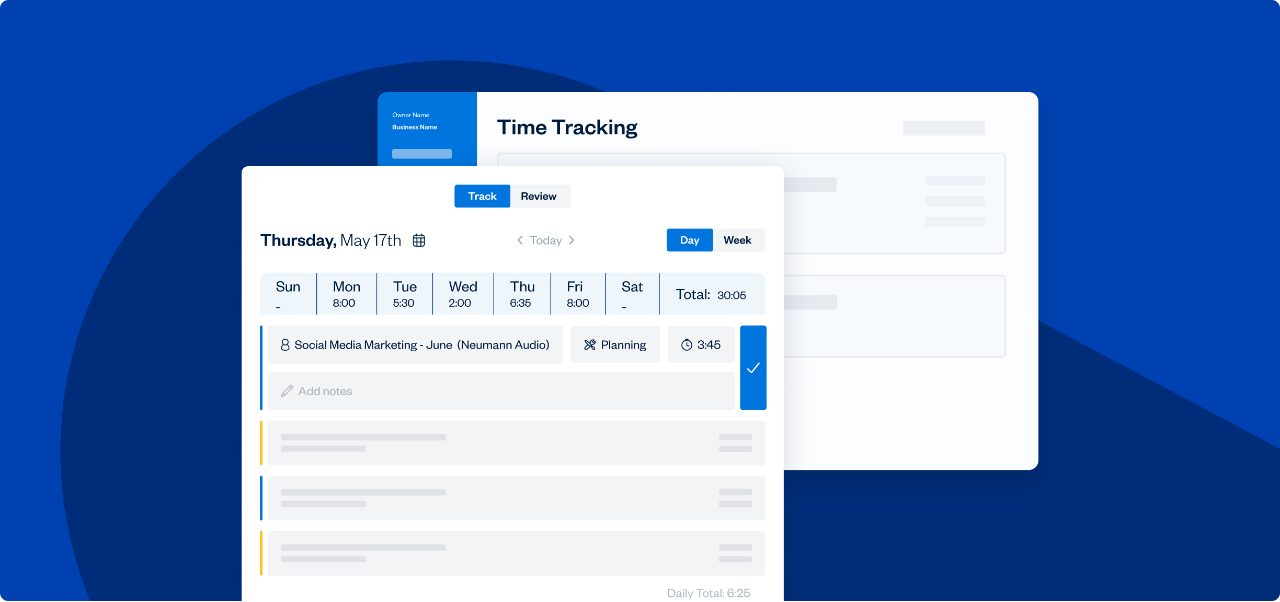
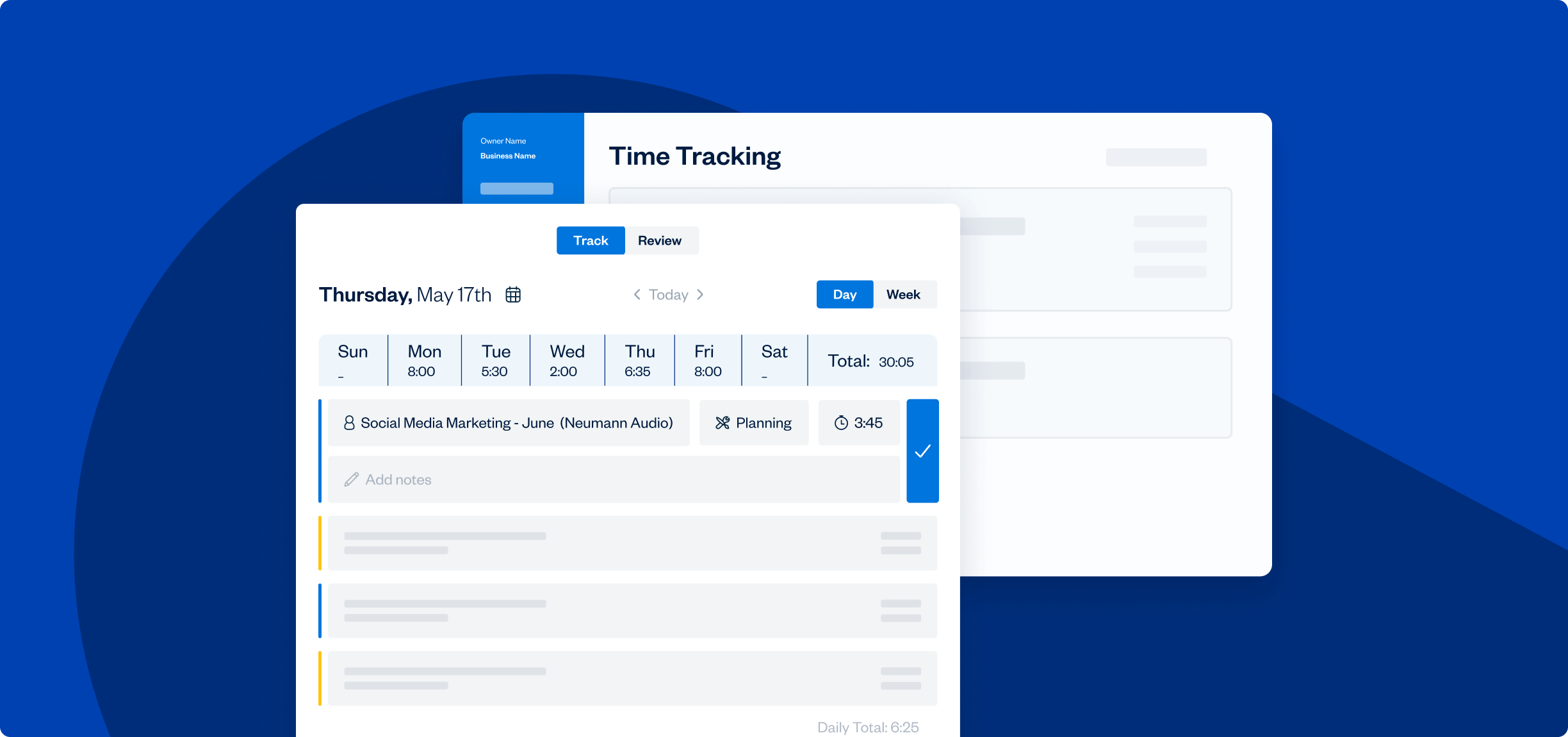
- Built-in time tracking that bills to invoices
- Gusto-powered payroll add-on
Pros
- The easiest product here for non-accountants
- The best invoicing for client work
Cons
- Lite has no reconciliation, double-entry reports, or accountant access
- Client limits on Lite and Plus, and $11 a month per extra person
- Bills need the $70 Premium plan
- No inventory tracking
- Skip if:
- You have more than a couple of people who need logins
FreshBooks is a subscription cloud accounting and invoicing service for freelancers and small businesses. Every plan includes a built-in timer and manual time entry that can be added to invoices as line items, plus online payments, recurring invoices and a client portal. It runs in a web browser with iOS and Android apps and a Chrome timer extension, and is closed-source. Lite, the cheapest plan, allows five billable clients; Plus allows 50 and Premium is unlimited.
What users say
Evidence ↓Reviewers agree FreshBooks is easy for non-accountants. A TechRepublic reviewer found the timer intuitive but basic, Tech.co testers found the interface intuitive but struggled with client messaging, and a CPA reviewer at Fit Small Business says it suits DIY owners but that experienced bookkeepers may be frustrated by its limits (single-reviewer views from affiliate-supported sites; no user-forum sample was read). The same CPA says accountants overwhelmingly prefer QuickBooks and rates its banking poorly (1.3 of 5), and it is judged costly beyond about four seats.
Rankings and alternatives
- Accounting software for small businesses #6 of 7 Easiest invoicing for client work
- QuickBooks Online (Intuit) #1 Best if your accountant uses it
- Xero #2 Unlimited users at a lower price
- Zoho Books #3 Free up to $50K in revenue, cheap after
- Time-tracking apps for freelancers #7 of 9 For freelancers who want bookkeeping too



Also compared with: Hello Bonsai
Small business accounting software scores
Evaluated Nov 17, 2026 Evidence ↓- Books you can rely on 2
2/5 means: Double-entry books, but missing a core piece such as automatic bank feeds on most plans, a working reconciliation or editable reports
Bank feeds and reconciliation start at Plus along with double-entry reports, general ledger, trial balance and journal entries. Gaps are no class or location split, balance sheet without drill-down, weak banking (expenses sit in Petty Cash until they clear) and no CSV import. Transaction rules and an audit log are from Tech.co and my own knowledge, not confirmed on the vendor page. Writer calibration: lowered to 2 because Lite has no double-entry reports or reconciliation, and a CPA reviewer found the bank-feed-only banking workflow weak (no statement import, unmatched expenses parked in a holding account).
- Works with your accountant · counts double 2
2/5 means: An accountant can be added, but few US accountants or bookkeepers work in the product
A free accountant user is included from Plus (not Lite). A CPA reviewer says few US accountants know the product and most prefer QuickBooks; this is one reviewer's view, not a survey. Writer calibration: lowered to 2. Accountant access starts at Plus, and few US accountants keep client ledgers in FreshBooks.
- Ease for a non-accountant 5
5/5 means: Widely rated among the easiest for owners with no accounting background
Reviewers and Tech.co testers agree it is intuitive for owners without accounting training. Rough edges are client messaging, setup without a wizard or chart import, and being too basic for bookkeepers. A sample of affiliate-supported reviews, not a user forum. Writer calibration: raised to 5; FreshBooks is the product reviewers most consistently name as easiest for owners with no accounting background.
- Invoicing and getting paid 5
5/5 means: Everything in 4, plus deposits or retainers and a customer portal, on low plans
Estimates, recurring invoices, late reminders, card and ACH payments, deposits and a client portal are checked on Lite per the vendor table; retainers start at Plus. Estimate-to-invoice conversion is from my own knowledge.
- Bills and expenses 3
3/5 means: Bills and receipt capture, but paying vendors, purchase orders or both need an add-on or a higher plan
Bills, vendor management and bill receipt capture need Premium; expense receipt capture and mileage are cheaper. Whether Bill Pay (checked on every plan) pays vendors from the product is unclear, and there are no purchase orders. 1099 payments run through the Payroll add-on.
- Cost for a small team 2
2/5 means: $91 to $130 a month
Premium is the cheapest plan with bills and accountant access: $70 a month month-to-month plus 2 extra users at $11 = $92 (70 + 2 x 11). The accountant seat is free. It sits just over the $91 threshold; the monthly price is from the vendor's price list, which does not state month-to-month terms explicitly.
- Payroll and app connections 3
3/5 means: Payroll that files taxes, built in or from a tightly connected partner, but a small app marketplace or payroll limited to some states
Payroll is a Gusto-powered add-on ($40 plus $6 per person) that pays employees and 1099 contractors, a tightly connected partner. State coverage was not checked, and the marketplace is described as 70 to 100+ integrations, short of hundreds.
- Inventory and sales tax · counts half 2
2/5 means: A basic item list without stock counts, and sales tax rates entered by hand
One review says there are no stock counts or cost of goods sold (another claims basic inventory tracking, unverified). Sales tax rates are entered by hand and applied per line; no automatic rate lookup or filing.
Time-tracking apps for freelancers scores
Evaluated Nov 17, 2026 Evidence ↓- From hours to invoice · counts double 5
5/5 means: Invoices from tracked time and expenses with online card payment, paid status and reminders or recurring invoices
Time entries go onto invoices as line items, with online card and ACH payment, late reminders and recurring invoices on Lite. Per-client rate setup rests on my own knowledge of the product, not a page I read.
- Ease of everyday tracking · counts double 3
3/5 means: Competent timer and editing, plain or dated, or good only on some devices
One reviewer found the timer easy and the apps are well rated, but the timer is basic next to dedicated trackers. This rests on one reviewer plus my own knowledge; no broad user sample was read.
- Catching forgotten time 1
1/5 means: Manual timers and entries only
Only a timer and manual entry were described, with third-party timer integrations. I did not read the docs to confirm that no reminders or idle detection exist, so this is from product knowledge.
- Yearly cost for one freelancer 2
2/5 means: $150 to $300 a year
Lite is $248.40 a year at the yearly discount (23 x 12 x 0.9), which falls in the $150 to $300 band.
- Reports to send clients 3
3/5 means: PDF timesheets or summary reports a client can read as they are
Time can be grouped by client and project, invoices carry the hours, and clients see invoices in a portal. Writer calibration: no shareable or branded time report was confirmed, so level 3 rather than 4; the portal shows invoices rather than a live view of hours.
- Devices you can track from · counts half 3
3/5 means: Four surfaces
Web, iOS, Android and a Chrome extension make four surfaces; no desktop app is mentioned.
Pricing
- Lite $23.00 /month Includes unlimited time tracking and unlimited invoices but only 5 billable clients (active and archived both count). Billed yearly it is $248.40 (23 x 12 x 0.9, a 10% yearly discount). Extra team members cost $11 per month each. Has no bank reconciliation, no double-entry accounting reports and no accountant access; it does include automated bank import, unlimited expenses and mobile mileage tracking.
- Plus $43.00 /month Up to 50 billable clients. Billed yearly it is $464.40. Promotions such as 80% off for 4 months were shown on this plan when read. Adds double-entry accounting reports, bank reconciliation, accountant access (no extra seat fee per a reviewer), and automatic receipt data capture. Includes one user.
- Premium $70.00 /month Unlimited billable clients. Billed yearly it is $756.00. Adds accounts payable (bill and vendor management), bill receipt capture and project profitability. Includes one user; five users cost $114 a month ($70 + 4 x $11).
- Select Contact sales Custom pricing, unlimited clients, lower card fees and two team accounts included.
- Advanced Payments $20.00 /month , extra Add-on for taking card payments by phone or in person; included in Select.
- Extra team member $11.00 /month per seat , extra Add-on on every plan, including Select, which includes two team accounts. Each plan includes one user. A reviewer found FreshBooks expensive beyond about four seats.
- FreshBooks Payroll $40.00 /month , extra Add-on powered by Gusto, plus $6 a month per person paid; also pays 1099 contractors. Available on every plan.
Prices checked Nov 17, 2026.
Evidence and sources
What users say
Summary 8 quotes
-
I found the timer very easy and intuitive to operate, and adding a time entry after the fact was super quick.
Kara Sherrer, reviewer at TechRepublic · techrepublic.com/article/freshbooks-review · published · checked -
However, the timer is pretty simple and doesn’t support advanced time tracking like entering particular billing codes for individual jobs.
Kara Sherrer, reviewer at TechRepublic · techrepublic.com/article/freshbooks-review · published · checked -
Some, but most FreshBooks users are business owners because it is designed to be very simple to use for small business owners. Small business accountants in the US overwhelmingly prefer QuickBooks.
Tim Yoder, CPA and accounting expert reviewer at Fit Small Business · fitsmallbusiness.com/freshbooks-review · published · checked -
I agree that FreshBooks is too expensive when you get more than about four seats.
Tim Yoder, CPA and accounting expert reviewer at Fit Small Business · fitsmallbusiness.com/freshbooks-review · published · checked -
Generally easy to use for DIY users; experienced bookkeepers might become frustrated with the workflow and limitations of some features
Tim Yoder, CPA and accounting expert reviewer at Fit Small Business · fitsmallbusiness.com/freshbooks-review · published · checked -
Overall, FreshBooks receives some of the best reviews we’ve seen for small business accounting software. Reviewers consistently praise its ease of use and customer service.
Tim Yoder, CPA and accounting expert reviewer at Fit Small Business · fitsmallbusiness.com/freshbooks-review · published · checked -
“I did think it was very intuitive to use, and finding things was easy. […] Editing aspects, e.g., on invoices, were all in the same place, so you know where to look the next time.” -Tech.co tester, about FreshBooks
Tech.co tester, tester in a hands-on usability study · tech.co/accounting-software/freshbooks-review · published · checked -
However, the FreshBooks platform drew plenty of concerns, too. The client messaging function was difficult to use, which might deter clients from reaching out to communicate or clarify issues.
tech.co/accounting-software/freshbooks-review · published · checked
Small business accounting software scores
Books you can rely on 7 quotes
-
Plan plus feature Double-Entry Accounting Reports
freshbooks.com/pricing · checked -
Plan plus feature Bank Reconciliation
freshbooks.com/pricing · checked -
Plan lite feature Automated Bank Import
freshbooks.com/pricing · checked -
You can modify the chart of accounts, turn account numbers on or off, and make adjusting journal entries.
Tim Yoder, CPA and accounting expert reviewer at Fit Small Business · fitsmallbusiness.com/freshbooks-review · published · checked -
Bank feeds are the only way to import transactions into FreshBooks—it doesn’t allow importing transactions from a bank statement or CSV file.
Tim Yoder, CPA and accounting expert reviewer at Fit Small Business · fitsmallbusiness.com/freshbooks-review · published · checked -
When you record expenses or checks, the transaction is not assigned to a particular bank or credit card account until the transaction clears the bank and is transferred into FreshBooks via a bank feed. Instead, the check or expense always comes out of the Petty Cash account.
Tim Yoder, CPA and accounting expert reviewer at Fit Small Business · fitsmallbusiness.com/freshbooks-review · published · checked -
For instance, the balance sheets only show main categories, which means I can’t drill down in reports for more specific levels of detail, such as classes and location. Other reports available include A/R aging, A/P aging, income or loss by month or by customer, trial balance, and general ledgers (GLs).
Tim Yoder, CPA and accounting expert reviewer at Fit Small Business · fitsmallbusiness.com/freshbooks-review · published · checked
Works with your accountant 4 quotes
-
Plan plus feature Accountant Access
freshbooks.com/pricing · checked -
Importantly for nonaccountants, you can invite an accountant user to access your books to help keep things straight or get information to file your tax return. Thankfully, you don’t have to pay an additional user fee to add an accountant user.
Tim Yoder, CPA and accounting expert reviewer at Fit Small Business · fitsmallbusiness.com/freshbooks-review · published · checked -
Some, but most FreshBooks users are business owners because it is designed to be very simple to use for small business owners. Small business accountants in the US overwhelmingly prefer QuickBooks.
Tim Yoder, CPA and accounting expert reviewer at Fit Small Business · fitsmallbusiness.com/freshbooks-review · published · checked -
FreshBooks is not well known among independent accountants and bookkeepers, so you might have trouble finding a professional to work with.
Tim Yoder, CPA and accounting expert reviewer at Fit Small Business · fitsmallbusiness.com/freshbooks-review · published · checked
Ease for a non-accountant 5 quotes
-
Generally easy to use for DIY users; experienced bookkeepers might become frustrated with the workflow and limitations of some features
Tim Yoder, CPA and accounting expert reviewer at Fit Small Business · fitsmallbusiness.com/freshbooks-review · published · checked -
Overall, FreshBooks receives some of the best reviews we’ve seen for small business accounting software. Reviewers consistently praise its ease of use and customer service.
Tim Yoder, CPA and accounting expert reviewer at Fit Small Business · fitsmallbusiness.com/freshbooks-review · published · checked -
“I did think it was very intuitive to use, and finding things was easy. […] Editing aspects, e.g., on invoices, were all in the same place, so you know where to look the next time.” -Tech.co tester, about FreshBooks
Tech.co tester, tester in a hands-on usability study · tech.co/accounting-software/freshbooks-review · published · checked -
However, the FreshBooks platform drew plenty of concerns, too. The client messaging function was difficult to use, which might deter clients from reaching out to communicate or clarify issues.
tech.co/accounting-software/freshbooks-review · published · checked -
I was also unable to import my chart of accounts and input beginning balances; instead, I had to enter them as a journal entry.
Tim Yoder, CPA and accounting expert reviewer at Fit Small Business · fitsmallbusiness.com/freshbooks-review · published · checked
Invoicing and getting paid 5 quotes
-
Plan lite feature Automated Recurring Invoices
freshbooks.com/pricing · checked -
Plan lite feature Client Account Portal
freshbooks.com/pricing · checked -
Plan lite feature Automated Late Payment Reminders
freshbooks.com/pricing · checked -
Standard credit and debit cards (Visa, Mastercard, Discover and others) 2.9% + $0.30
freshbooks.com/faq-price-change · checked -
Bank Transfers (ACH): 1% bank transfer fees*
freshbooks.com/pricing · checked
Bills and expenses 6 quotes
-
Plan premium feature Accounts Payable
freshbooks.com/pricing · checked -
Plan lite feature Bill Pay
freshbooks.com/pricing · checked -
Plan plus feature Automatic Expense Receipt Data Capture
freshbooks.com/pricing · checked -
Plan lite feature Mobile Mileage Tracking
freshbooks.com/pricing · checked -
Available for Premium and Select subscribers, the A/P tool includes bill and vendor management features.
Tim Yoder, CPA and accounting expert reviewer at Fit Small Business · fitsmallbusiness.com/freshbooks-review · published · checked -
For $40 per month plus $6 per month per employee, users can automate their entire payroll to ensure employees are paid on time, every time. Now, new updates give users the ability to pay 1099 contractors as well, log historical pay runs from before they adopted the FreshBooks software, and set up journal entries to be automatically logged in the chart of accounts whenever payroll runs.
tech.co/accounting-software/freshbooks-review · published · checked
Cost for a small team 4 quotes
-
• Lite plans will be $23/month or $248.40/year • Plus plans will be $43/month or $464.40/year • Premium plans will be $70/month or $756.00/year
freshbooks.com/faq-price-change · checked -
Plan plus feature Accountant Access
freshbooks.com/pricing · checked -
Plan premium feature Accounts Payable
freshbooks.com/pricing · checked -
Seats Included · 1 · 1 · 1 · Custom
Tim Yoder, CPA and accounting expert reviewer at Fit Small Business · fitsmallbusiness.com/freshbooks-review · published · checked
Payroll and app connections 3 quotes
-
$40/mo plus $6/mo per user · $40/mo plus $6/mo per user · $40/mo plus $6/mo per user · $40/mo plus $6/mo per user
freshbooks.com/pricing · checked -
Payroll · FreshBooks Payroll (Powered by Gusto) starts at $40 plus $6 per person, per month
Tim Yoder, CPA and accounting expert reviewer at Fit Small Business · fitsmallbusiness.com/freshbooks-review · published · checked -
For $40 per month plus $6 per month per employee, users can automate their entire payroll to ensure employees are paid on time, every time. Now, new updates give users the ability to pay 1099 contractors as well, log historical pay runs from before they adopted the FreshBooks software, and set up journal entries to be automatically logged in the chart of accounts whenever payroll runs.
tech.co/accounting-software/freshbooks-review · published · checked
Inventory and sales tax 3 quotes
-
Beyond the basics, FreshBooks doesn’t offer much for sales tax management. It won’t help you decide which jurisdiction a particular customer is subject to, nor will it help you file your sales tax returns.
Tim Yoder, CPA and accounting expert reviewer at Fit Small Business · fitsmallbusiness.com/freshbooks-review · published · checked -
While you can easily set up inventory descriptions to be added to bills, you cannot track the number of items on hand, the value of stock available, or the cost of your inventory sold.
Tim Yoder, CPA and accounting expert reviewer at Fit Small Business · fitsmallbusiness.com/freshbooks-review · published · checked -
Inventory tracking is included, so you’ll be able to keep an eye on inventory levels as well as track your fixed assets, but asset depreciation or amortization won’t be automatically accounted for
tech.co/accounting-software/freshbooks-review · published · checked
Time-tracking apps for freelancers scores
From hours to invoice 5 quotes
-
All the hours you or your team log can be automatically pulled onto an invoice and billed directly to your client, to help get you paid.
freshbooks.com/timesheets-and-time-tracking · checked -
You can add time entries as line items right from the invoicing tool.
Kara Sherrer, reviewer at TechRepublic · techrepublic.com/article/freshbooks-review · published · checked -
Plan lite feature Automated Recurring Invoices
freshbooks.com/pricing · checked -
Plan lite feature Automated Late Payment Reminders
freshbooks.com/pricing · checked -
Standard credit and debit cards (Visa, Mastercard, Discover and others) 2.9% + $0.30
freshbooks.com/faq-price-change · checked
Ease of everyday tracking 2 quotes
-
I found the timer very easy and intuitive to operate, and adding a time entry after the fact was super quick.
Kara Sherrer, reviewer at TechRepublic · techrepublic.com/article/freshbooks-review · published · checked -
However, the timer is pretty simple and doesn’t support advanced time tracking like entering particular billing codes for individual jobs.
Kara Sherrer, reviewer at TechRepublic · techrepublic.com/article/freshbooks-review · published · checked
Catching forgotten time 1 quote
-
Plus, you can track time directly from the apps you already know and love – Asana, Basecamp, Trello and Teamwork.
freshbooks.com/timesheets-and-time-tracking · checked
Yearly cost for one freelancer 1 quote
-
• Lite plans will be $23/month or $248.40/year • Plus plans will be $43/month or $464.40/year • Premium plans will be $70/month or $756.00/year
freshbooks.com/faq-price-change · checked
Reports to send clients 2 quotes
-
As an employer, you can sort hours worked by client, team member, date and project to see how work time is being spent.
Kara Sherrer, reviewer at TechRepublic · techrepublic.com/article/freshbooks-review · published · checked -
Plan lite feature Client Account Portal
freshbooks.com/pricing · checked
Devices you can track from 3 quotes
-
FreshBooks and all FreshBooks features are 100% web-based, meaning you can access them anywhere.
freshbooks.com/pricing · checked -
if you want to access FreshBooks accounting software on your mobile device you will need to install the iOS or Android app.
freshbooks.com/pricing · checked -
Plus, you can track time directly from the apps you already know and love – Asana, Basecamp, Trello and Teamwork.
freshbooks.com/timesheets-and-time-tracking · checked
Facts
License 1 quote
-
FreshBooks and all FreshBooks features are 100% web-based, meaning you can access them anywhere.
freshbooks.com/pricing · checked
Runs on 3 quotes
-
FreshBooks and all FreshBooks features are 100% web-based, meaning you can access them anywhere.
freshbooks.com/pricing · checked -
if you want to access FreshBooks accounting software on your mobile device you will need to install the iOS or Android app.
freshbooks.com/pricing · checked -
Plus, you can track time directly from the apps you already know and love – Asana, Basecamp, Trello and Teamwork.
freshbooks.com/timesheets-and-time-tracking · checked
Users 1 quote
-
500K+ small businesses have used FreshBooks
freshbooks.com/about · checked
More from the sources
Pricing 2 quotes
-
80% Off for 4 Months
freshbooks.com/pricing · checked -
FreshBooks runs frequent sales that lock in deep discounts for your first six months; however, you must choose between the introductory discount and the free trial — you can’t have both.
Kara Sherrer, reviewer at TechRepublic · techrepublic.com/article/freshbooks-review · published · checked
Features 17 quotes
-
Plan lite feature Unlimited Time-Tracking
freshbooks.com/pricing · checked -
FreshBooks accounting software has accounting reports for small businesses, like the Profit and Loss Report and Sales Tax Summary, which have the key numbers you need to fill out and file your tax return.
freshbooks.com/pricing · checked -
You’ll get phone support from 8 am to 7 pm Eastern time, email support upon request, and live chat help, both from a bot and from human staffers. The chatbot’s 24/7 support means that you’ll always be able to get some support whenever you need it.
tech.co/accounting-software/freshbooks-review · published · checked -
Customer Support · Phone support, chatbot, email support, and self-help resources
Tim Yoder, CPA and accounting expert reviewer at Fit Small Business · fitsmallbusiness.com/freshbooks-review · published · checked -
Plan plus feature Unlimited Proposals
freshbooks.com/pricing · checked -
Plan lite feature Unlimited Estimates
freshbooks.com/pricing · checked -
Plan plus feature Accept E-Signatures
freshbooks.com/pricing · checked -
you can easily convert an estimate or proposal into a project with a single click. The same customer that got your estimate or proposal now has a project assigned to them, and any and all services that were added in the estimate or proposal are now added to the project.
freshbooks.com/pricing · checked -
FreshBooks software features an audit trail and offers in-app commenting so you can align timelines, adjust details, get approval, and utilize e-signature capabilities to finish the deal. Move to the next step by converting the proposal to an invoice.
freshbooks.com/hub/estimates/best-proposal-software · published · checked -
Plan lite feature Manage Budget and Billing for Projects
freshbooks.com/pricing · checked -
Plan premium feature Project Profitability
freshbooks.com/pricing · checked -
Employee When an employee logs into the business’ account, they can view the below sections. Some limitations apply in specific sections:
support.freshbooks.com/hc/en-us/articles/115002261367 · checked -
Invite up to 10 accountants per business at no extra cost, on
support.freshbooks.com/hc/en-us/articles/115002261367 · checked -
Whether on the go with the mobile app or browsing the web with the FreshBooks Chrome Timer, FreshBooks ensures you bank every billable hour.
freshbooks.com/timesheets-and-time-tracking · checked -
On every invoice, you have the option to select the language and currency of your choice. And once you set up a client in a particular currency, that becomes the default going forward so you never have to specify the currency again.
freshbooks.com/hub/feature-news/bring-clarity-to-your-multi-currency-accounting · published · checked -
Review Manage Clients to download active and archived clients as a CSV file, including all secondary contacts.
support.freshbooks.com/hc/en-us/articles/360032628152 · checked -
CSV File - Review Export Invoices to download active and archived invoices as a CSV file
support.freshbooks.com/hc/en-us/articles/360032628152 · checked
Show all 17
Limits and known issues 8 quotes
-
Billable Clients · 5 Clients · 50 Clients · Unlimited · Unlimited
freshbooks.com/pricing · checked -
The client limit on each of FreshBooks plans refers to the number of both active and archived clients in your account.
freshbooks.com/pricing · checked -
Plan select feature 2 Team Member Accounts Included
freshbooks.com/pricing · checked -
Adding team members for any role is a paid add-on
support.freshbooks.com/hc/en-us/articles/115002261367 · checked -
FreshBooks Payments powered by Stripe is one of our many online payment processors, also known as payment gateways, to allow businesses in Canada and the United States to receive online payments. Online payments using FreshBooks Payments can be accepted with all major debit cards, credit cards, and bank transfers (ACH) from clients in over 190 countries and 135+ currencies.
support.freshbooks.com/hc/en-us/articles/24999759052429 · checked -
FreshBooks Payments powered by Stripe is only available for businesses in Canada and the United States. International businesses can use Stripe Standard instead.
support.freshbooks.com/hc/en-us/articles/24999759052429 · checked -
As of Oct 1, 2026, FreshBooks no longer supports setting up new PayPal connections to accept online payments. If you want to start accepting online payments, set up FreshBooks Payments for Canadian and US businesses, or Stripe Standard for international businesses instead.
support.freshbooks.com/hc/en-us/articles/360049689732 · checked -
Archived clients count towards your client limit on all plans
support.freshbooks.com/hc/en-us/articles/360000027187 · checked
Platforms and requirements 1 quote
-
The Chrome time tracker extension allows you to easily track time from your browser, wherever your work takes you across the web.
support.freshbooks.com/hc/en-us/articles/115013039527 · checked
Pricing
freshbooks.com/faq-price-change · checked