Highlights
PDF reader for research that turns annotations into exportable notes, on Mac, iPad and iPhone
Our verdict
#7 of 7 in Free PDF readers for Mac · Highlights on Mac and iPad
What it does
- Notes view that collects every highlight and comment
- Free apps for iPhone and iPad
- Exports notes as a PDF summary for free
Pros
- Standard annotations that other apps can read
- Clean, fast app for marking up papers
- No ads or time limits in the free version
Cons
- Markdown and note-app export need Pro
- No drawing, forms, or signatures
- Doesn't always reopen a file where you left off
- Choose if:
- You read on a Mac and an iPad and want standard in-file highlights on both
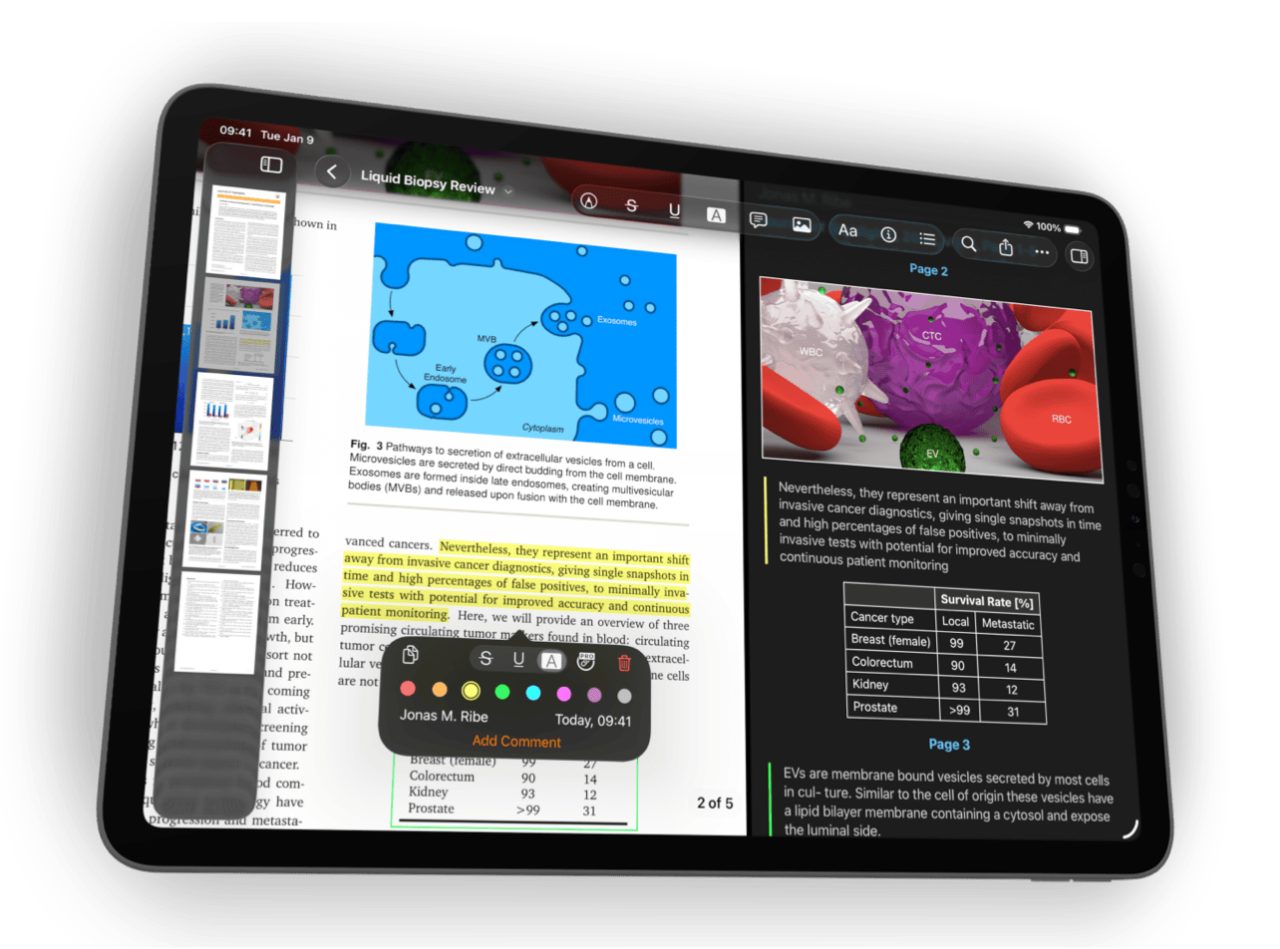
Highlights is a PDF reader and annotator for macOS, iPadOS and iOS from developer Jonas Myren Ribe, aimed at students and researchers. It reads PDFs, adds highlight, underline, strikethrough, comments and image selections as standard embedded PDF annotations, and collects them into a notes view. The app is a free download from the App Store with no ads or time limits; a Highlights Pro subscription (shared across Mac, iPad and iPhone) unlocks Markdown, TextBundle and HTML export, direct export to notes apps, OCR-style text and table recognition, citation lookup and reference manager integration. Freehand drawing, form filling and signing are not documented.
What users say
Evidence ↓Reviewers praise the annotation-to-notes workflow and, for free users, the quality of the free tier (a student called it "soooo good"); a professor liked the text and image extraction and DOI matching on an M1 Mac. Complaints in the App Store reviews shown are that it does not remember the last-read page, multi-page highlights can misbehave, and there is no freehand drawing. MacStories (2020, iOS/iPadOS) also noted missing handwriting and that links are lost in saved notes. These are a few individual reviews, mostly from 2021-2022, not a broad sample.
Rankings and alternatives

Free Mac PDF readers scores
Evaluated Nov 22, 2026 Evidence ↓- Reading long PDFs · counts double 3
3/5 means: Smooth on most files, with search, outline and thumbnails; some lag or hangs reported
Fast lightweight reader with instant search, thumbnails, two-page mode, dark mode and tabs; but reviewers say it does not remember the last-read page and has no bookmark, and no source reports large-file speed on current Macs.
- Highlighting and notes 3
3/5 means: Highlights, notes, typed text and drawing or shapes, with a list of annotations
Free has highlight, underline, strikethrough, image selection, comments, sticky notes and a notes list, plus export of notes as PDF. No freehand drawing or shapes (reviews call it missing); Markdown export and custom default colors are Pro. Between 2 and 3.
- Filling and signing forms 1
1/5 means: Can't fill or sign forms
No page mentions filling forms or signing, and it is described as a reader and annotator; I could not confirm the absence.
- Nothing held back 4
4/5 means: Everyday tools free with no account; occasional upgrade prompts or optional paid extras
No ads, time limits, tracking or watermark stated, no account needed; a Pro subscription is offered in the app for export and recognition features.
- Easy and at home on a Mac 4
4/5 means: Easy to learn and feels at home on a Mac
Native Apple app with tabs, Handoff, Finder default-app setup and a small download; a reviewer praised it on an M1 Mac. Apple Silicon native support is not explicitly stated.
- Scanned PDFs 2
2/5 means: Text in scans can be selected on screen, but no text layer is saved
Vendor table lists Scan Documents and Smart OCR as not Pro-gated, but text and table recognition are Pro, and no source says a text layer is saved into the file.
- Page tools 1
1/5 means: None or one of the five
No rotate, delete, reorder, merge or extract tools are mentioned anywhere I read.
- Study and research extras 2
2/5 means: Two of the five
Free: annotations become a notes view with page links, and a free iPad/iPhone app with Handoff. Markdown export, citation lookup and reference manager links are Pro; no SyncTeX.
Pricing
- Free (Essentials) Free Reading and annotating PDFs, notes view, export notes as PDF, sort annotations by color category, smart merge annotations, document scanning and Smart OCR, dark mode, Handoff, per the vendor's table. No ads, time limits or tracking per the App Store listing. Markdown/HTML/TextBundle export, export to apps, text and table recognition, smart copy, citation lookup and reference manager integration need Pro. No form filling or signing is documented either way.
- Highlights Pro Monthly $4.99 /month Subscription covering iPhone, iPad and Mac; shareable through Family Sharing; 14-day free trial.
- Highlights Pro Annual $29.99 /year Billed once a year ($29.99, about $2.50 per month); the vendor says SAVE 50%. The App Store also lists a Highlights Pro: Legacy Upgrade at $29.99.
Prices checked Nov 22, 2026.
Evidence and sources
What users say
Summary 5 quotes
-
The Mac version is especially good on an M1 machine. Moreover, I find the text and image extraction capabilities to be excellent and so useful, as is the doi citation matching.
BamaGuy006, App Store reviewer (professor and biomed lab director) · apps.apple.com/us/app/highlights-pdf-reader-notes/id1498912833 · published · checked -
Unfortunately, the app never remembers the page I'm on in a document, and there doesn't even seem to be a way to manually bookmark where I leave off.
Sojo616, App Store reviewer · apps.apple.com/us/app/highlights-pdf-reader-notes/id1498912833 · published · checked -
the free version is soooo good, I’m bout ready to buy the pro version.
Insomniaczxzv, App Store reviewer (student) · apps.apple.com/us/app/highlights-pdf-reader-notes/id1498912833 · published · checked -
Perhaps the thing I miss most when using Highlights compared to the way I used to annotate PDFs in the analog world is the ability to take handwritten notes.
John Voorhees, Managing Editor at MacStories · macstories.net/reviews/highlights-for-iphone-and-ipad-an-excellent-companion-for-researchers · checked -
makes this an app that students, academics, and anyone who does substantial amounts of PDF-based research should try.
John Voorhees, Managing Editor at MacStories · macstories.net/reviews/highlights-for-iphone-and-ipad-an-excellent-companion-for-researchers · checked
Free Mac PDF readers scores
Reading long PDFs 3 quotes
-
Free users have access to standard PDF reader features including document browsing, reading and annotating. There are NO ADS, time limits or tracking.
apps.apple.com/us/app/highlights-pdf-reader-notes/id1498912833 · checked -
Unfortunately, the app never remembers the page I'm on in a document, and there doesn't even seem to be a way to manually bookmark where I leave off.
Sojo616, App Store reviewer · apps.apple.com/us/app/highlights-pdf-reader-notes/id1498912833 · published · checked -
The Mac version is especially good on an M1 machine. Moreover, I find the text and image extraction capabilities to be excellent and so useful, as is the doi citation matching.
BamaGuy006, App Store reviewer (professor and biomed lab director) · apps.apple.com/us/app/highlights-pdf-reader-notes/id1498912833 · published · checked
Highlighting and notes 4 quotes
-
Free users have access to standard PDF reader features including document browsing, reading and annotating. There are NO ADS, time limits or tracking.
apps.apple.com/us/app/highlights-pdf-reader-notes/id1498912833 · checked -
Export Notes as Markdown, HTML & TextBundle files
highlightsapp.net/pricing · checked -
The Mac version is especially good on an M1 machine. Moreover, I find the text and image extraction capabilities to be excellent and so useful, as is the doi citation matching.
BamaGuy006, App Store reviewer (professor and biomed lab director) · apps.apple.com/us/app/highlights-pdf-reader-notes/id1498912833 · published · checked -
Perhaps the thing I miss most when using Highlights compared to the way I used to annotate PDFs in the analog world is the ability to take handwritten notes.
John Voorhees, Managing Editor at MacStories · macstories.net/reviews/highlights-for-iphone-and-ipad-an-excellent-companion-for-researchers · checked
Markup others can see 2 quotes
-
Yes, Highlights uses standard embedded annotations which are supported by most PDF readers on both macOS and iOS/iPadOS.
highlightsapp.net/faq · checked -
Some PDF apps and most reference managers use non-standard annotations which are not compatible with Highlights.
highlightsapp.net/faq · checked
Nothing held back 3 quotes
-
Free users have access to standard PDF reader features including document browsing, reading and annotating. There are NO ADS, time limits or tracking.
apps.apple.com/us/app/highlights-pdf-reader-notes/id1498912833 · checked -
The Highlights Pro subscription unlocks advanced features on your iPhone, iPad and Mac: • Export options for other apps and easily editable formats • Extract information using table and text recognition • Customize accent colors and alternative app icons • Power annotation tools • Citation lookups • Smart Copy
apps.apple.com/us/app/highlights-pdf-reader-notes/id1498912833 · checked -
Export Notes as Markdown, HTML & TextBundle files
highlightsapp.net/pricing · checked
Easy and at home on a Mac 2 quotes
-
Mac Requires macOS 12.0 or later.
apps.apple.com/us/app/highlights-pdf-reader-notes/id1498912833 · checked -
The Mac version is especially good on an M1 machine. Moreover, I find the text and image extraction capabilities to be excellent and so useful, as is the doi citation matching.
BamaGuy006, App Store reviewer (professor and biomed lab director) · apps.apple.com/us/app/highlights-pdf-reader-notes/id1498912833 · published · checked
Scanned PDFs 1 quote
-
Export Notes as Markdown, HTML & TextBundle files
highlightsapp.net/pricing · checked
Study and research extras 3 quotes
-
Free users have access to standard PDF reader features including document browsing, reading and annotating. There are NO ADS, time limits or tracking.
apps.apple.com/us/app/highlights-pdf-reader-notes/id1498912833 · checked -
Export Notes as Markdown, HTML & TextBundle files
highlightsapp.net/pricing · checked -
Perhaps the thing I miss most when using Highlights compared to the way I used to annotate PDFs in the analog world is the ability to take handwritten notes.
John Voorhees, Managing Editor at MacStories · macstories.net/reviews/highlights-for-iphone-and-ipad-an-excellent-companion-for-researchers · checked
Facts
License 2 quotes
-
Free users have access to standard PDF reader features including document browsing, reading and annotating. There are NO ADS, time limits or tracking.
apps.apple.com/us/app/highlights-pdf-reader-notes/id1498912833 · checked -
The Highlights Pro subscription unlocks advanced features on your iPhone, iPad and Mac: • Export options for other apps and easily editable formats • Extract information using table and text recognition • Customize accent colors and alternative app icons • Power annotation tools • Citation lookups • Smart Copy
apps.apple.com/us/app/highlights-pdf-reader-notes/id1498912833 · checked
Runs on 1 quote
-
Mac Requires macOS 12.0 or later.
apps.apple.com/us/app/highlights-pdf-reader-notes/id1498912833 · checked
Needs 1 quote
-
Mac Requires macOS 12.0 or later.
apps.apple.com/us/app/highlights-pdf-reader-notes/id1498912833 · checked
More from the sources
Pricing 2 quotes
-
Unlocks everything on your iPhone, iPad and Mac. Billed monthly. Cancel anytime.
highlightsapp.net/pricing · checked -
Highlights Pro $29.99
apps.apple.com/us/app/highlights-pdf-reader-notes/id1498912833 · checked
Features 2 quotes
-
Save or share your notes as portable files: Markdown, TextBundle, HTML, WebArchive or PDF • Share them to your favorite notes app: Apple Notes, Bear, Craft, Evernote, DEVONThink, Keep It, MindNode, Notion, Obsidian, Roam Research or Ulysses
apps.apple.com/us/app/highlights-pdf-reader-notes/id1498912833 · checked -
Yes, Highlights integrates with Bookends (tutorial here) and Papers (tutorial here) on macOS.
highlightsapp.net/faq · checked
Platforms and requirements 1 quote
-
macOS Catalina (10.15) or higher.
highlightsapp.net/faq · checked
How widely it is used 1 quote
-
4.5 out of 5 1.6K Ratings
apps.apple.com/us/app/highlights-pdf-reader-notes/id1498912833 · checked
Pricing
highlightsapp.net/pricing · checked