
Skim
Free open-source PDF reader and note-taker for macOS, built for reading papers
Our verdict
#3 of 7 in Free PDF readers for Mac · Built for reading papers
What it does
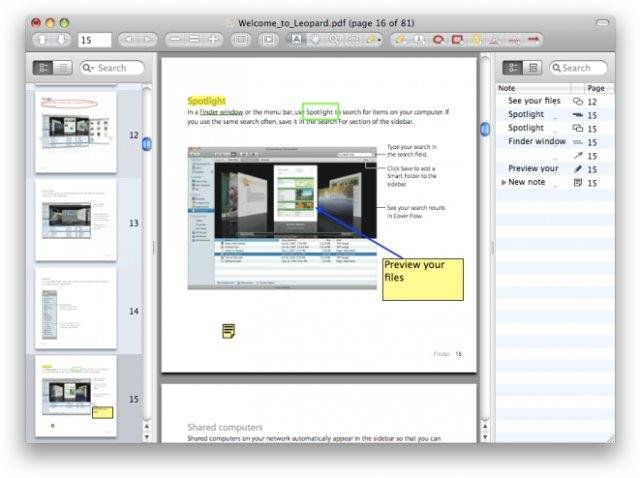
- Highlights, notes, and shapes with a full notes panel
- Snapshots of figures and a reading bar
- Link previews and SyncTeX for LaTeX
- Exports notes as text
Pros
- The best reading tools for papers on a Mac
- Open source and free, with no account
- Native Mac app that stays out of the way
Cons
- Notes vanish when files are emailed or synced through Dropbox
- No signature tool
- No OCR or page tools
- Skip if:
- You share annotated PDFs or keep them in Dropbox
Skim is a free, open-source PDF reader and note-taker for macOS, designed for reading and annotating scientific papers. It offers highlights, notes, snapshots, a reading bar, bookmarks, a notes panel with text export, and SyncTeX integration for LaTeX. By default it keeps notes outside the PDF in the file’s extended attributes, so they stay editable in Skim but do not appear in other viewers until you export a copy with embedded notes. It is released under a BSD license and downloaded from SourceForge.
What users say
Evidence ↓Few reviews were read, all on SourceForge, where Skim scores 4.7 of 5 from 110 self-selected ratings. Reviewers like its feature set and no-frills markup, and one uses it for Beamer slides. One reviewer notes that annotations do not persist across other apps.
Rankings and alternatives

Free Mac PDF readers scores
Evaluated Nov 22, 2026 Evidence ↓- Reading long PDFs · counts double 4
4/5 means: Fast and stable on large files, with good search and navigation
Built on PDFKit, with a table of contents, thumbnails, bookmarks, split view, a reading bar, link previews and snapshots; long a favorite for papers. No performance reports were read, so speed and stability on current Macs rest on general knowledge.
- Highlighting and notes 4
4/5 means: All of that, plus a way to export or collect your notes as text
Highlights, notes, text, shapes and ink, a notes panel listing everything, and export of notes as text (also FDF and .skim).
- Filling and signing forms 2
2/5 means: Fills interactive fields only, or types onto the page only, with no signature tool
Skim fills interactive form fields (data saved in extended attributes). No signature tool is documented or known, and I did not verify flat-form typing beyond its free-text notes.
- Nothing held back 5
5/5 means: Everything free, with no account, ads or upgrade prompts
Free open-source BSD app with no account, ads, watermarks or upgrade prompts on any page read.
- Easy and at home on a Mac 4
4/5 means: Easy to learn and feels at home on a Mac
Native Cocoa app that follows Mac conventions, and light to install. Apple Silicon support is unconfirmed by pages read (my knowledge is that current builds run on it), and the interface looks dated.
- Scanned PDFs 2
2/5 means: Text in scans can be selected on screen, but no text layer is saved
Skim has no OCR and saves no text layer, but PDFKit's system text recognition makes text in scans selectable on screen on newer macOS (one user comment).
- Page tools 1
1/5 means: None or one of the five
No merge, reorder, delete or extract is documented or known; rotation and crop are saved only through the embedded-notes export.
- Study and research extras 3
3/5 means: Three of the five
Three of five are documented. Link previews, notes export as text, and SyncTeX are listed. There is no iPhone or iPad app, and no Markdown notes with page links.
Pricing
- Free Free Open source; no paid plan, account, ads or watermarks mentioned on the pages read.
Prices checked Nov 22, 2026.
Evidence and sources
What users say
Summary 3 quotes
-
An excellent no frills app to peruse and markup pdf's. Well done! Edit: Annotations don't persist across apps.
SourceForge reviewer, user review (5 of 5 stars) · sourceforge.net/projects/skim-app · checked -
Very nice software! I use to present Beamer presentations in PDF while still having the option of annotations and next-slide preview. There is room for improvement, but the current version is already very helpful.
SourceForge reviewer, user review (4 of 5 stars) · sourceforge.net/projects/skim-app · checked -
4.7 out of 5 stars
sourceforge.net/projects/skim-app · checked
Free Mac PDF readers scores
Reading long PDFs 2 quotes
-
Skim is a PDF reader and note-taker for OS X. It is designed to help you read and annotate scientific papers in PDF, but is also great for viewing any PDF file.
skim-app.sourceforge.io · checked -
Making "snapshots" for easy reference
skim-app.sourceforge.io · checked
Highlighting and notes 3 quotes
-
Skim is a PDF reader and note-taker for OS X. It is designed to help you read and annotate scientific papers in PDF, but is also great for viewing any PDF file.
skim-app.sourceforge.io · checked -
Making "snapshots" for easy reference
skim-app.sourceforge.io · checked -
Save a copy of the notes in a .skim file. Choose Export... from the File menu and select Skim Notes from the File Format popup button. Notes from a separate .skim file can later be added using the Read Notes... menu item from the File menu.
sourceforge.net/p/skim-app/wiki/FAQ · checked
Markup others can see 5 quotes
-
Skim stores its notes and highlights in extended attributes (EAs). EAs are metadata that many file systems, such as HFS+, can associate with a file. So the notes are not stored in the PDF data itself. Since 1.5.9 also fillable form data is saved in the EAs.
sourceforge.net/p/skim-app/wiki/FAQ · checked -
No, email loses the EAs and therefore the notes. You can use the menu items in the File menu to safely send a PDF with notes in archived form over email.
sourceforge.net/p/skim-app/wiki/FAQ · checked -
It is known that CVS, Subversion, Git, Dropbox, and Unison do not preserve EAs. On the other hand tools such as cp, rsync, tar, zip, gzip, and SuperDuper do preserve EAs
sourceforge.net/p/skim-app/wiki/FAQ · checked -
Save a copy of the file with the notes included in the PDF. Choose Export... from the File menu and select PDF from the File Format popup button and select the With Embedded Notes option. Notes and highlights are now visible in other viewers, such as Preview and Acrobat Reader. Alternatively, you can Print to a file. Go to the print dialog window (command+P) and choose Print to PDF. However with both techniques, you won't be able to edit the notes and highlights in the exported copy.
sourceforge.net/p/skim-app/wiki/FAQ · checked -
An excellent no frills app to peruse and markup pdf's. Well done! Edit: Annotations don't persist across apps.
SourceForge reviewer, user review (5 of 5 stars) · sourceforge.net/projects/skim-app · checked
Filling and signing forms 1 quote
-
Skim stores its notes and highlights in extended attributes (EAs). EAs are metadata that many file systems, such as HFS+, can associate with a file. So the notes are not stored in the PDF data itself. Since 1.5.9 also fillable form data is saved in the EAs.
sourceforge.net/p/skim-app/wiki/FAQ · checked
Nothing held back 1 quote
-
It is released under a BSD license.
en.wikipedia.org/wiki/Skim_(software) · checked
Easy and at home on a Mac 2 quotes
-
Skim requires OS X 10.10 or higher.
sourceforge.net/projects/skim-app · checked -
Skim is a PDF reader and note-taker for OS X. It is designed to help you read and annotate scientific papers in PDF, but is also great for viewing any PDF file.
skim-app.sourceforge.io · checked
Scanned PDFs 2 quotes
-
It is possible to add a text layer using third-party OCR software, however Skim can not do this itself currently.
sourceforge.net/p/skim-app/wiki/FAQ · checked -
With the latest versions of PDFKit, maybe since Ventura, the section on "I cannot select text" is no longer current. Apple's PDFKit makes it so that all text in images is selectable. Drag your cursor across the text to initiate the text recognition; after a few seconds, the text will be selectable.
Grant Barrett, SourceForge user commenting on the Skim FAQ · sourceforge.net/p/skim-app/wiki/FAQ · published · checked
Page tools 1 quote
-
Only if you export the PDF With Embedded Notes, the page rotation and crop will be saved in the modified PDF data.
sourceforge.net/p/skim-app/wiki/FAQ · checked
Study and research extras 2 quotes
-
Making "snapshots" for easy reference
skim-app.sourceforge.io · checked -
Interaction with LaTeX, SyncTeX, and PDFSync
skim-app.sourceforge.io · checked
Facts
License 1 quote
-
It is released under a BSD license.
en.wikipedia.org/wiki/Skim_(software) · checked
Runs on 1 quote
-
Skim requires OS X 10.10 or higher.
sourceforge.net/projects/skim-app · checked
Needs 1 quote
-
Skim requires OS X 10.10 or higher.
sourceforge.net/projects/skim-app · checked
Users 1 quote
-
4.7 out of 5 stars
sourceforge.net/projects/skim-app · checked
Pricing
sourceforge.net/projects/skim-app · checked