
Zotero
Free, open-source reference manager with Word, LibreOffice and Google Docs citing and optional paid file sync.
Our verdict
#4 of 7 in Free PDF readers for Mac · Reading where you cite
What it does
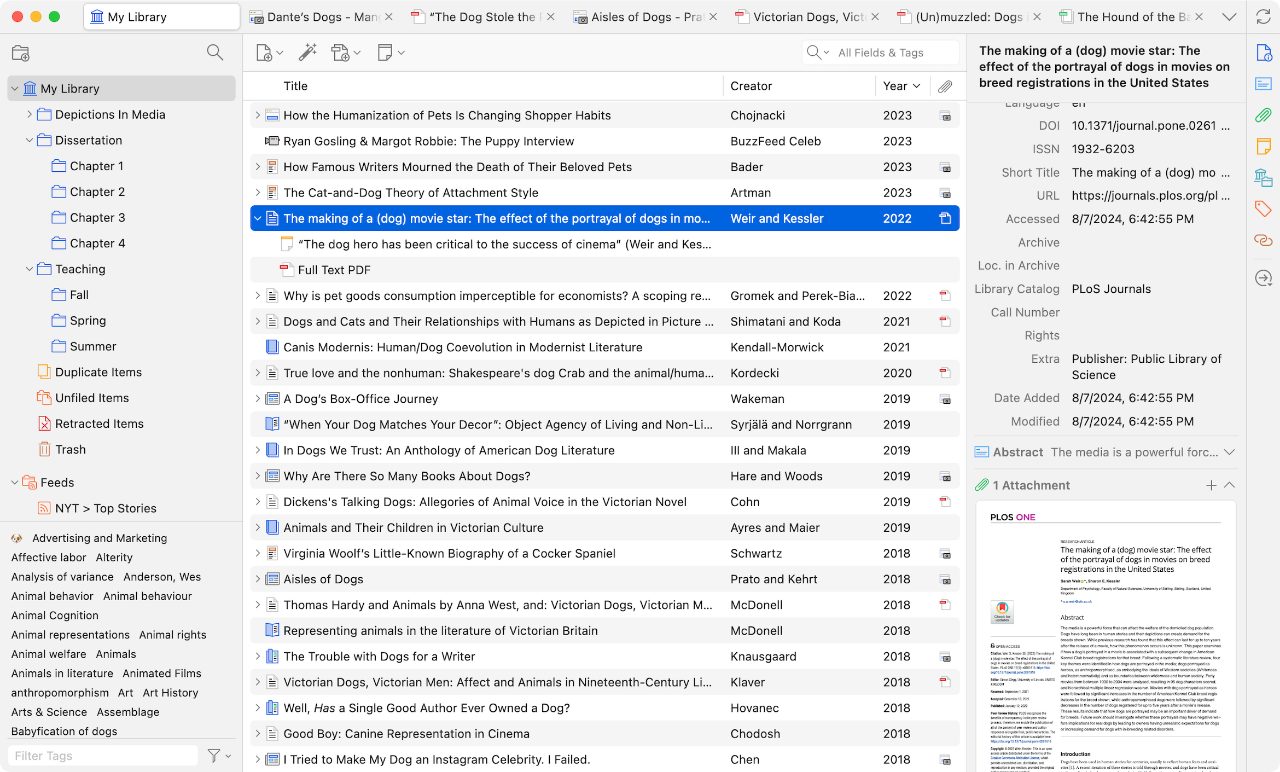
- Tabbed reader with citation and link previews
- Highlights, notes, drawing, and image clips
- Turns annotations into notes with page links and citations
- Free iPhone and iPad apps
Pros
- Reading, notes, and citations in one free app
- Open source, from a nonprofit
- Annotations follow your library across devices
Cons
- PDFs must be added to the library before you can read them
- Annotations stay outside the file until you export a copy
- No forms, signatures, or OCR
- Choose if:
- You write papers with citations and want notes tied to sources
Zotero is a free, open-source reference manager built around a desktop app for Windows, macOS and Linux, with iOS and Android apps, a browser connector for capturing sources, and plugins for Word, LibreOffice and Google Docs. It supports over 9,000 citation styles, optional sync, and free shared group libraries. Syncing your data is free, but file attachments such as PDFs sync against a free 300 MB allowance, with paid storage plans of 2 GB, 6 GB or unlimited. It is developed by the nonprofit Corporation for Digital Scholarship, and it can import directly from an online Mendeley library. LaTeX users usually add the community Better BibTeX extension for stable citation keys and automatic .bib export.
Rankings and alternatives

Free Mac PDF readers scores
Evaluated Nov 21, 2026 Evidence ↓- Reading long PDFs · counts double 4
4/5 means: Fast and stable on large files, with good search and navigation
Tabs with a tab list, outline, thumbnails, search, dark mode and sepia, and hover popups for citations; Apple Silicon native. Performance on very large scans is from general knowledge, not measured.
- Highlighting and notes 4
4/5 means: All of that, plus a way to export or collect your notes as text
Highlight, underline, text, ink and an annotations sidebar, plus turning annotations into notes. No strikethrough or shapes found; area annotation is from knowledge only. Notes export is via Zotero notes, Markdown not documented.
- Filling and signing forms 1
1/5 means: Can't fill or sign forms
No form filling or signing is described in Zotero's reader docs and I believe it has none, but absence was not established by an explicit statement.
- Nothing held back 4
4/5 means: Everyday tools free with no account; occasional upgrade prompts or optional paid extras
The app is free and open source with no watermarks or ads; the optional paid piece is sync storage beyond 300 MB. An account is not needed for local use, from knowledge.
- Easy and at home on a Mac 3
3/5 means: Easy enough, with a non-Mac interface or some clutter
Native on Apple Silicon, but it is a full reference manager with its own interface and library-first workflow, so it is heavier and less Mac-like than a plain viewer. Whether it can open arbitrary PDFs as the default app is unverified.
- Scanned PDFs 1
1/5 means: No OCR
Zotero's reader has no OCR; users add a text layer with separate OCR software or a third-party plugin. Rests on knowledge of the app.
- Page tools 1
1/5 means: None or one of the five
Only rotate and delete pages (from the thumbnails tab) are documented; no reorder, merge or extract.
- Study and research extras 4
4/5 means: Four of the five
Has citation and link hover previews, annotations to notes with page links, and a free iOS/iPad app (from knowledge); Markdown note export and SyncTeX are not documented.
Pricing
- Free (300 MB storage) Free The Zotero app is free. 300 MB of Zotero Storage for synced files; the page does not state a cap on the number of references.
- 2 GB storage $20.00 /year , extra Equal to $1.67 per month; billed yearly.
- 6 GB storage $60.00 /year , extra Equal to $5 per month; billed yearly.
- Unlimited storage $120.00 /year , extra Equal to $10 per month; billed yearly. Group library file storage draws from the group owner's storage account.
Prices checked Nov 22, 2026.
Evidence and sources
Free Mac PDF readers scores
Reading long PDFs 4 quotes
-
We’ve also implemented basic dark-mode support for PDF and EPUB content, with more advanced rendering options coming soon. If you need to view a document in its original state, you can disable dark mode for content from the reader’s View menu.
zotero.org/blog/zotero-7 · published · checked -
Zotero 7 added a dark mode to the reader, and we've now added additional themes (including sepia, similar to the Firefox Reader View) in the Zotero 7.1 beta
Zotero team member, staff reply on the Zotero forums (username not shown in the fetched text) · forums.zotero.org/discussion/96104/enable-night-mode-pdf-reader-dyslexic-mode-inverted-colors-dark-mode-for-easy-reading · published · checked -
Zotero 7 is dramatically faster across the board, and it brings native support for Apple Silicon Macs, 64-bit Windows, and Windows on ARM, ensuring smooth operation on the latest hardware.
zotero.org/blog/zotero-7 · published · checked -
Hovering over a citation or internal link now opens a popup showing the associated reference or figure.
zotero.org/blog/zotero-7 · published · checked
Highlighting and notes 3 quotes
-
To create a new note from all annotations in the current PDF, click one of the “+” buttons and select Add Item Note from Annotations or Add Standalone Note from Annotations.
zotero.org/support/pdf_reader · checked -
We’ve also added support for creating ink, underline, and text annotations. Ink annotations were already supported on iOS, and it’s now possible to create them in the desktop app as well. (This works best if you have a touchscreen PC or stylus.)
zotero.org/blog/zotero-7 · published · checked -
Underline annotations are available for PDFs, EPUBs, and snapshots, while ink and text annotations are available for PDFs only.
zotero.org/blog/zotero-7 · published · checked
Markup others can see 3 quotes
-
To enable this tight integration, Zotero stores annotations in the Zotero database, not in the PDF file.
zotero.org/support/kb/annotations_in_database · checked -
You can export a copy of the PDF with annotations embedded by using File → “Export PDF…” from the library view or “Save As…” from the PDF reader.
zotero.org/support/kb/annotations_in_database · checked -
Note that annotations created in the built-in PDF reader are stored in the Zotero database, so they won’t be visible in external PDF readers unless you export a PDF with embedded annotations.
zotero.org/support/pdf_reader · checked
Easy and at home on a Mac 2 quotes
-
Zotero 7 is dramatically faster across the board, and it brings native support for Apple Silicon Macs, 64-bit Windows, and Windows on ARM, ensuring smooth operation on the latest hardware.
zotero.org/blog/zotero-7 · published · checked -
If you’d prefer to open PDFs in an external PDF reader, you can choose one from the General pane of the Zotero preferences.
zotero.org/support/pdf_reader · checked
Study and research extras 2 quotes
-
To create a new note from all annotations in the current PDF, click one of the “+” buttons and select Add Item Note from Annotations or Add Standalone Note from Annotations.
zotero.org/support/pdf_reader · checked -
Hovering over a citation or internal link now opens a popup showing the associated reference or figure.
zotero.org/blog/zotero-7 · published · checked
Facts
License 1 quote
-
Zotero is open source and developed by an independent, nonprofit organization that has no financial interest in your private information. With Zotero, you always stay in control of your own data.
zotero.org · checked
Runs on 1 quote
-
Available for Mac, Windows, Linux, iOS, and Android
zotero.org · checked
More from the sources
Pricing 2 quotes
-
300 MB · Free · 2 GB · $20/year (equal to $1.67 per month) · 6 GB · $60/year (equal to $5 per month) · Unlimited · $120/year (equal to $10 per month)
zotero.org/storage · checked -
Development, maintenance, support, and infrastructure costs for Zotero services are funded by storage subscriptions from individuals and organizations.
zotero.org/storage · checked
Features 11 quotes
-
Zotero is a free, easy-to-use tool to help you collect, organize, annotate, cite, and share research.
zotero.org · checked -
Zotero instantly creates references and bibliographies for any text editor, and directly inside Word, LibreOffice, and Google Docs. With support for over 9,000 citation styles, you can format your work to match any style guide or publication.
zotero.org · checked -
Zotero can optionally synchronize your data across devices, keeping your files, notes, and bibliographic records seamlessly up to date. If you decide to sync, you can also always access your research from any web browser.
zotero.org · checked -
Zotero lets you co-write a paper with a colleague, distribute course materials to students, or build a collaborative bibliography. You can share a Zotero library with as many people you like, at no cost.
zotero.org · checked -
Zotero can directly import all data, including the full folder structure, from an online Mendeley library.
zotero.org/support/kb/mendeley_import · checked -
Zotero’s Word and LibreOffice plugins can read citations created by Mendeley Desktop and automatically relink them to imported Mendeley items in your Zotero library, so you can continue using the same documents with Zotero. Citations created with Mendeley Cite are not readable by Zotero.
zotero.org/support/kb/mendeley_import · checked -
Better BibTeX (BBT) is an extension for Zotero and (in principle) Juris-M that makes it easier to manage bibliographic data, especially for people authoring documents using text-based toolchains (e.g. based on LaTeX / Markdown).
retorque.re/zotero-better-bibtex · checked -
Auto export of collections or entire libraries when they change.
retorque.re/zotero-better-bibtex · checked -
With the advent of Zotero 8, items have a Zotero-native citation key field. This has replaced the BBT citation key field.
retorque.re/zotero-better-bibtex · checked -
Unlink Zotero citations in the document by removing the field codes. This prevents any further automatic updates of the citations and bibliographies.
zotero.org/support/word_processor_plugin_usage · checked -
EPUBs now open in Zotero’s built-in reader in the same way as PDFs, and you can annotate them and add those annotations to notes just as you’ve been able to for PDFs.
zotero.org/blog/zotero-7 · published · checked
Limits and known issues 4 quotes
-
Zotero groups can also use Zotero Storage at no additional charge. Group file storage always draws from the storage account of the group owner.
zotero.org/storage · checked -
It’s not possible to directly import group libraries. To import items in group libraries, copy the group items to a collection in your Mendeley library before importing.
zotero.org/support/kb/mendeley_import · checked -
Manual edits made to the bibliography in Word will be overwritten the next time Zotero refreshes the document.
zotero.org/support/word_processor_plugin_usage · checked -
External annotations are read-only by default — indicated by a lock icon — but you can transfer them into Zotero by selecting File → “Import Annotations…” from within the PDF reader, after which they’ll be fully editable. The annotations are removed from the PDF to avoid conflicts and duplicates.
zotero.org/support/kb/annotations_in_database · checked
Pricing
zotero.org/storage · checked