
IDrive
Online backup service with a separate low-cost IDrive Photos app for phone photo and video backup
Our verdict
#9 of 9 in Cloud storage for photos · Cheapest per terabyte for one big library
What it does
- Backs up phones and computers into one account
- 5 TB Personal plan, plus small IDrive Photos plans
- One free shipped drive a year for moving a big backup
Pros
- Cheapest per terabyte for one big library
- Covers computers as well as phones
Cons
- One shared login rather than family accounts
- iPhone backup mostly runs while the app is open
- Basic photo browsing
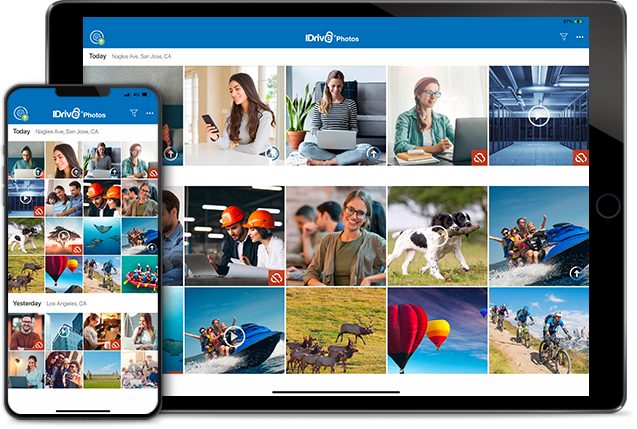
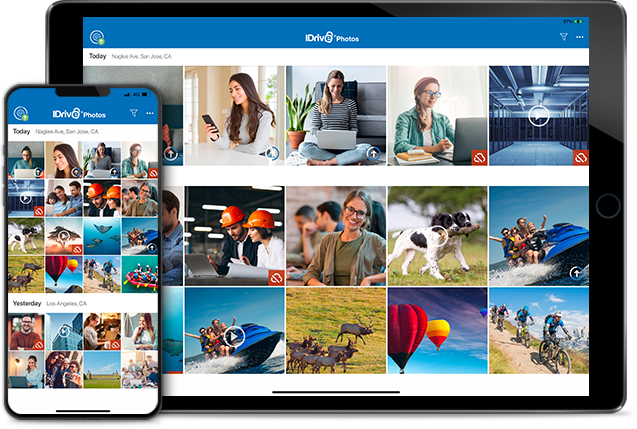
IDrive is an online backup and cloud storage service. For photos it sells two entry points on the same storage. The IDrive Photos app (iOS and Android) is a simple gallery that uploads your camera roll in original resolution, with a timeline, location filter, sharing links and web access, and it runs on the small Mini plans (100 GB or 500 GB). The IDrive Online Backup app and the Personal plans (5 TB and up) add computer, Mac, Linux and phone backup into one account, a private-key encryption option, and IDrive Express shipped drives. It is a commercial subscription service.
What users say
Evidence ↓TechRadar's reviewers like IDrive for low price, original-resolution photo upload and broad device support. They fault its plain interface, slow initial uploads, and in the Photos app the lack of built-in editing (a 2022 review; the FAQ now documents basic editing). These are two reviewer accounts, not a sample of users.
Rankings and alternatives
- Cloud storage for photos #9 of 9 Cheapest per terabyte for one big library
- Google Photos #1 Best for most families
- Ente Photos #2 For privacy without losing search
- Microsoft OneDrive #3 If you already pay for Microsoft 365



Cloud storage for phone photos scores
Evaluated Nov 17, 2026 Evidence ↓- Phone backup on iPhone and Android · counts double 2
2/5 means: Automatic backup on both, but on one of them uploads mostly run only while the app is open on screen
Android uploads run in the background, but on iPhone IDrive says the app only attempts automatic upload and you must leave it open (or on the supercharged backup screen) to upload the whole library. Live Photos are backed up on iOS. Desktop upload exists through the separate Personal plan desktop client.
- Finding photos 2
2/5 means: A timeline with filters such as date, type or place, but no search by what is in the photo
The documented tools are a timeline scroll bar and photo, video and location filters. No face grouping, object search or text search appears on the pages read, though I did not check every feature page.
- Sharing with family 2
2/5 means: Several phones can use one login, or each person needs their own paid plan; sharing by link
Personal plans let several devices back up into one account, so a household shares one login, and sharing is by password-protected links limited to 25 downloads and 30 days. No per-person libraries or shared albums are documented.
- Price for 2 TB 4
4/5 means: $80 to $109 a year
The cheapest plan holding 2 TB is Personal 5 TB. Only the monthly price is documented ($6.99 per month per TechRadar), so $6.99 x 12 = $83.88 a year; the first-year discount is not counted. IDrive's own yearly list price did not render.
- Privacy of your photos 3
3/5 means: The company holds the keys but analyzes little or nothing of your photos' contents, or end-to-end encryption is only a paid add-on that automatic backup can't use
By default IDrive holds the keys; a private-key encryption option exists on the main service, but share links need default encryption, and whether the Photos app works with a private key is not documented. No analysis of photo contents is documented.
- Getting photos back out 3
3/5 means: A bulk export of original files, but dates or albums come out in separate files that need another tool to put back
The whole library can be restored in bulk to the phone with Supercharged Restore, and downloaded from the web, and Personal plans get one free IDrive Express drive a year. How dates and albums come out, and whether a desktop tool copies the library, is not documented.
Pricing
- Basic (free) Free Up to 10 GB of free storage, per TechRadar.
- IDrive Photos / Mini 100 GB $2.95 /year Billed annually. Backs up iOS, Android, PC and Mac per the IDrive Photos page. Shown as the starting price; the pricing page says its new-signup discounts do not apply to signups from the mobile apps. Renewal price not found.
- IDrive Photos / Mini 500 GB $9.95 /year Billed annually. Renewal price not found.
- IDrive Personal 5 TB $6.99 /month Monthly price from TechRadar's review. IDrive's pricing page advertises 30% off the first year on yearly billing and up to 50% off on a 2-year plan for new signups only (not from mobile apps); the dollar amounts did not render on the pages read. TechRadar's older Photos review cites $79.50 per year for 5 TB. Overage on Personal is $0.25 per GB per month.
- IDrive Personal 10 TB $10.49 /month Monthly price from TechRadar's review; yearly and 2-year discounts as for 5 TB.
- IDrive Express extra request $59.95 one-time , extra Personal plans include one free Express backup per year, then $59.95 per further request.
Prices checked Nov 17, 2026.
Evidence and sources
What users say
Summary 3 quotes
-
iDrive only uploads modified parts of files to reduce bandwidth usage
techradar.com/reviews/idrive · checked -
iPhones and iPads are limited to contact, calendar, photos and videos (however this is more of a limitation set out by Apple than iDrive).
techradar.com/reviews/idrive · checked -
While you won’t find any built-in photo editing tools, the IDrive Photos backup app is one of the most cost-effective and easy-to-use cloud storage services in the mobile marketplace.
Michael Bizzaco, reviewer at TechRadar · techradar.com/reviews/idrive-photos-cloud-storage · published · checked
Cloud storage for phone photos scores
Phone backup on iPhone and Android 3 quotes
-
IDrive Photos attempts to automatically backup your photos and videos. Leave the app open or tap 'Start supercharged backup' and leave it on the supercharged backup screen to upload all the photos and videos on your iOS device. Backup occurs in the background for Android devices.
idrive.com/photos · checked -
Download and install the IDrive Photo Backup app from Google Play Store on your device.
idrive.com/idrive-photos-faq · checked -
Yes, live motion images (photos with motion) can be backed up from iOS devices.
idrive.com/idrive-photos-faq · checked
Finding photos 1 quote
-
You can use the timeline scroll bar to view media from a specific period. You can filter for only photos or videos. You can also filter photos and videos by a location.
idrive.com/idrive-photos-faq · checked
Sharing with family 2 quotes
-
Set a password - You can set a password for accessing the link. No. of Downloads - You can specify a limit for the number of downloads. The maximum limit is 25. No. of Days - You can specify the duration for which the link remains active. The maximum duration is 30 days.
idrive.com/idrive-photos-faq · checked -
The paid plans offer plenty of options to choose from. If you're an individual, you have two choices: the Mini plan or the Personal plan. The Mini plan is meant for a single user, whereas the Personal plan allows you to use your storage across multiple computers.
techradar.com/reviews/idrive · checked
Price for 2 TB 2 quotes
-
The Personal plan gives you five storage options to choose from: 5TB at $6.99/month, 10TB at $10.49/month, 20TB at $17.49/month, 50TB at $34.99/month, and 100TB at $69.99/month.
techradar.com/reviews/idrive · checked -
Sign up today and get 30% off on your first year or get 50% off on your first year for a 2 year plan. These Mini, Personal, Team, and Business plans are available only for new signups and are available for a limited time only. Discounts are not available for signup from IDrive mobile apps.
idrive.com/pricing · checked
Privacy of your photos 2 quotes
-
Sharing option is only available for accounts with default encryption.
idrive.com/idrive-photos-faq · checked -
End-to-end encryption option
techradar.com/reviews/idrive · checked
Getting photos back out 2 quotes
-
IDrive Photo Backup is a photo manager app for your mobile device. Store pictures and videos from your mobile device in original resolution. The app provides a simple user interface to view your Photos and Videos.
idrive.com/idrive-photos-faq · checked -
All paid users get access to these physical backups via a temporary storage device, which is especially handy for those with poor Internet connectivity. This is capped at once per year for Personal customers and three times a year for Team and Business subscribers, though subsequent requests are always available at the cost of $59.95.
techradar.com/reviews/idrive · checked
Facts
Runs on 3 quotes
-
IDrive Photos attempts to automatically backup your photos and videos. Leave the app open or tap 'Start supercharged backup' and leave it on the supercharged backup screen to upload all the photos and videos on your iOS device. Backup occurs in the background for Android devices.
idrive.com/photos · checked -
Download and install the IDrive Photo Backup app from Google Play Store on your device.
idrive.com/idrive-photos-faq · checked -
Windows 11, Windows 10, Windows 8.1, Windows 8, Windows 7
idrive.com/pricing · checked
More from the sources
Pricing 3 quotes
-
Starts at $0.25 / month $2.95 / year for 100 GB Billed Annually Backup your iOS, Android, PC, and Mac
idrive.com/photos · checked -
Starts at $0.83 / month $9.95 / year for 500 GB
idrive.com/photos · checked -
You can create a free 10 GB IDrive Basic account.
idrive.com/pricing · checked
Pricing
idrive.com/pricing · checked