
Immich
Self-hosted photo and video backup with mobile apps, face recognition and smart search

Our verdict
#2 of 4 in Self-hosted photo libraries · For a family on a roomy home server
Pros
- Background backup from official apps on both phone systems
- Five of the six search and recognition features we checked, including text inside photos
- Shares a whole library with a partner, or albums relatives can add to
- Reads folders you already have, and an experimental watcher picks up new files
- The project says every feature will stay free
Cons
- Needs the most memory of the four
- Runs three services next to the server
- Google Takeout imports go through immich-go, a community tool
- The docs we read mention no second login factor
Who should skip:Anyone who wants face recognition and smart search on a server with less than 6 GB of RAM to spare; at 4 GB it runs only with machine learning turned off.
Rankings and alternatives
- #2 of 4 Self-hosted photo libraries For a family on a roomy home server
- Ente Photos #1 If your server is small or rented
- LibrePhotos #3 For searching folders you already have
- PhotoPrism #4 For one admin with a folder archive



Self-hosted photo libraries scores
Evaluated Nov 7, 2026 Evidence ↓- Phone backup 5
5/5 means: Official apps on Android and iOS upload new photos in the background
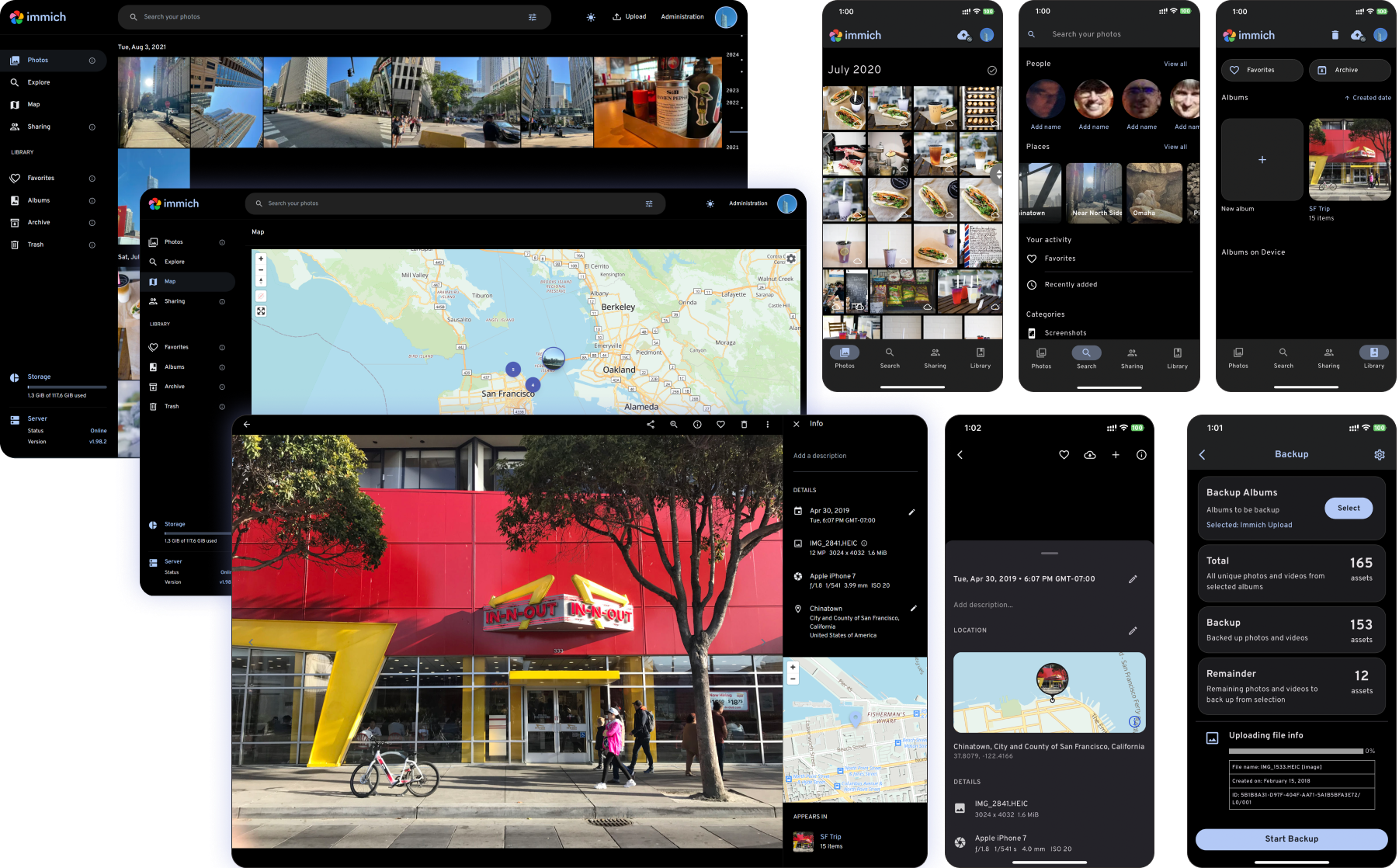
Official apps in the Apple App Store and Google Play upload new photos from chosen albums when the app opens and periodically in the background.
- Search and recognition 5
5/5 means: Five or six of the six
Five of the six. Groups faces into people, free-text content search (CLIP), search for text in images (OCR), a map, and a utility that lists visually similar duplicates. Automatic captions aren't documented.
- Sharing with family 5
5/5 means: Shared albums others add to, plus sharing a whole library with another account in one step
Shared albums that other users add their own photos to, plus partner sharing of a whole library.
- Setup and upkeep 2
2/5 means: Three extra services
The Compose file runs three services besides the server, a machine learning container, Valkey and PostgreSQL. Machine learning can be switched off, but face recognition and smart search need it.
- Server memory 2
2/5 means: 6 GB to under 8 GB
Minimum 6 GB of RAM, recommended 8 GB; 4 GB only with machine learning turned off.
- Privacy from the server 2
2/5 means: Chosen photos can be hidden behind a PIN or password in the app, but the files stay unencrypted
A Locked Folder hides chosen photos behind a PIN. The docs describe no encryption of stored photos.
- Works with your folders 5
5/5 means: The app reads photos from existing folders without copying them and picks up new files without anyone starting a scan
Uploads are stored under a directory and filename pattern the admin sets; external libraries read photos where they are on disk, and an optional watcher, which the docs call experimental, imports new files without a rescan.
- Moving from Google Photos 3
3/5 means: Dates and places are restored only through a separate third-party tool
For Takeout exports the docs recommend immich-go, a community-maintained tool, rather than a built-in import.
- Sign-in security 3
3/5 means: Two of the four
Two of the four. Single sign-on through OpenID Connect and API keys; the docs pages we read mention no second login factor or passkeys.
- Free when self-hosted 5
5/5 means: Every documented feature is free, with no paid tier for self-hosting
A paid license exists only as support; the project says all features will stay free and nothing will go behind a paywall.
Evidence and sources
Self-hosted photo libraries scores
Phone backup 5 quotes
-
“When backup is enabled, Immich will upload new photos and videos from selected albums when you open or resume the app, as well as periodically in the background.”
docs.immich.app/features/mobile-backup · checked -
“You must enable Background App Refresh for the app to work in the background.”
docs.immich.app/features/mobile-backup · checked -
“It is a well-known problem that some Android models are very strict with battery optimization settings, which can cause a problem with the background worker.”
docs.immich.app/features/mobile-backup · checked -
“Apple App Store”
docs.immich.app/features/mobile-app · checked -
“Google Play Store”
docs.immich.app/features/mobile-app · checked
Search and recognition 5 quotes
-
“Immich recognizes faces in your photos and videos and groups them together into people.”
docs.immich.app/features/facial-recognition · checked -
“This allows for freeform searches without requiring specific keywords in the image or video metadata.”
docs.immich.app/features/searching · checked -
“Optical Character Recognition (OCR)”
docs.immich.app/features/searching · checked -
“These assets will then be shown in the main timeline, and they will look and behave like any other asset, including viewing on the map, adding to albums, etc.”
docs.immich.app/features/libraries · checked -
“Immich comes with a duplicates utility to help you detect assets that look visually similar.”
docs.immich.app/features/duplicates-utility · checked
Sharing with family 2 quotes
-
“The shared users can view and add their own photos and videos to the shared album.”
docs.immich.app/features/sharing · checked -
“Partner sharing allows you to share your entire library with other users of your choice.”
docs.immich.app/features/sharing · checked
Setup and upkeep 5 quotes
-
“container_name: immich_machine_learning”
github.com/immich-app/immich/releases/latest/download/docker-compose.yml · checked -
“container_name: immich_redis”
github.com/immich-app/immich/releases/latest/download/docker-compose.yml · checked -
“image: docker.io/valkey/valkey:9”
github.com/immich-app/immich/releases/latest/download/docker-compose.yml · checked -
“container_name: immich_postgres”
github.com/immich-app/immich/releases/latest/download/docker-compose.yml · checked -
“For systems with only 4GB of RAM, Immich can be run with machine learning features disabled.”
docs.immich.app/install/requirements · checked
Server memory 2 quotes
-
“RAM: Minimum 6GB, recommended 8GB.”
docs.immich.app/install/requirements · checked -
“For systems with only 4GB of RAM, Immich can be run with machine learning features disabled.”
docs.immich.app/install/requirements · checked
Privacy from the server 1 quote
-
“The Locked Folder keeps selected photos and videos out of normal library views and protects access to them with a PIN.”
docs.immich.app/features/locked-folder · checked
Works with your folders 4 quotes
-
“External libraries track assets stored in the filesystem outside of Immich.”
docs.immich.app/features/libraries · checked -
“If enabled, it will allow automatic watching of the filesystem which means new assets are automatically imported to Immich without needing to rescan.”
docs.immich.app/features/libraries · checked -
“This feature is considered experimental and for advanced users only.”
docs.immich.app/features/libraries · checked -
“Immich allows the admin user to set the uploaded filename pattern at the directory and filename level as well as the storage label for a user.”
docs.immich.app/administration/storage-template · checked
Moving from Google Photos 1 quote
-
“If you are looking to import your Google Photos takeout, we recommend this community maintained tool immich-go”
docs.immich.app/features/command-line-interface · checked
Sign-in security 2 quotes
-
“Immich supports 3rd party authentication via OpenID Connect (OIDC), an identity layer built on top of OAuth2.”
docs.immich.app/administration/oauth · checked -
“This includes being able to update their profile, toggle certain feature, generate API keys, manage the logged in devices, a view of account usage statistics, and more.”
docs.immich.app/features/user-settings · checked
Free when self-hosted 1 quote
-
“Don't worry, all features will be free, forever! Nothing will ever be put behind any paywalls.”
docs.immich.app/overview/support-the-project · checked
Facts
License 1 quote
-
“Immich is available as open source under the terms of the GNU AGPL v3 License.”
docs.immich.app/install/requirements · checked
Runs on 5 quotes
-
“Immich runs on the amd64 and arm64 platforms.”
docs.immich.app/install/requirements · checked -
“Immich requires Docker with the Docker Compose plugin:”
docs.immich.app/install/requirements · checked -
“Non-Linux OSes tend to provide a poor Docker experience and are strongly discouraged.”
docs.immich.app/install/requirements · checked -
“Apple App Store”
docs.immich.app/features/mobile-app · checked -
“Google Play Store”
docs.immich.app/features/mobile-app · checked
Needs 5 quotes
-
“Immich requires Docker with the Docker Compose plugin:”
docs.immich.app/install/requirements · checked -
“RAM: Minimum 6GB, recommended 8GB.”
docs.immich.app/install/requirements · checked -
“For systems with only 4GB of RAM, Immich can be run with machine learning features disabled.”
docs.immich.app/install/requirements · checked -
“image: docker.io/valkey/valkey:9”
github.com/immich-app/immich/releases/latest/download/docker-compose.yml · checked -
“container_name: immich_postgres”
github.com/immich-app/immich/releases/latest/download/docker-compose.yml · checked
Notability
Other quotes
Not cited by a score or fact 1 quote
-
“Immich optionally uses transcoding and machine learning for several features. However, it can be too heavy to run on a Raspberry Pi. You can mitigate this or host Immich's machine-learning container on a more powerful system, or disable machine learning entirely.”
docs.immich.app/FAQ · checked