
Musicnotes
Free sheet music player and store for iPad, Android and Windows, with import of your own PDFs
Our verdict
#5 of 5 in Sheet music reader apps · Free, cross-platform and simple
What it does
- Imports your own PDFs alongside Musicnotes purchases
- Set lists and folders that sync between devices
- Pedal page turns
- Playback, transposition and looping for purchased arrangements
Pros
- Free on almost every tablet, including Android and Windows
- Simple enough to use on day one
Cons
- Basic markup on your own PDFs
- No playback or transposition for imported PDFs
- Few tools for performing from a large library
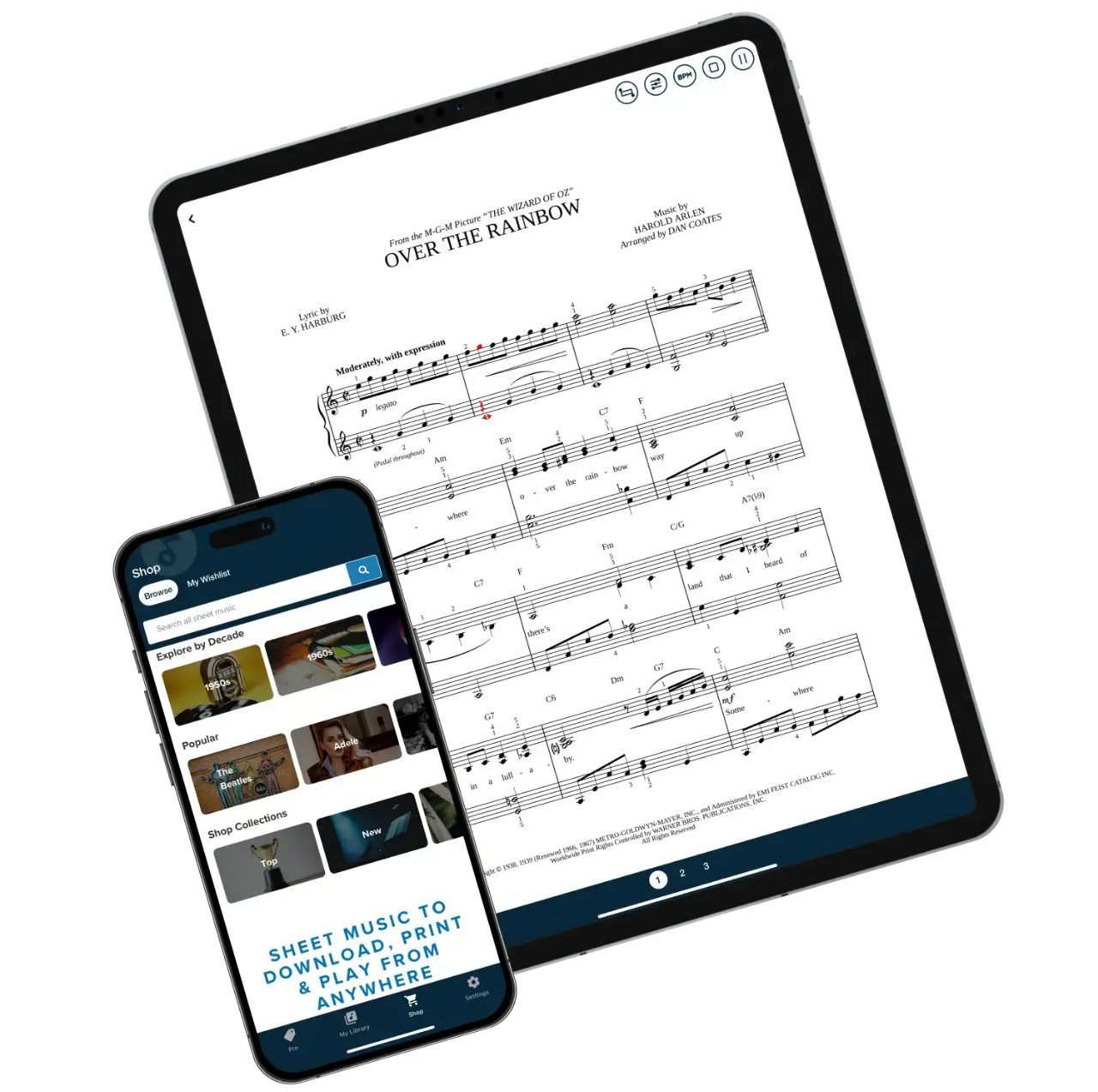
Musicnotes is a free sheet music reader and player from Musicnotes, Inc. that is built around its store of over 500,000 licensed arrangements, which you buy per title and can transpose, loop, slow down and play back. The free app also imports your own PDFs, with set lists, folders, markup and Bluetooth pedal page turns, but imported PDFs are static and get none of the playback or transposition tools. Musicnotes Pro is an optional subscription whose main reader benefit is syncing set lists, folders and markup across devices; its other perks are purchase discounts and credits. It runs on iPad, iPhone, Android, Windows 10/11, Mac and the web, and is proprietary.
What users say
Evidence ↓The few App Store reviews read are individual and dated. One reviewer likes importing their own PDFs and playing from an iPad Pro, and another uses a Bluetooth foot pedal and Apple Pencil markup happily. Critical comments concern Apple Pencil markup failing after an update in 2019 and in-app arrangements costing more than on the website. These are single voices from the first page of reviews, not a measured consensus.
Rankings and alternatives
- Sheet music reader apps #5 of 5 Free, cross-platform and simple
- forScore #1 The iPad reader to beat
- MobileSheets #2 The answer for Android and Windows
- Newzik #3 For ensembles sharing parts



Sheet music reader apps scores
Evaluated Nov 17, 2026 Evidence ↓- Page turns on stage · counts double 2
2/5 means: Works with a pedal, but has no half-page turns or repeat links, or users report turns that fail in performance
Tap, swipe and Bluetooth pedals (AirTurn, PageFlip) are documented and a user reports pedal use. Half-page turns, repeat links and face gestures are not documented on the pages read, and a 2025-26 fix for pedal turns failing in set lists suggests past reliability problems.
- Marking up parts 2
2/5 means: Basic freehand drawing and text
Stylus or finger markup with highlight, write and custom markings is documented, but no stamps or layers are, and Musicnotes advises marking up PDFs before importing. Past Apple Pencil complaints exist.
- Polish and ease of use 4
4/5 means: Clear and quick for everyday reading, with a few rough edges or features that are hard to find
A 4.8 average from 43K US App Store ratings suggests wide satisfaction, but the reviews read are few and dated, and some mention support and update problems.
- Library and setlists 2
2/5 means: Imports your own PDFs into folders or simple setlists, with little metadata or search
Own PDFs import from the device or cloud storage into My PDFs, folders and set lists with editable title info. Search and metadata are modest, the app is built around its store, and no book splitting is documented.
- Sharing with a band or ensemble 1
1/5 means: No sharing beyond exporting a PDF
No sharing of scores, setlists or annotations with other players appears on the pages read, so only PDF export is assumed.
- Cost of the full reader 4
4/5 means: One-time purchase of 40 US dollars or less, with some performance features in an optional subscription
The app is free with import, set lists, folders, markup and pedal turns. Cross-device sync needs an optional Pro subscription, at $36.99 a year on the vendor's pricing page.
- Tablets it runs on · counts half 5
5/5 means: Native apps on iPad, Android and Windows, with sync
Native apps on iPad, Android and Windows 10/11, with set list, folder and markup sync across them.
- Practice tools · counts half 1
1/5 means: None of the five
Playback, transposition, tempo and looping do not work on imported PDFs, and no metronome, tuner or recording is documented for them.
Pricing
- Free app Free
- Musicnotes Pro for Education Free
- Musicnotes Pro $4.99/month
- Musicnotes Pro - Premium $10.99/month
Prices checked Nov 17, 2026.
Evidence and sources
What users say
Summary 3 quotes
-
I love that I can import my own PDFS and playing from an iPad Pro is amazing . My only criticisms would be that it is cheaper to purchase sheets through a web browser than it is to purchase direct through the app.
EvoWake, App Store reviewer · apps.apple.com/us/app/musicnotes-sheet-music-reader/id924050984 · published · checked -
I use a Bluetooth foot pedal and it and the mark ups make it faster to get around.
LexusGram, App Store reviewer · apps.apple.com/us/app/musicnotes-sheet-music-reader/id924050984 · published · checked -
something happened in the last update, and now my first gen Apple Pencil doesn’t work. And I’m mad.
Electroviolin, App Store reviewer and violinist and strings teacher · apps.apple.com/us/app/musicnotes-sheet-music-reader/id924050984 · published · checked
Sheet music reader apps scores
Page turns on stage 2 quotes
-
Tap or swipe to turn pages—or use AirTurn & Pageflip for hands-free playing
apps.apple.com/us/app/musicnotes-sheet-music-reader/id924050984 · checked -
I use a Bluetooth foot pedal and it and the mark ups make it faster to get around.
LexusGram, App Store reviewer · apps.apple.com/us/app/musicnotes-sheet-music-reader/id924050984 · published · checked
Marking up parts 2 quotes
-
Mark up your sheet music with a stylus or finger to improve sight-reading, interpretation, and recall skills
apps.apple.com/us/app/musicnotes-sheet-music-reader/id924050984 · checked -
something happened in the last update, and now my first gen Apple Pencil doesn’t work. And I’m mad.
Electroviolin, App Store reviewer and violinist and strings teacher · apps.apple.com/us/app/musicnotes-sheet-music-reader/id924050984 · published · checked
Polish and ease of use 3 quotes
-
43K Ratings
apps.apple.com/us/app/musicnotes-sheet-music-reader/id924050984 · checked -
I love that I can import my own PDFS and playing from an iPad Pro is amazing . My only criticisms would be that it is cheaper to purchase sheets through a web browser than it is to purchase direct through the app.
EvoWake, App Store reviewer · apps.apple.com/us/app/musicnotes-sheet-music-reader/id924050984 · published · checked -
something happened in the last update, and now my first gen Apple Pencil doesn’t work. And I’m mad.
Electroviolin, App Store reviewer and violinist and strings teacher · apps.apple.com/us/app/musicnotes-sheet-music-reader/id924050984 · published · checked
Library and setlists 3 quotes
-
Explore over 500,000 arrangements in the Musicnotes catalog, or import your own PDFs! Keep it all organized with set lists and folders.
musicnotes.com/apps · checked -
The app will use the system file browser, allowing you to import PDFs that are stored on your device and/or any cloud services with which you may be signed in on your device.
help.musicnotes.com/hc/en-us/articles/360029213052-Importing-Your-Personal-Sheet-Music-PDFs · checked -
You may import your own personal sheet music PDF files into your library and access them within the Musicnotes Sheet Music Player app.
help.musicnotes.com/hc/en-us/articles/360050858512-Importing-Your-Personal-Sheet-Music-PDFs · checked
Cost of the full reader 4 quotes
-
Explore over 500,000 arrangements in the Musicnotes catalog, or import your own PDFs! Keep it all organized with set lists and folders.
musicnotes.com/apps · checked -
Free · In‑App Purchases · Designed for iPad
apps.apple.com/us/app/musicnotes-sheet-music-reader/id924050984 · checked -
Sync set lists, folders and markup on all of your devices - desktop, tablet and phone. When staying organized is easy, you can focus on the music!
musicnotes.com/pro · checked -
Free $4.99/mo $36.99/yr Due today: $0 $10.99/mo $71.99/yr
musicnotes.com/pro · checked
Tablets it runs on 3 quotes
-
Requires iPadOS 15.0 or later.
apps.apple.com/us/app/musicnotes-sheet-music-reader/id924050984 · checked -
Sync set lists, folders and markup on all of your devices - desktop, tablet and phone. When staying organized is easy, you can focus on the music!
musicnotes.com/pro · checked -
Mark-up can only be synced with our iOS, Android, Kindle Fire and Windows apps.
musicnotes.com/pro · checked
Practice tools 2 quotes
-
A PDF is a static, visual file intended for viewing. The Musicnotes Player apps are not able to create playback for imported PDFs.
help.musicnotes.com/hc/en-us/articles/360029213052-Importing-Your-Personal-Sheet-Music-PDFs · checked -
Customize key and tempo for vocal range exercises or skill development • Use interactive playback with the music note player to improve rhythm, timing, and accuracy • Loop difficult sections for targeted repetition and muscle memory
apps.apple.com/us/app/musicnotes-sheet-music-reader/id924050984 · checked
Facts
License 1 quote
-
Free · In‑App Purchases · Designed for iPad
apps.apple.com/us/app/musicnotes-sheet-music-reader/id924050984 · checked
Runs on 2 quotes
-
Requires iPadOS 15.0 or later.
apps.apple.com/us/app/musicnotes-sheet-music-reader/id924050984 · checked -
Sync set lists, folders and markup on all of your devices - desktop, tablet and phone. When staying organized is easy, you can focus on the music!
musicnotes.com/pro · checked
More from the sources
Pricing 1 quote
-
Musicnotes Pro - Premium members benefit from: 12 Pro credits for titles of your choice each year3 10 Musicnotes Edition titles each month 30% off digital sheet music purchases on Musicnotes.com PDF downloads of digital sheet music included in every available key (normally $3 per song) for purchases made when your subscription is active
musicnotes.com/pro · checked
Pricing
musicnotes.com/pro · checked