
myHomework Student Planner
Homework and class-schedule planner for students, free with ads and $4.99 per year to remove them
 (opens full size in a new tab)
Facts
- Price
- From a free plan or $4.99/year
- Runs on
- iOSiPadOSAndroidWindowsmacOSChromebookWeb
- License
- Proprietary
- Category
- Apps
- Facts checked
Price checked · Current prices on myhomeworkapp.com ↗
Our verdict
#5 of 7 in Student planner apps
Simple and cheap, with a Teachers.io link
What it does
- Homework with class, type, priority, and reminders
- Time, period, and block schedules
- Assignments from teachers who use Teachers.io
Pros
- Quick to learn and quick to add homework
- Cheap Premium plan
Cons
- Ads in the free version
- Long gaps between updates
- No grade tracking
- Choose if:
- Your teacher posts assignments on Teachers.io
About myHomework Student Planner
myHomework is a student planner from Instin, on the market since 2009. Students enter classes (with teacher, room and time, period or block schedules), then add homework, projects and tests to each class with due dates, priorities and reminders. The free Basic plan shows ads and Premium adds ad-free use, themes, file attachments, widgets, sharing and importing, and external calendar access. It syncs across mobile, desktop and web, can connect to teachers through Teachers.io, and is proprietary. The company’s own site now promotes a school hall-pass and planner product to schools, so the consumer app gets little current attention there.
What users say
Student reviewers on the App Store like the quick entry of assignments by class, the schedule with teacher and room, reminders and cross-device sync; the reviews date from 2018 to 2024 and the app has a 4.5 rating from about 4.3K ratings. Common Sense Media found setup by an adult useful for young kids and called manual entry tedious when teachers don't use Teachers.io. One reviewer also wrote of a small glitch.
4 quotes from users and reviewers
It’s also convenient as a schedule since you can write down the name of your teacher, the room number, and the time/period your class starts.
zohaxoxox, App Store reviewer · apps.apple.com/us/app/myhomework-student-planner/id303490844 · published · checked With the sync feature, I can put an assignment in on my phone or my computer, whichever I have out at the time, and not have to worry about pulling something out to put it down.
ZoSkMa, App Store reviewer · apps.apple.com/us/app/myhomework-student-planner/id303490844 · published · checked manually entering all assignments if teachers aren't using the companion software can be tedious.
commonsensemedia.org/app-reviews/myhomework-student-planner · checked 4.5 out of 5 4.3K Ratings
apps.apple.com/us/app/myhomework-student-planner/id303490844 · checked
Ranked in
-
#5 of 7 Student planner apps Simple and cheap, with a Teachers.io link 3.4/5
How it scored
-
Class timetable, including rotating schedules , counts double 3/5
Classes take teacher, room and time or period, and block schedules are supported. It is unclear whether Week A/Week B or day-number cycles are supported, which could raise this.
3/5 means: A class timetable with times and rooms on a weekly pattern, including period or block layouts, without A/B weeks or day cycles
Official product pages describe tracking for assignments, projects, tests, and classes, along with due-date reminders, synchronization, widgets, filters, priorities, and time-, period-, and block-based schedules.
itechguides.com/6-best-homework-planner-apps-for-students · checked Bug fixes for themes - Now you can see your block schedule when there are no classes scheduled. - Fixes to Google Sign In. - UI enhancements and bug fixes.
apps.apple.com/us/app/myhomework-student-planner/id303490844 · checked It’s also convenient as a schedule since you can write down the name of your teacher, the room number, and the time/period your class starts.
zohaxoxox, App Store reviewer · apps.apple.com/us/app/myhomework-student-planner/id303490844 · published · checked
-
Homework and exams by class 4/5
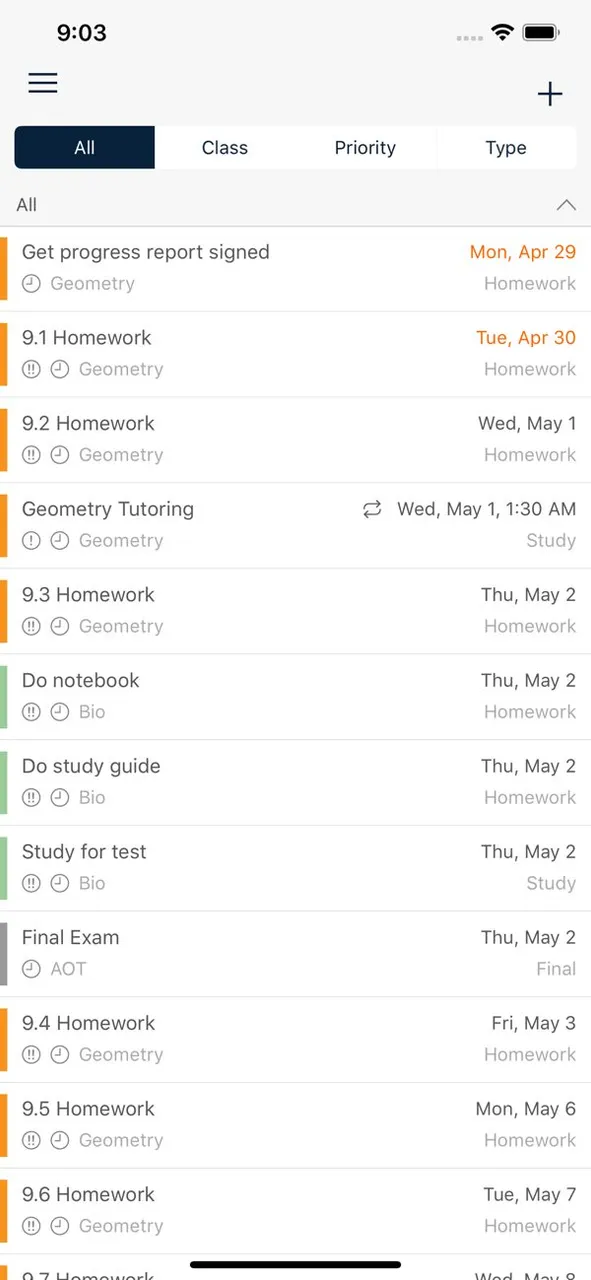
Homework is filed under a class with a type (the iOS screenshot shows Homework, Study and Final types) and can repeat.
4/5 means: Homework tied to classes and exams as their own entries, plus one of repeating homework or subtasks
To add new homework, users select the + (plus) symbol in the top right corner and the app will prompt students for the required details such as Description, Class, Type, Due Date/Time, Repeats, Priority, Reminder, Attach a file, and More Info.
neilsquire.ca/myhomework · published · checked Official product pages describe tracking for assignments, projects, tests, and classes, along with due-date reminders, synchronization, widgets, filters, priorities, and time-, period-, and block-based schedules.
itechguides.com/6-best-homework-planner-apps-for-students · checked
-
Quick and dependable every day 3/5
Users praise quick entry and sync, and the iOS rating is 4.5 from 4.3K ratings. The free version shows ads, and the iOS app went about 21 months without an update, with 2021 to 2024 gaps. Android and desktop maintenance is unchecked.
3/5 means: Easy enough, with clear rough edges such as ads, a dated design, rare updates, a disliked redesign or frequent upgrade prompts
In the free version, family-friendly consumer ads appear on the bottom of the screen; upgrading to a paid version eliminates ads.
commonsensemedia.org/app-reviews/myhomework-student-planner · checked 4.5 out of 5 4.3K Ratings
apps.apple.com/us/app/myhomework-student-planner/id303490844 · checked 6.8.15 02/05/2025 - ‣ Minor bug fixes and performance improvements.
apps.apple.com/us/app/myhomework-student-planner/id303490844 · checked It’s also convenient as a schedule since you can write down the name of your teacher, the room number, and the time/period your class starts.
zohaxoxox, App Store reviewer · apps.apple.com/us/app/myhomework-student-planner/id303490844 · published · checked With the sync feature, I can put an assignment in on my phone or my computer, whichever I have out at the time, and not have to worry about pulling something out to put it down.
ZoSkMa, App Store reviewer · apps.apple.com/us/app/myhomework-student-planner/id303490844 · published · checked
Show all 5
-
Cost for a school year 4/5
The free Basic plan covers the core job but shows ads; Premium is $4.99 a year to remove them, per third-party sources.
4/5 means: Free with ads or with a limit a full course load can run into, or a one-time unlock under $10
Price - The account is FREE everywhere and an ads-free premium experience is available.
apps.apple.com/us/app/myhomework-student-planner/id303490844 · checked myHomework Basic is available for free with ads, and myHomework Premium is available for $4.99 per year. The premium version offers more features includes app widgets, sharing and importing, file attachments, and more.
neilsquire.ca/myhomework · published · checked According to myHomework’s official pricing page, the Basic plan is free with ads and Premium is listed at $4.99 per year. The Premium plan adds features described by the vendor as including ad-free access, themes, file attachments, enhanced widgets, external calendar access, sharing, and homework importing.
itechguides.com/6-best-homework-planner-apps-for-students · checked In the free version, family-friendly consumer ads appear on the bottom of the screen; upgrading to a paid version eliminates ads.
commonsensemedia.org/app-reviews/myhomework-student-planner · checked
Show all 4
-
Reminders before things are due 4/5
A reminder per assignment plus class reminders on iOS. A user asked for several reminders per item, so that is probably not supported.
4/5 means: Reminders for each task plus reminders before classes or exams
To add new homework, users select the + (plus) symbol in the top right corner and the app will prompt students for the required details such as Description, Class, Type, Due Date/Time, Repeats, Priority, Reminder, Attach a file, and More Info.
neilsquire.ca/myhomework · published · checked Settings easily adjust to a variety of school schedules. Reminders help kids stay on track to complete tasks.
commonsensemedia.org/app-reviews/myhomework-student-planner · checked With the sync feature, I can put an assignment in on my phone or my computer, whichever I have out at the time, and not have to worry about pulling something out to put it down.
ZoSkMa, App Store reviewer · apps.apple.com/us/app/myhomework-student-planner/id303490844 · published · checked
-
Phone and computer 5/5
Third parties list iOS, Android, Mac, Windows, Chromebook and web with free sync.
5/5 means: iPhone, Android, the web, Windows and Mac
Price - The account is FREE everywhere and an ads-free premium experience is available.
apps.apple.com/us/app/myhomework-student-planner/id303490844 · checked myHomework is a cross-platform student-planner that syncs across iOS, Android, Mac, Chromebook, and Windows devices, so no matter what device you have at hand, you’ll have access to your planner, and no internet connection is required to use the app.
neilsquire.ca/myhomework · published · checked According to myHomework’s official pricing page, the Basic plan is free with ads and Premium is listed at $4.99 per year. The Premium plan adds features described by the vendor as including ad-free access, themes, file attachments, enhanced widgets, external calendar access, sharing, and homework importing.
itechguides.com/6-best-homework-planner-apps-for-students · checked
-
Grades and GPA , counts half 1/5
One source says it lacks an integrated grade system.
1/5 means: No grade tracking
Students who need sophisticated time-blocking, workload estimation, or a deeply integrated grade system may outgrow myHomework. Teachers.io support should also not be treated as proof of broad Canvas, Blackboard, Moodle, or Google Classroom integration.
itechguides.com/6-best-homework-planner-apps-for-students · checked
-
Room for the rest of life , counts half 2/5
A school-focused planner where other activities would be added as classes or events.
2/5 means: School planner with a workaround for other things, such as adding a job as a class or an event
To add new homework, users select the + (plus) symbol in the top right corner and the app will prompt students for the required details such as Description, Class, Type, Due Date/Time, Repeats, Priority, Reminder, Attach a file, and More Info.
neilsquire.ca/myhomework · published · checked
Top of this ranking
- Power Planner #1
- MyStudyLife #2
- School Planner #3
-



Sources
15 quotes from 4 pages; the 12 most useful are below.
-
Pricing 4
Price - The account is FREE everywhere and an ads-free premium experience is available.
apps.apple.com/us/app/myhomework-student-planner/id303490844 · checked According to myHomework’s official pricing page, the Basic plan is free with ads and Premium is listed at $4.99 per year. The Premium plan adds features described by the vendor as including ad-free access, themes, file attachments, enhanced widgets, external calendar access, sharing, and homework importing.
itechguides.com/6-best-homework-planner-apps-for-students · checked In the free version, family-friendly consumer ads appear on the bottom of the screen; upgrading to a paid version eliminates ads.
commonsensemedia.org/app-reviews/myhomework-student-planner · checked myHomework Basic is available for free with ads, and myHomework Premium is available for $4.99 per year. The premium version offers more features includes app widgets, sharing and importing, file attachments, and more.
neilsquire.ca/myhomework · published · checked
-
Limits and known issues 1
Students who need sophisticated time-blocking, workload estimation, or a deeply integrated grade system may outgrow myHomework. Teachers.io support should also not be treated as proof of broad Canvas, Blackboard, Moodle, or Google Classroom integration.
itechguides.com/6-best-homework-planner-apps-for-students · checked
-
What users say 2
With the sync feature, I can put an assignment in on my phone or my computer, whichever I have out at the time, and not have to worry about pulling something out to put it down.
ZoSkMa, App Store reviewer · apps.apple.com/us/app/myhomework-student-planner/id303490844 · published · checked manually entering all assignments if teachers aren't using the companion software can be tedious.
commonsensemedia.org/app-reviews/myhomework-student-planner · checked
-
Features 3
Official product pages describe tracking for assignments, projects, tests, and classes, along with due-date reminders, synchronization, widgets, filters, priorities, and time-, period-, and block-based schedules.
itechguides.com/6-best-homework-planner-apps-for-students · checked Settings easily adjust to a variety of school schedules. Reminders help kids stay on track to complete tasks.
commonsensemedia.org/app-reviews/myhomework-student-planner · checked To add new homework, users select the + (plus) symbol in the top right corner and the app will prompt students for the required details such as Description, Class, Type, Due Date/Time, Repeats, Priority, Reminder, Attach a file, and More Info.
neilsquire.ca/myhomework · published · checked
-
Platforms and requirements 2
6.8.15 02/05/2025 - ‣ Minor bug fixes and performance improvements.
apps.apple.com/us/app/myhomework-student-planner/id303490844 · checked myHomework is a cross-platform student-planner that syncs across iOS, Android, Mac, Chromebook, and Windows devices, so no matter what device you have at hand, you’ll have access to your planner, and no internet connection is required to use the app.
neilsquire.ca/myhomework · published · checked