School Planner
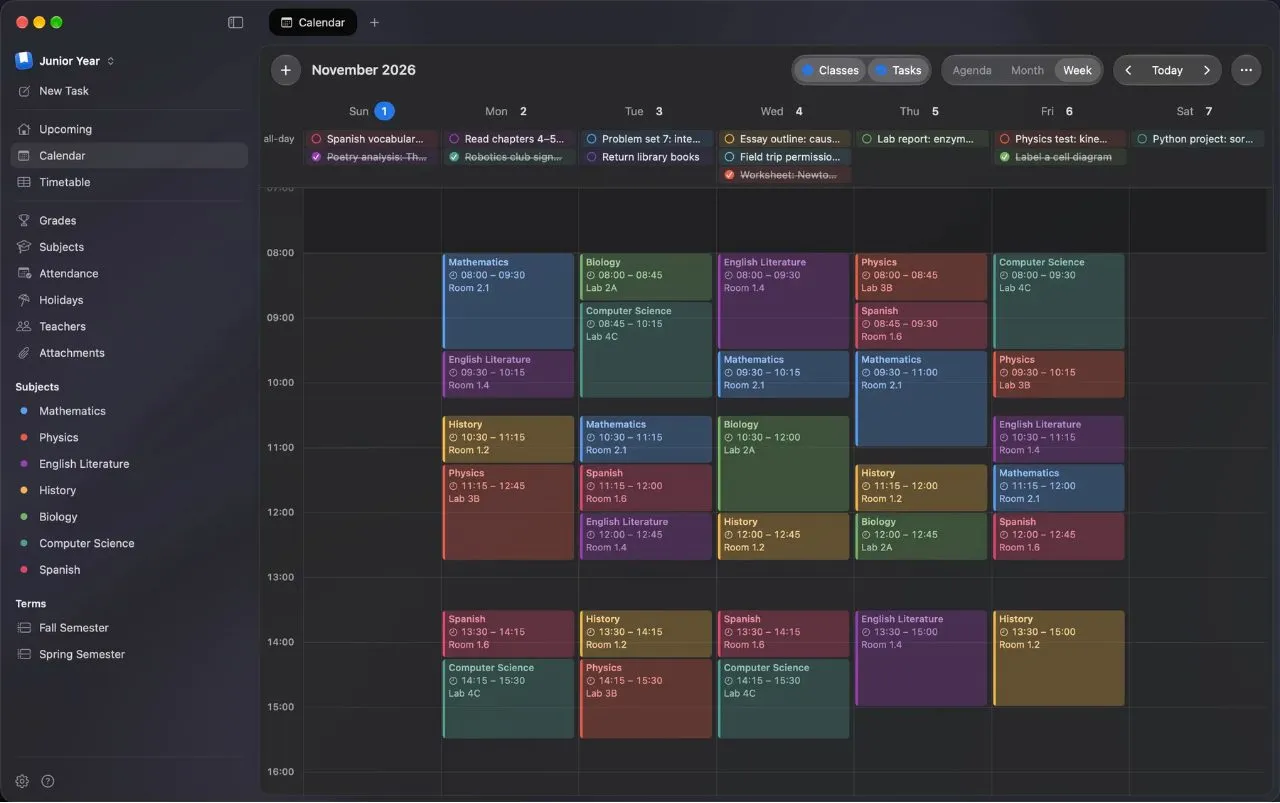
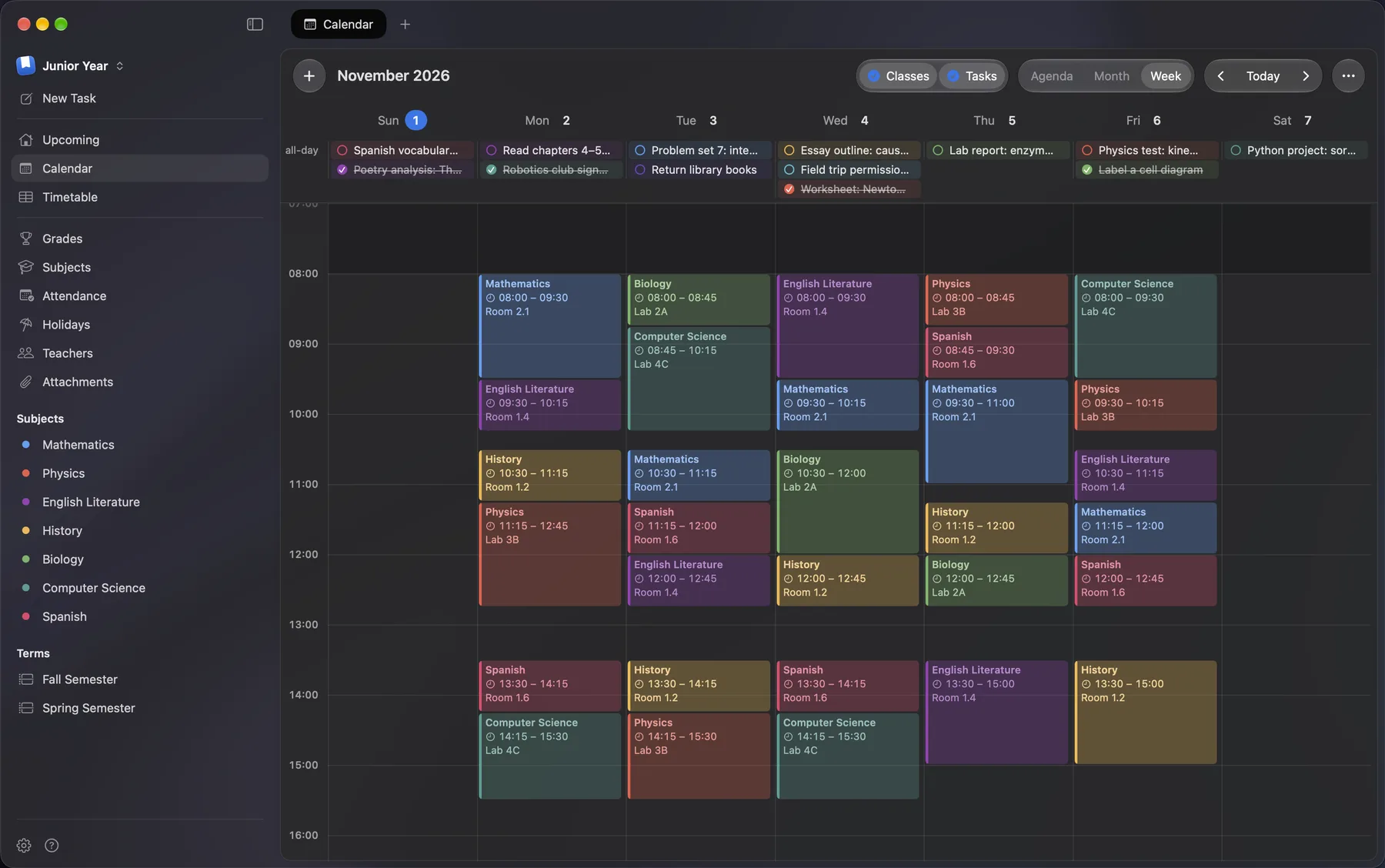
A student planner for homework, exams, timetable and grades, on Android, iPhone, iPad, Mac, Apple Watch and the web.
 (opens full size in a new tab)
Facts
- Price
- From a free plan or $1.99/month or $8.99/year or $19.99 one-time
- Users
- About 10M
- Runs on
- AndroidiPhoneiPadMacApple WatchWeb
- Needs
- iOS 17.0 or latermacOS 14.0 or laterwatchOS 10.0 or later
- License
- Proprietary
- Category
- Apps
- Facts checked
Price checked · Current prices on apps.apple.com ↗
Our verdict
#3 of 7 in Student planner apps
Android favorite, now on iPhone and Mac too
What it does
- Timetable with Week A/Week B, rooms, and teachers
- Homework, exams, and reminders by subject
- Marks with averages per subject and term
- Lecture recording on Android
Pros
- Polished on Android, with a large user base
- Runs on Android, iPhone, iPad, Mac, Apple Watch, and the web
Cons
- Ads in the free Android app
- No Windows app
- Grades have no weighted categories
- Choose if:
- You want to record lectures in the same app as your timetable
About School Planner
School Planner is a student planner by Andrea Dal Cin (Andrea Porfiri Dal Cin on the App Store; copyright School Planner s.r.l.). It combines a homework and exam agenda, a class timetable with week A/week B rotation, a calendar, grade averages, lecture recordings and teacher contacts. It began as an Android app in 2018 and now also runs on iPhone, iPad, Mac, Apple Watch and the web. It is free with in-app purchases; the Android app shows ads. It is proprietary.
What users say
Android reviewers like it as a simple all-in-one planner and accept paying once to remove ads, but individual reviews ask for A/B-day schedules and off days, and complain about class reminders. An iOS reviewer likes it but lists missing custom assignment categories, weighted grading and letter-grade display. Each point comes from one review.
4 quotes from users and reviewers
Maybe add an A-Day/B-Day and an option to add off days (Early Out, Assembly, etc...) on top of the time/period options for the timetable options.
Anonymous Google Play reviewer, Android user · play.google.com/store/apps/details · checked Also, as good of an app it is, the ads will get to you. But considering making them go away for life is half the cost of most paper planners, I was personally fine paying it.
Anonymous Google Play reviewer, Android user · play.google.com/store/apps/details · checked I love this app and it's helped me a lot with memorizing classes and stuff but it doesn't sync terms to the time table so in the second term it thinks it has the same classes as first term.
Jose Ramos jkjkjk, App Store reviewer · apps.apple.com/us/app/school-planner-timetable/id6474174333 · checked I started using this app when I was still using android and liked the fact that I could organize my classes and see on a time table and calendar the things that lie ahead. I received a great surprise when I logged in my apple devices where I could see that I still maintained my premium purchase.
DogarooMe, App Store reviewer · apps.apple.com/us/app/school-planner-timetable/id6474174333 · published · checked
Ranked in
-
#3 of 7 Student planner apps Android favorite, now on iPhone and Mac too 3.8/5
How it scored
-
Class timetable, including rotating schedules , counts double 4/5
The developer's site says classes are set up once with week A and week B, showing subject, room and teacher. Day-number cycles, custom rotations, holidays that skip classes and period layouts are not documented, and one iOS reviewer says terms do not switch the timetable. Whether A/B weeks are in the free version, or in the Android app, is unconfirmed.
4/5 means: A class timetable that handles Week A/Week B rotation, but not day-number cycles or custom rotations
Maybe add an A-Day/B-Day and an option to add off days (Early Out, Assembly, etc...) on top of the time/period options for the timetable options.
Anonymous Google Play reviewer, Android user · play.google.com/store/apps/details · checked Set up your classes once, with week A and week B if your school rotates, and see your day at a glance: subject, room and teacher.
schoolplanner.io · checked I love this app and it's helped me a lot with memorizing classes and stuff but it doesn't sync terms to the time table so in the second term it thinks it has the same classes as first term.
Jose Ramos jkjkjk, App Store reviewer · apps.apple.com/us/app/school-planner-timetable/id6474174333 · checked
-
Homework and exams by class 4/5
Homework and exams are separate entry types in an agenda, each set against a subject from the timetable, and repeating tasks arrived in version 5. It is unclear whether subtasks exist, so not the top level. Assignment types are limited to Homework and Exam according to one reviewer.
4/5 means: Homework tied to classes and exams as their own entries, plus one of repeating homework or subtasks
Agenda for homework, exams, reminders Timetable Calendar Beautiful, colorful themes Backup on Google Drive Notifications for assignments, tests, reminders Management of grades, marks, subjects Record your lectures
play.google.com/store/apps/details · checked What's new in School Planner 5 • A new home on Mac and iPad. A redesigned workspace with a sidebar and tabs, so your timetable, tasks and grades are always a click away. It adapts to any window size. • School Planner on Apple Watch. See your next class and today's tasks at a glance, right on your wrist. • Tasks that repeat. Set homework or reminders to repeat daily, weekly or on your own schedule. • Voice notes. Record a quick voice note and attach it to any task.
apps.apple.com/us/app/school-planner-timetable/id6474174333 · checked I started using this app when I was still using android and liked the fact that I could organize my classes and see on a time table and calendar the things that lie ahead. I received a great surprise when I logged in my apple devices where I could see that I still maintained my premium purchase.
DogarooMe, App Store reviewer · apps.apple.com/us/app/school-planner-timetable/id6474174333 · published · checked
-
Quick and dependable every day 3/5
Play rating is 4.3 from 194K reviews and the app is updated actively (Nov 2026). Ads on Android, repeating class-reminder vibration complaints and a reported terms issue are rough edges.
3/5 means: Easy enough, with clear rough edges such as ads, a dated design, rare updates, a disliked redesign or frequent upgrade prompts
Andrea Dal Cin Contains adsIn-app purchases 4.3_star_ 194K reviews
play.google.com/store/apps/details · checked Thanks for choosing School Planner! This update brings some big improvements to your planning experience: Our Cloud Sync feature has been completely overhauled for better speed and reliability. Added support for Android 16. We've also fixed various bugs and made performance enhancements for a smoother experience.
play.google.com/store/apps/details · checked Maybe add an A-Day/B-Day and an option to add off days (Early Out, Assembly, etc...) on top of the time/period options for the timetable options.
Anonymous Google Play reviewer, Android user · play.google.com/store/apps/details · checked Also, as good of an app it is, the ads will get to you. But considering making them go away for life is half the cost of most paper planners, I was personally fine paying it.
Anonymous Google Play reviewer, Android user · play.google.com/store/apps/details · checked What's new in School Planner 5 • A new home on Mac and iPad. A redesigned workspace with a sidebar and tabs, so your timetable, tasks and grades are always a click away. It adapts to any window size. • School Planner on Apple Watch. See your next class and today's tasks at a glance, right on your wrist. • Tasks that repeat. Set homework or reminders to repeat daily, weekly or on your own schedule. • Voice notes. Record a quick voice note and attach it to any task.
apps.apple.com/us/app/school-planner-timetable/id6474174333 · checked I love this app and it's helped me a lot with memorizing classes and stuff but it doesn't sync terms to the time table so in the second term it thinks it has the same classes as first term.
Jose Ramos jkjkjk, App Store reviewer · apps.apple.com/us/app/school-planner-timetable/id6474174333 · checked
Show all 6
-
Cost for a school year 4/5
Priced as the free version, which has ads on Android, with a one-time ad-removal purchase (price unseen on Android; iOS lists $19.99 one-time plus $1.99 and $8.99 subscriptions). Uncertain whether sync and reminders are free or Premium-gated, which could push the cost up.
4/5 means: Free with ads or with a limit a full course load can run into, or a one-time unlock under $10
Andrea Dal Cin Contains adsIn-app purchases 4.3_star_ 194K reviews
play.google.com/store/apps/details · checked Also, as good of an app it is, the ads will get to you. But considering making them go away for life is half the cost of most paper planners, I was personally fine paying it.
Anonymous Google Play reviewer, Android user · play.google.com/store/apps/details · checked In-App Purchases Yes Premium Subscription $1.99 Premium Subscription $8.99 School Planner Premium $19.99
apps.apple.com/us/app/school-planner-timetable/id6474174333 · checked One time purchase (perpetual license) + free version with limited functionality.
alternativeto.net/software/school-planner/about · checked
Show all 4
-
Reminders before things are due 4/5
Notifications for assignments, tests and reminders exist, plus class-start notifications that a reviewer says repeat. Several reminders per item are not documented, and which are free is unknown.
4/5 means: Reminders for each task plus reminders before classes or exams
Agenda for homework, exams, reminders Timetable Calendar Beautiful, colorful themes Backup on Google Drive Notifications for assignments, tests, reminders Management of grades, marks, subjects Record your lectures
play.google.com/store/apps/details · checked Maybe add an A-Day/B-Day and an option to add off days (Early Out, Assembly, etc...) on top of the time/period options for the timetable options.
Anonymous Google Play reviewer, Android user · play.google.com/store/apps/details · checked
-
Phone and computer 4/5
iPhone, iPad, Android, Apple Watch, Mac and the web are listed on the developer's site, but there is no Windows app. Whether sync and the web app are free is not stated.
4/5 means: iPhone and Android plus the web or computer apps, missing one of the web, Windows or Mac
Homework, exams, your timetable and your grades, all in one place and on every device you own. Free on iPhone, iPad, Mac, Apple Watch, Android and the web.
schoolplanner.io · checked Set up your week on your Mac or in the browser, then take it with you on your iPhone, your iPad and your Apple Watch.
schoolplanner.io · checked What's new in School Planner 5 • A new home on Mac and iPad. A redesigned workspace with a sidebar and tabs, so your timetable, tasks and grades are always a click away. It adapts to any window size. • School Planner on Apple Watch. See your next class and today's tasks at a glance, right on your wrist. • Tasks that repeat. Set homework or reminders to repeat daily, weekly or on your own schedule. • Voice notes. Record a quick voice note and attach it to any task.
apps.apple.com/us/app/school-planner-timetable/id6474174333 · checked MULTI-DEVICE SYNCHRONIZATION Sync your School Planner across multiple devices, ensuring you have access to your timetable, homework, and notes, whether you're on your phone, tablet, or laptop.
apps.apple.com/us/app/school-planner-timetable/id6474174333 · checked
Show all 4
-
Grades and GPA , counts half 3/5
Grades by subject and term with averages. A reviewer says weighted categories, custom assignment categories and letter grades are missing. No GPA across semesters or what-if calculator is documented. Free vs Premium is unknown.
3/5 means: Grades per class with averages
Agenda for homework, exams, reminders Timetable Calendar Beautiful, colorful themes Backup on Google Drive Notifications for assignments, tests, reminders Management of grades, marks, subjects Record your lectures
play.google.com/store/apps/details · checked Record every mark on your school's grading system and follow your averages by subject and by term, with no spreadsheet.
schoolplanner.io · checked I started using this app when I was still using android and liked the fact that I could organize my classes and see on a time table and calendar the things that lie ahead. I received a great surprise when I logged in my apple devices where I could see that I still maintained my premium purchase.
DogarooMe, App Store reviewer · apps.apple.com/us/app/school-planner-timetable/id6474174333 · published · checked
-
Room for the rest of life , counts half 3/5
A general calendar, reminders, repeating tasks, voice notes and lecture recordings sit alongside classes. Habits, notes and a general to-do app are not documented.
3/5 means: School planner with activities or general tasks alongside classes
Agenda for homework, exams, reminders Timetable Calendar Beautiful, colorful themes Backup on Google Drive Notifications for assignments, tests, reminders Management of grades, marks, subjects Record your lectures
play.google.com/store/apps/details · checked What's new in School Planner 5 • A new home on Mac and iPad. A redesigned workspace with a sidebar and tabs, so your timetable, tasks and grades are always a click away. It adapts to any window size. • School Planner on Apple Watch. See your next class and today's tasks at a glance, right on your wrist. • Tasks that repeat. Set homework or reminders to repeat daily, weekly or on your own schedule. • Voice notes. Record a quick voice note and attach it to any task.
apps.apple.com/us/app/school-planner-timetable/id6474174333 · checked
Top of this ranking
- Power Planner #1
- MyStudyLife #2
- TickTick #4
-


Sources
17 quotes from 4 pages; the 10 most useful are below.
-
Pricing 3
Also, as good of an app it is, the ads will get to you. But considering making them go away for life is half the cost of most paper planners, I was personally fine paying it.
Anonymous Google Play reviewer, Android user · play.google.com/store/apps/details · checked In-App Purchases Yes Premium Subscription $1.99 Premium Subscription $8.99 School Planner Premium $19.99
apps.apple.com/us/app/school-planner-timetable/id6474174333 · checked One time purchase (perpetual license) + free version with limited functionality.
alternativeto.net/software/school-planner/about · checked
-
Limits and known issues 2
Maybe add an A-Day/B-Day and an option to add off days (Early Out, Assembly, etc...) on top of the time/period options for the timetable options.
Anonymous Google Play reviewer, Android user · play.google.com/store/apps/details · checked I love this app and it's helped me a lot with memorizing classes and stuff but it doesn't sync terms to the time table so in the second term it thinks it has the same classes as first term.
Jose Ramos jkjkjk, App Store reviewer · apps.apple.com/us/app/school-planner-timetable/id6474174333 · checked
-
What users say 1
I started using this app when I was still using android and liked the fact that I could organize my classes and see on a time table and calendar the things that lie ahead. I received a great surprise when I logged in my apple devices where I could see that I still maintained my premium purchase.
DogarooMe, App Store reviewer · apps.apple.com/us/app/school-planner-timetable/id6474174333 · published · checked
-
Features 2
Agenda for homework, exams, reminders Timetable Calendar Beautiful, colorful themes Backup on Google Drive Notifications for assignments, tests, reminders Management of grades, marks, subjects Record your lectures
play.google.com/store/apps/details · checked Set up your classes once, with week A and week B if your school rotates, and see your day at a glance: subject, room and teacher.
schoolplanner.io · checked
-
Platforms and requirements 2
Homework, exams, your timetable and your grades, all in one place and on every device you own. Free on iPhone, iPad, Mac, Apple Watch, Android and the web.
schoolplanner.io · checked Set up your week on your Mac or in the browser, then take it with you on your iPhone, your iPad and your Apple Watch.
schoolplanner.io · checked