
Power Planner
A homework, class schedule and grade planner for students, free with a one-time Premium unlock.
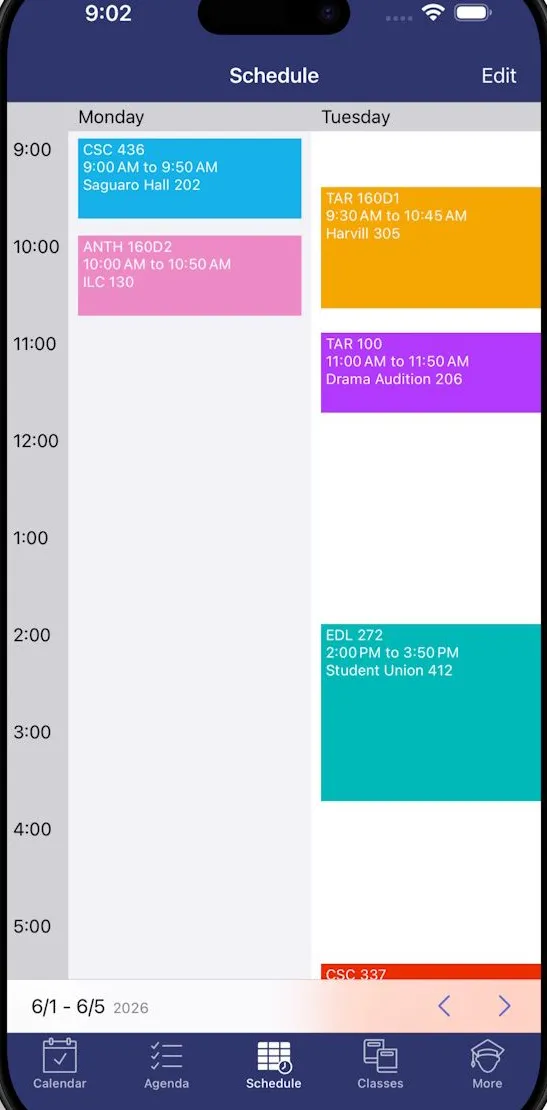 (opens full size in a new tab)
Facts
- Price
- From a free plan or $4.99 one-time
- Users
- About 100K
- Runs on
- WindowsiOSiPadOSAndroidMacWeb
- Needs
- iOS 15.0 or latermacOS 14.0 or later
- License
- GPL-3.0, open source
- Company
- BareBones Dev
- Category
- Apps
- Facts checked
Price checked · Current prices on powerplanner.net ↗
Our verdict
#1 of 7 in Student planner apps
Free pick for weekly and Week A/B timetables
What it does
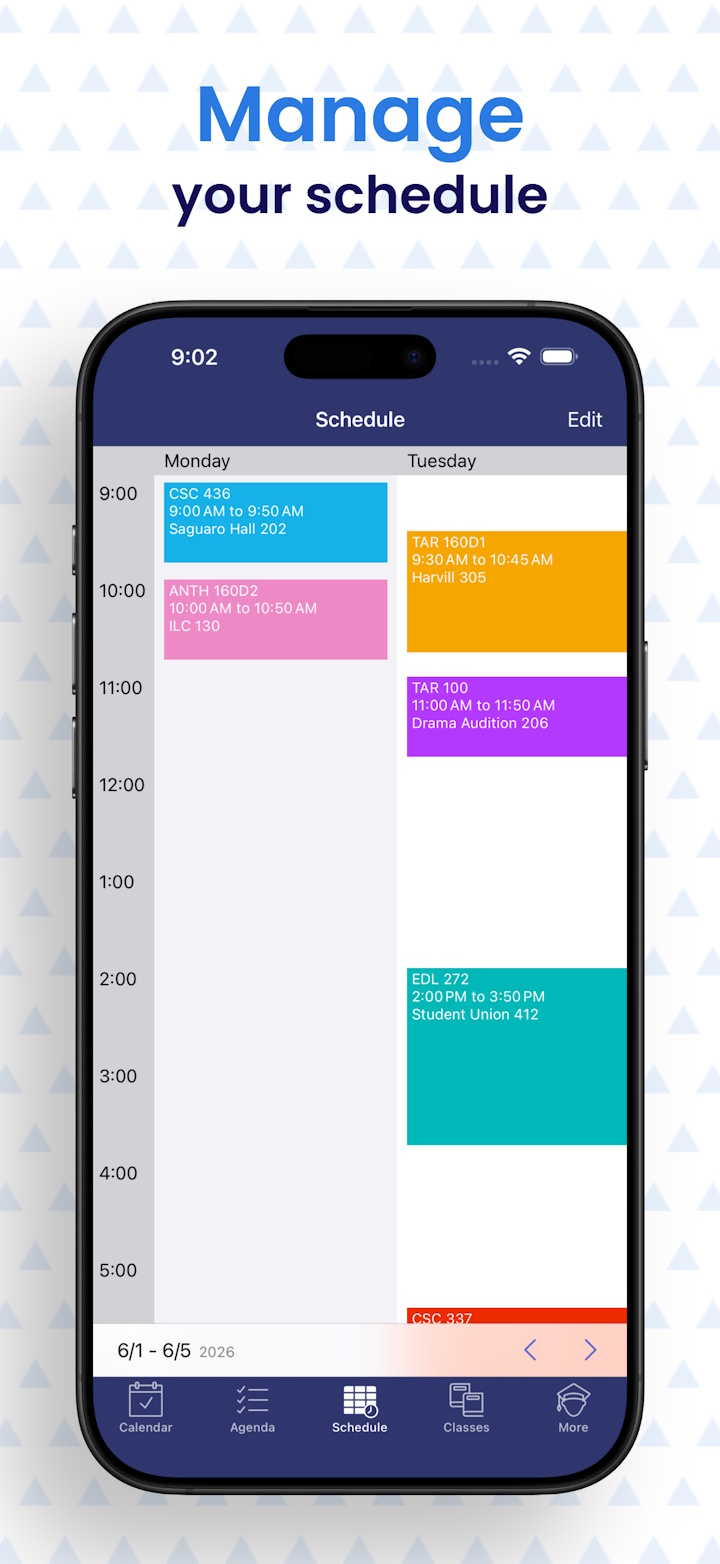
- Class timetable with Week A/Week B support
- Homework and exams attached to each class, with reminders
- Weighted grades, GPA, and a what-if mode
- Apps for Windows, Mac, iPhone, Android, and the web, plus Google Calendar sync
Pros
- Free version has no ads and no limit on homework
- Paid features are a one-time purchase, with no subscription
- Updated often
Cons
- Can't follow day cycles, A/B days, or other custom rotations
- Free grade tracking stops at one semester and five grades per class
- Looks plain next to MyStudyLife
- Choose if:
- You want your GPA and what-if grades without paying a subscription
About Power Planner
Power Planner is a student planner app by BareBones Dev that keeps classes (with times and rooms), homework, exams, grades and GPA in one place, with reminders, widgets and optional free online sync. It runs on Windows, iOS, Android, Mac and the web. It supports standard and A/B week schedules but not fully custom rotations. It is free and ad-free; a one-time Premium purchase of $4.99 on the US App Store lifts limits on grades per class and semesters.
What users say
Reviews are favorable. Long-term users praise its grade tracking, calendar sync and the one-time price over a subscription, and one says they have kept coming back to it over six years. A nursing student wanted more flexible class times and lab options.
3 quotes from users and reviewers
I will say as a nursing student I would prefer if the class time function was more flexible and options to add labs were available. Either way using the events function I was able to add everything!
Loavly, App Store reviewer (college student) · apps.apple.com/us/app/power-planner-homework/id1278178608 · checked This app definitely caters to those in school or with a busy schedule. Im in school and have 2 jobs. I add my jobs as a class on the app and it's made managing my schedule so much easier. I swear this app is solely keeping my life together. I've tried other planner apps as well over the years and always end up coming back to Power Planner.
pbangelly20, App Store reviewer (6-year user) · apps.apple.com/us/app/power-planner-homework/id1278178608 · checked Great app although one problem that needs fixing is when I sync my schedule with Google calendar it does not seam to transfer over my 'Week A' and 'Week B' settings for class times. Instead every class is on every week instead of their designated weeks. Would love to hear back for any solution! Other than that it's a great app!! EDIT: DEVELOPER LISTENED AND FIXED MY CONCERN! 5 STARS! THANK YOU!!
Google Play reviewer, Google Play reviewer (name not captured) · play.google.com/store/apps/details · checked
Ranked in
-
#1 of 7 Student planner apps Free pick for weekly and Week A/B timetables 4.0/5
How it scored
-
Class timetable, including rotating schedules , counts double 4/5
Classes with times and rooms, plus Week A/Week B rotation. The vendor's own cons list says fully custom (non A/B) schedules are not supported, so no day-number cycles or custom rotations.
4/5 means: A class timetable that handles Week A/Week B rotation, but not day-number cycles or custom rotations
It supports standard and rotating A/B week class schedules.
powerplanner.net/best-homework-planner-apps · checked Cons No Canvas / Blackboard integration Doesn't support fully custom (non A/B) class schedules
powerplanner.net/best-homework-planner-apps · checked Great app although one problem that needs fixing is when I sync my schedule with Google calendar it does not seam to transfer over my 'Week A' and 'Week B' settings for class times. Instead every class is on every week instead of their designated weeks. Would love to hear back for any solution! Other than that it's a great app!! EDIT: DEVELOPER LISTENED AND FIXED MY CONCERN! 5 STARS! THANK YOU!!
Google Play reviewer, Google Play reviewer (name not captured) · play.google.com/store/apps/details · checked I will say as a nursing student I would prefer if the class time function was more flexible and options to add labs were available. Either way using the events function I was able to add everything!
Loavly, App Store reviewer (college student) · apps.apple.com/us/app/power-planner-homework/id1278178608 · checked
Show all 4
-
Homework and exams by class 3/5
Homework and exams are tied to classes and exams are their own item type. Neither repeating homework nor subtasks exists, so it falls short of the level that requires one of them; between 3 and 4.
3/5 means: General tasks with repeats and subtasks filed under lists you make for each class, or homework and exams tied to classes without repeating homework or subtasks
Add homework assignments and exams with due dates. Receive automatic reminders so you never miss a deadline.
powerplanner.net · checked
-
Quick and dependable every day 4/5
App Store 4.8 (1.7K ratings) and Google Play 4.7 (1.55K reviews), ad-free, widgets, about 30 releases in five months. Reviews praise simplicity; complaints are minor (default color, class time flexibility).
4/5 means: Quick to set up and to add homework, actively updated, with minor complaints
4.7_star_ 1.55K reviews
play.google.com/store/apps/details · checked 4.8 out of 5 1.7K Ratings
apps.apple.com/us/app/power-planner-homework/id1278178608 · checked Individual settings for task vs event reminders 2611.17.282 6d ago
apps.apple.com/us/app/power-planner-homework/id1278178608 · checked This app definitely caters to those in school or with a busy schedule. Im in school and have 2 jobs. I add my jobs as a class on the app and it's made managing my schedule so much easier. I swear this app is solely keeping my life together. I've tried other planner apps as well over the years and always end up coming back to Power Planner.
pbangelly20, App Store reviewer (6-year user) · apps.apple.com/us/app/power-planner-homework/id1278178608 · checked I will say as a nursing student I would prefer if the class time function was more flexible and options to add labs were available. Either way using the events function I was able to add everything!
Loavly, App Store reviewer (college student) · apps.apple.com/us/app/power-planner-homework/id1278178608 · checked
Show all 5
-
Cost for a school year 5/5
Free and ad-free covers timetable, all homework and exams, reminders and sync; Premium ($4.99 one-time) only lifts grade and semester limits, which this criterion leaves out.
5/5 means: Free for that use, with no ads
The free version is fully functional. Upgrade to Premium for less than $5 — a one-time, lifetime purchase with no subscriptions. Unlock unlimited grades per class, multiple semesters, and more. Buy once, and it unlocks on all your devices forever.
powerplanner.net · checked FREE TO USE: Power Planner is fully featured, ad-free, and 100% functional for free. GO PREMIUM (One-Time Purchase): If you want to unlock its full potential, a single one-time in-app purchase unlocks premium features across all your devices forever: Add more than 5 grades per class Manage unlimited semesters And more!!
play.google.com/store/apps/details · checked In-App Purchases Yes Premium (Lifetime) $4.99
apps.apple.com/us/app/power-planner-homework/id1278178608 · checked
-
Reminders before things are due 4/5
Automatic reminders for tasks and exams, with separate settings for task and event reminders. Reminders before classes and several per item were not confirmed.
4/5 means: Reminders for each task plus reminders before classes or exams
Add homework assignments and exams with due dates. Receive automatic reminders so you never miss a deadline.
powerplanner.net · checked Individual settings for task vs event reminders 2611.17.282 6d ago
apps.apple.com/us/app/power-planner-homework/id1278178608 · checked
-
Phone and computer 5/5
Windows, iOS, Android and Mac apps plus a web version, synced through a free online account. The Mac app may be the iPhone app on Apple silicon.
5/5 means: iPhone, Android, the web, Windows and Mac
iPhone Requires iOS 15.0 or later. iPad Requires iPadOS 15.0 or later. iPod touch Requires iOS 15.0 or later. Mac Requires macOS 14.0 or later. Apple Vision Requires visionOS 1.0 or later.
apps.apple.com/us/app/power-planner-homework/id1278178608 · checked Stay on top of assignments, class schedules, grades, and GPA — synced across Windows, Mac, iOS, and Android.
powerplanner.net · checked
-
Grades and GPA , counts half 4/5
In the free version, weighted grades and GPA, but only one semester and five grades per class. What If mode is listed, though whether it is free and on every platform is unconfirmed.
4/5 means: Weighted grades and a GPA, with limits such as one semester or a few grades per class
FREE TO USE: Power Planner is fully featured, ad-free, and 100% functional for free. GO PREMIUM (One-Time Purchase): If you want to unlock its full potential, a single one-time in-app purchase unlocks premium features across all your devices forever: Add more than 5 grades per class Manage unlimited semesters And more!!
play.google.com/store/apps/details · checked Know exactly where you stand. Track grades per class and calculate your GPA across multiple semesters. Use "What If?" mode to plan ahead.
powerplanner.net · checked Input your scores and know exactly where you stand with automatic weighted GPA calculation across multiple semesters.
apps.apple.com/us/app/power-planner-homework/id1278178608 · checked Sadly, that feature is currently only available on the PC version, but I highly recommend using both.
Jacobwr100, App Store reviewer · apps.apple.com/us/app/power-planner-homework/id1278178608 · published · checked
Show all 4
-
Room for the rest of life , counts half 2/5
A school planner; a user adds jobs as classes, and an events function exists. No general to-do, habits or notes found.
2/5 means: School planner with a workaround for other things, such as adding a job as a class or an event
I will say as a nursing student I would prefer if the class time function was more flexible and options to add labs were available. Either way using the events function I was able to add everything!
Loavly, App Store reviewer (college student) · apps.apple.com/us/app/power-planner-homework/id1278178608 · checked This app definitely caters to those in school or with a busy schedule. Im in school and have 2 jobs. I add my jobs as a class on the app and it's made managing my schedule so much easier. I swear this app is solely keeping my life together. I've tried other planner apps as well over the years and always end up coming back to Power Planner.
pbangelly20, App Store reviewer (6-year user) · apps.apple.com/us/app/power-planner-homework/id1278178608 · checked
Top of this ranking
- MyStudyLife #2
- School Planner #3
- TickTick #4
-

Sources
20 quotes from 5 pages; the 11 most useful are below.
-
Pricing 2
As of this review the pro version is $1.99 super cheap. With this you unlock the ability to create more than one semester as well as other useful features.
Elly914, App Store reviewer · apps.apple.com/us/app/power-planner-homework/id1278178608 · published · checked The free version is fully functional. Upgrade to Premium for less than $5 — a one-time, lifetime purchase with no subscriptions. Unlock unlimited grades per class, multiple semesters, and more. Buy once, and it unlocks on all your devices forever.
powerplanner.net · checked
-
Limits and known issues 2
FREE TO USE: Power Planner is fully featured, ad-free, and 100% functional for free. GO PREMIUM (One-Time Purchase): If you want to unlock its full potential, a single one-time in-app purchase unlocks premium features across all your devices forever: Add more than 5 grades per class Manage unlimited semesters And more!!
play.google.com/store/apps/details · checked Cons No Canvas / Blackboard integration Doesn't support fully custom (non A/B) class schedules
powerplanner.net/best-homework-planner-apps · checked
-
What users say 2
I will say as a nursing student I would prefer if the class time function was more flexible and options to add labs were available. Either way using the events function I was able to add everything!
Loavly, App Store reviewer (college student) · apps.apple.com/us/app/power-planner-homework/id1278178608 · checked Great app although one problem that needs fixing is when I sync my schedule with Google calendar it does not seam to transfer over my 'Week A' and 'Week B' settings for class times. Instead every class is on every week instead of their designated weeks. Would love to hear back for any solution! Other than that it's a great app!! EDIT: DEVELOPER LISTENED AND FIXED MY CONCERN! 5 STARS! THANK YOU!!
Google Play reviewer, Google Play reviewer (name not captured) · play.google.com/store/apps/details · checked
-
Features 2
It supports standard and rotating A/B week class schedules.
powerplanner.net/best-homework-planner-apps · checked Know exactly where you stand. Track grades per class and calculate your GPA across multiple semesters. Use "What If?" mode to plan ahead.
powerplanner.net · checked
-
Platforms and requirements 2
iPhone Requires iOS 15.0 or later. iPad Requires iPadOS 15.0 or later. iPod touch Requires iOS 15.0 or later. Mac Requires macOS 14.0 or later. Apple Vision Requires visionOS 1.0 or later.
apps.apple.com/us/app/power-planner-homework/id1278178608 · checked Stay on top of assignments, class schedules, grades, and GPA — synced across Windows, Mac, iOS, and Android.
powerplanner.net · checked
-
License 1
Freemium Open Source (GPL-3.0)
alternativeto.net/software/power-planner/about · checked