
Microsoft Power BI
Microsoft's business intelligence service with Copilot chat over semantic models, which needs a paid Fabric or Premium capacity
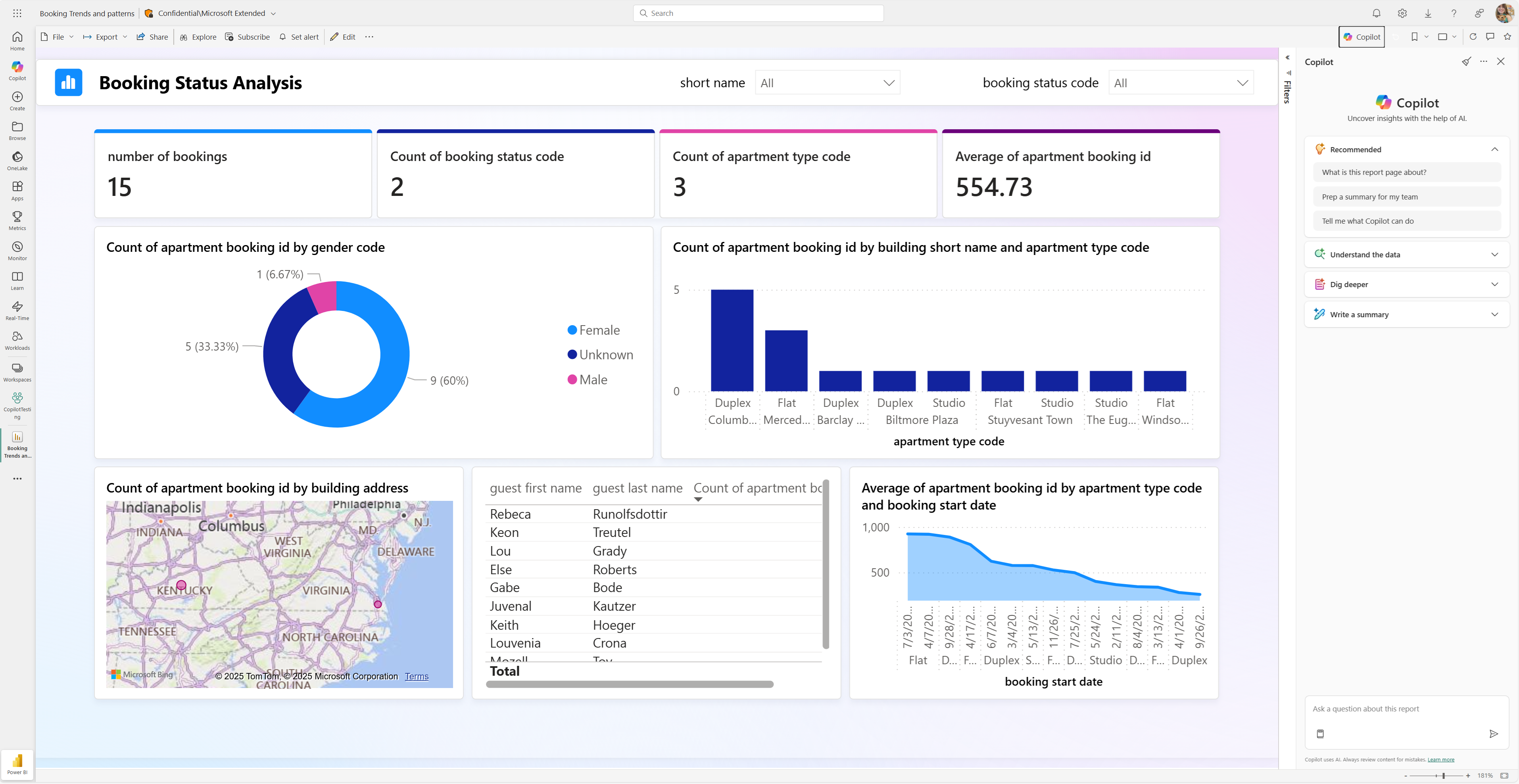
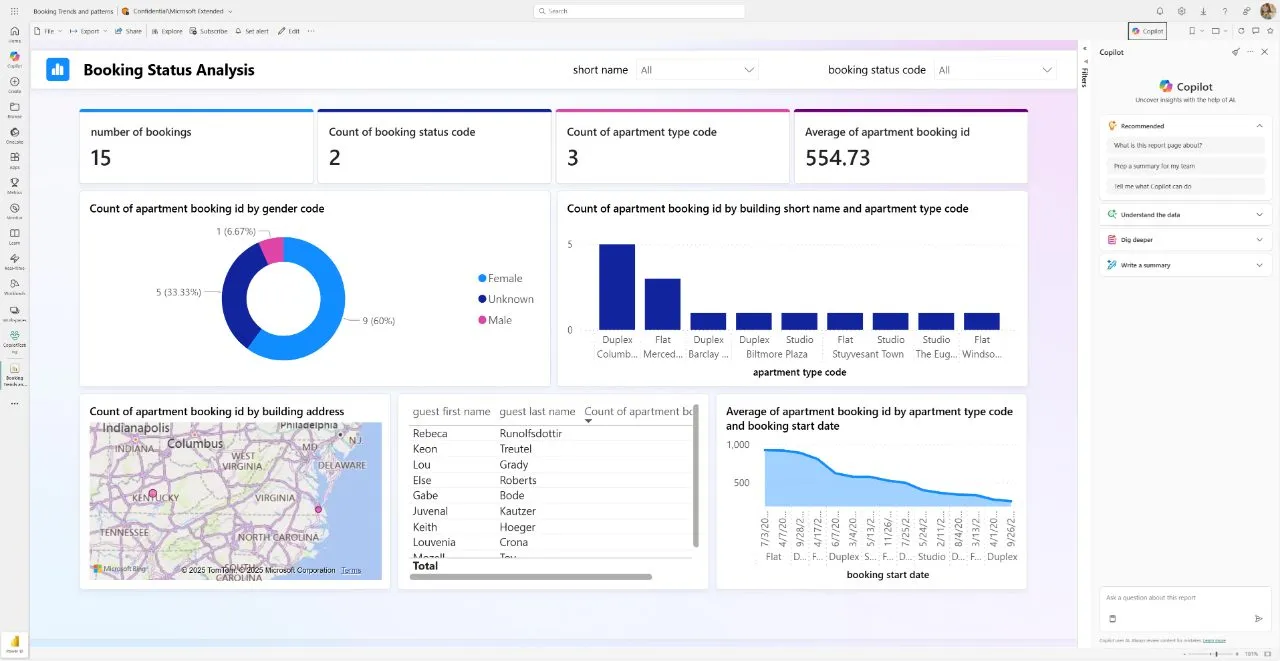 (opens full size in a new tab)
Facts
- Price
- From a free plan or $14.00/month
- Runs on
- WebWindows (Power BI Desktop)
- Needs
- Paid Fabric capacity (F2 or higher) or Power BI Premium capacity (P1 or higher) for CopilotCopilot enabled by the Fabric adminPower BI Pro or Premium Per User license to publish and share
- Category
- AI
- Facts checked
Price checked · Current prices on microsoft.com ↗
Our verdict
#9 of 10 in AI data analysis tools
Copilot for Microsoft BI shops
What it does
- Copilot answers questions about a report's semantic model
- Shows the DAX query behind an answer with Fabric IQ on
- Builds report pages and visuals from a prompt
Pros
- Uses the measures and row-level security already in your Power BI models
- Shares through the Power BI reports and apps your company already uses
Cons
- Needs a paid Fabric or Premium capacity on top of per-user licenses
- Answers ignore the report page's slicers and filters
- No forecasting or anomaly detection in Copilot answers
About Microsoft Power BI
Power BI is Microsoft’s business intelligence product, made of the free Power BI Desktop authoring app for Windows and the Power BI service in the browser, where reports and apps are published and shared. Copilot in Power BI adds chat with your data in a report pane, report building, and DAX help. It answers from a semantic model that someone has built and, optionally, prepared for AI, and it can show the DAX behind an answer. It is a paid, closed-source Microsoft service. Sharing needs Pro ($14 per user per month, paid yearly) or Premium Per User ($24), and Copilot also needs a paid Fabric (F2 or higher) or Power BI Premium (P1 or higher) capacity. A Pro or PPU license alone is not enough.
Ranked in
-
#9 of 10 AI data analysis tools Copilot for Microsoft BI shops 3.2/5
How it scored
-
Correct answers , counts double 3/5
Copilot queries a curated semantic model (measures, relationships, Prep data for AI instructions, verified answers) and generates DAX, but Microsoft documents gaps: it ignores the slicers and filters on the page, falls back to the model's general knowledge when the semantic model lacks an answer, and returns generic or inaccurate results on unprepared models.
3/5 means: Computes answers by running code or SQL with occasional wrong column choices or numbers stated without computing, and no shared definitions to ground it; or grounded in a model but with documented gaps, such as ignoring filters or failing whole kinds of questions
When a question is related to data in the semantic model, Copilot uses the semantic model to answer the question. Otherwise, it answers from the large language model's (LLM) general knowledge.
learn.microsoft.com/en-us/power-bi/create-reports/copilot-introduction · checked Prepare your semantic model before you use Copilot. When model owners prepare their data for AI, Copilot better understands your business context and returns responses that are consistent and reliable. Without preparation, Copilot can misinterpret the data and return generic or inaccurate results.
learn.microsoft.com/en-us/power-bi/create-reports/copilot-introduction · checked Fabric IQ uses the measures, relationships, and business definitions in your semantic model to answer questions. Review your semantic model and test the questions that are most important to your organization. Define business meaning in the semantic model, add context with Prep data for AI, and compare responses with validated results.
learn.microsoft.com/en-us/power-bi/create-reports/copilot-ask-data-question · checked Copilot data questions don't apply filters or slicers currently affecting visuals on the report page to the answers generated in the Copilot pane.
learn.microsoft.com/en-us/power-bi/create-reports/copilot-ask-data-question · checked
Show all 4
-
Shows its work 3/5
With Fabric IQ in view mode Copilot shows reasoning steps, the DAX query and the result table, and the DAX query view can be opened; without it only fields and filters are shown, and Fabric IQ does not apply in editing. Editing and rerunning the DAX in the chat was not found.
3/5 means: Shows the code or query, but it can't be edited and rerun in place, or it shows only in some modes
Provide the underlying DAX query and data table used to generate a response.
learn.microsoft.com/en-us/power-bi/create-reports/copilot-ask-data-question · checked
-
Depth of analysis 2/5
Answers aggregations and comparisons on one semantic model and makes visuals, but Copilot data questions do no forecasting, anomaly detection or key influencers, and there is no Python in the chat.
2/5 means: Aggregations and charts on one model, with no forecasting or statistics
Provide the underlying DAX query and data table used to generate a response.
learn.microsoft.com/en-us/power-bi/create-reports/copilot-ask-data-question · checked Copilot can't currently answer questions that require generating new insights, such as anomaly detection, forecasting, or finding key influencers.
learn.microsoft.com/en-us/power-bi/create-reports/copilot-ask-data-question · checked
-
Connects to your data 4/5
Desktop connects to Excel/CSV and to Snowflake, BigQuery, Postgres, Redshift and Databricks, but Copilot answers one semantic model at a time.
4/5 means: Most major warehouses and databases natively, with files, though one answer works on one connection or model at a time
For some sources, such as DirectQuery or Direct Lake models, you might need to enable Q&A manually, either in your semantic model settings in the Power BI service or in your Data Load settings in Power BI Desktop.
learn.microsoft.com/en-us/power-bi/create-reports/copilot-ask-data-question · checked
-
Sharing with the team 5/5
Pro publishes and shares interactive reports and apps; Copilot summaries can be added to scheduled report subscriptions; viewers can ask Copilot in a report. Teams and Slack delivery was not verified, and viewing needs Pro licenses unless the capacity is F64 or larger.
5/5 means: Interactive dashboards or apps, scheduled delivery, Slack or Teams, and separate access for people who only view
Power BI Pro $14.00 user/month, paid yearly
microsoft.com/en-us/microsoft-fabric/features/power-bi/pricing · checked Upgrade to Pro or Premium to share reports
microsoft.com/en-us/microsoft-fabric/features/power-bi/pricing · checked
-
Security and data governance 4/5
Entra SSO, row-level security and sensitivity labels apply to the semantic models Copilot queries, and Azure OpenAI data is not used to train models. Row-level security is defined in the semantic model rather than inherited from the warehouse for every user.
4/5 means: No training, SOC 2 and admin controls, plus shared definitions or per-user data permissions set in the tool or its connections
Copilot isn't currently supported for Private Link or closed network environments.
learn.microsoft.com/en-us/power-bi/create-reports/copilot-enable-power-bi · checked
-
Price per analyst 3/5
Pro is $14 a user a month but Copilot needs a separately billed Fabric F2+ or Premium P1+ capacity, billed by compute use; a launch-era figure for F2 was about $263 a month, roughly $66 an analyst over five people with Pro.
3/5 means: About $51 to $100 an analyst a month; or a low seat price plus a separately billed capacity, usage billing with no free allowance, or a cap on AI questions a daily user will hit
Paid Fabric capacity (F2 or higher) or Power BI Premium (P1 or higher). Trial capacities and free SKUs aren't supported.
learn.microsoft.com/en-us/power-bi/create-reports/copilot-introduction · checked A Power BI Pro or Premium Per User (PPU) license alone isn't sufficient—Copilot requires organizational capacity.
learn.microsoft.com/en-us/power-bi/create-reports/copilot-introduction · checked Power BI Pro $14.00 user/month, paid yearly
microsoft.com/en-us/microsoft-fabric/features/power-bi/pricing · checked Annual purchase, saving 40.5% over pay-as-you-go prices
microsoft.com/en-us/microsoft-fabric/features/power-bi/pricing · checked Token consumption drives billing for Copilot in Fabric. Fabric bills separately for any downstream actions that Copilot triggers, such as DAX queries, data refreshes, or email subscriptions, through their standard Fabric pathways.
learn.microsoft.com/en-us/power-bi/create-reports/copilot-introduction · checked
Show all 5
-
Works without a data team 2/5
Needs an admin-enabled paid capacity and a semantic model that someone has built and prepared; Microsoft says unprepared models give generic or inaccurate results. An analyst can build a model in Desktop alone, so the data team need not be separate.
2/5 means: A data team must model or curate the data first; an analyst alone gets unreliable answers
Paid Fabric capacity (F2 or higher) or Power BI Premium (P1 or higher). Trial capacities and free SKUs aren't supported.
learn.microsoft.com/en-us/power-bi/create-reports/copilot-introduction · checked Prepare your semantic model before you use Copilot. When model owners prepare their data for AI, Copilot better understands your business context and returns responses that are consistent and reliable. Without preparation, Copilot can misinterpret the data and return generic or inaccurate results.
learn.microsoft.com/en-us/power-bi/create-reports/copilot-introduction · checked Fabric IQ uses the measures, relationships, and business definitions in your semantic model to answer questions. Review your semantic model and test the questions that are most important to your organization. Define business meaning in the semantic model, add context with Prep data for AI, and compare responses with validated results.
learn.microsoft.com/en-us/power-bi/create-reports/copilot-ask-data-question · checked
Top of this ranking
- Hex #1
- Claude #2
- ThoughtSpot #3
-



Sources
19 quotes from 5 pages; the 12 most useful are below.
-
Pricing 6
Paid Fabric capacity (F2 or higher) or Power BI Premium (P1 or higher). Trial capacities and free SKUs aren't supported.
learn.microsoft.com/en-us/power-bi/create-reports/copilot-introduction · checked The Fabric Copilot capacity must reside on at least an F2 or P1 SKU.
learn.microsoft.com/en-us/fabric/enterprise/fabric-copilot-capacity · checked Power BI Pro $14.00 user/month, paid yearly
microsoft.com/en-us/microsoft-fabric/features/power-bi/pricing · checked Power BI Premium Per User $24.00 user/month, paid yearly
microsoft.com/en-us/microsoft-fabric/features/power-bi/pricing · checked Upgrade to Pro or Premium to share reports
microsoft.com/en-us/microsoft-fabric/features/power-bi/pricing · checked A Fabric Copilot capacity is billed only for Copilot AI consumption, which includes prompt processing and response generation. Any downstream operations, such as querying against a semantic model, are charged to the semantic model's capacity, not to your Fabric Copilot capacity.
learn.microsoft.com/en-us/power-bi/create-reports/copilot-enable-power-bi · checked
Show all 6
-
Limits and known issues 4
Standalone Copilot in Power BI and app-scoped Copilot in workspace apps are retiring. Copilot within reports isn't affected.
learn.microsoft.com/en-us/power-bi/create-reports/copilot-introduction · checked Copilot can't currently answer questions that require generating new insights, such as anomaly detection, forecasting, or finding key influencers.
learn.microsoft.com/en-us/power-bi/create-reports/copilot-ask-data-question · checked Copilot data questions don't apply filters or slicers currently affecting visuals on the report page to the answers generated in the Copilot pane.
learn.microsoft.com/en-us/power-bi/create-reports/copilot-ask-data-question · checked Copilot isn't currently supported for Private Link or closed network environments.
learn.microsoft.com/en-us/power-bi/create-reports/copilot-enable-power-bi · checked
-
Features 2
When a question is related to data in the semantic model, Copilot uses the semantic model to answer the question. Otherwise, it answers from the large language model's (LLM) general knowledge.
learn.microsoft.com/en-us/power-bi/create-reports/copilot-introduction · checked Provide the underlying DAX query and data table used to generate a response.
learn.microsoft.com/en-us/power-bi/create-reports/copilot-ask-data-question · checked