
Snowflake CoWork
Snowflake's personal work agent (formerly Snowflake Intelligence) that answers questions on governed Snowflake data by generating SQL
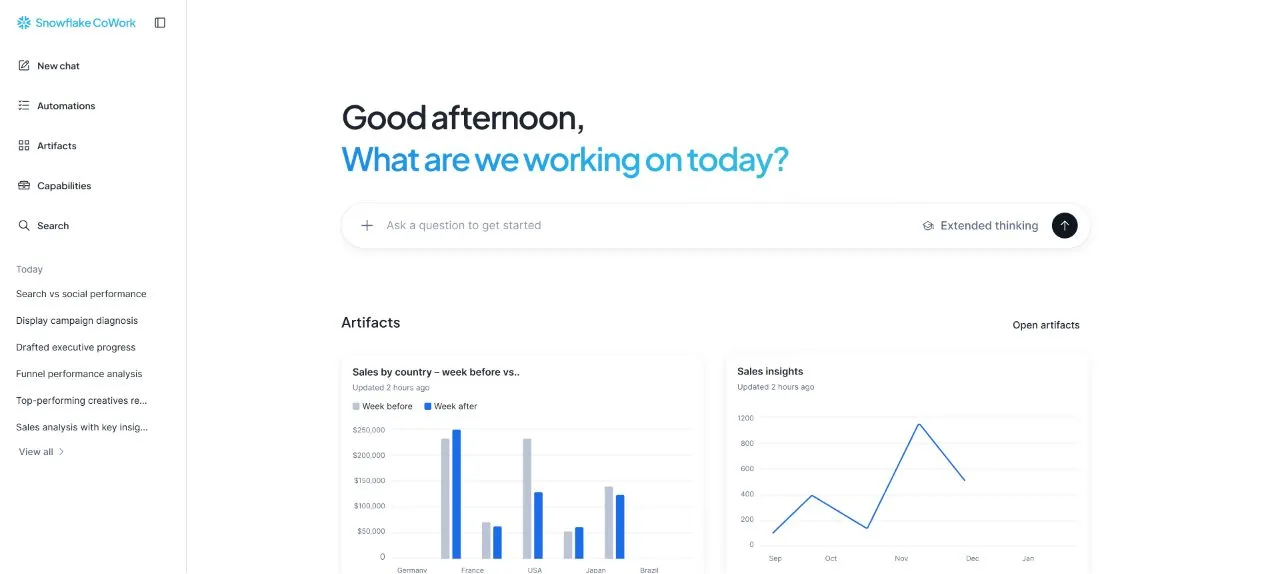 (opens full size in a new tab)
Facts
- Price
- Free plan
- Runs on
- WebiOS
- Needs
- Snowflake accountSemantic views defined by a data teamVirtual warehouse to run the SQLRole with the SNOWFLAKE.CORTEX_USER database role
- License
- Proprietary
- Category
- AI
- Facts checked
Price checked · Current prices on docs.snowflake.com ↗
Our verdict
#8 of 10 in AI data analysis tools
For data that lives in Snowflake
What it does
- Answers questions with SQL over Snowflake semantic views
- Uploads of CSV and Excel files alongside Snowflake data
- Scheduled questions that email results
Pros
- Enforces Snowflake roles, row access, and masking for each user
- No seat fee
- Data stays in Snowflake
Cons
- Needs admin setup and semantic views before anyone can ask
- Works only on Snowflake data and uploaded files
- Usage billing makes cost per question hard to predict
About Snowflake CoWork
Snowflake CoWork, formerly called Snowflake Intelligence, is Snowflake’s conversational agent for business users, available at ai.snowflake.com and in an iOS app. It runs on Cortex Agents, which call Cortex Analyst to turn a question into SQL over semantic views a data team defines, then run that SQL on the user’s own Snowflake warehouse and return answers, Vega-Lite charts, saved Artifacts, scheduled Automations and generated documents. It also searches uploaded files and documents, runs a multi-step Deep Research mode, and reaches tools such as Slack, Gmail and Jira through MCP connectors. It requires a Snowflake account, inherits the user’s roles and row-level policies, and has no per-seat fee; usage is billed in AI Credits plus warehouse compute. Snowflake is proprietary software.
Ranked in
-
#8 of 10 AI data analysis tools For data that lives in Snowflake 3.2/5
How it scored
-
Correct answers , counts double 4/5
Generates SQL through Cortex Analyst and runs it on the warehouse, grounded in semantic views with metrics, join paths and verified queries a data team curates. The only accuracy figure (90%+) is Snowflake's own 2024 benchmark, and no independent tests were found.
4/5 means: Runs SQL or code grounded in shared definitions a team curates (a semantic model, verified queries or endorsed tables), with reported mistakes mainly on data nobody curated
Create SQL queries from natural language, then run these queries on your semantic views for structured data with [Cortex Analyst]
docs.snowflake.com/en/user-guide/snowflake-cortex/snowflake-cowork · checked Generic AI solutions often struggle with text-to-SQL conversions when given only a database schema, as schemas lack critical knowledge like business process definitions and metrics handling.
docs.snowflake.com/en/user-guide/snowflake-cortex/cortex-analyst · checked Sample questions and their SQL answers guide query generation
docs.snowflake.com/en/user-guide/snowflake-cortex/cortex-analyst · checked You can evaluate the quality of your semantic view by running your verified queries against Cortex Analyst and measuring how accurately it generates SQL.
docs.snowflake.com/en/user-guide/snowflake-cortex/cortex-analyst · checked By leveraging semantic models, Cortex Analyst achieves more than 90%+ SQL accuracy on real-world use cases, while allowing enterprises to customize their Cortex Analyst experience according to their unique requirements.
Nipun Sehrawat, Principal Software Engineer, AI and ML at Snowflake · snowflake.com/en/blog/engineering/snowflake-cortex-analyst-behind-the-scenes · published · checked Our benchmarking results show that Cortex Analyst is close to 2x more accurate than single-shot SQL generation using a state of the art LLM, like GPT-4o, and delivers roughly 14% higher accuracy than another text-to-SQL solution in the market.
Nipun Sehrawat, Principal Software Engineer, AI and ML at Snowflake · snowflake.com/en/blog/engineering/snowflake-cortex-analyst-behind-the-scenes · published · checked
Show all 6
-
Shows its work 3/5
Docs promise traceability to source data and queries, and reports cite their queries, but no source says the SQL can be edited and rerun in place.
3/5 means: Shows the code or query, but it can't be edited and rerun in place, or it shows only in some modes
Provides traceability to source data and queries, while “Verified Answers” allow data teams to add trusted responses.
docs.snowflake.com/en/user-guide/snowflake-cortex/snowflake-cowork · checked Deep Research is an investigation mode for complex, open-ended questions that require multi-step reasoning across your data. Instead of returning a single result, Snowflake CoWork decomposes the question into multiple sub-investigations, runs them in parallel across your structured and unstructured data, and synthesizes the findings into a structured report.
docs.snowflake.com/en/user-guide/snowflake-cortex/snowflake-cowork · checked
-
Depth of analysis 3/5
Multi-step questions and Deep Research reports with SQL through Cortex Analyst and Vega-Lite charts, but Cortex Analyst answers only questions SQL can resolve and can't see earlier results; Python statistics or forecasting in the chat were not confirmed.
3/5 means: Multi-step SQL questions and charts, with statistics or forecasting limited or in a separate tool
Deep Research is an investigation mode for complex, open-ended questions that require multi-step reasoning across your data. Instead of returning a single result, Snowflake CoWork decomposes the question into multiple sub-investigations, runs them in parallel across your structured and unstructured data, and synthesizes the findings into a structured report.
docs.snowflake.com/en/user-guide/snowflake-cortex/snowflake-cowork · checked Snowflake CoWork supports most Vega-Lite chart types, including area charts, heatmaps, box plots, dual-axis and layered charts, faceted small-multiple charts, error bars, and text annotations, in addition to bar, line, pie, and scatter charts.
docs.snowflake.com/en/user-guide/snowflake-cortex/snowflake-cowork · checked Cortex Analyst is limited to answering questions that can be resolved with SQL. It does not generate insights for broader business-related queries, such as “What trends do you observe?”
docs.snowflake.com/en/user-guide/snowflake-cortex/cortex-analyst · checked
-
Connects to your data 2/5
Analyzes data inside Snowflake, plus uploaded CSV and Excel files (50 MB each, 5 per thread) and MCP tools for Slack, Gmail and similar. No direct BigQuery, Postgres or Databricks connection is documented; a third-party blog says external databases are not queried.
2/5 means: Data in one vendor's platform only, perhaps with file uploads
Snowflake CoWork supports uploading files directly in the chat interface to provide more context for the agent. The agent can use the content of the files to answer questions and provide insights.
docs.snowflake.com/en/user-guide/snowflake-cortex/snowflake-cowork · checked Each file must be less than 50 MB, and users can upload up to 5 files.
docs.snowflake.com/en/user-guide/snowflake-cortex/snowflake-cowork · checked Slack, Gmail, Jira and Salesforce sit one MCP call away, and Microsoft Teams, Outlook and Exchange connect today through custom MCP.
snowflake.com/en/product/snowflake-cowork · checked Data must stay in Snowflake; external database querying isn’t allowed.
flexera.com/blog/finops/snowflake-intelligence · checked
Show all 4
-
Sharing with the team 4/5
Shareable Artifacts and conversation snapshots, scheduled Automations that email results, and Slack briefs; Snowflake Dashboards can be queried. Separate view-only access was not confirmed.
4/5 means: Dashboards or reports teammates can open, plus scheduled runs or delivery by email, Slack or Teams
Save charts, tables, and maps to revisit an analysis, or share a conversation as a snapshot.
docs.snowflake.com/en/user-guide/snowflake-cortex/snowflake-cowork · checked Turn a one-time report into a recurring one that re-runs your question with fresh data and emails you the results.
docs.snowflake.com/en/user-guide/snowflake-cortex/snowflake-cowork · checked Slack, Gmail, Jira and Salesforce sit one MCP call away, and Microsoft Teams, Outlook and Exchange connect today through custom MCP.
snowflake.com/en/product/snowflake-cowork · checked
-
Security and data governance 5/5
Inherits Snowflake row-access policies, masking and RBAC for each user, supports SCIM via Okta or Entra, and Cortex Analyst does not train on customer data. Snowflake is widely certified.
5/5 means: Inherits the warehouse's row- and column-level permissions and masking for every user, with no training and enterprise identity controls
Automatically inherits and respects all existing Snowflake data governance controls, including row-access policies and column-level security.
docs.snowflake.com/en/user-guide/snowflake-cortex/snowflake-cowork · checked Roll out to thousands of users with less manual setup via Okta or Microsoft Entra ID through SCIM.
snowflake.com/en/product/snowflake-cowork · checked Cortex Analyst does not train on Customer Data. We do not use your Customer Data to train or fine-tune any Model to be made available for use across our customer base.
docs.snowflake.com/en/user-guide/snowflake-cortex/cortex-analyst · checked
-
Price per analyst 3/5
No seat fee, but usage is billed in AI Credits ($2.00 each) with no free allowance, plus warehouse compute and a Snowflake account; cost per question was not found, so the level is a judgment.
3/5 means: About $51 to $100 an analyst a month; or a low seat price plus a separately billed capacity, usage billing with no free allowance, or a cap on AI questions a daily user will hit
AI costs scale with your usage. Each service is charged at the rates listed in the Consumption table. There are no per-seat fees.
docs.snowflake.com/en/user-guide/snowflake-cortex/pricing · checked Assume a customer has an Enterprise Edition account, where Platform Credits are $3.00 per credit and AI Credits are $2.00 per credit for global routing.
docs.snowflake.com/en/user-guide/snowflake-cortex/pricing · checked Regional routing · $2.20 · CORTEX_ENABLED_CROSS_REGION is set to DISABLED or a specific regional setting such as AWS_US, AWS_EU, AZURE_US, or AZURE_EU. Requests are restricted to the account’s home region or selected geographies, typically for data residency or compliance requirements.
docs.snowflake.com/en/user-guide/snowflake-cortex/pricing · checked Snowflake CoWork is billed in AI Credits based on token consumption. Snowflake CoWork uses agents to orchestrate multi-step workflows. Costs are additive across the underlying services the agent invokes (such as Cortex Analyst and Cortex Search). The specific rate depends on the model selected for orchestration.
docs.snowflake.com/en/user-guide/snowflake-cortex/pricing · checked Snowflake recommends invoking Cortex Analyst through Cortex Agents, in which case the pricing is the same token-based AI Credit model as Cortex Agents. If you invoke Cortex Analyst directly through the standalone Analyst API, it’s billed per 1,000 messages. In both cases, executing the generated SQL incurs standard virtual warehouse compute charges.
docs.snowflake.com/en/user-guide/snowflake-cortex/pricing · checked
Show all 5
-
Works without a data team 1/5
An ACCOUNTADMIN must set up the account, roles and agents, and a data team must define semantic views first. Auto-generated context (Cortex Sense) is not yet generally available.
1/5 means: Admins must provision the platform and a data team must define semantic models before anyone can ask a question
End users can ask questions using natural language, without needing to know SQL or have technical expertise. To get Snowflake Intelligence running, though, data engineers or admins have some setup work to do. This includes creating semantic models, configuring agents, setting up Cortex Search services, and managing access controls.
flexera.com/blog/finops/snowflake-intelligence · checked Auto-generated business context (Cortex Sense, private preview soon) means the agent understands your data from day one without manual semantic-model setup.
snowflake.com/en/product/snowflake-cowork · checked You need a Snowflake account on a supported edition (standard or above) with an active Snowflake Snowsight interface. The ACCOUNTADMIN role is required to create the Snowflake Intelligence object.
flexera.com/blog/finops/snowflake-intelligence · checked
Top of this ranking
- Hex #1
- Claude #2
- ThoughtSpot #3
-




Sources
30 quotes from 6 pages; the 17 most useful are below.
-
Pricing 3
AI costs scale with your usage. Each service is charged at the rates listed in the Consumption table. There are no per-seat fees.
docs.snowflake.com/en/user-guide/snowflake-cortex/pricing · checked Assume a customer has an Enterprise Edition account, where Platform Credits are $3.00 per credit and AI Credits are $2.00 per credit for global routing.
docs.snowflake.com/en/user-guide/snowflake-cortex/pricing · checked Regional routing · $2.20 · CORTEX_ENABLED_CROSS_REGION is set to DISABLED or a specific regional setting such as AWS_US, AWS_EU, AZURE_US, or AZURE_EU. Requests are restricted to the account’s home region or selected geographies, typically for data residency or compliance requirements.
docs.snowflake.com/en/user-guide/snowflake-cortex/pricing · checked
-
Limits and known issues 6
Cortex Analyst is limited to answering questions that can be resolved with SQL. It does not generate insights for broader business-related queries, such as “What trends do you observe?”
docs.snowflake.com/en/user-guide/snowflake-cortex/cortex-analyst · checked Cortex Analyst doesn’t have access to results from previous SQL queries. For example, if you first ask, “What are my products?” and then ask, “What is the revenue of the second product?”, Cortex Analyst cannot refer to the list of products from the first query to get the second product.
docs.snowflake.com/en/user-guide/snowflake-cortex/cortex-analyst · checked Each file must be less than 50 MB, and users can upload up to 5 files.
docs.snowflake.com/en/user-guide/snowflake-cortex/snowflake-cowork · checked Data must stay in Snowflake; external database querying isn’t allowed.
flexera.com/blog/finops/snowflake-intelligence · checked End users can ask questions using natural language, without needing to know SQL or have technical expertise. To get Snowflake Intelligence running, though, data engineers or admins have some setup work to do. This includes creating semantic models, configuring agents, setting up Cortex Search services, and managing access controls.
flexera.com/blog/finops/snowflake-intelligence · checked You need a Snowflake account on a supported edition (standard or above) with an active Snowflake Snowsight interface. The ACCOUNTADMIN role is required to create the Snowflake Intelligence object.
flexera.com/blog/finops/snowflake-intelligence · checked
Show all 6
-
Features 8
By leveraging semantic models, Cortex Analyst achieves more than 90%+ SQL accuracy on real-world use cases, while allowing enterprises to customize their Cortex Analyst experience according to their unique requirements.
Nipun Sehrawat, Principal Software Engineer, AI and ML at Snowflake · snowflake.com/en/blog/engineering/snowflake-cortex-analyst-behind-the-scenes · published · checked Our benchmarking results show that Cortex Analyst is close to 2x more accurate than single-shot SQL generation using a state of the art LLM, like GPT-4o, and delivers roughly 14% higher accuracy than another text-to-SQL solution in the market.
Nipun Sehrawat, Principal Software Engineer, AI and ML at Snowflake · snowflake.com/en/blog/engineering/snowflake-cortex-analyst-behind-the-scenes · published · checked Snowflake CoWork (formerly Snowflake Intelligence) is a personal work agent where you work smarter. Available at ai.snowflake.com and on your mobile iOS device, it gives knowledge workers one place to ask questions of their enterprise data, get cited answers, save multi-step work as Skills, schedule with Automations and take action across Gmail, Jira, Slack, Salesforce and more, all within Snowflake's governed platform.
snowflake.com/en/product/snowflake-cowork · checked Snowflake Intelligence is now Snowflake CoWork. The name evolved alongside the product, which has expanded from conversational analytics to a personal work agent that reasons across your data, automates routine tasks and acts in the tools your business already uses. Existing customers do not need to take any action because of the name change.
snowflake.com/en/product/snowflake-cowork · checked Provides traceability to source data and queries, while “Verified Answers” allow data teams to add trusted responses.
docs.snowflake.com/en/user-guide/snowflake-cortex/snowflake-cowork · checked Create SQL queries from natural language, then run these queries on your semantic views for structured data with [Cortex Analyst]
docs.snowflake.com/en/user-guide/snowflake-cortex/snowflake-cowork · checked Generic AI solutions often struggle with text-to-SQL conversions when given only a database schema, as schemas lack critical knowledge like business process definitions and metrics handling.
docs.snowflake.com/en/user-guide/snowflake-cortex/cortex-analyst · checked Slack, Gmail, Jira and Salesforce sit one MCP call away, and Microsoft Teams, Outlook and Exchange connect today through custom MCP.
snowflake.com/en/product/snowflake-cowork · checked
Show all 8