
Visual Studio Code
Open-source code editor with integrated Copilot, Claude and Codex agent workflows
Our verdict
#2 of 7 in AI code editors · For compatibility and a choice of agents
Pros
- The best compatibility with existing projects, extensions, and remote setups
- A free editor with unusually broad agent and model choice
- Strong everyday editing, debugging, and review tools
Cons
- The AI experience and review controls vary by harness
- Language depth and performance depend on the extension setup
- Individual GitHub data can train models unless you opt out
Skip if: Teams that need identical agent review controls for every developer, and developers who want one fixed AI workflow without configuring extensions or providers.
Rankings and alternatives
- #2 of 7 AI code editors For compatibility and a choice of agents
- Cursor #1 Best overall for hands-on AI coding
- IntelliJ IDEA #3 For Java and Kotlin teams
- Zed #4 For fast, open AI coding



AI code editors scores
Evaluated Nov 12, 2026 Evidence ↓- AI coding quality · counts double 4
4/5 means: Strong predictive and multi-file assistance, with a meaningful limitation on complex work or in the editor's implementation
Copilot supplies useful completions, contextual chat and multi-file assistance inside the editor. The option to install Claude or Codex adds flexibility but does not transfer their coding reputations to VS Code itself, and the default interactive experience has less consistent practitioner preference than Cursor.
- Editor quality 4
4/5 means: A strong complete editor with either excellent native performance or deep language support, and a manageable limitation
A mature cross-platform editor with excellent navigation, debugging and language breadth. Its language depth and performance depend more heavily on installed extensions than an integrated JetBrains IDE or a native Zed setup.
- Integrated AI workflow · counts double 4
4/5 means: A cohesive manual-and-AI workflow with one significant rough edge or an opinionated interface that will not suit everyone
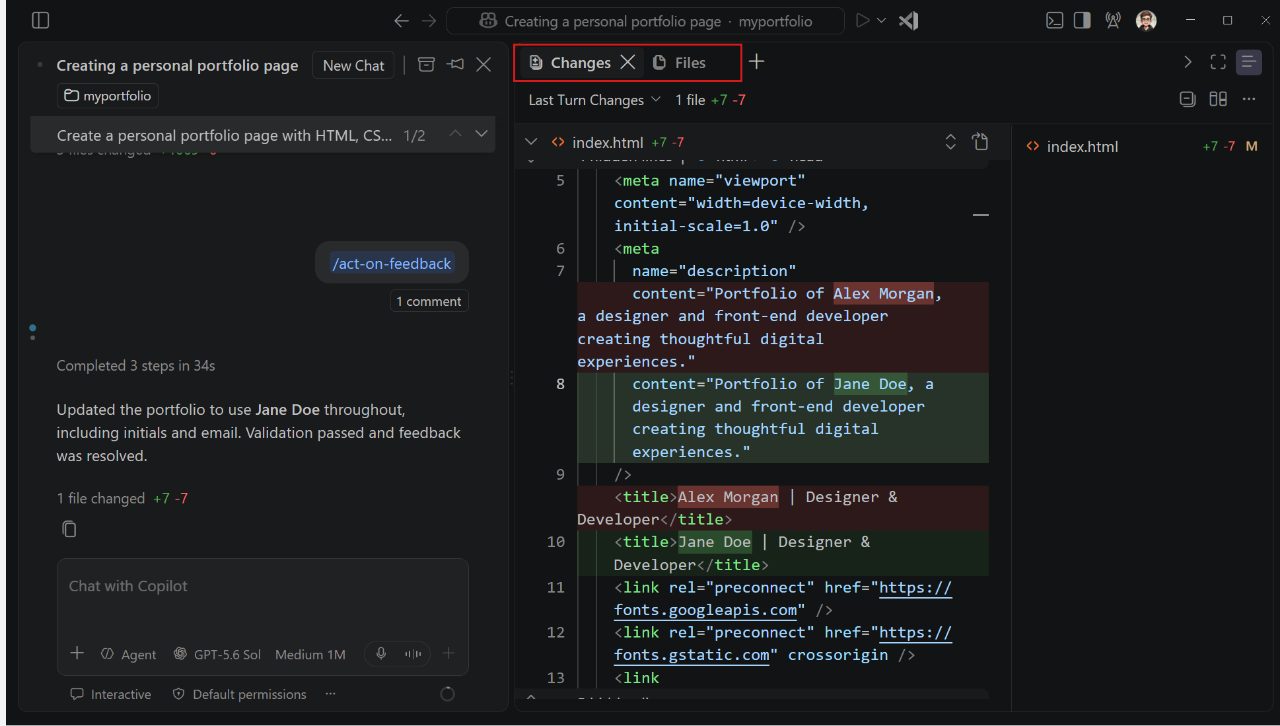
Chat, inline suggestions, an editor agent and the Agents window keep work close to the code, while selectable harnesses support different working styles. The available review and permission behavior varies by harness, making the experience less unified than Cursor.
- Review and change control 4
4/5 means: Strong review and recovery with a specific limitation in the available controls or their consistency
Copilot supports individual keep/undo controls and every harness supports diffs, feedback and isolated sessions. Terminal or script changes can fall outside the pending-edit list, and Claude or Codex use diff review rather than the same pending-edit controls.
- Compatibility with existing workflows 5
5/5 means: Mature cross-platform support, extensive language and extension coverage, and well-established remote and project workflows
The broadest language, extension, documentation and remote-development ecosystem here, on Windows, macOS, Linux and the web. It is the least disruptive choice for existing projects and mixed teams.
- Model and agent choice 5
5/5 means: Multiple agent harnesses and providers, existing subscriptions or custom endpoints, and practical local inference
Copilot, Claude and Codex harnesses, several providers, custom endpoints and local models allow the editor to outlast a particular AI vendor. The exact permissions and billing still belong to the chosen harness.
- Learning resources and support 5
5/5 means: Extensive, established learning and troubleshooting resources across ordinary editing, project setup and AI assistance
Extensive language and extension documentation, mature remote-development guidance and familiar Copilot workflows provide unusually broad learning and troubleshooting resources. Advice for a particular external harness still depends on that harness.
- Privacy and team controls 3
3/5 means: Useful no-training options or administration, with important defaults, retention or identity limitations
Copilot Business provides useful central policy and usage management, and provider-controlled routes are available. Individual GitHub inputs and outputs can be used for training unless the user opts out, and different harnesses bring different data terms.
Pricing
- Editor Free AI usage requires a provider subscription, API key or local model; Copilot Pro starts at $10/month
From the vendor’s pricing page, checked Nov 12, 2026. That page is authoritative.
Evidence and sources
AI code editors scores
AI coding quality 3 quotes
-
“Choose from Anthropic, OpenAI, Google, Microsoft, and open-weight models, or BYOK from any provider. Use the agent harness that works best for you: Copilot, Claude, or Codex.”
code.visualstudio.com · checked -
“Use Chat for a code-first workflow where you can inspect edits as they happen, ask follow-up questions, and take over in the editor whenever you want. The full VS Code editing experience stays within reach, including IntelliSense, refactoring, source control, testing, and debugging.”
code.visualstudio.com/features/agents · checked -
“Run GitHub Copilot, Claude Code, or Codex in VS Code. Each harness brings its own tools, permissions, and way of working with your code.”
code.visualstudio.com/features/agents · checked
Editor quality 2 quotes
-
“Use Chat for a code-first workflow where you can inspect edits as they happen, ask follow-up questions, and take over in the editor whenever you want. The full VS Code editing experience stays within reach, including IntelliSense, refactoring, source control, testing, and debugging.”
code.visualstudio.com/features/agents · checked -
“Because VS Code ships as a lean shell, its IDE-grade behavior for any given language is only as good as the extensions you install and how well they're maintained. That is a strength for coverage, since 50,000-plus extensions exist, but a weakness for consistency: two developers on the same team can have meaningfully different debugging or refactoring experiences depending on which extensions they installed and kept current.”
guptadeepak.com/tools/top-5-code-editors-ides-2026 · checked
Integrated AI workflow 3 quotes
-
“Choose from Anthropic, OpenAI, Google, Microsoft, and open-weight models, or BYOK from any provider. Use the agent harness that works best for you: Copilot, Claude, or Codex.”
code.visualstudio.com · checked -
“Use Chat for a code-first workflow where you can inspect edits as they happen, ask follow-up questions, and take over in the editor whenever you want. The full VS Code editing experience stays within reach, including IntelliSense, refactoring, source control, testing, and debugging.”
code.visualstudio.com/features/agents · checked -
“Run GitHub Copilot, Claude Code, or Codex in VS Code. Each harness brings its own tools, permissions, and way of working with your code.”
code.visualstudio.com/features/agents · checked
Review and change control 2 quotes
-
“Open a file from the changed-files list in the Chat view. Review the highlighted changes in the editor. Use the Up and Down controls in the editor overlay to navigate between edits. Select Keep or Undo beside an individual change, or use the file-level or all-files review controls to resolve multiple pending edits at once.”
code.visualstudio.com/docs/agents/run/review-code-edits · checked -
“The working set only tracks changes from supported agent edit tools. Changes made through terminal commands, scripts, or other untracked tools don't appear. Review these changes separately, and use Source Control to inspect changed and untracked files when the folder uses Git.”
code.visualstudio.com/docs/agents/run/review-code-edits · checked
Compatibility with existing workflows 3 quotes
-
“Windows Requires Windows 10 or 11, 64-bit User Installer x64 Arm64 System Installer x64 Arm64 .zip x64 Arm64 CLI x64 Arm64 macOS macOS 12.0 or later .dmg Universal Apple silicon Intel”
code.visualstudio.com/download · checked -
“Use VS Code on Windows, macOS, or Linux, or open it in your browser at vscode.dev. Develop in a container, over SSH, or in WSL, and reach the agents on your machine from anywhere with Dev Tunnels or GitHub Environments.”
code.visualstudio.com · checked -
“Because VS Code ships as a lean shell, its IDE-grade behavior for any given language is only as good as the extensions you install and how well they're maintained. That is a strength for coverage, since 50,000-plus extensions exist, but a weakness for consistency: two developers on the same team can have meaningfully different debugging or refactoring experiences depending on which extensions they installed and kept current.”
guptadeepak.com/tools/top-5-code-editors-ides-2026 · checked
Model and agent choice 3 quotes
-
“Connect a provider account with your own API key, or send model requests through infrastructure you control. You can also run supported models locally when the work needs to stay offline or on your machine.”
code.visualstudio.com/features/models · checked -
“Choose from Anthropic, OpenAI, Google, Microsoft, and open-weight models, or BYOK from any provider. Use the agent harness that works best for you: Copilot, Claude, or Codex.”
code.visualstudio.com · checked -
“Run GitHub Copilot, Claude Code, or Codex in VS Code. Each harness brings its own tools, permissions, and way of working with your code.”
code.visualstudio.com/features/agents · checked
Learning resources and support 5 quotes
-
“Windows Requires Windows 10 or 11, 64-bit User Installer x64 Arm64 System Installer x64 Arm64 .zip x64 Arm64 CLI x64 Arm64 macOS macOS 12.0 or later .dmg Universal Apple silicon Intel”
code.visualstudio.com/download · checked -
“Choose from Anthropic, OpenAI, Google, Microsoft, and open-weight models, or BYOK from any provider. Use the agent harness that works best for you: Copilot, Claude, or Codex.”
code.visualstudio.com · checked -
“Use VS Code on Windows, macOS, or Linux, or open it in your browser at vscode.dev. Develop in a container, over SSH, or in WSL, and reach the agents on your machine from anywhere with Dev Tunnels or GitHub Environments.”
code.visualstudio.com · checked -
“Visual Studio Code | 9,350 | 70.9%”
survey.stackoverflow.co/2026/technology/data/dev-ide · checked -
“Run GitHub Copilot, Claude Code, or Codex in VS Code. Each harness brings its own tools, permissions, and way of working with your code.”
code.visualstudio.com/features/agents · checked
Privacy and team controls 3 quotes
-
“Connect a provider account with your own API key, or send model requests through infrastructure you control. You can also run supported models locally when the work needs to stay offline or on your machine.”
code.visualstudio.com/features/models · checked -
“We use your Inputs to generate Outputs and provide the AI Features. You also grant GitHub and its Affiliates a license to collect and use your Inputs and Outputs to develop, train and improve artificial intelligence and machine learning models and technologies including those that power AI Features, unless (a) you opt out through your account settings, or (b) your use of the Service is governed by a GitHub Customer Agreement or volume licensing agreement. If you opt out, GitHub will not collect or use your Inputs and Outputs for the purposes described in this paragraph from the effective date of your opt-out going forward.”
docs.github.com/en/site-policy/github-terms/github-terms-of-service · checked -
“Organizations and enterprises can centrally manage access, policies, and usage controls with Copilot Business, Copilot Enterprise, or Copilot access for eligible enterprises.”
docs.github.com/en/copilot/get-started/plans · checked
Facts
License 2 quotes
-
“MIT License”
raw.githubusercontent.com/microsoft/vscode/main/LICENSE.txt · checked -
“This license applies to the Visual Studio Code product. Source Code for Visual Studio Code is available at https://github.com/Microsoft/vscode under the MIT license agreement at https://github.com/microsoft/vscode/blob/main/LICENSE.txt.”
code.visualstudio.com/license · checked
Runs on 1 quote
-
“Windows Requires Windows 10 or 11, 64-bit User Installer x64 Arm64 System Installer x64 Arm64 .zip x64 Arm64 CLI x64 Arm64 macOS macOS 12.0 or later .dmg Universal Apple silicon Intel”
code.visualstudio.com/download · checked
Needs 1 quote
-
“Connect a provider account with your own API key, or send model requests through infrastructure you control. You can also run supported models locally when the work needs to stay offline or on your machine.”
code.visualstudio.com/features/models · checked
Notability
Other quotes
Not cited by a score or fact 3 quotes
-
“Copilot Pro $10 USD per month”
docs.github.com/en/copilot/get-started/plans · checked -
“Limited to 2000 completions per month on Copilot Free.”
docs.github.com/en/copilot/get-started/plans · checked -
“You use credits when you chat with Copilot and work with agents. Code completions and next edit suggestions don't use credits. They remain unlimited with every paid plan.”
github.com/features/copilot · checked
Pricing
code.visualstudio.com/download · checked