
Cursor
AI-first code editor based on VS Code, with local and cloud coding agents
Our verdict
#1 of 7 in AI code editors · Best overall for hands-on AI coding
Pros
- The most cohesive combination of manual editing and AI assistance
- Excellent predictive edits and in-context change review
- Familiar migration path from VS Code
Cons
- Third-party models cost extra from the first request
- The full individual plan is expensive and its allowance is hard to predict
- The proprietary editor can use more resources than a native alternative
Skip if: Developers who need third-party models included in the subscription, or an open-source editor with lower resource use.
Rankings and alternatives
- #1 of 7 AI code editors Best overall for hands-on AI coding
- Visual Studio Code #2 For compatibility and a choice of agents
- IntelliJ IDEA #3 For Java and Kotlin teams
- Zed #4 For fast, open AI coding
- #2 of 7 AI coding tools For hands-on editing and close agent control
- Claude Code #1 Best overall for substantial repository work
- OpenAI Codex #3 For local-to-cloud work with ChatGPT
- Cline #4 For provider choice and checkpoint recovery






AI coding tools in 2027 scores
Evaluated Nov 12, 2026 Evidence ↓- Coding and repository-task quality · counts double 4
4/5 means: Strong everyday coding and multi-file work, with a tradeoff on extended tasks or model configuration
Excellent predictive edits and strong repository-aware interactive work, with practitioner praise for the tight review loop. Extended autonomous work is less consistently favored than Claude Code, and broad tasks can introduce unwanted changes.
- Everyday coding workflow 5
5/5 means: Excellent completions and in-context review in a cohesive editor or across a broad choice of existing editors
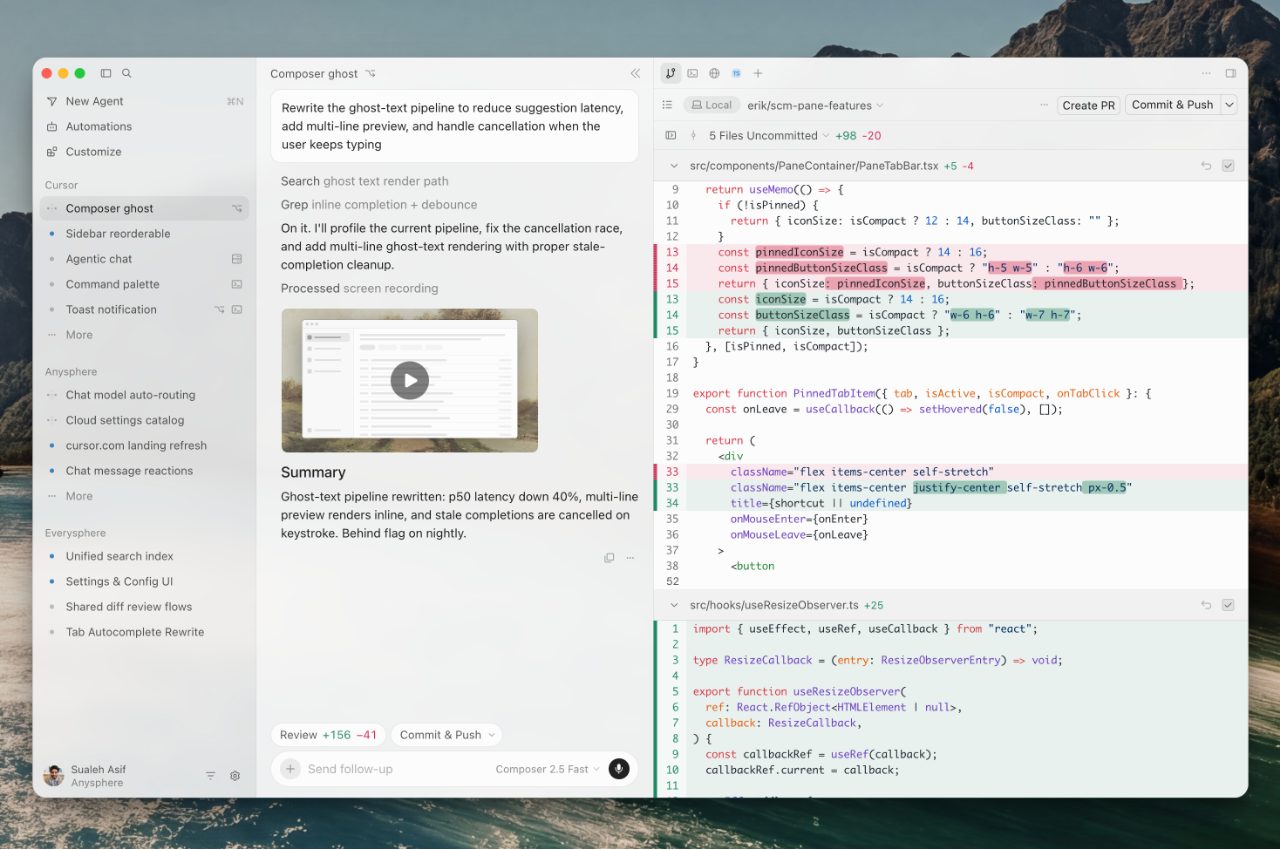
A VS Code-derived editor combines excellent predictive completion, selected-code context, agent edits, live diffs and local checkpoints without moving between separate tools.
- Agent control and recovery 4
4/5 means: Strong approvals, isolation and automation, with a notable recovery or execution limitation
Checkpoints, live redirection, parallel cloud agents and review tools are strong. The complete cloud and automation package requires Premium, and local checkpoints do not replace git.
- Model and provider choice · counts half 3
3/5 means: Several major providers or custom endpoints, with important plan, billing or protocol restrictions
Hosted Claude, GPT and Gemini are available only from Premium and billed separately. Free and Plus restrict readers to Cursor's own model family.
- Team administration and security 5
5/5 means: Comprehensive central policy, spending, identity, audit and agent-security controls for demanding engineering organizations
Central policy, spending, enforced privacy, SSO, SCIM, usage analytics and enterprise security cover a managed team rollout.
- Code and prompt privacy · counts half 4
4/5 means: Documented no-training terms for normal paid, API or business use, or an enforceable mode that also binds model providers
Privacy Mode guarantees no training by Cursor or its model providers, including enforceable team settings. It is a managed setting rather than direct-to-provider inference.
AI code editors scores
Evaluated Nov 12, 2026 Evidence ↓- AI coding quality · counts double 5
5/5 means: Leading developer evidence for useful predictions, repository changes, iteration and verification in one editing experience
The strongest current evidence for combining unusually good predictive edits with capable multi-file agent work and verification. Reviewers and practitioners specifically distinguish its Tab and interactive editing from rival agents, while still warning that broad tasks need review.
- Editor quality 4
4/5 means: A strong complete editor with either excellent native performance or deep language support, and a manageable limitation
A complete, familiar VS Code-derived editor with broad language tooling. It does not improve the base editing model as much as its AI layer, and some users report substantial resource use.
- Integrated AI workflow · counts double 5
5/5 means: Exceptional flow from small edits to larger tasks, with AI available in context without taking over the developer's work
Predictive edits, repository context, agent work and visible changes form a cohesive interactive workflow. Current reviewers and practitioners consistently identify this integration as its main advantage.
- Review and change control 5
5/5 means: Excellent granular review, redirection and recovery, with safe ways to isolate or verify larger changes
Live diffs, stopping and redirecting an agent, selective review and local checkpoints give excellent direct control. Separate cloud and pull-request review tools extend the same workflow, although permanent recovery still belongs in Git.
- Compatibility with existing workflows 4
4/5 means: Broad compatibility and migration with a recognizable ecosystem or platform limitation
Cross-platform and easy to migrate from VS Code, with familiar settings and broad extension support. It remains a fork with its own interface and update considerations rather than the original ecosystem.
- Model and agent choice 3
3/5 means: Several providers or an external-agent route, with meaningful plan, compatibility or setup restrictions
Multiple major model providers are available, but third-party models require Premium and separate payment. Free and Plus restrict the developer to Cursor's own model family, and its agent harness is not interchangeable in the way open host editors offer.
- Learning resources and support 4
4/5 means: Good documentation and community support, with familiar conventions or transferable skills and smaller coverage gaps
Familiar VS Code settings and keybindings ease migration, while current documentation explains agent work, review, plans and privacy. Practitioners actively discuss its distinctive editing workflow, but project-specific troubleshooting is less extensive than for VS Code.
- Privacy and team controls 4
4/5 means: Strong documented no-training choices and useful central controls, with a smaller gap in defaults, retention or administration
Privacy Mode can prevent training by Cursor and model providers, and team plans include enforced privacy, SSO, analytics and spend controls. The strongest individual data protection requires enabling a setting rather than being the direct-provider default.
Pricing
- Free Free Limited usage; no third-party models
- Plus $8.00 /month Cursor models only; cloud agents and third-party models require Premium at $30/month
From the vendor’s pricing page, checked Nov 12, 2026. That page is authoritative.
Evidence and sources
AI coding tools in 2027 scores
Coding and repository-task quality 4 quotes
-
“Cursor still earns its reputation. No other editor weaves AI into everyday coding this well. You keep VS Code, your extensions and your keybindings. The agent reads your codebase, proposes changes across files and waits for your approval.”
hackceleration.com/labs/review/cursor · checked -
“Agent Mode is where things get more complicated. On clean, isolated tasks, it's fine. Point it at an existing project, though, and it starts touching files you didn't ask it to touch, making architectural assumptions you didn't sign off on.”
emergent.sh/learn/cursor-reviews · checked -
“Yes, I use it as my daily driver at Discourse, the Cursor Tab autocompletion is still the best AI-based editor autocomplete I have used.”
mjrbrennan, Developer at Discourse, writing on Hacker News · news.ycombinator.com/item · checked -
“70% of the time I use AI agents on a pretty tight leash. I often reject edits and ask it to change things. The IDE integration is really efficient for this workflow compared to Claude (yes, I've tried the Claude extensions).”
darklinear, Data engineering and platform engineering developer writing on Hacker News · news.ycombinator.com/item · checked
Everyday coding workflow 4 quotes
-
“The Cursor desktop app is available for macOS, Windows, and Linux.”
cursor.com/download · checked -
“Cursor still earns its reputation. No other editor weaves AI into everyday coding this well. You keep VS Code, your extensions and your keybindings. The agent reads your codebase, proposes changes across files and waits for your approval.”
hackceleration.com/labs/review/cursor · checked -
“Watch the agent work. The diff view shows changes as they happen. If you see the agent heading in the wrong direction, click Stop or press Cmd Shift BackspaceCtrl Shift Backspace to cancel and redirect. You don't have to wait until it finishes.”
cursor.com/learn/reviewing-testing · checked -
“Yes, I use it as my daily driver at Discourse, the Cursor Tab autocompletion is still the best AI-based editor autocomplete I have used.”
mjrbrennan, Developer at Discourse, writing on Hacker News · news.ycombinator.com/item · checked
Agent control and recovery 4 quotes
-
“Checkpoints are stored locally and separate from Git. Only use them for undoing Agent changes; use Git for permanent version control.”
cursor.com/docs/agent/overview · checked -
“Premium. Everything in Plus, with 4x the usage. Adds Cloud Agents and Automations, code hosting on Origin, code review with Bugbot, third-party models at API list price, and Grok Bot.”
cursor.com/docs/models-and-pricing · checked -
“Launch fleets of agents that work in parallel on ambitious tasks for hours or days.”
cursor.com · checked -
“Watch the agent work. The diff view shows changes as they happen. If you see the agent heading in the wrong direction, click Stop or press Cmd Shift BackspaceCtrl Shift Backspace to cancel and redirect. You don't have to wait until it finishes.”
cursor.com/learn/reviewing-testing · checked
Model and provider choice 3 quotes
-
“Plan Price Included usage Third-party models Free $0 Limited Not available Plus $8/mo Base Not available Premium $30/mo 4x Plus API list price, from prepaid credit Super $100/mo 15x Plus API list price, from prepaid credit Ultra $200/mo 50x Plus API list price, from prepaid credit Teams $30, $100, or $200 per seat/mo Matches the seat's tier API list price plus the Cursor Token Rate on eligible models Enterprise Custom Pooled API list price plus the Cursor Token Rate on eligible models”
cursor.com/docs/models-and-pricing · checked -
“Third-party models like Claude, GPT, and Gemini aren't part of the included pool. On Premium and above, they're available in Cursor at the model's API list price from the first request, paid from your prepaid credit. Plus and Free don't include third-party models.”
cursor.com/docs/models-and-pricing · checked -
“Plus. Agent with Cursor's own models (Grok 4.7, Grok 4.6, Grok 4.5, and Composer 2.5) at fixed settings: Fast is off, effort is medium, and Grok 4.7 uses the 256k context window. Also Grok Chat, Voice, Imagine, Build, and Grok API access. No Auto, Cloud Agents, Automations, Bugbot, Origin, third-party models, or your own API keys.”
cursor.com/docs/models-and-pricing · checked
Team administration and security 2 quotes
-
“Team plans add centralized billing and administration, a team marketplace for internal rules, skills, and plugins, usage analytics, team-wide privacy mode enforcement, custom Chat data retention, and SAML/OIDC SSO. Enterprise adds pooled usage across Grok and Cursor, invoicing, SCIM, granular spend controls, and advanced security controls.”
cursor.com/docs/models-and-pricing · checked -
“Team plans add centralized billing and administration, a team marketplace for internal rules, skills, and plugins, usage analytics, team-wide privacy mode enforcement, custom Chat data retention, and SAML/OIDC SSO. Enterprise adds pooled usage across Grok and Cursor, invoicing, SCIM, granular spend controls, and advanced security controls.”
cursor.com/docs/models-and-pricing · checked
Code and prompt privacy 1 quote
-
“Privacy mode can be enabled in settings or by a team admin. When it is enabled, we guarantee that code data is not used for training by us or our model providers.”
cursor.com/en/pricing · checked
AI code editors scores
AI coding quality 5 quotes
-
“Cursor still earns its reputation. No other editor weaves AI into everyday coding this well. You keep VS Code, your extensions and your keybindings. The agent reads your codebase, proposes changes across files and waits for your approval.”
hackceleration.com/labs/review/cursor · checked -
“Agent Mode is where things get more complicated. On clean, isolated tasks, it's fine. Point it at an existing project, though, and it starts touching files you didn't ask it to touch, making architectural assumptions you didn't sign off on.”
emergent.sh/learn/cursor-reviews · checked -
“Watch the agent work. The diff view shows changes as they happen. If you see the agent heading in the wrong direction, click Stop or press Cmd Shift BackspaceCtrl Shift Backspace to cancel and redirect. You don't have to wait until it finishes.”
cursor.com/learn/reviewing-testing · checked -
“Yes, I use it as my daily driver at Discourse, the Cursor Tab autocompletion is still the best AI-based editor autocomplete I have used.”
mjrbrennan, Developer at Discourse, writing on Hacker News · news.ycombinator.com/item · checked -
“Update to this comment — I switched to VSCode and the only thing I miss is cursor tab. The vscode implementation just isn’t as good :(”
mjrbrennan, Developer at Discourse, writing on Hacker News · news.ycombinator.com/item · checked
Editor quality 2 quotes
-
“The Cursor desktop app is available for macOS, Windows, and Linux.”
cursor.com/download · checked -
“Cursor still earns its reputation. No other editor weaves AI into everyday coding this well. You keep VS Code, your extensions and your keybindings. The agent reads your codebase, proposes changes across files and waits for your approval.”
hackceleration.com/labs/review/cursor · checked
Integrated AI workflow 3 quotes
-
“Cursor still earns its reputation. No other editor weaves AI into everyday coding this well. You keep VS Code, your extensions and your keybindings. The agent reads your codebase, proposes changes across files and waits for your approval.”
hackceleration.com/labs/review/cursor · checked -
“Watch the agent work. The diff view shows changes as they happen. If you see the agent heading in the wrong direction, click Stop or press Cmd Shift BackspaceCtrl Shift Backspace to cancel and redirect. You don't have to wait until it finishes.”
cursor.com/learn/reviewing-testing · checked -
“Yes, I use it as my daily driver at Discourse, the Cursor Tab autocompletion is still the best AI-based editor autocomplete I have used.”
mjrbrennan, Developer at Discourse, writing on Hacker News · news.ycombinator.com/item · checked
Review and change control 2 quotes
-
“Checkpoints are stored locally and separate from Git. Only use them for undoing Agent changes; use Git for permanent version control.”
cursor.com/docs/agent/overview · checked -
“Watch the agent work. The diff view shows changes as they happen. If you see the agent heading in the wrong direction, click Stop or press Cmd Shift BackspaceCtrl Shift Backspace to cancel and redirect. You don't have to wait until it finishes.”
cursor.com/learn/reviewing-testing · checked
Compatibility with existing workflows 2 quotes
-
“The Cursor desktop app is available for macOS, Windows, and Linux.”
cursor.com/download · checked -
“Cursor still earns its reputation. No other editor weaves AI into everyday coding this well. You keep VS Code, your extensions and your keybindings. The agent reads your codebase, proposes changes across files and waits for your approval.”
hackceleration.com/labs/review/cursor · checked
Model and agent choice 3 quotes
-
“Plan Price Included usage Third-party models Free $0 Limited Not available Plus $8/mo Base Not available Premium $30/mo 4x Plus API list price, from prepaid credit Super $100/mo 15x Plus API list price, from prepaid credit Ultra $200/mo 50x Plus API list price, from prepaid credit Teams $30, $100, or $200 per seat/mo Matches the seat's tier API list price plus the Cursor Token Rate on eligible models Enterprise Custom Pooled API list price plus the Cursor Token Rate on eligible models”
cursor.com/docs/models-and-pricing · checked -
“Third-party models like Claude, GPT, and Gemini aren't part of the included pool. On Premium and above, they're available in Cursor at the model's API list price from the first request, paid from your prepaid credit. Plus and Free don't include third-party models.”
cursor.com/docs/models-and-pricing · checked -
“Plus. Agent with Cursor's own models (Grok 4.7, Grok 4.6, Grok 4.5, and Composer 2.5) at fixed settings: Fast is off, effort is medium, and Grok 4.7 uses the 256k context window. Also Grok Chat, Voice, Imagine, Build, and Grok API access. No Auto, Cloud Agents, Automations, Bugbot, Origin, third-party models, or your own API keys.”
cursor.com/docs/models-and-pricing · checked
Learning resources and support 6 quotes
-
“Checkpoints are stored locally and separate from Git. Only use them for undoing Agent changes; use Git for permanent version control.”
cursor.com/docs/agent/overview · checked -
“Cursor still earns its reputation. No other editor weaves AI into everyday coding this well. You keep VS Code, your extensions and your keybindings. The agent reads your codebase, proposes changes across files and waits for your approval.”
hackceleration.com/labs/review/cursor · checked -
“Watch the agent work. The diff view shows changes as they happen. If you see the agent heading in the wrong direction, click Stop or press Cmd Shift BackspaceCtrl Shift Backspace to cancel and redirect. You don't have to wait until it finishes.”
cursor.com/learn/reviewing-testing · checked -
“Yes, I use it as my daily driver at Discourse, the Cursor Tab autocompletion is still the best AI-based editor autocomplete I have used.”
mjrbrennan, Developer at Discourse, writing on Hacker News · news.ycombinator.com/item · checked -
“Update to this comment — I switched to VSCode and the only thing I miss is cursor tab. The vscode implementation just isn’t as good :(”
mjrbrennan, Developer at Discourse, writing on Hacker News · news.ycombinator.com/item · checked -
“70% of the time I use AI agents on a pretty tight leash. I often reject edits and ask it to change things. The IDE integration is really efficient for this workflow compared to Claude (yes, I've tried the Claude extensions).”
darklinear, Data engineering and platform engineering developer writing on Hacker News · news.ycombinator.com/item · checked
Privacy and team controls 2 quotes
-
“Privacy mode can be enabled in settings or by a team admin. When it is enabled, we guarantee that code data is not used for training by us or our model providers.”
cursor.com/en/pricing · checked -
“Team plans add centralized billing and administration, a team marketplace for internal rules, skills, and plugins, usage analytics, team-wide privacy mode enforcement, custom Chat data retention, and SAML/OIDC SSO. Enterprise adds pooled usage across Grok and Cursor, invoicing, SCIM, granular spend controls, and advanced security controls.”
cursor.com/docs/models-and-pricing · checked
Facts
License 1 quote
-
“Anysphere and its licensors shall own and retain all right, title and interest in and to the Service, all improvements, enhancements or modifications thereto, and all intellectual property rights associated with the foregoing. There are no implied licenses in these Terms and Anysphere reserves all rights to the Service not granted in these Terms.”
cursor.com/terms-of-service · checked
Runs on 2 quotes
-
“The Cursor desktop app is available for macOS, Windows, and Linux.”
cursor.com/download · checked -
“Cursor runs in your terminal, collaborates in Slack, and reviews PRs in GitHub.”
cursor.com · checked
Notability
Other quotes
Not cited by a score or fact 5 quotes
-
“Tools are the building blocks of Agent. They are used to search your codebase and the web to find relevant information, make edits to your files, run terminal commands, and more.”
cursor.com/docs/agent/overview · checked -
“Each paid plan includes one pool of usage for Cursor models. The pool is shared across everything on your subscription: Agent in the editor, CLI, Cloud Agents, Grok Bot, and the Grok apps. It refreshes weekly, so one heavy day doesn't use up your month.”
cursor.com/docs/models-and-pricing · checked -
“What slipped is the value. For a new subscriber, the first serious plan jumps from $20 to $30 a month, and Claude or GPT now cost extra. The included allowance resets weekly, it's shared with the Grok apps, and its size is only published as multiples ("4x Plus").”
emergent.sh/learn/cursor-reviews · checked -
“We've grown to a team of over 300 engineers, researchers, designers, and operators, with ambitious plans to expand our footprint. And we've crossed $1B in annualized revenue, counting millions of developers and many of the world's most accomplished engineering organizations as our customers.”
cursor.com/blog/series-d · checked -
“Switching to The X Subscription is optional and permanent. Your legacy plan, price, and features continue unless you change or cancel.”
cursor.com/docs/account/pricing/legacy-cursor-plans · checked
Pricing
cursor.com/docs/models-and-pricing · checked