Abel
Windows change-ringing simulator for home and sensor-equipped towers
Our verdict
#1 of 5 in Change-ringing practice software · For all-round solo and tower practice
Pros
- Covers keyboard, physical tower-bell and moving-handbell practice
- Detailed feedback helps isolate recurring striking faults
- The download undercuts the other full desktop simulators
Cons
- Windows only; Mac and mobile versions are separate products
- Online practice requires Muster and a simulator for every participant
Skip if: Ringers who need a native Mac or mobile app, or an online band in a browser.
Rankings and alternatives
- #1 of 5 Change-ringing practice software For all-round solo and tower practice
- Beltower #2 For adaptive practice, composing and conducting
- Virtual Belfry #3 For teaching displays and detailed striking analysis
- Ringing Room #4 For online bands and filling empty bells



Change-ringing practice software scores
Evaluated Nov 12, 2026 Evidence ↓- Physical bell inputs 5
5/5 means: Documented tower-bell/dumbbell sensors and moving-handbell controllers
Tower bells, dumbbells and sensor-equipped handbells can connect through serial interfaces; Handbell Manager adds USB motion-controller input.
- Striking feedback 5
5/5 means: Live feedback plus detailed post-practice breakdowns that isolate recurring faults
Live early/late and stroke feedback is followed by row filters, early/late histograms, numerical error summaries, replay and CSV or Lowndes export.
- Solo practice 4
4/5 means: Complete solo practice with recovery, repetition or adaptive pacing
Abel supplies the other bells for one tower bell or a handbell pair, with speed, call and exercise controls, but does not document Beltower's cooperative timing or correct-place gate.
- Methods and compositions 4
4/5 means: Broad method library with custom methods and touches, conducting or splicing
Methods on 3–24 bells, custom methods, touches, conducting and up to 100-spliced methods are supported, without Beltower's integrated composition proving.
- Learner guidance 4
4/5 means: Strong diagrams, animated ringers, structured exercises or useful review
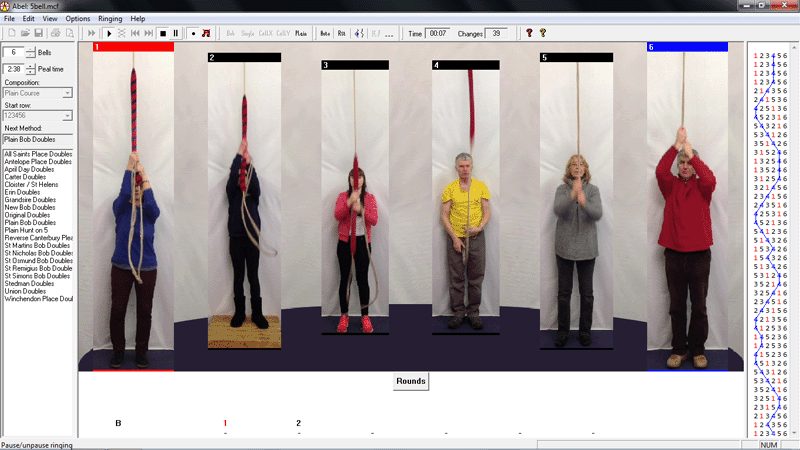
Learning the Ropes exercises, blue lines, moving ringers and detailed striking review give useful structured and visual guidance.
- Online band practice 2
2/5 means: Online ringing through a separate companion, with every ringer needing the desktop simulator
The separate free Muster companion links Abel installations, but every remote participant needs Abel on Windows and keypress input.
- Device coverage 2
2/5 means: Windows desktop only
Current Abel runs on Windows Vista through Windows 11. Mabel and Mobel are separate products and don't broaden Abel's own device coverage.
- Software price 4
4/5 means: One-time purchase from £10 to £25
The download is a £20 one-time purchase; a CD is £24 including post and packing.
Pricing
- Download £20.00 one-time One personal/household licence or one tower location; free updates
- CD including post and packing £24.00 one-time
From the vendor’s pricing page, checked Nov 12, 2026. That page is authoritative.
Evidence and sources
Change-ringing practice software scores
Physical bell inputs 3 quotes
-
“In addition, Abel provides the following facilities intended mainly for use in towers: Connect to sensors on external bells - so you can ring real bells or dumbbells or dummy handbells with Abel to practise with a perfect band, and also have truly 'silent' practices With Abel 3.8 or later, ring with a "Moving Ringers" display, providing real ropesight Vary the quality of the striking, and get reports on the accuracy of your own striking.”
abelsim.co.uk/main.htm · checked -
“If you configure your dummy handbells as external bells 1 and 2, they have the same effect as using the J and F keys.”
abelsim.co.uk/doc/using5.htm · checked -
“Handbell Manager, written by Graham John and available as a free download, enables USB motion controllers to be used as dummy handbells with Abel.”
abelsim.co.uk/download.htm · checked
Striking feedback 4 quotes
-
“The position accurately represents how early or late the bell is. The letter H or B at the left of the window shows whether this is a handstroke or a backstroke.”
abelsim.co.uk/doc/striking.htm · checked -
“It's worth looking for things you regularly get wrong: for example, are your up dodges always a bit lazy; is your second blow at the back always late; are your handstroke leads too early? To help with this, you can use set filters in the tool bar of the window, so that only selected rows are shown: for example, only backstrokes, or only up-dodges.”
abelsim.co.uk/doc/striking.htm · checked -
“In each bar chart, the central dark green bar shows how many blows were accurate (close to perfect!); to the left, other bars show how many blows were early, and to the right bars show blows that were late. Beneath the bar charts, there is a text summary of the striking for the bell. For example, it might say "Error 23%, 18% Late ". The Error percentage shows the average distance that the bell was from its correct position: if the figure is much larger than the Late/Early figure, it shows that the striking was rather unsteady. The "Late" or "Early" percentage shows if the bell has a general tendency to be early or late (being late at backstroke is very common!). Ideally all the reported figures should be zero - but in practice this is impossible to achieve. A good ringer should be able to achieve around 4% error when ringing from the keyboard, and should aspire to better than 10% error when ringing with external tower bells.”
abelsim.co.uk/doc/striking.htm · checked -
“For each blow, the csv file gives the bell number and the number of milliseconds since the previous blow (0 for the first blow recorded). The final alternative, available only if more than sixty blows have been rung, is to save in the "Lowndes" format; this data can be used by the CAS striking analysis software (as used in the National 12-bell Striking Competition), which is available as a free download.”
abelsim.co.uk/doc/striking.htm · checked
Solo practice 3 quotes
-
“In addition, Abel provides the following facilities intended mainly for use in towers: Connect to sensors on external bells - so you can ring real bells or dumbbells or dummy handbells with Abel to practise with a perfect band, and also have truly 'silent' practices With Abel 3.8 or later, ring with a "Moving Ringers" display, providing real ropesight Vary the quality of the striking, and get reports on the accuracy of your own striking.”
abelsim.co.uk/main.htm · checked -
“Of course, tower bell ringers normally ring only one bell, using 'J'; and most handbell ringers ring only two, using 'J' and 'F'. Normally you ring a bell by pressing and immediately releasing the appropriate key, but you can also choose "up/down action": see Options/Ringing Options; this is particularly intended for handbell ringers.”
abelsim.co.uk/doc/using5.htm · checked -
“Abel includes a Learning Exercises method collection, containing various useful exercises that are used in the Learning the Ropes scheme and elsewhere. To access it, click File/Open and select Learning Exercises. Each exercise is a method within this collection: double click the method name, then ring it in the usual way.”
abelsim.co.uk/doc/exercises.htm · checked
Methods and compositions 2 quotes
-
“Abel and Mabel provide a wide range of features, simulating all the situations you're likely to encounter in real-life tower- and hand-bell change ringing. You can use Abel or Mabel to: Practise ringing and conducting from the keyboard Ring any method or touch, on any number of bells from 3 to 24 Practise calling and ringing Call Changes Splice up to 100 methods Print methods and touches Simulate tower bells or handbells, using real bell sounds - you can add your own recordings, too”
abelsim.co.uk/main.htm · checked -
“Overview Defining Methods Details Adding Methods from the CCCBR Library Place Notation Editing Methods Deleting Methods”
abelsim.co.uk/doc/main_index.htm · checked
Learner guidance 3 quotes
-
“Abel includes a Learning Exercises method collection, containing various useful exercises that are used in the Learning the Ropes scheme and elsewhere. To access it, click File/Open and select Learning Exercises. Each exercise is a method within this collection: double click the method name, then ring it in the usual way.”
abelsim.co.uk/doc/exercises.htm · checked -
“Abel and Mabel provide a wide range of features, simulating all the situations you're likely to encounter in real-life tower- and hand-bell change ringing. You can use Abel or Mabel to: Practise ringing and conducting from the keyboard Ring any method or touch, on any number of bells from 3 to 24 Practise calling and ringing Call Changes Splice up to 100 methods Print methods and touches Simulate tower bells or handbells, using real bell sounds - you can add your own recordings, too”
abelsim.co.uk/main.htm · checked -
“It's worth looking for things you regularly get wrong: for example, are your up dodges always a bit lazy; is your second blow at the back always late; are your handstroke leads too early? To help with this, you can use set filters in the tool bar of the window, so that only selected rows are shown: for example, only backstrokes, or only up-dodges.”
abelsim.co.uk/doc/striking.htm · checked
Online band practice 1 quote
-
“Muster, written by Jonathan Agg and Dave Richards, and available as a free download, works with Abel 3.10.2 and later versions, to join ringers together using the power of the Internet. Muster works by connecting copies of Abel in a peer-to-peer framework: the ringers, who may be separated by many miles, press keys to ring one or two bells just as in Abel, and the bells sound and move on all their PCs.”
abelsim.co.uk/download.htm · checked
Device coverage 1 quote
-
“Abel is the most popular change ringing simulator in the world for Windows PCs, for both home and tower use. Mabel is a ringing simulator for the Apple Mac, intended primarily for home use. Mobel is a simpler simulator for Apple iPhone, iPad, iPod Touch, and Mac; and for Android phones and tablets too. Ringing simulators are used by learners and advanced ringers. At home and in the tower, learners use them to practise call changes, plain hunt, and basic methods; advanced ringers use them to practise for peals and public demonstrations of ringing, right up to the level of Bristol Surprise 16 and 100-spliced minor. Towers also use Abel for "silent practice" sessions. All the simulators can also display the blue line diagram for any method.”
abelsim.co.uk/main.htm · checked
Software price 1 quote
-
“You can buy Abel immediately as a download, or you can order it on a CD. The price is £20 (20 pounds sterling) for a download, and £24 (24 pounds sterling) for a CD (including post and packing). All profits from the sale of Abel go to charity, including ringing charities.”
abelsim.co.uk/buyingAbel.htm · checked
Facts
License 1 quote
-
“Our intent is that this copy of Abel is for use in one of two ways: For personal use. You, as an individual, can install and yourself use Abel on one or more PCs. As an extension of this, members of your family who live with you can also use Abel on these PCs. For Tower use. You can install Abel on one or more PCs in one church tower or similar location, for use by ringers at that location. If other people want to use Abel on their PCs, they're welcome to buy their own copies, but not to use this one!”
abelsim.co.uk/doc/welcome1.htm · checked
Runs on 1 quote
-
“Abel is the most popular change ringing simulator in the world for Windows PCs, for both home and tower use. Mabel is a ringing simulator for the Apple Mac, intended primarily for home use. Mobel is a simpler simulator for Apple iPhone, iPad, iPod Touch, and Mac; and for Android phones and tablets too. Ringing simulators are used by learners and advanced ringers. At home and in the tower, learners use them to practise call changes, plain hunt, and basic methods; advanced ringers use them to practise for peals and public demonstrations of ringing, right up to the level of Bristol Surprise 16 and 100-spliced minor. Towers also use Abel for "silent practice" sessions. All the simulators can also display the blue line diagram for any method.”
abelsim.co.uk/main.htm · checked
Needs 2 quotes
-
“Versions of Abel from 3.9.2 onwards require Pentium IV processors or later (any x86-compatible processor made this century!). If you have a very old PC with a Pentium III processor, contact the support address (above) for assistance.”
abelsim.co.uk/support.htm · checked -
“Of course, tower bell ringers normally ring only one bell, using 'J'; and most handbell ringers ring only two, using 'J' and 'F'. Normally you ring a bell by pressing and immediately releasing the appropriate key, but you can also choose "up/down action": see Options/Ringing Options; this is particularly intended for handbell ringers.”
abelsim.co.uk/doc/using5.htm · checked
Notability
Our estimate: AbelSim reports cumulative purchases across Abel, Mabel and Mobel, not Abel alone or current users. A conservative half of the family total is used as an order-of-magnitude estimate for the best-known product.
Users 1 quote
-
“Abel is the most popular change ringing simulator in the world for Windows PCs, for both home and tower use. Mabel is a ringing simulator for the Apple Mac, intended primarily for home use. Mobel is a simpler simulator for Apple iPhone, iPad, iPod Touch, and Mac; and for Android phones and tablets too. Ringing simulators are used by learners and advanced ringers. At home and in the tower, learners use them to practise call changes, plain hunt, and basic methods; advanced ringers use them to practise for peals and public demonstrations of ringing, right up to the level of Bristol Surprise 16 and 100-spliced minor. Towers also use Abel for "silent practice" sessions. All the simulators can also display the blue line diagram for any method.”
abelsim.co.uk/main.htm · checked
Other quotes
Not cited by a score or fact 2 quotes
-
“Many simulators allow you to 'ring' by pressing keys instead of using a sensor attached to a bell. This removes an important part of the simulated ringing experience – the feel of the act of ringing and the dynamic behaviour of the bell –with an action that is nothing like ringing a bell. Even the timing is different, since the button is pressed at the instant the bell sounds, whereas the definitive action on the end of a bellrope is a second or two earlier. It has of no value for training ringers in the skills of accurately timed bell control, but it is widely used to permit ringers to exercise the cognitive skills of method ringing (the 4th skill in the list above). It is attractive because it requires no hardware apart from a standard computer (or pad or smart-phone) so it can be used anywhere, not just in the tower. Some people adapt to pressing keys rather than being on the end of a rope but others find it very unnatural and much harder to do well.”
jaharrison.me.uk/Ringing/Simulators/index.html · checked -
“Having said that, now I'm further on I practice at least half the time without the visuals. It does mean you really have to concentrate on listening and rhythm as it's all you have, and it's easier to concentrate on navigating the line without having to deal with the visual aspect, as you say. And yes, not having the added pressure of being the crasher-abouter in a real band is also a help :grin:”
John de Overa, Ringing Forums user describing his own Abel practice · ringingforums.org/discussion/569/bell-position-monitor-for-use-with-ringing-simulators · checked
Pricing
abelsim.co.uk/buyingAbel.htm · checked