Change-ringing software can supply the rest of a band while you ring one tower bell or a pair of handbells. The right choice depends on the skill you want to practise. Learning a method’s sequence of work needs a good method library and forgiving pacing. Improving physical bell control needs sensors on a real bell or dumbbell, or moving handbell controllers. Ringing with distant friends needs an online room rather than a solo simulator.
Abel is our general-purpose recommendation for Windows users: it combines both kinds of physical input with detailed striking feedback and a £20 one-time download price, as of November 2026. Beltower is the choice for adaptive solo exercises, composing and proving touches. Virtual Belfry is the teaching specialist, especially when you want to see exactly where a ringer’s timing goes wrong. Mobel puts solo method practice on a phone or tablet, and Ringing Room is the free choice for an online band.
One caution matters more than any feature count. Pressing a key or tapping a screen can train method memory, rhythm and listening, but it does not reproduce the pull and timing of a rope. For that, choose a simulator that supports your physical bell setup, and have another competent person present when practising with a real tower bell.
Key facts
5 productsLicenses, requirements, and starting prices. Prices as of November 2026.
- License
- Proprietary
- Runs on
- Windows Vista, 7, 8, 8.1, 10 and 11
- Needs
- Pentium IV or later x86-compatible processor
- sensors for physical bell input
- Price
- From £20.00 one-time
- License
- Proprietary
- Runs on
- Windows (32-bit and 64-bit
- through Windows 11)
- Needs
- Sound card and speakers
- CD or USB delivery
- sensors for physical bell input
- Price
- From £30.00 one-time
- License
- Proprietary
- Runs on
- Windows XP or later
- Needs
- Windows PC
- machine-specific activation
- sensors for physical bell input
- Price
- From £39.95 one-time
- License
- GPL-3.0, open source
- Runs on
- Web on macOS and Windows
- iOS 17 or later
- iPadOS 17 or later
- Needs
- Account and internet connection
- separate voice chat for most bands
- Price
- Free plan
- License
- Proprietary
- Runs on
- iOS 12 or later
- iPadOS 12 or later
- Android 5 or later
- macOS Big Sur or later
- Needs
- Touchscreen or hardware keyboard
- Price
- From £5.99 one-time




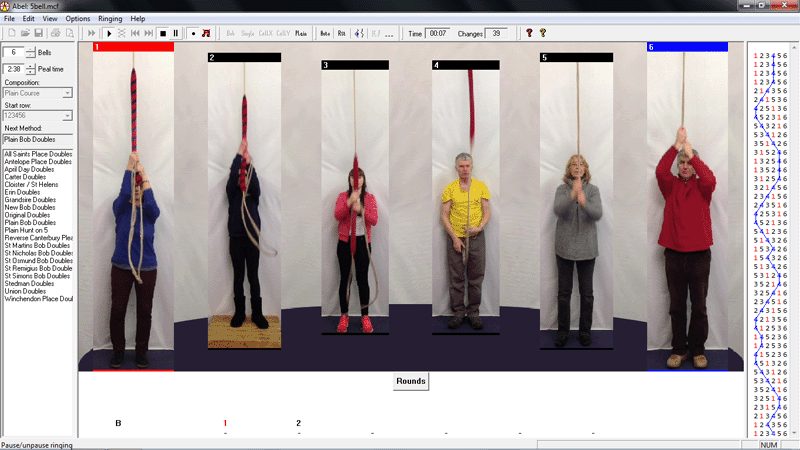
Abel is the most broadly useful choice for a Windows user who wants one simulator for keyboard practice now and physical bells later. It supplies the other bells while you ring one tower bell or two handbells, and its Learning Exercises collection supports the Learning the Ropes teaching scheme. Moving ringers add visual ropesight, the movement of the other ropes that helps you follow your place among them.
Its striking tools are practical rather than just a score at the end. During ringing, Abel shows whether each blow is early or late and identifies the stroke. Afterwards, you can filter the review to up-dodges or backstrokes, look for recurring errors and replay the touch. Histograms separate early and late blows, and striking data can be exported to a spreadsheet or the CAS analysis software used for striking competitions.
Physical inputs include tower-bell sensors, dumbbells and dummy handbells through serial interfaces. Handbell Manager adds USB motion controllers. This makes Abel suitable for method practice at home, tied-bell tuition and silent band practice with the right hardware. A tied bell has its clapper secured so the bell can move without sounding outside.
Abel costs £20 as an immediate download, or £24 on CD, as of November 2026. One licence covers personal and household use on your PCs or shared use at one tower location. It is less expensive than the other full desktop simulators here, though still a Windows-only choice. Mabel is the separate Mac-native option; Mobel is the portable one.
Remote ringing is possible through the separate free Muster application, which links copies of Abel by keypress. Ringing Room is simpler for that purpose, with shared browser rooms and its Wheatley computer ringer built in. Abel’s strength is flexible local practice, not being the easiest way to convene a remote band.
What it does
- Solo tower-bell or handbell-pair practice with a simulated band
- Serial sensors for real bells, dumbbells and dummy handbells
- Moving ringers, blue lines and Learning the Ropes exercises
- Early/late striking review, replay and data export
- Optional online ringing through the separate Muster application
Pros
- Covers keyboard, physical tower-bell and moving-handbell practice
- Detailed feedback helps isolate recurring striking faults
- The download undercuts the other full desktop simulators
Cons
- Windows only; Mac and mobile versions are separate products
- Online practice requires Muster and a simulator for every participant
Skip if: Ringers who need a native Mac or mobile app, or an online band in a browser.
Beltower combines a simulator with method, touch and peal editors, a composer and a prover. Choose it when practice extends into calling and composition, or when a learner needs the simulated band to accommodate hesitation instead of marching on regardless.
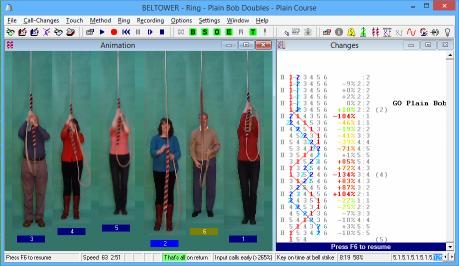
Cooperative Timing is the standout. The other bells can wait when the learner is late, close a gap when the learner is early and adjust their speed to fit. A separate mode waits for the correct place input, so a wrong place does not let the method run away. Those options make Beltower unusually adaptable for solo learning and for filling gaps in a short-handed practice band.
The composition tools go well beyond choosing a method. You can enter methods by place notation or blue line, splice at any row and mix stages. The composer generates touches from selected criteria, while the prover checks for repeated rows. A prover verifies that a composition does not repeat changes, an essential check when writing a touch or peal. Listening and conducting exercises can introduce deliberate striking or method errors for you to detect. These tools reward experienced ringers, though the range of settings gives a new user more to learn than a straightforward phone app.
Beltower accepts tower-bell and dummy-handbell sensors on any or all bells, including moving controllers through Handbell Manager. Striking can be recorded, replayed, assessed and reported. The current feature summary is less specific than Virtual Belfry’s position-by-position analysis, so teachers who want to diagnose a particular stroke or place should compare that display before buying.
The awkward part is procurement. The full package costs £30 on CD, or £34 on USB, as of November 2026, and arrives by post rather than download. It runs on Windows through Windows 11. Muster can connect Beltower users online, but everyone needs Windows, Muster and a compatible simulator.
What it does
- Cooperative timing and speed that follow the learner
- Correct-place practice that waits instead of running ahead
- Method, touch and call-change editors with mixed-stage splicing
- Integrated touch composer, musical analysis and prover
- Tower/handbell sensors, MIDI and Handbell Manager support
Pros
- The most adaptable solo pacing in this group
- Composition, proving and conducting practice in one package
- Physical inputs cover tower bells and moving handbells
Cons
- No download; installation media arrives by post
- Its many practice and composition settings add complexity
Skip if: Anyone who wants an immediate download or a simple phone app.
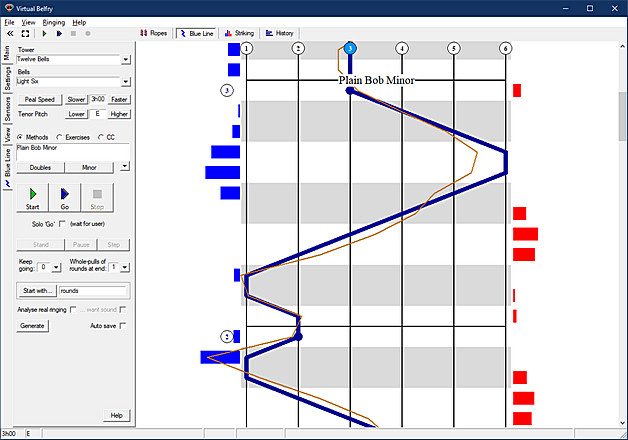
Virtual Belfry is the Windows simulator to choose when a teacher needs to show what happened, not merely report that striking was uneven. Animated ringers, photographic bells and blue-line views explain both the mechanics of ringing and a method’s path. Several views can be shown together or moved into separate windows for a teaching screen.
Its striking analysis is the strongest here for diagnosing a habit. Results break down by position, handstroke and backstroke, bell and the bell you followed. Mean placement shows a consistent early or late tendency, while standard deviation shows how scattered the blows were. A session history preserves touches so progress can be reviewed over time, and a live display can be blanked when a learner needs to listen rather than watch.
With a sensor on every bell, Analyse Real Ringing can assess an ordinary band without generating bell sounds. The same sensor setup can support a tied-bell or silent practice. Solo Go starts with rounds and waits for the individual ringer to join before going into changes, a small but useful accommodation when practising alone.
Keyboard practice is less visually convincing: tapping the spacebar sounds your bell immediately rather than moving its animated ringer. The developer recommends using the blue-line view for keyboard practice and the animated ropes when holding a physical rope. The current guidance we read does not document the dedicated moving-handbell-controller route offered by Abel and Beltower.
Virtual Belfry costs £39.95, as of November 2026, making it the most expensive program here. You can download an evaluation that stops after ten whole pulls each time you start ringing. After purchase, activation keys are generated for each computer and can take a few hours or overnight to arrive. There is no documented built-in online-band mode; Ringing Room is the better remote choice.
What it does
- Animated ringers, photographic bells and configurable blue-line views
- Striking analysis by position, stroke, bell and bell followed
- Saved session histories and live early/late feedback
- Solo Go practice and analysis of a fully sensor-equipped real band
- A ten-pull evaluation before buying
Pros
- Excellent visual tools for explaining ringing and reviewing errors
- Detailed reports separate persistent bias from inconsistent striking
- Can analyse a whole real band with sensors on every bell
Cons
- Windows only and the highest software price in this group
- Keyboard input does not drive the animated ringer
Skip if: Ringers who want mobile access, built-in online ringing or the simplest interface.
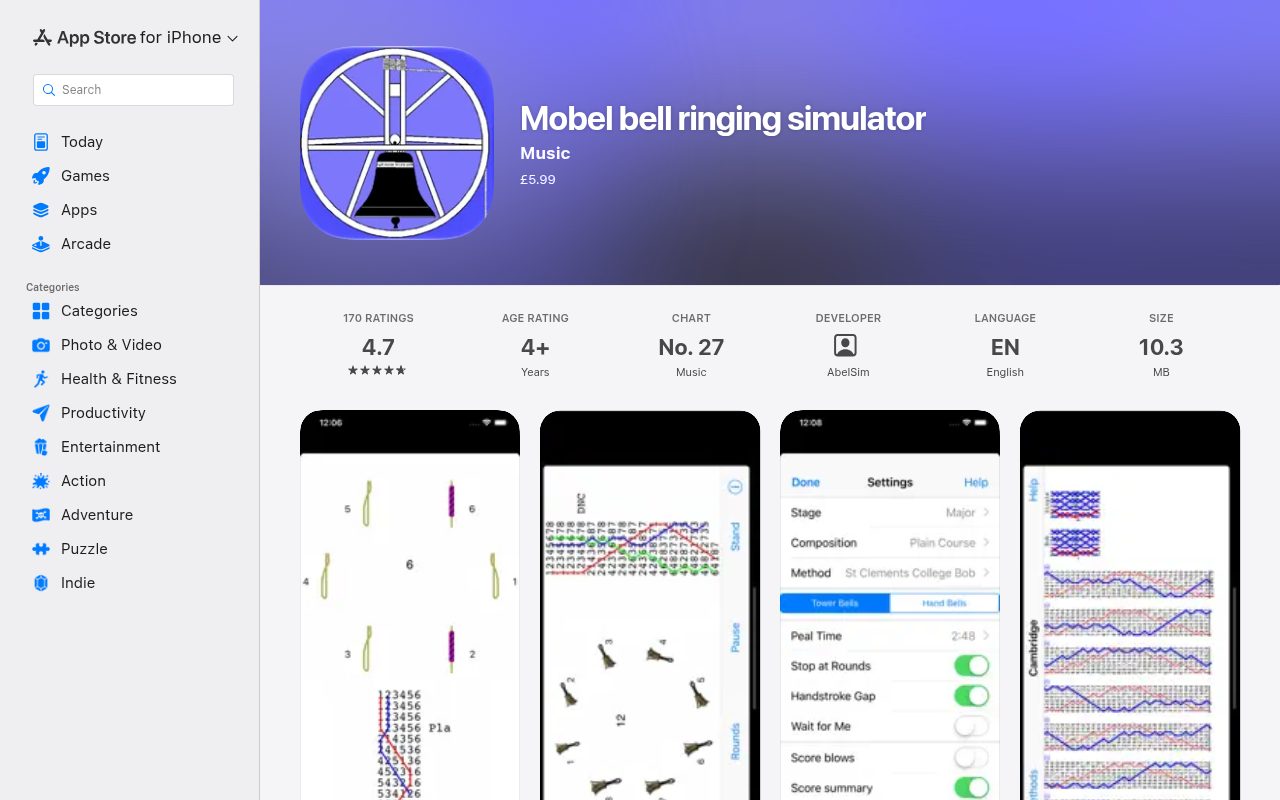
Mobel is the easiest recommendation for practising away from a desktop. It runs on iPhone, iPad, Android and Mac, and supplies the other bells while you tap for one tower bell or a handbell pair. It costs £5.99 on the UK Apple App Store and $6.99 on US Google Play, as of November 2026.
This is a serious method-practice tool rather than a pocket diagram. The Android version offers more than 22,000 methods, custom methods and compositions, spliced ringing and conducting. Three blue-line layouts let you study the work with or without the underlying bell numbers, or see the relationships in a grid. Spoken calls and different tower-bell and handbell sounds complete the simulated practice.
Wait for Me is the feature that makes solo learning forgiving. Turn it on and the band pauses when you hesitate; turn it off and the other bells maintain their rhythm. If you stop providing input, Mobel can take your bell back after a few blows. Optional scores show the timing accuracy of each tap and an overall result at the end.
Those scores describe tap timing, not physical bell handling. Mobel has no physical tower-bell sensor or moving-handbell-controller workflow, and it is for solo practice rather than an online band. Use it to learn the method and train your ear before putting that knowledge into action with a rope or handbells.
The developer documents a speed-specific rhythm issue on some devices and recommends changing the speed slightly if it occurs. Very large diagrams can also exceed device memory for long compositions on high numbers of bells. These are narrower limitations than the platform restriction shared by the desktop leaders, and they do little to diminish Mobel’s usefulness as a portable practice companion.
What it does
- Native iPhone, iPad, Android and Mac versions
- More than 22,000 methods on Android, with custom methods and touches
- Three blue-line styles and selectable tower/handbell presentation
- Wait for Me, automatic recovery and adjustable ringing speed
- Per-tap and overall timing scores
Pros
- A full solo method trainer that fits on a phone or tablet
- Forgiving pacing and clear method diagrams
- Low one-time price with no subscription
Cons
- Touch or keyboard input cannot teach physical rope control
- No shared online-band mode
- Rhythm can be unsteady at particular speed/device combinations
Skip if: Ringers who need physical bell inputs or an online practice band.
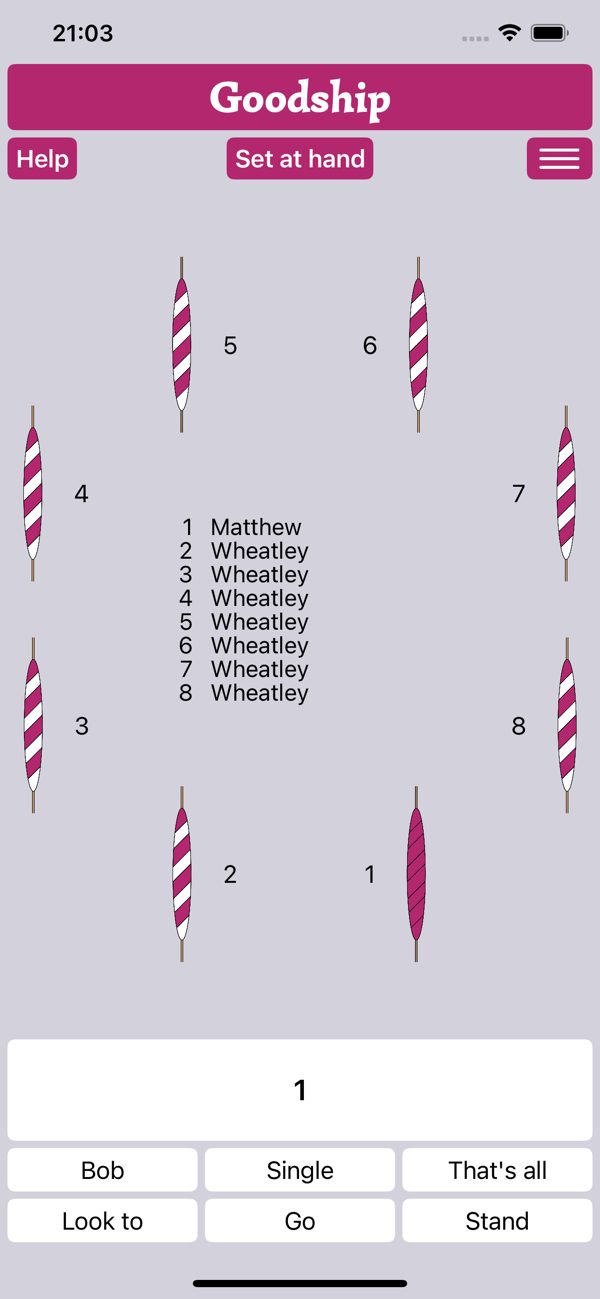
Ringing Room is the clear choice when the point is to ring with other people online. Each band gets a persistent virtual tower with a circle of ropes or handbells. Members hear and see one another’s bells, assign themselves to positions and use keyboard, mouse or touch input. The service is free, with optional donations, and requires an account.
Wheatley, its built-in computer ringer, makes the platform useful for incomplete bands and solo practice too. Assign it to any empty bells, choose a method and it responds to calls made through the keyboard. A Fill In button assigns every unoccupied bell at once. Wheatley can follow a composition from a Composition Library link and adjust its speed to the human ringers, so a tutor and one learner can practise without recruiting a full supporting band.
Handbell ringers can connect eBells or ActionXL motion controllers directly, rather than relying on the two keyboard inputs. These provide moving-handbell practice, but Ringing Room does not connect to tower-bell sensors or provide the desktop simulators’ detailed striking analysis. Teachers who want to diagnose recurring timing faults should use a sensor-equipped desktop simulator instead.
Latency is the unavoidable tradeoff. Signals take time to travel to the server and back, and a delay that is tolerable in conversation can disrupt a close sequence of bells. Ringing Room recommends a server near the whole band, a wired internet connection and wired headphones. Most bands also need a separate voice-chat service because the built-in communication is text chat.
Use Chrome on a Mac or Windows PC for the main web experience. Safari, Firefox and newer Edge versions have also been tested, but the developers do not recommend Android devices. An official companion app supports iPhone and iPad. None of that changes the central appeal: for getting a distributed band into one virtual room with computer ringers available, Ringing Room is the simplest option here.
What it does
- Persistent shared towers for tower bells or handbells
- Built-in Wheatley computer ringer with fill-in and adaptive pacing
- Keyboard, mouse, touch and motion-controller inputs
- Composition Library links, host controls and listener links
- Free access with optional donations
Pros
- The easiest shared online-band setup in this group
- Computer ringers can complete a band or support one learner
- Free, with desktop browsers and an iOS companion app
Cons
- Network delay can disrupt close striking
- No physical tower-bell inputs or detailed striking analysis
- Android browser use is not recommended
Skip if: Ringers practising offline or working on physical tower-bell control and detailed striking analysis.
How to choose change-ringing practice software
- You want one Windows simulator for home and tower use: Abel. It has the broadest useful balance of physical inputs, feedback, exercises and price. Beltower is worth the extra money when adaptive pacing or composition tools matter more.
- You are teaching striking or analysing a band: Virtual Belfry. Its position, stroke and followed-bell reports show where to focus a lesson, and its displays help explain the result. Abel is the more economical all-rounder.
- You are learning a new method by yourself: Mobel on a phone or tablet, Abel on Windows, or Beltower when waiting for correct places and cooperative timing would help. None of these requires a full band.
- You compose or conduct touches: Beltower. Its editor, composer and prover support the work before and during practice rather than treating composition as a separate task.
- Your band cannot meet in person: Ringing Room. Use a nearby server, wired networking and headphones where possible, and add voice chat for spoken instructions.
- You want moving-handbell practice: Abel or Beltower through Handbell Manager, or Ringing Room with compatible controllers. Mobel’s two-sided touch input is a portable alternative, not the same physical exercise.
Visual displays serve different purposes. Animated ringers help with ropesight and explaining a method, while listening without a screen can reveal whether you are relying too heavily on visual cues. The best practice setup lets you choose rather than forcing one approach.
Scores
1–5 per criterion · select a score for its reasoning and any sources| # | Product | Overall | Physical bell inputs | Striking feedback | Solo practice | Methods and compositions | Learner guidance | Online band practice | Device coverage | Software price |
|---|---|---|---|---|---|---|---|---|---|---|
| 1 | Abel | 3.8 | 5 | 5 | 4 | 4 | 4 | 2 | 2 | 4 |
| 2 | Beltower | 3.8 | 5 | 4 | 5 | 5 | 4 | 2 | 2 | 3 |
| 3 | Virtual Belfry | 3.5 | 4 | 5 | 4 | 4 | 5 | 1 | 2 | 3 |
| 4 | Ringing Room | 3.5 | 3 | 1 | 4 | 3 | 3 | 5 | 4 | 5 |
| 5 | Mobel | 3.4 | 1 | 3 | 4 | 4 | 4 | 1 | 5 | 5 |
Equal displayed overall scores are ordered by the earlier criteria; a known score comes before an unknown score. Identical scores use alphabetical order.
How each criterion is scored
Physical bell inputs
How well the software supports practice with something more physically representative than a tap or keypress: sensors on tower bells or dumbbells, and motion controllers swung like handbells. Software-only keyboard and touch practice can teach methods and listening, but not physical rope control.
- 5 Documented tower-bell/dumbbell sensors and moving-handbell controllers
- 4 Tower-bell sensors plus multiple external inputs, without a documented handbell-controller route
- 3 Direct moving-handbell controllers, but no tower-bell sensor workflow
- 2 Limited or indirect physical input for one ringing form
- 1 Only touchscreen, mouse or keyboard input
Striking feedback
How precisely the software helps a ringer identify and correct timing errors, from live early/late indications to post-practice analysis by stroke, place or bell followed. The score reflects available feedback, not a guarantee of improvement.
- 5 Live feedback plus detailed post-practice breakdowns that isolate recurring faults
- 4 Detailed live or recorded feedback, with error summaries, filters or replay
- 3 Per-blow and overall accuracy scores
- 2 A general accuracy indication without a useful post-practice breakdown
- 1 No automated striking assessment documented in the current feature guidance
Solo practice
How effectively one ringer can practise with a simulated band, including pacing, recovery after hesitation, targeted repetition and adaptable exercises.
- 5 Highly adaptable solo practice with waiting, place checks or cooperative timing
- 4 Complete solo practice with recovery, repetition or adaptive pacing
- 3 Basic computer-filled ringing with speed controls
- 2 Solo ringing is possible only with significant extra setup or limited automation
- 1 No practical way for one person to ring with computer-controlled bells
Methods and compositions
The breadth of method and touch practice: supplied libraries, custom methods, compositions, splicing, conducting and tools to compose or prove a touch.
- 5 As 4, plus integrated touch composition, analysis or truth proving
- 4 Broad method library with custom methods and touches, conducting or splicing
- 3 Named-method selection and external composition links, without a documented direct custom-method workflow
- 2 A limited method collection with little custom practice
- 1 Rounds or a small fixed set of exercises only
Learner guidance
Teaching and visualization that help a learner understand a method, develop ropesight or review a practice session, rather than merely hear the bells.
- 5 Several complementary teaching views, exercises and session-review tools
- 4 Strong diagrams, animated ringers, structured exercises or useful review
- 3 Live bell-circle or blue-line displays with basic guidance
- 2 Raw rows or basic controls with little instructional support
- 1 No useful practice display or teaching guidance
Online band practice
How readily ringers in different places can ring together, including built-in computer ringers to fill gaps and the setup each participant needs.
- 5 Integrated shared rooms plus computer ringers that fill unassigned bells and follow calls
- 4 Integrated shared online ringing with straightforward room and bell controls
- 3 Shared online rooms with modest setup or external companion software
- 2 Online ringing through a separate companion, with every ringer needing the desktop simulator
- 1 No shared online-band mode documented in the current product guidance
Device coverage
Which kinds of devices can run the current product, with any material browser or operating-system restrictions. Several versions of one OS count as one platform family.
- 5 Native desktop and mobile support across iOS, Android and macOS
- 4 Desktop browsers on macOS and Windows plus an iOS app, with Android browser use not recommended
- 3 Native support on two desktop operating-system families
- 2 Windows desktop only
- 1 One current desktop operating system
Software price
What one user pays for the software itself, excluding optional physical bells, sensors, controllers and voice-chat services. One-time prices are compared in the currencies published for this niche market.
- 5 Free or a one-time purchase below £10
- 4 One-time purchase from £10 to £25
- 3 One-time purchase from £26 to £45
- 2 One-time purchase above £45
- 1 Requires an ongoing subscription
Our verdict
Start with Abel unless your main requirement points elsewhere. It is the most economical full desktop simulator and covers the widest range of local practice: keyboard methods, sensor-equipped tower bells, moving handbells and detailed striking review. It is not the best online platform, and its Windows-only scope is a real limitation.
Beltower is the better investment for a ringer who will use its cooperative pacing, composition and proving tools. Virtual Belfry earns its higher price in a teaching setting, where its visuals and fault-specific analysis can change the next exercise you choose. Mobel is the practical companion for learning methods anywhere, while Ringing Room solves a different problem: getting people together online and filling any empty bells.
The important division is between practising a method and practising the physical action of ringing. A phone or browser can be excellent for the first. Only appropriate sensors or controllers address the second, so check your hardware before treating any of these as a substitute for time with a real band.
Also considered
- Handbell Stadium
A dedicated 3D handbell simulator with solo computer-filled ringing and online rooms. It is compelling for ringers who already own compatible motion controllers and want a first-person view of the circle, but personally ringing a pair requires those controllers and capable graphics. Its advertised release remains a beta and its downloads name older operating-system versions. Ringing Room is the easier online recommendation, while Abel and Beltower are broader established local choices.
- Mabel
The Mac-native member of the AbelSim family, priced at £15 as of November 2026 and intended primarily for home use. It supports moving handbells through Handbell Manager for Mac, but not Abel’s documented physical tower-bell and dumbbell inputs. Mobel also runs on Mac as well as phones and tablets, so Mabel serves a narrower audience on this page.
Questions
Can a ringing app teach me to handle a real tower bell?
A keyboard or touchscreen app can teach methods, calls, listening and tap timing, but not the physical control of a swinging bell. For bell handling and striking, use a sensor-equipped real bell or dumbbell with a simulator such as Abel, Beltower or Virtual Belfry, with appropriate supervision and a safely silenced clapper.
What is the difference between a method and a composition?
A method is the repeating pattern of work that determines how the bells change places. A composition adds calls such as bobs and singles to produce a particular touch or peal. All five products support method selection; Beltower adds integrated tools to create and check compositions for repeated changes.
Do I need motion controllers for handbell practice?
No. Two keys or two sides of a touchscreen are enough for method practice in Abel, Beltower, Mobel and Ringing Room. Controllers add an up-and-down hand movement that closer resembles ringing a handbell. Ringing Room supports compatible controllers directly; Abel and Beltower use Handbell Manager.