
Ringing Room
Free online tower and handbell practice with computer ringers
Our verdict
#4 of 5 in Change-ringing practice software · For online bands and filling empty bells
Pros
- The easiest shared online-band setup in this group
- Computer ringers can complete a band or support one learner
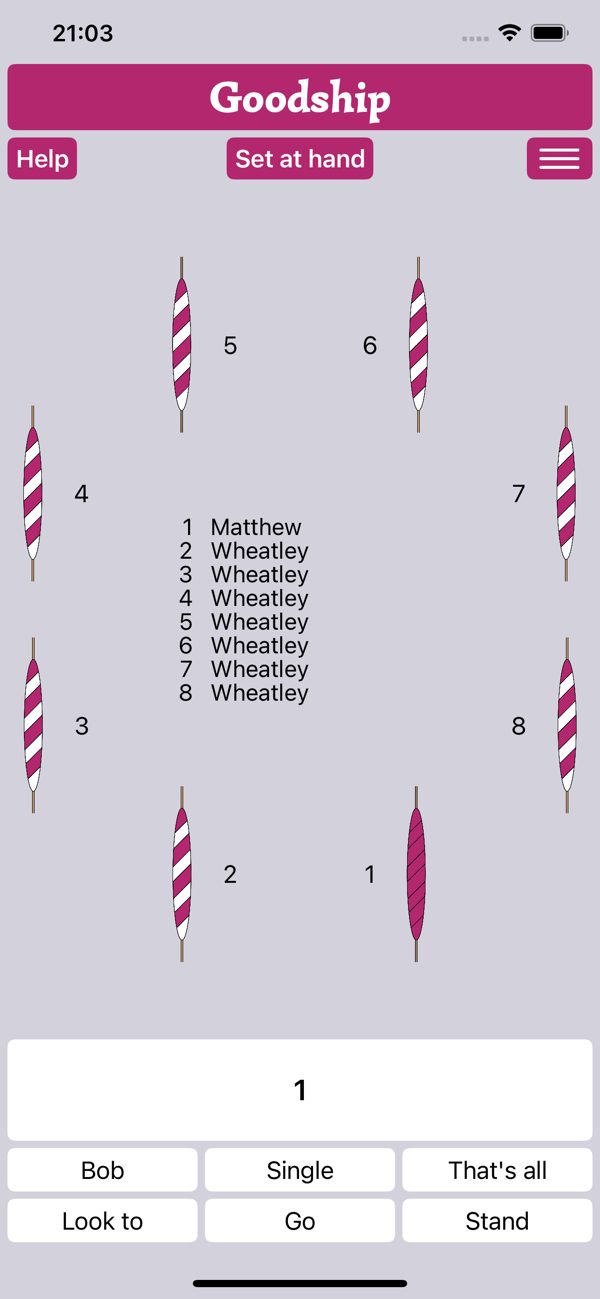
- Free, with desktop browsers and an iOS companion app
Cons
- Network delay can disrupt close striking
- No physical tower-bell inputs or detailed striking analysis
- Android browser use is not recommended
Skip if: Ringers practising offline or working on physical tower-bell control and detailed striking analysis.
Rankings and alternatives
- #4 of 5 Change-ringing practice software For online bands and filling empty bells
- Abel #1 For all-round solo and tower practice
- Beltower #2 For adaptive practice, composing and conducting
- Virtual Belfry #3 For teaching displays and detailed striking analysis


Change-ringing practice software scores
Evaluated Nov 12, 2026 Evidence ↓- Physical bell inputs 3
3/5 means: Direct moving-handbell controllers, but no tower-bell sensor workflow
eBells and ActionXL controllers can directly ring one bell or a handbell pair, but no physical tower-bell sensor workflow is documented.
- Striking feedback 1
1/5 means: No automated striking assessment documented in the current feature guidance
Current help documents synchronized ringing, Wheatley's adaptive pacing and human instruction, but no automated striking score or post-practice fault analysis. This is an unknown, not a confirmed absence.
Rests partly on what the sources don't mention, which is a weaker signal than what they say.
- Solo practice 4
4/5 means: Complete solo practice with recovery, repetition or adaptive pacing
Built-in Wheatley can fill any unassigned bells, follow methods and calls, and adapt its speed to the human ringer, with configurable peal speed.
- Methods and compositions 3
3/5 means: Named-method selection and external composition links, without a documented direct custom-method workflow
Wheatley accepts named methods and calls and loads compositions through a Composition Library URL. No direct custom-method entry or integrated proving workflow was found in current guidance.
- Learner guidance 3
3/5 means: Live bell-circle or blue-line displays with basic guidance
Shared rope/handbell visuals, bell assignment, hotkeys and listener links aid live practice, but the platform has no structured exercise or post-practice teaching display comparable to the desktop leaders.
- Online band practice 5
5/5 means: Integrated shared rooms plus computer ringers that fill unassigned bells and follow calls
Persistent shared towers synchronize sight and sound, while integrated Wheatley fills unassigned bells and follows hotkey calls.
- Device coverage 4
4/5 means: Desktop browsers on macOS and Windows plus an iOS app, with Android browser use not recommended
Mac and Windows browsers are supported and an iOS app is recommended for Apple mobile devices. Android browser use is explicitly not recommended.
- Software price 5
5/5 means: Free or a one-time purchase below £10
The official companion app is listed as free and the service solicits optional donations rather than requiring a subscription.
Pricing
- Web and iOS app Free Optional Patreon, Venmo and PayPal donations
From the vendor’s pricing page, checked Nov 12, 2026. That page is authoritative.
Evidence and sources
Change-ringing practice software scores
Physical bell inputs 2 quotes
-
“Congratulations, you're in a tower and ready to ring! You should see a circle of either ropes or handbells in the center of the screen; if you click on any of these, it will cause it to ring; anyone else currently in the tower will also see and hear that bell. Most people prefer to ring using the keyboard: By default, the space bar will always ring the bell in the bottom-right corner of the circle, while the left & right arrow keys or the f & j keys will ring the two bells in the bottom left and right (useful for ringing a handbell pair).”
ringingroom.com/help · checked -
“You can use external motion controllers such as eBells or ActionXLs directly with Ringing Room. You should see the Controllers box in the Tower Controls whenever you have your controllers connected; if it doesn't appear, try moving one of the controllers to make it send a signal for Ringing Room to detect.”
ringingroom.com/help · checked
Solo practice 4 quotes
-
“Wheatley is a computer ringer for Ringing Room, made by Ben White-Horne and Matthew Johnson and designed to be a 'ninja helper with no ego' - i.e. Wheatley will ring any number of bells to whatever you want to ring, but should fit in as much as possible to what you're ringing. Wheatley is now available directly inside Ringing Room, without any installation.”
ringingroom.com/help · checked -
“Now, you need to tell Wheatley what you want to ring. Wheatley can ring any method you want, and will respond to any calls made through Ringing Room via the hotkeys while ringing.”
ringingroom.com/help · checked -
“To ring something with Wheatley, assign Wheatley to any bells that you need filled. You can use the Fill In button in the Wheatley box to quickly assign all unassigned bells to Wheatley.”
ringingroom.com/help · checked -
“You can set the ringing speed, but it waits for the humans to ring and also adjusts its speed to fit in with the speed of the human ringers. Optionally you can turn that feature off and have something more like Abel, but if you keep the adaptive speed setting it's very convenient because you don't even have to worry about whether you set the correct speed at the beginning.”
simon, Handbell ringer and Learning to Ring Handbells blogger · handbellringing.co.uk/blog/wheatley-a-great-advance-for-practice-and-training · checked
Methods and compositions 2 quotes
-
“Now, you need to tell Wheatley what you want to ring. Wheatley can ring any method you want, and will respond to any calls made through Ringing Room via the hotkeys while ringing.”
ringingroom.com/help · checked -
“Go to complib.org and find the composition you want to ring. In the top-right corner, click the chain icon and copy the link that's generated. Return to Ringing Room and click on the tab in the Wheatley box that says 'Composition' (as opposed to 'Method'). Paste the link you copied into the box that says 'CompLib URL'. Change the tower size if prompted. Once correct, the title of the composition will be displayed. Once you've got the right tower size, click 'Load' and Wheatley will be ready to call that composition.”
ringingroom.com/help · checked
Learner guidance 2 quotes
-
“Welcome to Ringing Room! Ringing Room is a web platform that lets you ring online with friends near & far. Getting started on Ringing Room is easy: Just create an account, join a tower, and catch hold!”
ringingroom.com/help · checked -
“Congratulations, you're in a tower and ready to ring! You should see a circle of either ropes or handbells in the center of the screen; if you click on any of these, it will cause it to ring; anyone else currently in the tower will also see and hear that bell. Most people prefer to ring using the keyboard: By default, the space bar will always ring the bell in the bottom-right corner of the circle, while the left & right arrow keys or the f & j keys will ring the two bells in the bottom left and right (useful for ringing a handbell pair).”
ringingroom.com/help · checked
Online band practice 4 quotes
-
“Welcome to Ringing Room! Ringing Room is a web platform that lets you ring online with friends near & far. Getting started on Ringing Room is easy: Just create an account, join a tower, and catch hold!”
ringingroom.com/help · checked -
“Congratulations, you're in a tower and ready to ring! You should see a circle of either ropes or handbells in the center of the screen; if you click on any of these, it will cause it to ring; anyone else currently in the tower will also see and hear that bell. Most people prefer to ring using the keyboard: By default, the space bar will always ring the bell in the bottom-right corner of the circle, while the left & right arrow keys or the f & j keys will ring the two bells in the bottom left and right (useful for ringing a handbell pair).”
ringingroom.com/help · checked -
“Wheatley is a computer ringer for Ringing Room, made by Ben White-Horne and Matthew Johnson and designed to be a 'ninja helper with no ego' - i.e. Wheatley will ring any number of bells to whatever you want to ring, but should fit in as much as possible to what you're ringing. Wheatley is now available directly inside Ringing Room, without any installation.”
ringingroom.com/help · checked -
“To ring something with Wheatley, assign Wheatley to any bells that you need filled. You can use the Fill In button in the Wheatley box to quickly assign all unassigned bells to Wheatley.”
ringingroom.com/help · checked
Device coverage 2 quotes
-
“In general, Ringing Room works best on a Mac or Windows PC and in the Google Chrome browser; it has also been tested in Safari, Firefox, and newer versions of Microsoft Edge. On other platforms we expect performance to be degraded; in particular, we cannot recommend using Ringing Room on a Kindle / Kindle Fire or other Android device. For iOS devices, there is a Ringing Room app developed by Matthew Goodship; we recommend using that app rather than going through the browser.”
ringingroom.com/help · checked -
“Free · Designed for iPad. Not verified for macOS.”
apps.apple.com/gb/app/ringing-room/id1531929847 · checked
Software price 2 quotes
-
“We decided to create the Ringing Room in order to facilitate continued engagement with ringing during the coronavirus crisis and are deeply honored by the enthusiasm and support the community has shown us. If you'd like to help us keep the site up and running into the future, the best way to support us is on Patreon:”
ringingroom.com/donate · checked -
“Free · Designed for iPad. Not verified for macOS.”
apps.apple.com/gb/app/ringing-room/id1531929847 · checked
Facts
License 1 quote
-
“GPL-3.0 license”
github.com/lelandpaul/ringingroom · checked
Runs on 2 quotes
-
“Welcome to Ringing Room! Ringing Room is a web platform that lets you ring online with friends near & far. Getting started on Ringing Room is easy: Just create an account, join a tower, and catch hold!”
ringingroom.com/help · checked -
“Free · Designed for iPad. Not verified for macOS.”
apps.apple.com/gb/app/ringing-room/id1531929847 · checked
Needs 1 quote
-
“Welcome to Ringing Room! Ringing Room is a web platform that lets you ring online with friends near & far. Getting started on Ringing Room is easy: Just create an account, join a tower, and catch hold!”
ringingroom.com/help · checked
Other quotes
Not cited by a score or fact 4 quotes
-
“Lag is an inherent part of the online ringing experience, unfortunately — it simply takes time for the signals to get from your computer up to the Ringing Room server and back. We find that most people are able to have a good experience on Ringing Room most of the time. However, if you are experiencing a lot of lag there are a few things you can do to help:”
ringingroom.com/help · checked -
“Use voice-chat: While Ringing Room does have a built-in chat functionality, most bands find it easiest to use another platform (like Zoom, Discord, or Google Meet) to talk while using the platform.”
ringingroom.com/help · checked -
“Use (wired) headphones: If you're using an audio chat platform, it's important to wear headphones so that your microphone doesn't pick up the sound of your bells — because of transmission delays, other ringers will generally hear your bells at a different time from you, so it can be very distracting to hear them from two sources! If possible, we recommend wired headphones — wireless ones often introduce extra delay and may make it hard to strike your bells.”
ringingroom.com/help · checked -
“Use a wired ethernet connection: If you're struggling with lots of lag, connecting your computer to the internet via ethernet cable (rather than WiFi) can help.”
ringingroom.com/help · checked